> ## Documentation Index
> Fetch the complete documentation index at: https://docs.frankieone.com/llms.txt
> Use this file to discover all available pages before exploring further.
# Bulk actions
### Video Guide
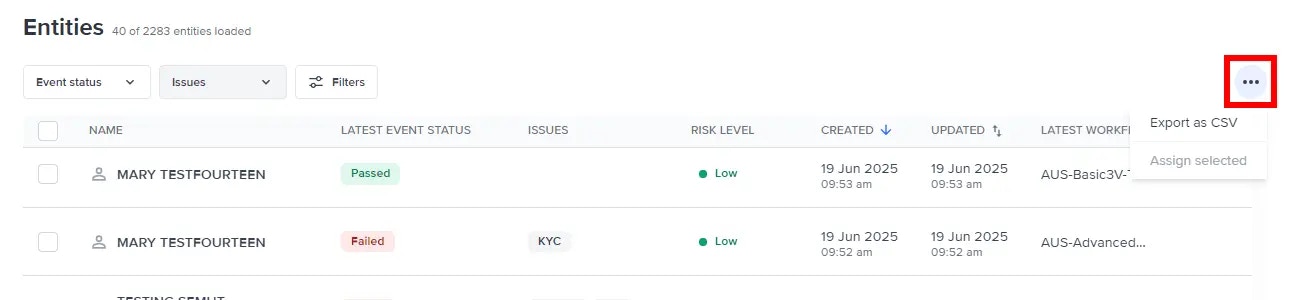
Selecting entities allows you to perform bulk actions. Select "..." to see the actions allowed.
 ## Bulk actions
Bulk actions are limited to 100 entities at a time.
### Assignment
Easily identify and manage unallocated resources or tasks by bulk assigning entities. Select **Assign selected** from the actions dropdown to open the **Assign selected entities** menu. From this menu, select the user you want to assign your selected entities.
## Bulk actions
Bulk actions are limited to 100 entities at a time.
### Assignment
Easily identify and manage unallocated resources or tasks by bulk assigning entities. Select **Assign selected** from the actions dropdown to open the **Assign selected entities** menu. From this menu, select the user you want to assign your selected entities.
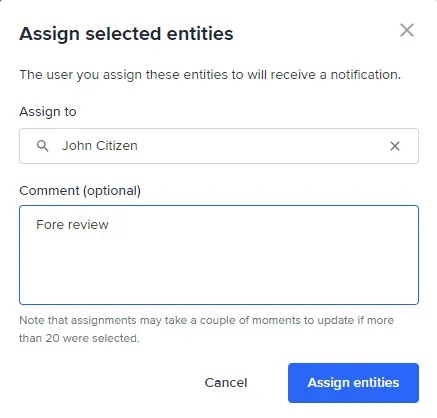 Optionally, add a comment for other portal users regarding this action.
Afterwards, select **Assign entities**. The new assignments will appear under the **Assignee** column on the **Entities** page.
Optionally, add a comment for other portal users regarding this action.
Afterwards, select **Assign entities**. The new assignments will appear under the **Assignee** column on the **Entities** page.