> ## Documentation Index
> Fetch the complete documentation index at: https://docs.frankieone.com/llms.txt
> Use this file to discover all available pages before exploring further.
# Quick Start
> Get a working embedded OneSDK integration running in minutes with React or vanilla HTML/JS.
This guide walks you through setting up a minimal embedded IDV flow — from generating a session token to mounting the SDK in your page. Once you have this working, you can swap in any of the flow guides for more advanced journeys.
Instead of building from scratch, you can fork an existing flow from the [public sample codes](https://github.com/FrankieOne/frontend-onesdk-public-sample-codes/).
## Prerequisites
* A **Customer ID** and **API Key** from the FrankieOne portal
* A backend endpoint that can generate [session tokens](/docs/sdk-reference/session-management) (or use the inline fetch shown below for development only)
* Node.js 16+ (for the React example)
## Architecture
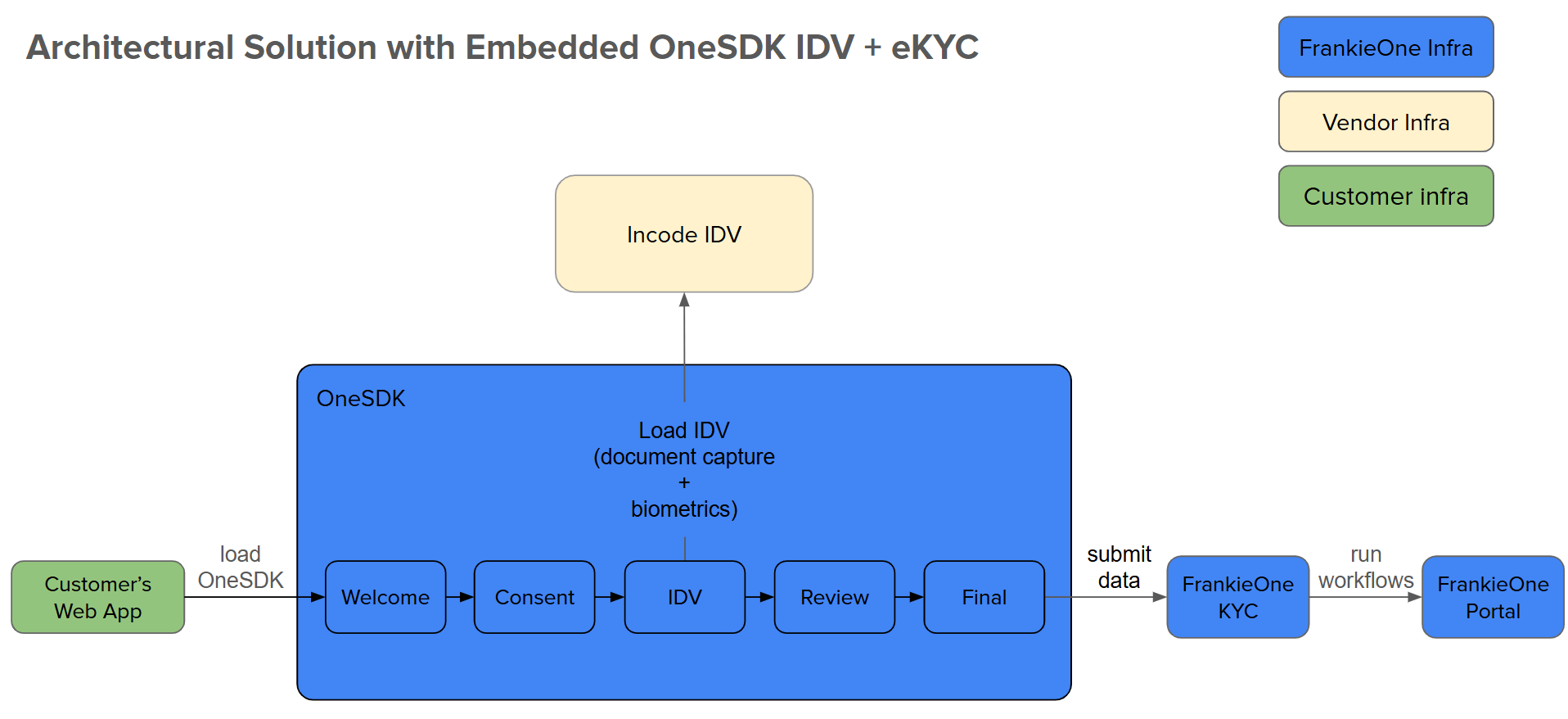 1. **Customer Web App** — your application hosting OneSDK
2. **OneSDK** — manages the verification UI/UX
3. **Incode IDV** — handles document and biometric capture
4. **FrankieOne KYC** — processes verification checks
5. **Portal** — displays verification results
## Full Implementation
Copy this into an `.html` file and open it in a browser. Replace the placeholder credentials with your own.
```html theme={null}
OneSDK Quick Start
```
### 1. Project Setup
```bash theme={null}
npm create vite@latest onesdk-quickstart -- --template react
cd onesdk-quickstart
npm install @frankieone/one-sdk
```
### 2. Environment Variables
Create a `.env` file:
```text theme={null}
VITE_CUSTOMER_ID=your_customer_id
VITE_API_KEY=your_api_key
VITE_FRANKIE_BASE_URL=https://backend.kycaml.uat.frankiefinancial.io
```
Never commit credentials to version control. Use environment variables in production.
### 3. SDK Handler
```jsx OneSDKHandler.jsx theme={null}
import OneSdk from "@frankieone/one-sdk";
import { useEffect, useRef, useState } from "react";
const CUSTOMER_ID = import.meta.env.VITE_CUSTOMER_ID;
const API_KEY = import.meta.env.VITE_API_KEY;
const BASE_URL = import.meta.env.VITE_FRANKIE_BASE_URL;
export default function OneSDKHandler({ config }) {
const [instance, setInstance] = useState(null);
const [error, setError] = useState(null);
const [loading, setLoading] = useState(true);
const initRef = useRef(false);
useEffect(() => {
if (initRef.current) return;
initRef.current = true;
(async () => {
try {
const tokenRes = await fetch(`${BASE_URL}/auth/v2/machine-session`, {
method: "POST",
headers: {
authorization: `machine ${btoa(`${CUSTOMER_ID}:${API_KEY}`)}`,
"Content-Type": "application/json",
},
body: JSON.stringify({
permissions: { preset: "one-sdk", reference: `demo-${Date.now()}` },
}),
});
const session = await tokenRes.json();
const sdk = await OneSdk({
session,
mode: "development",
recipe: {
form: {
provider: { name: "react" },
},
},
...config,
});
setInstance(sdk);
} catch (err) {
setError(err.message);
} finally {
setLoading(false);
}
})();
}, []);
return { instance, error, loading };
}
```
### 4. IDV Flow Component
```jsx OneSDKFlow.jsx theme={null}
import { useEffect, useRef } from "react";
import OneSDKHandler from "./OneSDKHandler";
export default function OneSDKFlow() {
const { instance, error, loading } = OneSDKHandler({});
const flowRef = useRef(false);
useEffect(() => {
if (!instance || flowRef.current) return;
flowRef.current = true;
const appContainer = "#onesdk-container";
const welcome = instance.component("form", { name: "WELCOME", type: "ocr" });
const consent = instance.component("form", { name: "CONSENT" });
const idv = instance.flow("idv");
welcome.on("form:welcome:ready", () => consent.mount(appContainer));
consent.on("form:consent:ready", () => idv.mount(appContainer));
idv.on("results", ({ checkStatus }) => {
if (checkStatus) {
document.getElementById("onesdk-container").innerHTML =
"
1. **Customer Web App** — your application hosting OneSDK
2. **OneSDK** — manages the verification UI/UX
3. **Incode IDV** — handles document and biometric capture
4. **FrankieOne KYC** — processes verification checks
5. **Portal** — displays verification results
## Full Implementation
Copy this into an `.html` file and open it in a browser. Replace the placeholder credentials with your own.
```html theme={null}
OneSDK Quick Start
```
### 1. Project Setup
```bash theme={null}
npm create vite@latest onesdk-quickstart -- --template react
cd onesdk-quickstart
npm install @frankieone/one-sdk
```
### 2. Environment Variables
Create a `.env` file:
```text theme={null}
VITE_CUSTOMER_ID=your_customer_id
VITE_API_KEY=your_api_key
VITE_FRANKIE_BASE_URL=https://backend.kycaml.uat.frankiefinancial.io
```
Never commit credentials to version control. Use environment variables in production.
### 3. SDK Handler
```jsx OneSDKHandler.jsx theme={null}
import OneSdk from "@frankieone/one-sdk";
import { useEffect, useRef, useState } from "react";
const CUSTOMER_ID = import.meta.env.VITE_CUSTOMER_ID;
const API_KEY = import.meta.env.VITE_API_KEY;
const BASE_URL = import.meta.env.VITE_FRANKIE_BASE_URL;
export default function OneSDKHandler({ config }) {
const [instance, setInstance] = useState(null);
const [error, setError] = useState(null);
const [loading, setLoading] = useState(true);
const initRef = useRef(false);
useEffect(() => {
if (initRef.current) return;
initRef.current = true;
(async () => {
try {
const tokenRes = await fetch(`${BASE_URL}/auth/v2/machine-session`, {
method: "POST",
headers: {
authorization: `machine ${btoa(`${CUSTOMER_ID}:${API_KEY}`)}`,
"Content-Type": "application/json",
},
body: JSON.stringify({
permissions: { preset: "one-sdk", reference: `demo-${Date.now()}` },
}),
});
const session = await tokenRes.json();
const sdk = await OneSdk({
session,
mode: "development",
recipe: {
form: {
provider: { name: "react" },
},
},
...config,
});
setInstance(sdk);
} catch (err) {
setError(err.message);
} finally {
setLoading(false);
}
})();
}, []);
return { instance, error, loading };
}
```
### 4. IDV Flow Component
```jsx OneSDKFlow.jsx theme={null}
import { useEffect, useRef } from "react";
import OneSDKHandler from "./OneSDKHandler";
export default function OneSDKFlow() {
const { instance, error, loading } = OneSDKHandler({});
const flowRef = useRef(false);
useEffect(() => {
if (!instance || flowRef.current) return;
flowRef.current = true;
const appContainer = "#onesdk-container";
const welcome = instance.component("form", { name: "WELCOME", type: "ocr" });
const consent = instance.component("form", { name: "CONSENT" });
const idv = instance.flow("idv");
welcome.on("form:welcome:ready", () => consent.mount(appContainer));
consent.on("form:consent:ready", () => idv.mount(appContainer));
idv.on("results", ({ checkStatus }) => {
if (checkStatus) {
document.getElementById("onesdk-container").innerHTML =
"Verification complete
";
}
});
idv.on("error", ({ message }) => {
console.error("IDV error:", message);
});
welcome.mount(appContainer);
}, [instance]);
if (error) return Error: {error}
;
if (loading) return Loading...
;
return ;
}
```
### 5. App Entry Point
```jsx App.jsx theme={null}
import OneSDKFlow from "./OneSDKFlow";
export default function App() {
return ;
}
```
### 6. Run
```bash theme={null}
npm install && npm run dev
```
## Step-by-Step Breakdown
### 1. Generate a Session Token
Your backend calls the `/auth/v2/machine-session` endpoint with your credentials and returns the session object to the frontend. See [Session Management](/docs/sdk-reference/session-management) for details.
### 2. Initialize the SDK
Pass the session object to [`OneSDK()`](/docs/sdk-reference/sdk-initialization) along with configuration options like `mode` and `recipe`. Include the `recipe.form.provider` configuration for the WELCOME and CONSENT screens.
### 3. Add Welcome and Consent Screens
Create WELCOME and CONSENT [form components](/docs/sdk-reference/form-module) to collect user consent before starting verification. Consent must be collected before the IDV flow can proceed.
### 4. Create a Flow or Component
Use `sdk.flow("idv")` to create an [IDV flow](/docs/sdk-reference/idv-module), or create individual components like [`sdk.component("ocr")`](/docs/sdk-reference/ocr-module) for more granular control.
### 5. Wire Up Events
Listen for [events](/docs/sdk-reference/events) like `form:welcome:ready`, `form:consent:ready`, `results`, `error`, and `loading` to drive your UI transitions.
### 6. Mount to the DOM
Call `.mount("#onesdk-container")` on the welcome screen to start the flow. Each subsequent screen is mounted by event listeners.
## Next Steps
Manual form-based KYC with document collection and fraud detection.
Camera-based identity document verification with minimal setup.
IDV flow with OCR review screen for data verification.
Separate OCR and Biometrics components for maximum control.
Document capture and data extraction without biometrics.
File-based document collection with upload screens.
## Additional Resources
Browse reference implementations.
Try OneSDK in an interactive environment.
Get test credentials and sample data.
## Troubleshooting
* Verify your Customer ID and API Key in the `.env` file
* Check network connectivity to the FrankieOne API
* Ensure you are using the correct endpoint (UAT vs production)
* Confirm the mount target element exists in the DOM (e.g., `#onesdk-container`)
* Check the browser console for initialization errors
* Verify the session token has not expired
* Always generate session tokens on your backend — never expose API keys in client code
* Implement error handling for all SDK operations
* Use [test data](/docs/test-data) during development