> ## Documentation Index
> Fetch the complete documentation index at: https://docs.frankieone.com/llms.txt
> Use this file to discover all available pages before exploring further.
# Hosted Flow Templates
## What are Flow Templates
Flow Templates are pre-configured, production-ready verification journeys built and maintained by FrankieOne.
Each template contains the complete onboarding workflow — data collection, verification logic, vendor orchestration, and results delivery — so you can go live quickly without designing screens or managing vendor SDKs.
All Pre-Built Flows share these qualities:
* **Managed & compliant**: Always up-to-date with the latest regulatory and vendor requirements.
* **Hosted by FrankieOne**: No need to deploy or maintain front-end infrastructure.
* **Essential Customisation**: Add your logo, colours, and on-screen messaging.
* **Scalable**: Enable different flows for different regions, risk levels, or customer types.
Most customers start with one of the three standard templates below.
## IDV (VOI) Flow
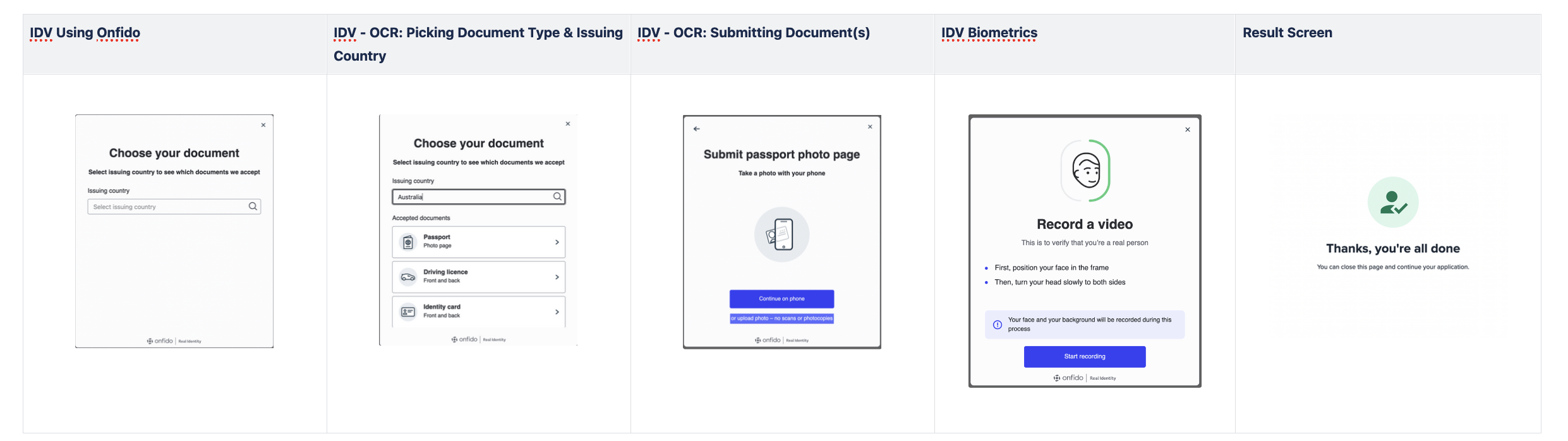
The **IDV Flow** is a full identity-verification experience using document scanning (OCR) and selfie capture (biometrics) to confirm the user’s identity.
Best for workflows where document and biometric verification are mandatory.
 ### Typical Journey
1. Customer scans a government ID (e.g. passport, licence, national ID).
2. Customer takes a selfie for liveness and face matching.
3. Vendor performs OCR, ID document checks and biometric comparison.
4. Data is validated through connected sources upon submission based on your recipes and workflows.
5. Results are returned to your Portal or via API.
6. Entity information, risk scores and status are updated automatically.
Creating a POST Request with following headers and request Body
```shell theme={null}
curl --location 'https://api.frankie.one/v2/individuals/hostedUrl' \
--header 'X-Frankie-Customerid: CUSTOMER_ID' \
--header 'api_key: API_KEY' \
--header 'Content-Type: application/json' \
--data '{
"customerRef": "YOUR_CUSTOMER_ID_OR_RANDOM_STRING",
"consent": true,
"oneSDKFlowId": "idv"
}'
```
will return object:
```json theme={null}
{
"entityId": "998a9d13-994b-4533-8a18-95208165cc9f",
"requestId": "01K1EWDQZRT7XPEGGWHJR1ZR4V",
"status": "success",
"url": "https://verify.uat.frankie.one/v2/?t=7MnbsKqvvXGucHxyy9p6cH",
"urlExpiry": "2025-08-02T23:59:32.081184475Z"
}
```
where `url` will contain the link to our Hosted OneSDK Solution. To read more, go here.
### Key Features
1. OCR extracting document information
2. Selfie comparison with portrait image on ID document
3. Built-in document fraud detection, selfie capture and liveness detection
4. Access Image of ID docs and Selfie on FrankieOne Portal or via API
5. FrankieOne provides integration with the most popular IDV vendors on the market
## OCR Only Flow
The **OCR-Only Flow** focuses on quick document validation without biometric capture.
It’s ideal for lower-risk onboarding, identity pre-checks, or use cases where a selfie step is unnecessary. Faster completion times and higher conversion.
### Typical Journey
1. Customer scans a government ID (e.g. passport, licence, national ID).
2. Customer takes a selfie for liveness and face matching.
3. Vendor performs OCR, ID document checks and biometric comparison.
4. Data is validated through connected sources upon submission based on your recipes and workflows.
5. Results are returned to your Portal or via API.
6. Entity information, risk scores and status are updated automatically.
Creating a POST Request with following headers and request Body
```shell theme={null}
curl --location 'https://api.frankie.one/v2/individuals/hostedUrl' \
--header 'X-Frankie-Customerid: CUSTOMER_ID' \
--header 'api_key: API_KEY' \
--header 'Content-Type: application/json' \
--data '{
"customerRef": "YOUR_CUSTOMER_ID_OR_RANDOM_STRING",
"consent": true,
"oneSDKFlowId": "idv"
}'
```
will return object:
```json theme={null}
{
"entityId": "998a9d13-994b-4533-8a18-95208165cc9f",
"requestId": "01K1EWDQZRT7XPEGGWHJR1ZR4V",
"status": "success",
"url": "https://verify.uat.frankie.one/v2/?t=7MnbsKqvvXGucHxyy9p6cH",
"urlExpiry": "2025-08-02T23:59:32.081184475Z"
}
```
where `url` will contain the link to our Hosted OneSDK Solution. To read more, go here.
### Key Features
1. OCR extracting document information
2. Selfie comparison with portrait image on ID document
3. Built-in document fraud detection, selfie capture and liveness detection
4. Access Image of ID docs and Selfie on FrankieOne Portal or via API
5. FrankieOne provides integration with the most popular IDV vendors on the market
## OCR Only Flow
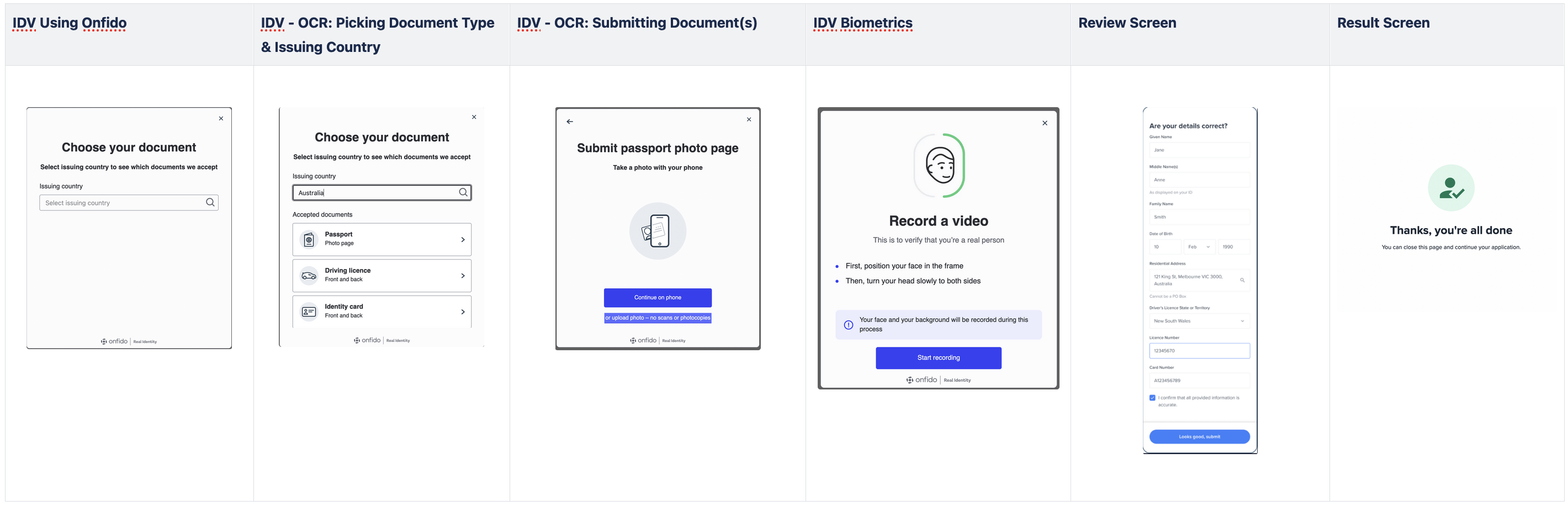
The **OCR-Only Flow** focuses on quick document validation without biometric capture.
It’s ideal for lower-risk onboarding, identity pre-checks, or use cases where a selfie step is unnecessary. Faster completion times and higher conversion.
 Creating a POST Request with following headers and request Body
```shell theme={null}
curl --location 'https://api.frankie.one/v2/individuals/hostedUrl' \
--header 'X-Frankie-Customerid: CUSTOMER_ID' \
--header 'api_key: API_KEY' \
--header 'Content-Type: application/json' \
--data '{
"customerRef": "YOUR_CUSTOMER_ID_OR_RANDOM_STRING",
"consent": true,
"oneSDKFlowId": "idv_review"
}'
```
will return object:
```json theme={null}
{
"entityId": "998a9d13-994b-4533-8a18-95208165cc9f",
"requestId": "01K1EWDQZRT7XPEGGWHJR1ZR4V",
"status": "success",
"url": "https://verify.uat.frankie.one/v2/?t=7MnbsKqvvXGucHxyy9p6cH",
"urlExpiry": "2025-08-02T23:59:32.081184475Z"
}
```
where`url` will contain the link to our Hosted OneSDK Solution. To read more, go here.
## eKYC Forms Flow
The eKYC Forms Flow on the Hosted OneSDK allow customers to embed or send their end-users a link with a fixed set of forms that allow PII data to be captured and used for KYC. Customers will gain access to the following screens in sequence with no ability to make any modifications.
Creating a POST Request with following headers and request Body
```shell theme={null}
curl --location 'https://api.frankie.one/v2/individuals/hostedUrl' \
--header 'X-Frankie-Customerid: CUSTOMER_ID' \
--header 'api_key: API_KEY' \
--header 'Content-Type: application/json' \
--data '{
"customerRef": "YOUR_CUSTOMER_ID_OR_RANDOM_STRING",
"consent": true,
"oneSDKFlowId": "idv_review"
}'
```
will return object:
```json theme={null}
{
"entityId": "998a9d13-994b-4533-8a18-95208165cc9f",
"requestId": "01K1EWDQZRT7XPEGGWHJR1ZR4V",
"status": "success",
"url": "https://verify.uat.frankie.one/v2/?t=7MnbsKqvvXGucHxyy9p6cH",
"urlExpiry": "2025-08-02T23:59:32.081184475Z"
}
```
where`url` will contain the link to our Hosted OneSDK Solution. To read more, go here.
## eKYC Forms Flow
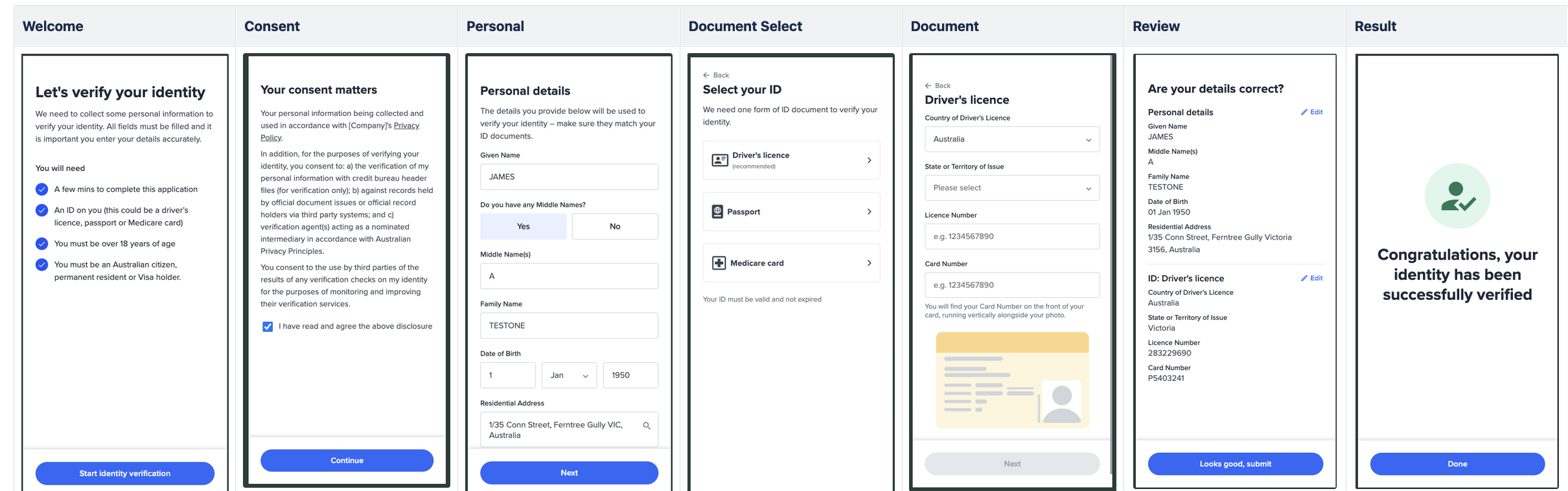
The eKYC Forms Flow on the Hosted OneSDK allow customers to embed or send their end-users a link with a fixed set of forms that allow PII data to be captured and used for KYC. Customers will gain access to the following screens in sequence with no ability to make any modifications.
 ### Typical Journey
1. Customer fills in personal details (name, DOB, address).
2. Data is validated through connected sources upon submission based on your recipes and workflows.
3. Results are returned to your Portal or via API.
4. Entity information, risk scores and status are updated automatically
Creating a POST Request with following headers and request Body
```shell theme={null}
curl --location 'https://api.frankie.one/v2/individuals/hostedUrl' \
--header 'X-Frankie-Customerid: CUSTOMER_ID' \
--header 'api_key: API_KEY' \
--header 'Content-Type: application/json' \
--data '{
"customerRef": "YOUR_CUSTOMER_ID_OR_RANDOM_STRING",
"consent": true,
"oneSDKFlowId": "manual_kyc"
}'
```
will return object:
```json theme={null}
{
"entityId": "998a9d13-994b-4533-8a18-95208165cc9f",
"requestId": "01K1EWDQZRT7XPEGGWHJR1ZR4V",
"status": "success",
"url": "https://verify.uat.frankie.one/v2/?t=7MnbsKqvvXGucHxyy9p6cH",
"urlExpiry": "2025-08-02T23:59:32.081184475Z"
}
```
where `url` will contain the link to our Hosted OneSDK Solution. To read more, go here.
### Key Features
1. Manual entry of PII (personal identity information), document information
2. One-click submission to FrankieOne KYC checks with DVS, PEP and AML options
### Typical Journey
1. Customer fills in personal details (name, DOB, address).
2. Data is validated through connected sources upon submission based on your recipes and workflows.
3. Results are returned to your Portal or via API.
4. Entity information, risk scores and status are updated automatically
Creating a POST Request with following headers and request Body
```shell theme={null}
curl --location 'https://api.frankie.one/v2/individuals/hostedUrl' \
--header 'X-Frankie-Customerid: CUSTOMER_ID' \
--header 'api_key: API_KEY' \
--header 'Content-Type: application/json' \
--data '{
"customerRef": "YOUR_CUSTOMER_ID_OR_RANDOM_STRING",
"consent": true,
"oneSDKFlowId": "manual_kyc"
}'
```
will return object:
```json theme={null}
{
"entityId": "998a9d13-994b-4533-8a18-95208165cc9f",
"requestId": "01K1EWDQZRT7XPEGGWHJR1ZR4V",
"status": "success",
"url": "https://verify.uat.frankie.one/v2/?t=7MnbsKqvvXGucHxyy9p6cH",
"urlExpiry": "2025-08-02T23:59:32.081184475Z"
}
```
where `url` will contain the link to our Hosted OneSDK Solution. To read more, go here.
### Key Features
1. Manual entry of PII (personal identity information), document information
2. One-click submission to FrankieOne KYC checks with DVS, PEP and AML options