> ## Documentation Index
> Fetch the complete documentation index at: https://docs.frankieone.com/llms.txt
> Use this file to discover all available pages before exploring further.
# Global KYB Implementation Guide
> Step-by-step walkthrough for verifying an international business: look up the business, create the entity, run a profile or ownership workflow, and interpret the result.
New to Global KYB? Start with the [Global KYB overview](/docs/kyb/global-kyb) for what it does and how coverage works, then come back here for the full walkthrough.
This guide covers international businesses — everywhere except Australia and the United States. Australian entities use the same API surface with an AU registration number; see the domestic KYB documentation. US entities have their own flow — see [US Business Verification](/docs/kyb/us-business-verification).
## Prerequisites
* An account with the `kyb:api` role, on the `DEFAULT` service.
* API credentials — your `api_key` and `X-Frankie-CustomerId`.
* Confirmation from your FrankieOne representative that international jurisdiction coverage is enabled for your account, and which countries are in your allowed list for profile and ownership (see [Country restriction](#country-restriction) below).
## Portal configuration (admins)
International KYB is switched on in **Operations Center → Customers → \[customer] → Configuration → KYB**. Changes can take up to 10 minutes to take effect.
1. **Portal Features tab** — turn on **KYB in Portal** (enables KYB V2 in the Portal at all) and **International KYB** (the master switch for international organization search). With International KYB off, the Portal offers Australia only, regardless of the Countries tab.
2. **Countries tab** — one row per country, with four independent settings: **Portal** (whether the country is selectable in the Portal's dropdowns), **Lookup** (whether the registry lookup call is allowed — the connector itself is chosen automatically: CreditorWatch for Australia, Kyckr everywhere else), **Profile**, and **Ownership**.
**All four settings are independent, and a country needs all four turned on to work end to end.** A country enabled for Portal but not for Profile lets an officer search the country, select a company, and then watch the workflow step fail with a country-restriction error. If a customer reports they can find a company but the workflow fails, this is the first thing to check.
Underlying config, for reference:
```json theme={null}
{
"kyb_portal": {
"international": {
"enabled": true,
"countries": ["AUS", "NZL", "SGP", "-USA"]
}
}
}
```
ISO 3166-1 alpha-3 codes; a `-` prefix excludes a country. Australia's Portal setting is always on and cannot be removed.
## Portal walkthrough
### Step 1: Search for the business
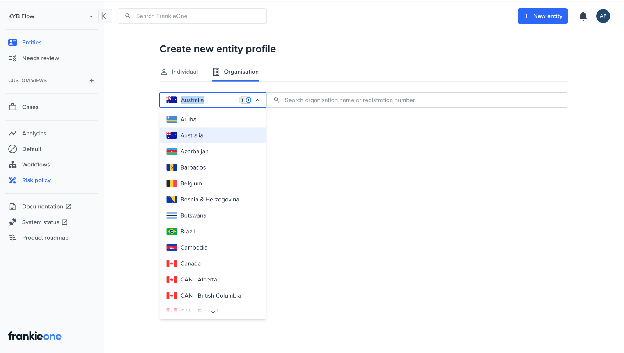
From the organization search screen, select the country from the dropdown — this list only shows countries your account is configured to search — then search by name or registration number.
 ### Step 2: Review the result
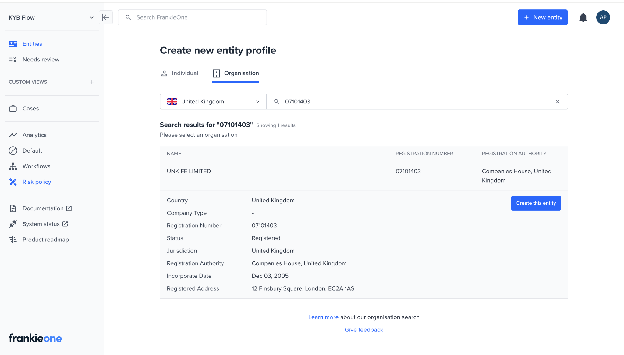
Expand a result to view its full registry detail before creating the entity, so you can confirm you've selected the right organization. This comes from the same lookup response, with no extra loading step or additional cost.
### Step 2: Review the result
Expand a result to view its full registry detail before creating the entity, so you can confirm you've selected the right organization. This comes from the same lookup response, with no extra loading step or additional cost.
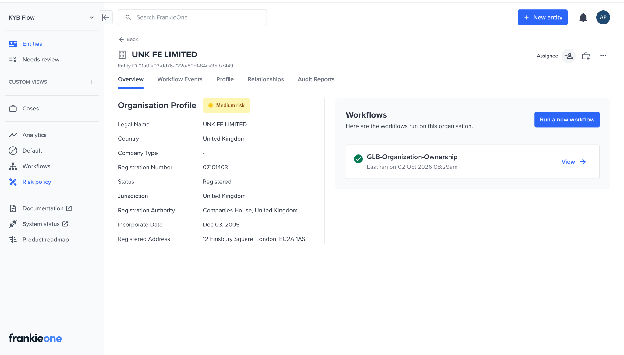
 ### Step 3: Create the entity and run a check
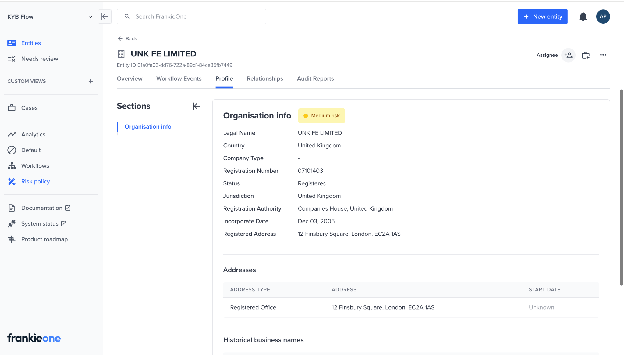
Creating the entity from a selected result and running Profile or Ownership works the same way as it does for a domestic entity. The Overview tab shows the registry-sourced profile once the workflow completes; sparse fields are expected for jurisdictions with lighter registry publishing, not a rendering fault.
### Step 3: Create the entity and run a check
Creating the entity from a selected result and running Profile or Ownership works the same way as it does for a domestic entity. The Overview tab shows the registry-sourced profile once the workflow completes; sparse fields are expected for jurisdictions with lighter registry publishing, not a rendering fault.
 ### Step 4: Review ownership
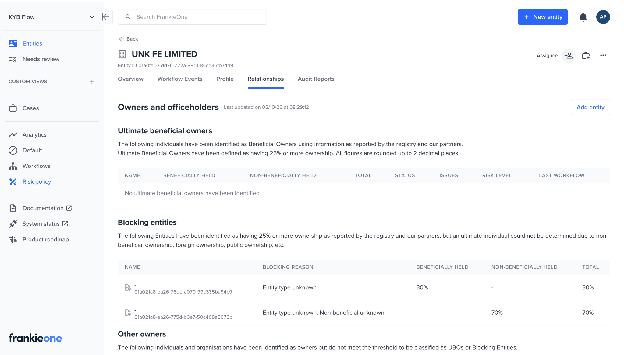
The Relationships tab shows Ultimate Beneficial Owners, Blocking Entities, Share Capital, and Officeholders, the same as domestic. Parties the registry couldn't classify as an individual or organization appear with an explicit Unknown treatment rather than being hidden or mis-typed.
If an ownership run hits its credit-cost ceiling before the tree fully resolves, the Relationships tab shows an in-progress or failure banner with a **Continue report generation** re-run option (gated on entity-write permission), and the entity where discovery stopped is flagged with the `INSUFFICIENT_MAX_CREDIT_COST` reason in the blocking-entities table. Re-running is a full new run rather than a resume, but running again within 24 hours reuses Kyckr's already-cached profiles, so the search effectively goes deeper for the same budget. There's no success toast; the in-progress banner is the feedback, and the officer stays on the Relationships tab.
When manually associating a party as an Organisation, the officer now searches the relevant business registry by country, name, or registration number — free-text entry has been removed for organizations. Switching country clears the current selection and search text. This doesn't apply to Individuals, which still take manual details.
### Step 4: Review ownership
The Relationships tab shows Ultimate Beneficial Owners, Blocking Entities, Share Capital, and Officeholders, the same as domestic. Parties the registry couldn't classify as an individual or organization appear with an explicit Unknown treatment rather than being hidden or mis-typed.
If an ownership run hits its credit-cost ceiling before the tree fully resolves, the Relationships tab shows an in-progress or failure banner with a **Continue report generation** re-run option (gated on entity-write permission), and the entity where discovery stopped is flagged with the `INSUFFICIENT_MAX_CREDIT_COST` reason in the blocking-entities table. Re-running is a full new run rather than a resume, but running again within 24 hours reuses Kyckr's already-cached profiles, so the search effectively goes deeper for the same budget. There's no success toast; the in-progress banner is the feedback, and the officer stays on the Relationships tab.
When manually associating a party as an Organisation, the officer now searches the relevant business registry by country, name, or registration number — free-text entry has been removed for organizations. Switching country clears the current selection and search text. This doesn't apply to Individuals, which still take manual details.
 ### Step 5: Generate a report
Generate a Profile Report or Ownership Report PDF from a completed workflow run, the same way as domestic. The template is selected automatically from the organization's jurisdiction — there is no customer setting or API parameter for this.
| Jurisdiction | Profile report | Ownership report |
| :- | :- | :- |
| Australia | AU template (ABR/ASIC) | AU template |
| United States | US template | Generic template — there is no US-specific ownership design |
| Everywhere else | International Profile Report | Generic ownership report |
The international profile report drops AU-only sections (ABR/ASIC extract, GST, state of registration, ANZSIC codes, historical business names) in favor of Industry Codes, Industry Declarations, Alternate Names, and Persons of Significant Control. AML screening results are deliberately never shown in a profile report — check the Portal for those. An empty section renders its heading with an explicit "none identified" message rather than being omitted.
**Troubleshooting tip:** if an international organization's PDF unexpectedly shows ABR/ASIC fields, it was routed to the AU template — this happens when the organization's jurisdiction country is empty and it also carries an AU marker (an ASIC registry reference, or an ABN/ACN-shaped registration number). The fix is to correct the entity's jurisdiction data; the routing itself is working as designed.
## API walkthrough
### Step 1: Look up the business
Search a registry for a given region by name or registration number. Perform the lookup using the [lookup organizations](/api-reference/organizations/lookup-organizations) endpoint.
```bash Request - Lookup by Name theme={null}
curl --request POST \
--url https://api.uat.frankie.one/v2/organizations/lookup \
--header 'X-Frankie-CustomerId: YOUR_CUSTOMER_ID' \
--header 'api_key: YOUR_API_KEY' \
--header 'content-type: application/json' \
--data '{
"organizationName": "Acme Trading Ltd",
"region": {
"country": "GBR"
}
}'
```
```json Response - Lookup by Name theme={null}
{
"matchedOrganizations": [
{
"addresses": [
{
"country": "GBR",
"unstructuredLongForm": "1 Example Street, London EC1A 1AA"
}
],
"alternateNames": [],
"country": "GBR",
"name": {
"name": "ACME TRADING LTD"
},
"organizationToken": "eyJ2ZXIiOiIxLjAiLCJ0cyI6IjIwMjYtMDYtMTBUMDQ6Mzc6MDIuMDg3MDU3MzMzWiIsIm9uIjpbeyJybiI6IjEyMzQ1Njc4IiwicmEiOiJDT01QQU5JRVNfSE9VU0UifV0sInByb3YiOiJreWNrciIsImNvIjoiR0JSIn0=",
"registrationDetails": [
{
"registrationNumber": "12345678",
"registrationNumberType": "COMPANIES_HOUSE"
}
],
"type": {
"description": "Private Limited Company"
}
}
],
"queryDetails": {
"organizationName": "Acme Trading Ltd",
"region": { "country": "GBR" }
},
"requestId": "01K4RYKAYFKYY7JJVEX234B0FN"
}
```
Unlike a domestic AU lookup, an international result may not include `status.normalized` — Kyckr only provides a normalized legal status once a full profile is purchased, not at lookup time.
Lookup can return multiple matches. Extract the `organizationToken` from the match you intend to process — you'll use it to create the entity in the next step.
```javascript Extracting the token theme={null}
const organizationToken = response.matchedOrganizations[0].organizationToken;
```
### Step 2: Create the organization
Create the entity from the `organizationToken`, using the [create an organization entity](/api-reference/organizations/create-an-organization-entity) endpoint.
```bash Request - Create Organization theme={null}
curl --location 'https://api.uat.frankie.one/v2/organizations' \
--header 'api_key: YOUR_API_KEY' \
--header 'X-Frankie-CustomerId: YOUR_CUSTOMER_ID' \
--header 'Content-Type: application/json' \
--data '{
"organizationToken": "eyJ2ZXIiOiIxLjAiLCJ0cyI6IjIwMjYtMDYtMTBUMDQ6Mzc6MDIuMDg3MDU3MzMzWiIsIm9uIjpbeyJybiI6IjEyMzQ1Njc4IiwicmEiOiJDT01QQU5JRVNfSE9VU0UifV0sInByb3YiOiJreWNrciIsImNvIjoiR0JSIn0=",
"serviceName": "DEFAULT"
}'
```
```json Response - 201 Created theme={null}
{
"organization": {
"entityId": "019f3ba1-6b80-7b29-8d39-b9f1fdc28db7",
"entityType": "ORGANIZATION",
"details": {
"name": { "name": "ACME TRADING LTD" }
},
"schemaVersion": 2
},
"requestId": "01KWXT2THHWJ2EWPY7G6KQKRMY",
"serviceProfiles": [
{
"entityId": "019f3ba1-6b80-7b29-8d39-b9f1fdc28db7",
"serviceName": "DEFAULT",
"serviceProfileId": "5cfdade0-71c7-4c7a-b348-2a53959a9caa",
"state": "INIT"
}
]
}
```
Retain the `entityId` — you need it for every subsequent call.
### Step 3: Execute a workflow
Run `GLB-Organization-Profile` for registry details, or `GLB-Organization-Ownership` for the full beneficial-ownership tree. Both have Force-Refresh variants that always re-fetch instead of reusing recently cached provider data.
```bash Request - Execute Workflow theme={null}
curl --location 'https://api.uat.frankie.one/v2/organizations/workflows/GLB-Organization-Ownership/execute' \
--header 'api_key: YOUR_API_KEY' \
--header 'X-Frankie-CustomerId: YOUR_CUSTOMER_ID' \
--header 'Content-Type: application/json' \
--data '{
"entityId": "019f3ba1-6b80-7b29-8d39-b9f1fdc28db7",
"serviceName": "DEFAULT"
}'
```
```json Response - Workflow Started theme={null}
{
"entityId": "019f3ba1-6b80-7b29-8d39-b9f1fdc28db7",
"requestId": "01KWXT2VG40KSG1X0RKBJHPKZF",
"serviceName": "DEFAULT",
"serviceProfileId": "5cfdade0-71c7-4c7a-b348-2a53959a9caa",
"workflowExecutionId": "01KWXT2WH7TZEZ6987AE9VB1TN"
}
```
Retain the `workflowExecutionId` to poll for the result.
### Step 4: Poll for the result
```bash Request - Get Workflow Execution theme={null}
curl --location 'https://api.uat.frankie.one/v2/organizations/{entityId}/serviceprofiles/DEFAULT/workflows/GLB-Organization-Ownership/executions/{workflowExecutionId}' \
--header 'api_key: YOUR_API_KEY' \
--header 'X-Frankie-CustomerId: YOUR_CUSTOMER_ID'
```
```json Response - Execution Complete theme={null}
{
"workflowResult": {
"workflowExecutionId": "01KWXT2WH7TZEZ6987AE9VB1TN",
"workflowExecutionState": "COMPLETED",
"status": "COMPLETE"
}
}
```
| State | Meaning |
| :- | :- |
| `IN_PROGRESS` | Still running — keep polling every few seconds. |
| `COMPLETED` | Finished. Retrieve the enriched organization and check the outcome. |
| `CANCELED` / `TERMINATED` | Ended before completion. |
| `ERROR` / `TIMEOUT` | Encountered an error, or timed out. |
**Check both fields.** `workflowExecutionState` reports whether the execution finished; `workflowResult.status` carries the verification outcome (`COMPLETE`, `REVIEW`, `FAIL`, and others). A `COMPLETED` execution can still return an outcome such as `REVIEW` that needs a closer look — for an ownership run, that's often `INSUFFICIENT_MAX_CREDIT_COST` on a blocking entity rather than a hard failure (see [Credit budget](#credit-budget-and-ownership-depth) below). Hitting the credit ceiling is not a failure: a partial tree is still returned.
### Step 5: Retrieve the enriched organization
```bash Request - Get Organization theme={null}
curl --location 'https://api.uat.frankie.one/v2/organizations/{entityId}' \
--header 'api_key: YOUR_API_KEY' \
--header 'X-Frankie-CustomerId: YOUR_CUSTOMER_ID'
```
The response uses the same organization object as domestic entities. A few things behave differently for international results:
| Field / behavior | What's different internationally |
| :- | :- |
| `officials[].entityType` | May be `UNKNOWN` where the registry didn't disclose whether a party is an individual or an organization. Never coerced to a guess. |
| `officials[].officialType`, PSC fields | Persons of Significant Control now carry their type and PSC attributes (kind, nature of control, notified-on date, nationality) on **organizations fetched after this fix shipped**. An organization whose data was fetched before then keeps its old shape until its next real re-fetch — a workflow re-run alone does not backfill this, since it reuses cached provider data within the ageing window. |
| `addresses[].country` | May be absent on a registry-sourced individual's address (e.g. a director) — the registry doesn't always supply one, and the platform will not guess it from the organization's own country. |
| `ownership.beneficialOwners[].percentageOwned` / `otherOwners[].percentageOwned` | Carries `isBeneficialNearZero`, `isNonBeneficialNearZero`, `isTotalNearZero`, and `isContainingJointOwnership` flags when applicable, including for holdings that round to zero — the object is no longer dropped just because the percentages are all zero. |
### Step 6: Review AML and ownership insights
Run AML screening and review ownership insights the same way as domestic — the same policy engine, blocking definitions, and 25% UBO threshold apply. A few blocking reasons are distinctly international:
| Blocking reason | When it fires internationally |
| :- | :- |
| `COUNTRY_NOT_SUPPORTED` | A sub-entity in the ownership chain sits in a jurisdiction Kyckr doesn't serve. Common and expected — not a defect. |
| `ENTITY_TYPE_UNKNOWN` | Fires, but is threshold-gated at 25% — an UNKNOWN holding below that threshold is classified as an "other owner," not a blocking entity. |
| `INSUFFICIENT_MAX_CREDIT_COST` | The UBO-discovery credit budget was exhausted before the tree fully resolved. Not a failure — the operation still returns a partial tree, with this reason on the entity where discovery stopped. See [Credit budget](#credit-budget-and-ownership-depth) below. |
## Country restriction
Profile and ownership coverage are each governed by a separate, per-customer allow-list. As currently deployed:
* **Profile** — 76 countries by default.
* **Ownership** — 15 countries by default, narrower than profile since recursive UBO coverage is narrower than basic company data.
The two lists are independent: an account can be allowed to pull a company profile in a country while UBO discovery there stays closed. A blocked country fails the check **before** any provider is called, so it costs nothing and raises no billing event; the workflow step ends in error naming the restriction, so it's visible in the audit trail rather than looking like missing data. Contact your FrankieOne representative to review or change your account's allowed countries.
## Credit budget and ownership depth
Recursive UBO discovery works by ordering the focus company's profile, unwrapping it to find shareholders, then ordering further profiles until every shareholder is identified, a blocking entity stops a branch, or the run's configured credit ceiling is reached.
* Hitting the ceiling is **not a failure**. The operation succeeds and returns a partial tree, with `INSUFFICIENT_MAX_CREDIT_COST` as the blocking reason on the entity where discovery stopped.
* Company profiles requested in the last 24 hours are cached at no extra cost. Re-running ownership on the same company within that window effectively deepens the tree further, since the already-ordered profiles come from cache.
* Results can only be retrieved for **30 days** from creation.
## Troubleshooting
| Symptom | Explanation |
| :- | :- |
| Profile is mostly empty | Expected for jurisdictions with lighter registry publishing. Every field still renders, with a placeholder for anything not returned. |
| Shareholder or officer shows as Unknown | Expected — the registry didn't disclose whether that party is an individual or an organization. Not an error. |
| Ownership tree looks shallow, or a blocking entity shows `INSUFFICIENT_MAX_CREDIT_COST` | The UBO-discovery credit budget was exhausted before the tree resolved. Re-run within 24 hours to reuse cached profiles and go deeper on the same budget, or ask your FrankieOne representative to raise the per-country credit ceiling. |
| A country is selectable in the Portal but a workflow step errors for it | The country is enabled for Portal display but not for Profile or Ownership. Ask your FrankieOne representative to check all four country settings. |
| An international organization's PDF shows ABR/ASIC fields | It was routed to the AU report template — this happens when the organization's jurisdiction is unset and it also carries an AU marker. Correct the entity's jurisdiction data. |
## References
* [Global KYB overview](/docs/kyb/global-kyb) — what's covered, coverage tiers, and FAQs.
* [US Business Verification](/docs/kyb/us-business-verification) — the separate flow for US-registered businesses.
* [Understanding Organization Ownership](/docs/kyb/organization-ownership) — what the ownership fields on the organization object mean.
* [Interpreting Workflow Results](/docs/kyb/interpreting-workflows-v2) — parse the full `workflowResult` object.
* [Anti-Money Laundering](/docs/kyb/anti-money-laundering) — screen the parties extracted from an ownership tree.
This documentation is built and hosted on [Mintlify](https://mintlify.com), a developer documentation platform.
### Step 5: Generate a report
Generate a Profile Report or Ownership Report PDF from a completed workflow run, the same way as domestic. The template is selected automatically from the organization's jurisdiction — there is no customer setting or API parameter for this.
| Jurisdiction | Profile report | Ownership report |
| :- | :- | :- |
| Australia | AU template (ABR/ASIC) | AU template |
| United States | US template | Generic template — there is no US-specific ownership design |
| Everywhere else | International Profile Report | Generic ownership report |
The international profile report drops AU-only sections (ABR/ASIC extract, GST, state of registration, ANZSIC codes, historical business names) in favor of Industry Codes, Industry Declarations, Alternate Names, and Persons of Significant Control. AML screening results are deliberately never shown in a profile report — check the Portal for those. An empty section renders its heading with an explicit "none identified" message rather than being omitted.
**Troubleshooting tip:** if an international organization's PDF unexpectedly shows ABR/ASIC fields, it was routed to the AU template — this happens when the organization's jurisdiction country is empty and it also carries an AU marker (an ASIC registry reference, or an ABN/ACN-shaped registration number). The fix is to correct the entity's jurisdiction data; the routing itself is working as designed.
## API walkthrough
### Step 1: Look up the business
Search a registry for a given region by name or registration number. Perform the lookup using the [lookup organizations](/api-reference/organizations/lookup-organizations) endpoint.
```bash Request - Lookup by Name theme={null}
curl --request POST \
--url https://api.uat.frankie.one/v2/organizations/lookup \
--header 'X-Frankie-CustomerId: YOUR_CUSTOMER_ID' \
--header 'api_key: YOUR_API_KEY' \
--header 'content-type: application/json' \
--data '{
"organizationName": "Acme Trading Ltd",
"region": {
"country": "GBR"
}
}'
```
```json Response - Lookup by Name theme={null}
{
"matchedOrganizations": [
{
"addresses": [
{
"country": "GBR",
"unstructuredLongForm": "1 Example Street, London EC1A 1AA"
}
],
"alternateNames": [],
"country": "GBR",
"name": {
"name": "ACME TRADING LTD"
},
"organizationToken": "eyJ2ZXIiOiIxLjAiLCJ0cyI6IjIwMjYtMDYtMTBUMDQ6Mzc6MDIuMDg3MDU3MzMzWiIsIm9uIjpbeyJybiI6IjEyMzQ1Njc4IiwicmEiOiJDT01QQU5JRVNfSE9VU0UifV0sInByb3YiOiJreWNrciIsImNvIjoiR0JSIn0=",
"registrationDetails": [
{
"registrationNumber": "12345678",
"registrationNumberType": "COMPANIES_HOUSE"
}
],
"type": {
"description": "Private Limited Company"
}
}
],
"queryDetails": {
"organizationName": "Acme Trading Ltd",
"region": { "country": "GBR" }
},
"requestId": "01K4RYKAYFKYY7JJVEX234B0FN"
}
```
Unlike a domestic AU lookup, an international result may not include `status.normalized` — Kyckr only provides a normalized legal status once a full profile is purchased, not at lookup time.
Lookup can return multiple matches. Extract the `organizationToken` from the match you intend to process — you'll use it to create the entity in the next step.
```javascript Extracting the token theme={null}
const organizationToken = response.matchedOrganizations[0].organizationToken;
```
### Step 2: Create the organization
Create the entity from the `organizationToken`, using the [create an organization entity](/api-reference/organizations/create-an-organization-entity) endpoint.
```bash Request - Create Organization theme={null}
curl --location 'https://api.uat.frankie.one/v2/organizations' \
--header 'api_key: YOUR_API_KEY' \
--header 'X-Frankie-CustomerId: YOUR_CUSTOMER_ID' \
--header 'Content-Type: application/json' \
--data '{
"organizationToken": "eyJ2ZXIiOiIxLjAiLCJ0cyI6IjIwMjYtMDYtMTBUMDQ6Mzc6MDIuMDg3MDU3MzMzWiIsIm9uIjpbeyJybiI6IjEyMzQ1Njc4IiwicmEiOiJDT01QQU5JRVNfSE9VU0UifV0sInByb3YiOiJreWNrciIsImNvIjoiR0JSIn0=",
"serviceName": "DEFAULT"
}'
```
```json Response - 201 Created theme={null}
{
"organization": {
"entityId": "019f3ba1-6b80-7b29-8d39-b9f1fdc28db7",
"entityType": "ORGANIZATION",
"details": {
"name": { "name": "ACME TRADING LTD" }
},
"schemaVersion": 2
},
"requestId": "01KWXT2THHWJ2EWPY7G6KQKRMY",
"serviceProfiles": [
{
"entityId": "019f3ba1-6b80-7b29-8d39-b9f1fdc28db7",
"serviceName": "DEFAULT",
"serviceProfileId": "5cfdade0-71c7-4c7a-b348-2a53959a9caa",
"state": "INIT"
}
]
}
```
Retain the `entityId` — you need it for every subsequent call.
### Step 3: Execute a workflow
Run `GLB-Organization-Profile` for registry details, or `GLB-Organization-Ownership` for the full beneficial-ownership tree. Both have Force-Refresh variants that always re-fetch instead of reusing recently cached provider data.
```bash Request - Execute Workflow theme={null}
curl --location 'https://api.uat.frankie.one/v2/organizations/workflows/GLB-Organization-Ownership/execute' \
--header 'api_key: YOUR_API_KEY' \
--header 'X-Frankie-CustomerId: YOUR_CUSTOMER_ID' \
--header 'Content-Type: application/json' \
--data '{
"entityId": "019f3ba1-6b80-7b29-8d39-b9f1fdc28db7",
"serviceName": "DEFAULT"
}'
```
```json Response - Workflow Started theme={null}
{
"entityId": "019f3ba1-6b80-7b29-8d39-b9f1fdc28db7",
"requestId": "01KWXT2VG40KSG1X0RKBJHPKZF",
"serviceName": "DEFAULT",
"serviceProfileId": "5cfdade0-71c7-4c7a-b348-2a53959a9caa",
"workflowExecutionId": "01KWXT2WH7TZEZ6987AE9VB1TN"
}
```
Retain the `workflowExecutionId` to poll for the result.
### Step 4: Poll for the result
```bash Request - Get Workflow Execution theme={null}
curl --location 'https://api.uat.frankie.one/v2/organizations/{entityId}/serviceprofiles/DEFAULT/workflows/GLB-Organization-Ownership/executions/{workflowExecutionId}' \
--header 'api_key: YOUR_API_KEY' \
--header 'X-Frankie-CustomerId: YOUR_CUSTOMER_ID'
```
```json Response - Execution Complete theme={null}
{
"workflowResult": {
"workflowExecutionId": "01KWXT2WH7TZEZ6987AE9VB1TN",
"workflowExecutionState": "COMPLETED",
"status": "COMPLETE"
}
}
```
| State | Meaning |
| :- | :- |
| `IN_PROGRESS` | Still running — keep polling every few seconds. |
| `COMPLETED` | Finished. Retrieve the enriched organization and check the outcome. |
| `CANCELED` / `TERMINATED` | Ended before completion. |
| `ERROR` / `TIMEOUT` | Encountered an error, or timed out. |
**Check both fields.** `workflowExecutionState` reports whether the execution finished; `workflowResult.status` carries the verification outcome (`COMPLETE`, `REVIEW`, `FAIL`, and others). A `COMPLETED` execution can still return an outcome such as `REVIEW` that needs a closer look — for an ownership run, that's often `INSUFFICIENT_MAX_CREDIT_COST` on a blocking entity rather than a hard failure (see [Credit budget](#credit-budget-and-ownership-depth) below). Hitting the credit ceiling is not a failure: a partial tree is still returned.
### Step 5: Retrieve the enriched organization
```bash Request - Get Organization theme={null}
curl --location 'https://api.uat.frankie.one/v2/organizations/{entityId}' \
--header 'api_key: YOUR_API_KEY' \
--header 'X-Frankie-CustomerId: YOUR_CUSTOMER_ID'
```
The response uses the same organization object as domestic entities. A few things behave differently for international results:
| Field / behavior | What's different internationally |
| :- | :- |
| `officials[].entityType` | May be `UNKNOWN` where the registry didn't disclose whether a party is an individual or an organization. Never coerced to a guess. |
| `officials[].officialType`, PSC fields | Persons of Significant Control now carry their type and PSC attributes (kind, nature of control, notified-on date, nationality) on **organizations fetched after this fix shipped**. An organization whose data was fetched before then keeps its old shape until its next real re-fetch — a workflow re-run alone does not backfill this, since it reuses cached provider data within the ageing window. |
| `addresses[].country` | May be absent on a registry-sourced individual's address (e.g. a director) — the registry doesn't always supply one, and the platform will not guess it from the organization's own country. |
| `ownership.beneficialOwners[].percentageOwned` / `otherOwners[].percentageOwned` | Carries `isBeneficialNearZero`, `isNonBeneficialNearZero`, `isTotalNearZero`, and `isContainingJointOwnership` flags when applicable, including for holdings that round to zero — the object is no longer dropped just because the percentages are all zero. |
### Step 6: Review AML and ownership insights
Run AML screening and review ownership insights the same way as domestic — the same policy engine, blocking definitions, and 25% UBO threshold apply. A few blocking reasons are distinctly international:
| Blocking reason | When it fires internationally |
| :- | :- |
| `COUNTRY_NOT_SUPPORTED` | A sub-entity in the ownership chain sits in a jurisdiction Kyckr doesn't serve. Common and expected — not a defect. |
| `ENTITY_TYPE_UNKNOWN` | Fires, but is threshold-gated at 25% — an UNKNOWN holding below that threshold is classified as an "other owner," not a blocking entity. |
| `INSUFFICIENT_MAX_CREDIT_COST` | The UBO-discovery credit budget was exhausted before the tree fully resolved. Not a failure — the operation still returns a partial tree, with this reason on the entity where discovery stopped. See [Credit budget](#credit-budget-and-ownership-depth) below. |
## Country restriction
Profile and ownership coverage are each governed by a separate, per-customer allow-list. As currently deployed:
* **Profile** — 76 countries by default.
* **Ownership** — 15 countries by default, narrower than profile since recursive UBO coverage is narrower than basic company data.
The two lists are independent: an account can be allowed to pull a company profile in a country while UBO discovery there stays closed. A blocked country fails the check **before** any provider is called, so it costs nothing and raises no billing event; the workflow step ends in error naming the restriction, so it's visible in the audit trail rather than looking like missing data. Contact your FrankieOne representative to review or change your account's allowed countries.
## Credit budget and ownership depth
Recursive UBO discovery works by ordering the focus company's profile, unwrapping it to find shareholders, then ordering further profiles until every shareholder is identified, a blocking entity stops a branch, or the run's configured credit ceiling is reached.
* Hitting the ceiling is **not a failure**. The operation succeeds and returns a partial tree, with `INSUFFICIENT_MAX_CREDIT_COST` as the blocking reason on the entity where discovery stopped.
* Company profiles requested in the last 24 hours are cached at no extra cost. Re-running ownership on the same company within that window effectively deepens the tree further, since the already-ordered profiles come from cache.
* Results can only be retrieved for **30 days** from creation.
## Troubleshooting
| Symptom | Explanation |
| :- | :- |
| Profile is mostly empty | Expected for jurisdictions with lighter registry publishing. Every field still renders, with a placeholder for anything not returned. |
| Shareholder or officer shows as Unknown | Expected — the registry didn't disclose whether that party is an individual or an organization. Not an error. |
| Ownership tree looks shallow, or a blocking entity shows `INSUFFICIENT_MAX_CREDIT_COST` | The UBO-discovery credit budget was exhausted before the tree resolved. Re-run within 24 hours to reuse cached profiles and go deeper on the same budget, or ask your FrankieOne representative to raise the per-country credit ceiling. |
| A country is selectable in the Portal but a workflow step errors for it | The country is enabled for Portal display but not for Profile or Ownership. Ask your FrankieOne representative to check all four country settings. |
| An international organization's PDF shows ABR/ASIC fields | It was routed to the AU report template — this happens when the organization's jurisdiction is unset and it also carries an AU marker. Correct the entity's jurisdiction data. |
## References
* [Global KYB overview](/docs/kyb/global-kyb) — what's covered, coverage tiers, and FAQs.
* [US Business Verification](/docs/kyb/us-business-verification) — the separate flow for US-registered businesses.
* [Understanding Organization Ownership](/docs/kyb/organization-ownership) — what the ownership fields on the organization object mean.
* [Interpreting Workflow Results](/docs/kyb/interpreting-workflows-v2) — parse the full `workflowResult` object.
* [Anti-Money Laundering](/docs/kyb/anti-money-laundering) — screen the parties extracted from an ownership tree.
This documentation is built and hosted on [Mintlify](https://mintlify.com), a developer documentation platform.