> ## Documentation Index
> Fetch the complete documentation index at: https://docs.frankieone.com/llms.txt
> Use this file to discover all available pages before exploring further.
# Manage User Roles and its Permissions
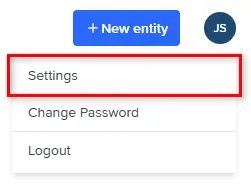
To view roles in the FrankieOne Portal, select the **Profile** menu, then select **Settings**.
 Select the **Role Management** tab. This displays the list of roles available.
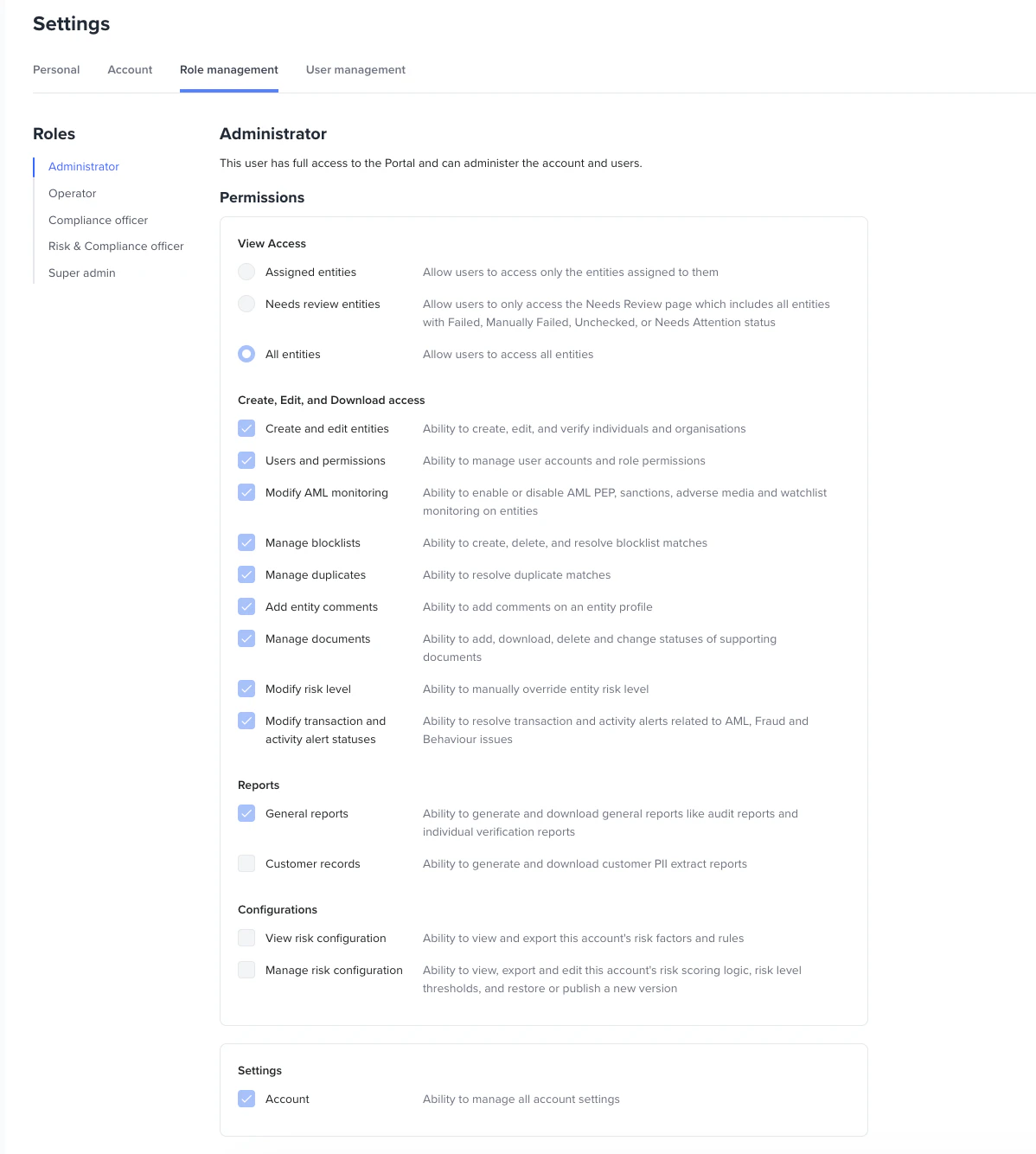 The default roles are **Administrator**, **Operator**, **Compliance Officer**, **Risk and Compliance Officer**, and **Super Admin**.
By default, all portal users should be able to view an entity and its audit report.
Additionally, they can:
1. Search and filter entities
2. Get workflow event details - check results, risk level
3. Get entity profile information - personal information, identity documents
4. Assign portal users to an entity - including bulk assignment
5. Create and manage custom views
6. See comments
Below is a breakdown of permissions for each default role:
| Permission | Administrator | Operator | Compliance officer | Risk and Compliance officer | Super Admin |
| :------------------------------------------- | :------------ | :------- | :----------------- | --------------------------- | ----------- |
| **View Access** | | | | | |
| Assigned Entities | | | | | |
| Needs Review Entities | | | | | |
| All Entities | ✅ | ✅ | ✅ | ✅ | ✅ |
| **Create, Edit, and Download access** | | | | | |
| Create and edit entities | ✅ | ✅ | | | ✅ |
| Users and permissions | ✅ | | | | ✅ |
| Modify AML monitoring | ✅ | ✅ | | | ✅ |
| Manage blocklists | ✅ | ✅ | | | ✅ |
| Manage duplicates | ✅ | ✅ | | | ✅ |
| Add Entity Comments | ✅ | ✅ | | | ✅ |
| Manage Documents | ✅ | ✅ | | | ✅ |
| Modify risk level | ✅ | ✅ | | | |
| Modify transaction and entity alert statuses | ✅ | ✅ | | | |
| **Reports** | | | | | |
| General Reports | ✅ | | ✅ | ✅ | ✅ |
| Organisation Reports | ✅ | ✅ | | | ✅ |
| Customer Records | | | | | ✅ |
| **Configurations** | | | | | |
| View Risk Configuration | ✅ | | ✅ | ✅ | ✅ |
| Manage Risk Configuration | | | | ✅ | |
| **Settings** | | | | | |
| Account | ✅ | | | | ✅ |
## Permissions
### View Access
#### Assigned entities
Allow users to access only the entities assigned to them.
#### Needs review entities
Allow users to only access the Needs Review page, which includes all entities with Failed, Manually Failed, Unchecked, or Needs Attention status.
#### All entities
Allow users to access all entities.
### Create, Edit, and Download Access
#### Create and edit entities
Ability to create, edit, and verify individuals and organisations.
* Manage entities
* Create and verify a new entity
* Archive/Unarchive an entity
* Assign the user to an entity
* Update and/or verify an existing entity
* Manual KYC for an existing entity
* Electronic KYC for an existing entity
* Review entities
* Allow override of workflow event status
* Retrigger checks by clicking the Verify entity button
* Update AML alert status
* Override Document check results
* Override Biometrics check results
* Re-send links for re-verification
* Download the entities table as a CSV file
* Leave comments on manual review actions
* Resolve Visa check issues
#### Modify AML monitoring
Ability to enable or disable AML PEP, sanctions, adverse media and watchlist monitoring on entities.
#### Manage blocklists
Ability to manage blocklist entries and blocklist assignments.
* Create/Update/Remove blocklist entries
* Add an existing entity to a blocklist
* Remove an existing entity from a blocklist
#### Manage duplicates
Ability to resolve duplicate issues on entity records.
#### Add entity comments
Ability to add comments on an entity profile.
#### Manage documents
Ability to add, download, delete, and change the status of supporting documents.
#### Modify risk level
Ability to manually override an entity's risk level.
#### Modify transaction and activity alert statuses
Ability to resolve transaction and activity alerts related to AML, Fraud, and Behaviour issues.
### Reports
#### General reports
Ability to generate and download general reports such as audit reports and individual verification reports.
#### Organisation reports
Ability to generate and download organisation reports.
#### Customer records
Ability to generate and download customer PII extract reports.
### Configurations
#### View risk configuration
Ability to view and export this account's risk factors and rules.
#### Manage risk configuration
Ability to view, export, and edit this account's risk scoring logic and risk level thresholds, and to restore or publish a new version.
### Settings
#### Users and permissions
Ability to manage user accounts and role permissions.
* See all available roles
* See all users
* Create new user
* Edit existing user
* Delete a user
* Lock a user
#### Account
Ability to manage all account settings.
* View and update customer account data
### SSO
To learn more about [Single Sign-On (SSO)](/docs/configuring-sso-with-the-frankieone-portal), please refer to the documentation found [here](/docs/configuring-sso-with-the-frankieone-portal).
The default roles are **Administrator**, **Operator**, **Compliance Officer**, **Risk and Compliance Officer**, and **Super Admin**.
By default, all portal users should be able to view an entity and its audit report.
Additionally, they can:
1. Search and filter entities
2. Get workflow event details - check results, risk level
3. Get entity profile information - personal information, identity documents
4. Assign portal users to an entity - including bulk assignment
5. Create and manage custom views
6. See comments
Below is a breakdown of permissions for each default role:
| Permission | Administrator | Operator | Compliance officer | Risk and Compliance officer | Super Admin |
| :------------------------------------------- | :------------ | :------- | :----------------- | --------------------------- | ----------- |
| **View Access** | | | | | |
| Assigned Entities | | | | | |
| Needs Review Entities | | | | | |
| All Entities | ✅ | ✅ | ✅ | ✅ | ✅ |
| **Create, Edit, and Download access** | | | | | |
| Create and edit entities | ✅ | ✅ | | | ✅ |
| Users and permissions | ✅ | | | | ✅ |
| Modify AML monitoring | ✅ | ✅ | | | ✅ |
| Manage blocklists | ✅ | ✅ | | | ✅ |
| Manage duplicates | ✅ | ✅ | | | ✅ |
| Add Entity Comments | ✅ | ✅ | | | ✅ |
| Manage Documents | ✅ | ✅ | | | ✅ |
| Modify risk level | ✅ | ✅ | | | |
| Modify transaction and entity alert statuses | ✅ | ✅ | | | |
| **Reports** | | | | | |
| General Reports | ✅ | | ✅ | ✅ | ✅ |
| Organisation Reports | ✅ | ✅ | | | ✅ |
| Customer Records | | | | | ✅ |
| **Configurations** | | | | | |
| View Risk Configuration | ✅ | | ✅ | ✅ | ✅ |
| Manage Risk Configuration | | | | ✅ | |
| **Settings** | | | | | |
| Account | ✅ | | | | ✅ |
## Permissions
### View Access
#### Assigned entities
Allow users to access only the entities assigned to them.
#### Needs review entities
Allow users to only access the Needs Review page, which includes all entities with Failed, Manually Failed, Unchecked, or Needs Attention status.
#### All entities
Allow users to access all entities.
### Create, Edit, and Download Access
#### Create and edit entities
Ability to create, edit, and verify individuals and organisations.
* Manage entities
* Create and verify a new entity
* Archive/Unarchive an entity
* Assign the user to an entity
* Update and/or verify an existing entity
* Manual KYC for an existing entity
* Electronic KYC for an existing entity
* Review entities
* Allow override of workflow event status
* Retrigger checks by clicking the Verify entity button
* Update AML alert status
* Override Document check results
* Override Biometrics check results
* Re-send links for re-verification
* Download the entities table as a CSV file
* Leave comments on manual review actions
* Resolve Visa check issues
#### Modify AML monitoring
Ability to enable or disable AML PEP, sanctions, adverse media and watchlist monitoring on entities.
#### Manage blocklists
Ability to manage blocklist entries and blocklist assignments.
* Create/Update/Remove blocklist entries
* Add an existing entity to a blocklist
* Remove an existing entity from a blocklist
#### Manage duplicates
Ability to resolve duplicate issues on entity records.
#### Add entity comments
Ability to add comments on an entity profile.
#### Manage documents
Ability to add, download, delete, and change the status of supporting documents.
#### Modify risk level
Ability to manually override an entity's risk level.
#### Modify transaction and activity alert statuses
Ability to resolve transaction and activity alerts related to AML, Fraud, and Behaviour issues.
### Reports
#### General reports
Ability to generate and download general reports such as audit reports and individual verification reports.
#### Organisation reports
Ability to generate and download organisation reports.
#### Customer records
Ability to generate and download customer PII extract reports.
### Configurations
#### View risk configuration
Ability to view and export this account's risk factors and rules.
#### Manage risk configuration
Ability to view, export, and edit this account's risk scoring logic and risk level thresholds, and to restore or publish a new version.
### Settings
#### Users and permissions
Ability to manage user accounts and role permissions.
* See all available roles
* See all users
* Create new user
* Edit existing user
* Delete a user
* Lock a user
#### Account
Ability to manage all account settings.
* View and update customer account data
### SSO
To learn more about [Single Sign-On (SSO)](/docs/configuring-sso-with-the-frankieone-portal), please refer to the documentation found [here](/docs/configuring-sso-with-the-frankieone-portal).