> ## Documentation Index
> Fetch the complete documentation index at: https://docs.frankieone.com/llms.txt
> Use this file to discover all available pages before exploring further.
# Entity view
## The Entity view
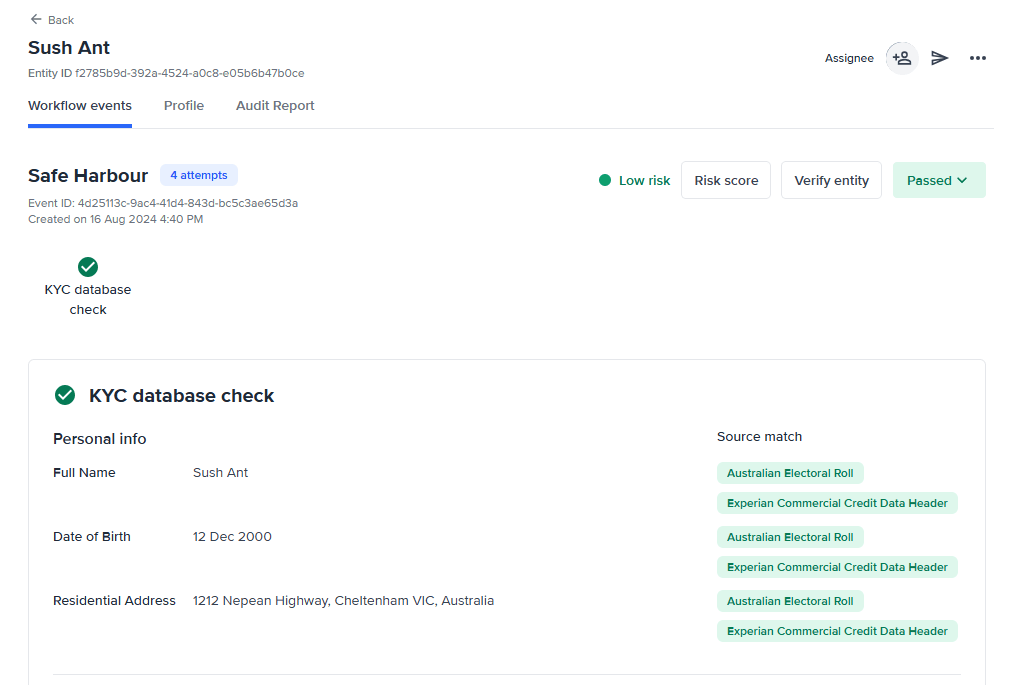
The entity view shows the entity details, events, and checks that have been run on an entity and the result of each of these checks.
 ### Video Guide
## Entity Page UI walkthrough
### Entity ID
Use the Entity ID found below the entity name on the Profile tab when speaking with our customer support team.
The type and order of checks that have been run on a particular customer are defined in the **Workflow** assigned to that entity.
### Workflow events
The [**Workflow events** tab](/docs/workflow-events-tab) displays all the relevant information related to the workflow assigned to the entity.
### Profile
The [**Profile** tab](/docs/personal-info) provides the personal information, and identity documents collected during KYC.
### Audit Report
The [Audit Report tab](/docs/audit-report) displays a record of all activity and status changes on the entity.
## Entity actions walkthrough
### **Assign a user to a profile**
#### Video Guide
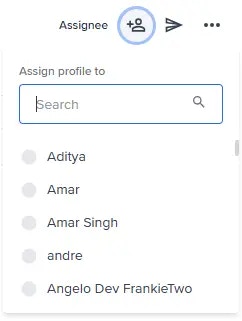
To assign a user to an entity, use the dropdown box in the top right corner.
### Video Guide
## Entity Page UI walkthrough
### Entity ID
Use the Entity ID found below the entity name on the Profile tab when speaking with our customer support team.
The type and order of checks that have been run on a particular customer are defined in the **Workflow** assigned to that entity.
### Workflow events
The [**Workflow events** tab](/docs/workflow-events-tab) displays all the relevant information related to the workflow assigned to the entity.
### Profile
The [**Profile** tab](/docs/personal-info) provides the personal information, and identity documents collected during KYC.
### Audit Report
The [Audit Report tab](/docs/audit-report) displays a record of all activity and status changes on the entity.
## Entity actions walkthrough
### **Assign a user to a profile**
#### Video Guide
To assign a user to an entity, use the dropdown box in the top right corner.
 ### View comments
To view comments on an entity, go to the **Profile** tab and select the **Comments** icon on the top right corner.
### Send a link
Use the **Send link** button to send an onboarding link to the end user. This will open the **Send link via SMS** modal where you can enter the details of the end user and send them a link to complete their onboarding.
### More button
The **More** button provides access to additional actions that can be performed on the selected entity. These actions allow operators to manage and maintain entity records beyond the standard review and verification workflows.
### View comments
To view comments on an entity, go to the **Profile** tab and select the **Comments** icon on the top right corner.
### Send a link
Use the **Send link** button to send an onboarding link to the end user. This will open the **Send link via SMS** modal where you can enter the details of the end user and send them a link to complete their onboarding.
### More button
The **More** button provides access to additional actions that can be performed on the selected entity. These actions allow operators to manage and maintain entity records beyond the standard review and verification workflows.
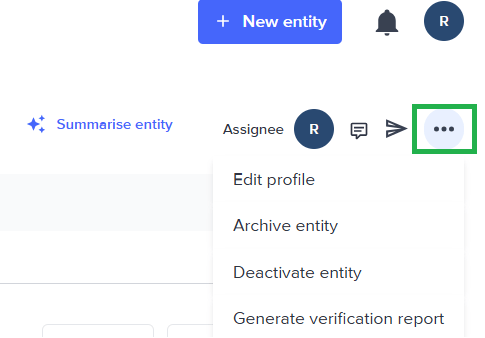 Depending on your permissions and configuration, the More menu may include actions below:
#### Edit profile
To edit the entity profile, select the **More** button and select **Edit profile**.
#### Add blocklist
To add a blocklist to an entity, select the **More** button and select **Add blocklist**. This will open the **Add blocklist** modal where you can select the blocklist to add to the entity.
#### Archive entity
In an **Archive** state, the selected entity record remains accessible but will no longer display on the default Entities page. We suggest using this when setting aside entities you are not actively working on, but may want to keep as a record.
In an **Archive** state, the selected entity record remains accessible but will no longer display on the default Entities page. We suggest using this when setting aside entities you are not actively working on, but may want to keep as a record.
To archive an entity, select the **More** button and select **Archive entity**. This will remove the entity from active usage but retain it in the system.
You must have the **"Create and edit entities"** permission to carry out this action. See under Settings > Role management
##### Video Guide to Archive an entity
#### Deactivate entity
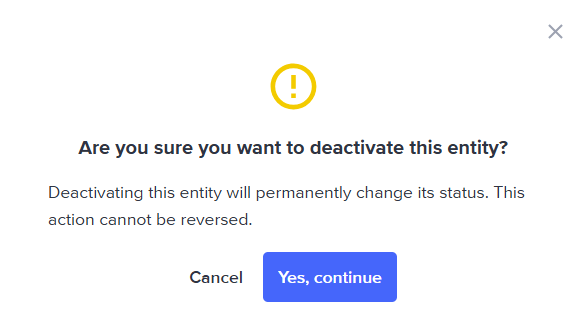
When an entity is deactivated, the system sets the entity status to **Inactive**. The selected entity record is permanently disabled and all associated indexes are removed from the system. We suggest using this when you no longer need an entity and do not intend to use it again in the future.
To deactivate an entity, select the **More** button, select **Deactivate entity.** A confirmation dialog will appear, asking you to confirm the action. Once confirmed, the entity's Service Profile status will be permanently set to **INACTIVE**.
Depending on your permissions and configuration, the More menu may include actions below:
#### Edit profile
To edit the entity profile, select the **More** button and select **Edit profile**.
#### Add blocklist
To add a blocklist to an entity, select the **More** button and select **Add blocklist**. This will open the **Add blocklist** modal where you can select the blocklist to add to the entity.
#### Archive entity
In an **Archive** state, the selected entity record remains accessible but will no longer display on the default Entities page. We suggest using this when setting aside entities you are not actively working on, but may want to keep as a record.
In an **Archive** state, the selected entity record remains accessible but will no longer display on the default Entities page. We suggest using this when setting aside entities you are not actively working on, but may want to keep as a record.
To archive an entity, select the **More** button and select **Archive entity**. This will remove the entity from active usage but retain it in the system.
You must have the **"Create and edit entities"** permission to carry out this action. See under Settings > Role management
##### Video Guide to Archive an entity
#### Deactivate entity
When an entity is deactivated, the system sets the entity status to **Inactive**. The selected entity record is permanently disabled and all associated indexes are removed from the system. We suggest using this when you no longer need an entity and do not intend to use it again in the future.
To deactivate an entity, select the **More** button, select **Deactivate entity.** A confirmation dialog will appear, asking you to confirm the action. Once confirmed, the entity's Service Profile status will be permanently set to **INACTIVE**.
 ### **When to use Deactivate vs Archive**
| | Archive | Deactivate (Inactive) |
| ------------------------------- | --------------------------------------------------------- | ---------------------------------------------- |
| Entity still accessible? | Yes | Yes |
| Shown in default Entities page? | No | No |
| All indexes removed? | Yes | Yes |
| Suitable for? | Entities you're not actively working on but may return to | Entities that are permanently no longer in use |
### **When to use Deactivate vs Archive**
| | Archive | Deactivate (Inactive) |
| ------------------------------- | --------------------------------------------------------- | ---------------------------------------------- |
| Entity still accessible? | Yes | Yes |
| Shown in default Entities page? | No | No |
| All indexes removed? | Yes | Yes |
| Suitable for? | Entities you're not actively working on but may return to | Entities that are permanently no longer in use |