> ## Documentation Index
> Fetch the complete documentation index at: https://docs.frankieone.com/llms.txt
> Use this file to discover all available pages before exploring further.
# Use Pre-built Pages & Hosted Flows
**Get Started**
You can start using Hosted Flows immediately - no SDK installation required.
Request your API key and Customer ID via the [FrankieOne Support Portal](https://frankieone.atlassian.net/servicedesk/customer/portals).
Use our [test data](/docs/test-data) to verify your implementation.
Track verification statuses and analytics in the Portal.
Switch to production credentials and start verifying users.
```bash title="1. Generate Onboarding URL" theme={null}
curl --request POST \
--url https://api.kycaml.uat.frankiefinancial.io/idv/v2/idvalidate/onboarding-url \
--header 'api_key: API-KEY' \
--header 'X-Frankie-CustomerID: CUSTOMER-ID' \
--header 'accept: application/json' \
--header 'content-type: application/json' \
--data-raw '{
"customerRef": "YOUR_UNIQUE_STRING",
"consent": true,
"flowId": "idv"
}'
```
Or generate and send verification links manually from the FrankieOne Portal.
## What are hosted flows
**Hosted Flows** are FrankieOne’s fully managed, ready-to-launch verification experiences.
They allow you to onboard customers through FrankieOne’s hosted infrastructure — without building or maintaining your own verification UI or vendor integrations.
Each Hosted Flow contains all necessary steps, from data capture to identity verification and result delivery, and can be tailored to your brand through light configuration.
They are the fastest, most compliant, and most reliable way to start using OneSDK.
### Key Benefits
* **Zero Frontend Code**: No need to build or maintain verification screens.
* **Managed Compliance**: FrankieOne ensures vendor updates, regulatory logic, and security.
* **Consistent UX**: Professionally designed flow that works across devices.
* **Scalable**: Easily expand to multiple regions and verification types as you grow.
## Features
Instant document verification and liveness detection
Built-in protection against deepfakes and screen captures
Advanced facial recognition and matching
Intuitive flow for both desktop and mobile users
## Why use hosted flows
**Hosted Flows** are recommended for most customers because they combine speed, flexibility, and compliance with minimal engineering effort.
### Use Hosted Flows when:
* You want to start verifying customers quickly without frontend development.
* You need a fully managed, compliant onboarding experience.
* Your verification process can use standard, proven flow templates (eKYC, IDV, OCR).
* You want a consistent experience across multiple vendors and markets.
## How does hosted flow work
Hosted Flows run on FrankieOne’s infrastructure and connect directly to your account’s verification configurations and vendors.
They handle all client-side logic, event tracking, and result submission.
### Flow Overview
The user is invited to complete verification (via link, redirect, or iframe).
OneSDK manages document capture, biometrics, or manual entry steps within the hosted interface.
FrankieOne routes verification requests to the selected vendor(s) and collects results.
Verification outcomes are available in your Portal or returned via API webhook.
### Architecture
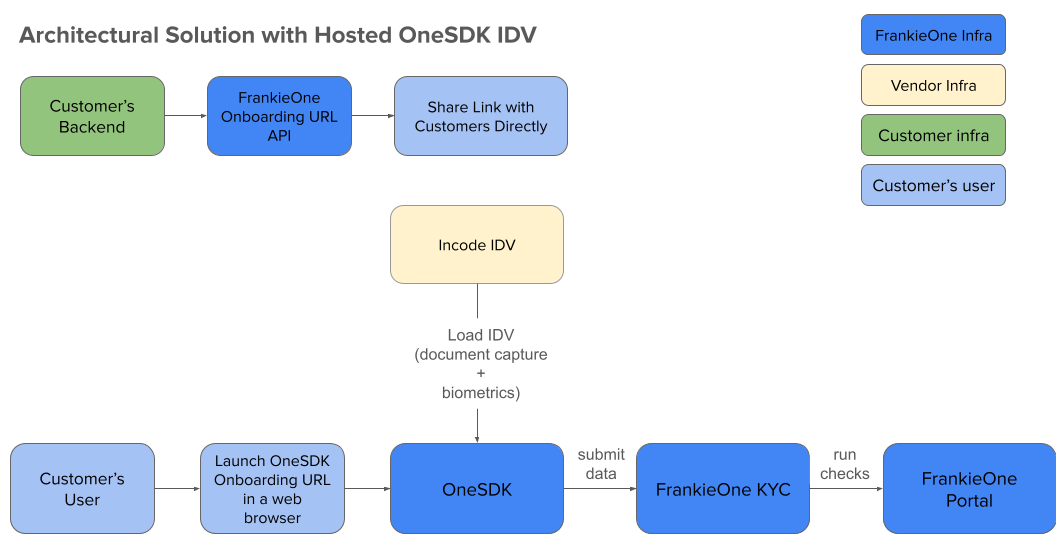 1. Backend requests onboarding URL
2. User receives verification link
3. OneSDK handles document/biometric capture
4. Incode processes IDV data
5. FrankieOne KYC analyzes results
6. Status updates in Portal
## What’s Next
Once you’ve decided to use Hosted Flows:
1. **Choose a template** — select from our standard eKYC, IDV, or OCR-only flows.
2. **Add it to your account** — via the Portal or through FrankieOne support.
3. **Customise branding and messaging** — update logo, colours, and copy.
4. **Generate verification links** — send via Portal or API.
5. **Monitor results** — view verification outcomes in the Portal or through API webhooks.
1. Backend requests onboarding URL
2. User receives verification link
3. OneSDK handles document/biometric capture
4. Incode processes IDV data
5. FrankieOne KYC analyzes results
6. Status updates in Portal
## What’s Next
Once you’ve decided to use Hosted Flows:
1. **Choose a template** — select from our standard eKYC, IDV, or OCR-only flows.
2. **Add it to your account** — via the Portal or through FrankieOne support.
3. **Customise branding and messaging** — update logo, colours, and copy.
4. **Generate verification links** — send via Portal or API.
5. **Monitor results** — view verification outcomes in the Portal or through API webhooks.