> ## Documentation Index
> Fetch the complete documentation index at: https://docs.frankieone.com/llms.txt
> Use this file to discover all available pages before exploring further.
# Standard Workflow Bundles
> Explore our out-of-the-box workflow solutions designed to get you started with best-practice compliance quickly.
## Out-of-the-Box Workflow Solutions
FrankieOne offers a suite of standard workflow bundles designed to address the most common KYC and AML compliance needs across different regions. These pre-configured workflows allow for rapid integration, enabling you to implement a best-practice verification process without the need for custom configuration.
To use a bundle, simply reference its **Workflow Name** when executing a workflow via the API.
### Choosing Your Bundle Type
Our bundles are generally categorized into two types to match your risk appetite:
* **Essential Bundles:** Designed for standard customer due diligence. These workflows provide foundational identity verification and AML screening, perfect for meeting core compliance requirements for low-to-medium risk customers.
* **Enhanced Bundles:** Designed for higher-risk environments. These workflows include more stringent checks, such as mandatory document verification, biometric checks, and screening against adverse media, providing a higher level of identity assurance.
***
## Australian (AU) Bundles
Our most comprehensive range of bundles is designed to meet Australian AML/CTF requirements.
### Essential AU Bundles
A foundational check ideal for low-risk digital onboarding. This workflow verifies a single government ID against the DVS and performs standard AML screening.
* **Workflow Name:** `AUS-Basic1V-IDOnly`
* **Use Case:** Verifying customers with a government-issued ID like a passport or driver's license.
* **Ruleset:** `gov_id_only`
* **Core Checks:** Government ID Check, AML (PEP & Sanctions) Screening, Risk Assessment.
A standard electronic verification workflow that matches customer data against two independent electronic sources, with an optional government ID check.
* **Workflow Name:** `AUS-Basic2V-TwoPlus`
* **Use Case:** Meeting standard 2+2 verification requirements without mandating a document scan.
* **Ruleset:** `two_plus`
* **Core Checks:** KYC (2+2), AML (PEP & Sanctions) Screening.
* **Primary Data Sources:** Credit Bureau 1, Credit Bureau 2.
Combines a 2+2 electronic check with a mandatory government ID verification for a higher level of assurance.
* **Workflow Name:** `AUS-Basic2V-TwoPlusID`
* **Use Case:** Onboarding customers where both electronic data and a government ID are required.
* **Ruleset:** `two_plus_gov_id`
* **Core Checks:** Government ID Check, KYC (2+2), AML (PEP & Sanctions) Screening.
* **Primary Data Sources:** Government Data Source, Credit Bureau 1, Credit Bureau 2.
An extensive electronic check using three independent data sources for customers who may have a thinner credit file or for when a higher degree of confidence is required.
* **Workflow Name:** `AUS-Basic3V-TwoPlus`
* **Use Case:** Achieving a 2+2 match when the initial two sources do not yield a result.
* **Ruleset:** `two_plus`
* **Core Checks:** KYC (2+2), AML (PEP & Sanctions) Screening, Risk Assessment.
* **Primary Data Sources:** Credit Bureau 1, Credit Bureau 2, Additional Data Source.
### Enhanced AU Bundles
A robust check for higher-risk customers, mandating a Government ID verification and screening for adverse media in addition to standard AML checks.
* **Workflow Name:** `AUS-Advanced1V-IDOnly`
* **Use Case:** Onboarding high-value customers or those in regulated industries requiring deeper screening.
* **Ruleset:** `gov_id_only`
* **Core Checks:** Government ID Check, IDV (Liveness/Biometrics), Enhanced AML (Adverse Media) Screening.
Our most thorough verification bundle for the highest-risk scenarios. It mandates a government ID check, biometrics, enhanced AML screening, and verifies against three independent electronic sources.
* **Workflow Name:** `AUS-Advanced3V-TwoPlusID`
* **Use Case:** For customers requiring the highest level of due diligence and identity assurance.
* **Ruleset:** `two_plus_gov_id`
* **Core Checks:** Government ID Check, KYC (2+2), Biometrics, Enhanced AML (Adverse Media) Screening, Risk Assessment.
* **Primary Data Sources:** Government Data Source, Credit Bureau 1, Credit Bureau 2, Additional Data Source.
A specialised workflow for age verification, designed for businesses that need to verify a customer is above a certain age (e.g., 18+) by confirming their date of birth against multiple reliable data sources.
* **Workflow Name:** `AUS-Basic3V-AgeVerify`
* **Use Case:** Verifying age for age-restricted products/services (gambling, alcohol, etc.)
* **Ruleset:** `two_plus_age`
* **Core Checks:** KYC (Age Verification), AML (PEP & Sanctions) Screening, Risk Assessment.
* **Primary Data Sources:** Credit Bureau 1, Credit Bureau 2, Additional Data Source.
* **Verification Logic:** Requires either **(2x Name AND 2x DOB)** OR **(2x Name AND 1x DOB AND 1x Address)**.
**Implementation Best Practices**
* **Fuzziness Settings:** When using age verification, ensure DOB matching fuzziness is set to 100% for accurate results.
* **Highest Assurance:** For highest assurance, we recommend including a government ID data source which provides an exact match on Name, DOB, and ID number.
### Risk-Based Onboarding
FrankieOne’s Risk-Based Onboarding model assigns each user a real-time risk score, categorizing them as low, medium, or high risk. This enables you to apply the right level of verification at every step—low-risk users proceed with ease, while higher-risk profiles undergo additional checks like ID validation, biometrics, or sanctions screening.
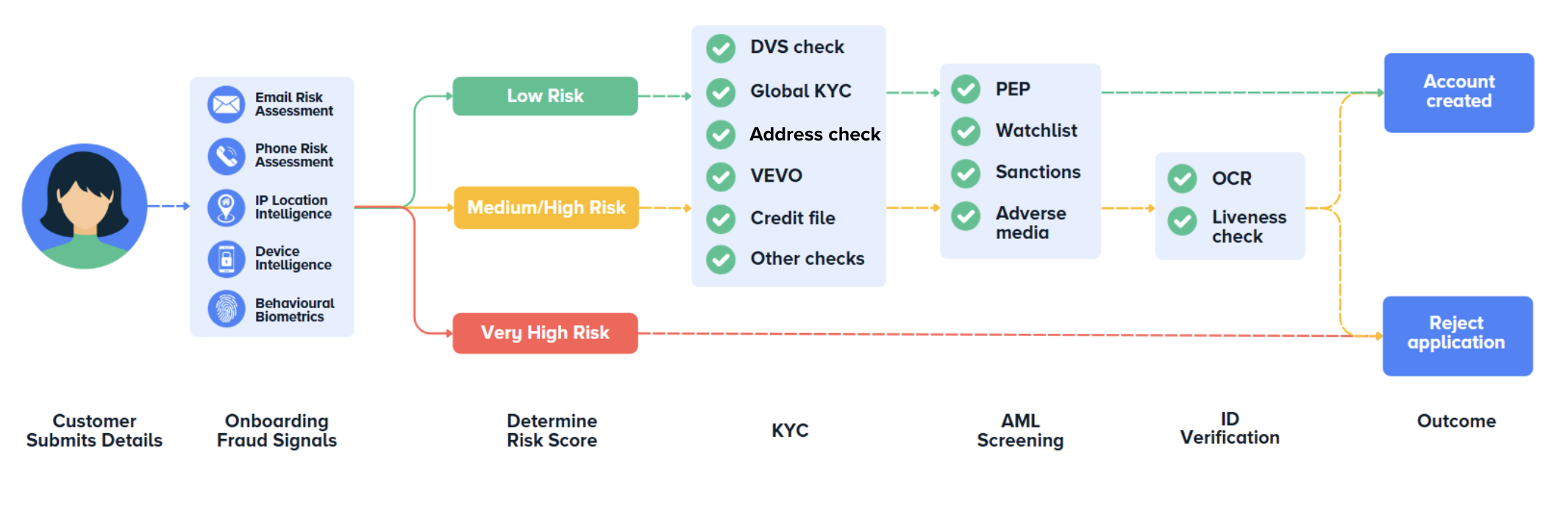 The FrankieOne risk engine uses the customer risk rating model to determine the overall risk a customer may pose based on a consistent set of risk factors specific to a business.
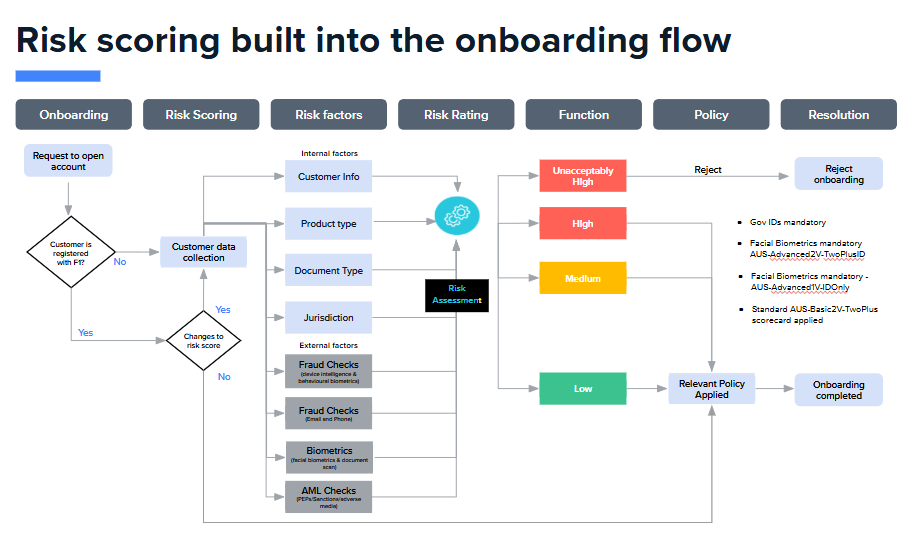
Advanced 2+2 verification with fraud signal assessment via email and phone checks, combined with biometrics and enhanced AML screening for dynamic risk-based onboarding.
* **Workflow Name:** `AUS-Risk-CDD-Email-Phone`
* **Use Case:** Medium-risk onboarding where you want to assess fraud signals before performing full verification. Enables step-up flows based on risk level.
* **Ruleset:** `two_plus`
* **Core Checks:** Onboarding Fraud (Email & Phone), Biometrics (IDV), KYC (2+2), Government ID Check, Enhanced AML (PEP & Adverse Media) Screening, Blocklist Check.
* **Risk Assessment:** Evaluates email reputation, phone line type, and combines with KYC results for comprehensive risk scoring.
Our most comprehensive risk-based bundle including device intelligence, IP analysis, email, and phone signals combined with advanced 2+2 verification, biometrics, and enhanced AML.
* **Workflow Name:** `AUS-Risk-CDD-Email-Phone-Device-IP`
* **Use Case:** High-risk environments requiring maximum fraud prevention. Enables sophisticated step-up/step-down flows based on comprehensive fraud and identity signals.
* **Ruleset:** `two_plus`
* **Core Checks:** Onboarding Fraud (Email, Phone, Device & IP), Biometrics (IDV), KYC (2+2), Government ID Check, Enhanced AML (PEP & Adverse Media) Screening, Blocklist Check.
* **Risk Assessment:** Comprehensive fraud detection including device fingerprinting, behavioral biometrics, IP geolocation, VPN detection, and email reputation/tenure.
* **Requirements:** Requires OneSDK implementation for device and IP signal collection.
#### Understanding Risk-Based Onboarding
Risk-based onboarding workflows adapt verification requirements based on real-time risk signals, enabling you to:
* **Low-Risk Users:** Proceed with minimal friction using standard KYC and AML checks
* **Medium/High-Risk Users:** Trigger additional verification steps such as biometrics, document verification, or enhanced screening
* **Very High-Risk Users:** Block onboarding entirely to prevent fraudulent accounts These workflows assess fraud risk using pre-KYC signals (device, email, phone, IP) before performing costly verification checks, helping you optimize conversion rates while maintaining security and compliance.
***
## International & Other Bundles
### New Zealand (NZL)
A foundational check for New Zealand customers, verifying identity against local data sources and performing AML screening.
* **Workflow Name:** `NZL-Basic1V-OnePlusOne`
* **Use Case:** Onboarding customers with a New Zealand residential address.
* **Ruleset:** `one_plus_one`
* **Primary Data Sources:** Local Data Source.
### United States (USA)
A streamlined onboarding flow for US customers that leverages a bank data source for fast, secure bank account-based identity verification.
* **Workflow Name:** `USA-Express`
* **Use Case:** Express onboarding for US customers by connecting their bank account.
* **Ruleset:** `us_onboarding`
* **Primary Data Sources:** Bank Data Source.
A streamlined onboarding flow for US customers that verifies Name, DOB, Address and or SSN.
* **Workflow Name:** `USA-Basic1V-OnePlus`
* **Use Case:** Express onboarding for US customers by connecting their bank account.
* **Ruleset:** `one_plus`
* **Primary Data Sources:** Bank Data Source.
### Global (GLB)
A flexible workflow for verifying customers from various countries where a single electronic data source is sufficient.
* **Workflow Name:** `GLB-IntlOnePlus`
* **Use Case:** Basic identity verification for a wide range of non-Australian customers.
* **Ruleset:** `one_plus`
An AML-focused workflow that screens an individual against PEP, Sanctions, and Adverse Media lists. No KYC checks are performed.
* **Workflow Name:** `GLB-AMLMedia`
* **Use Case:** Performing due diligence or risk screening on individuals without needing a full KYC verification.
* **Ruleset:** `aml_only`
A simple utility workflow that verifies a customer's address against one or more data sources.
* **Workflow Name:** `GLB-AddressVerify`
* **Use Case:** Validating a customer's address for purposes like shipping or proof of residence.
* **Ruleset:** `two_plus_both`