> ## Documentation Index
> Fetch the complete documentation index at: https://docs.frankieone.com/llms.txt
> Use this file to discover all available pages before exploring further.
# Australian ID Documents
## Driver's Licences
This guide explains how to verify Australian driver's licences across different states and territories.
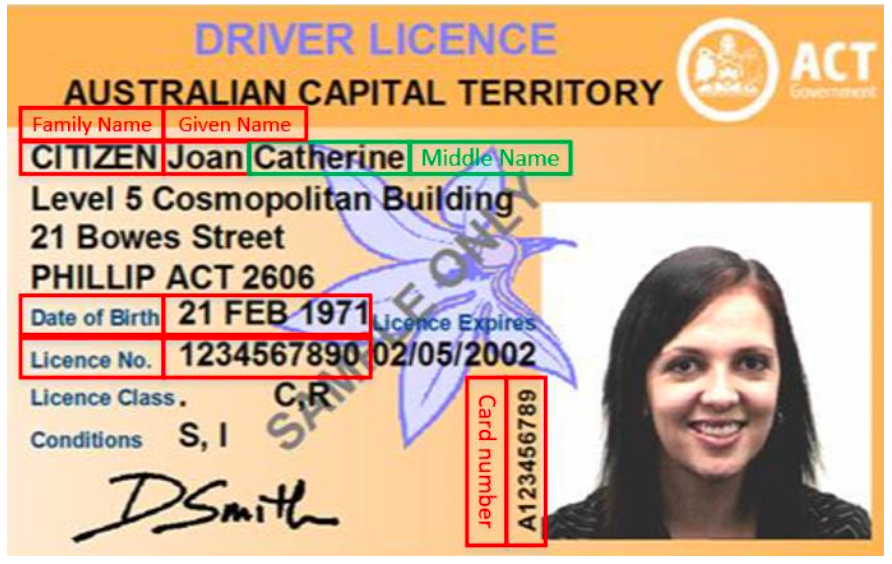
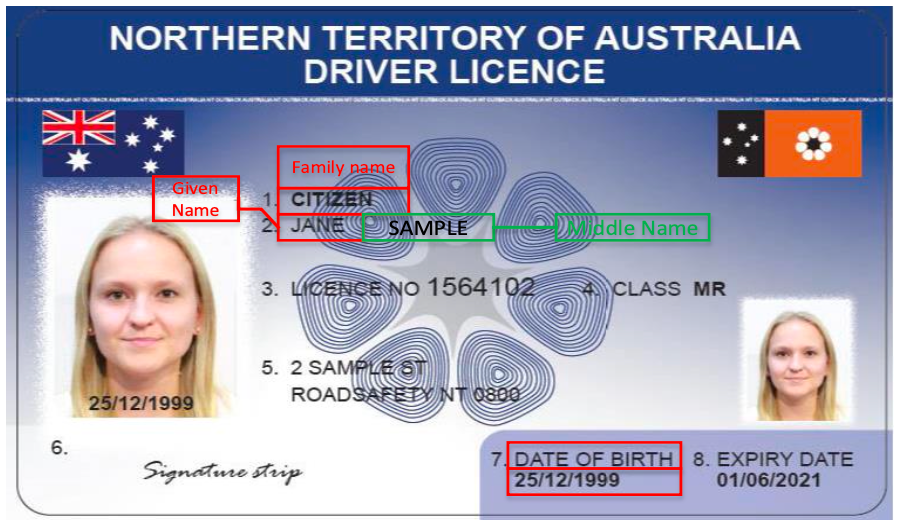
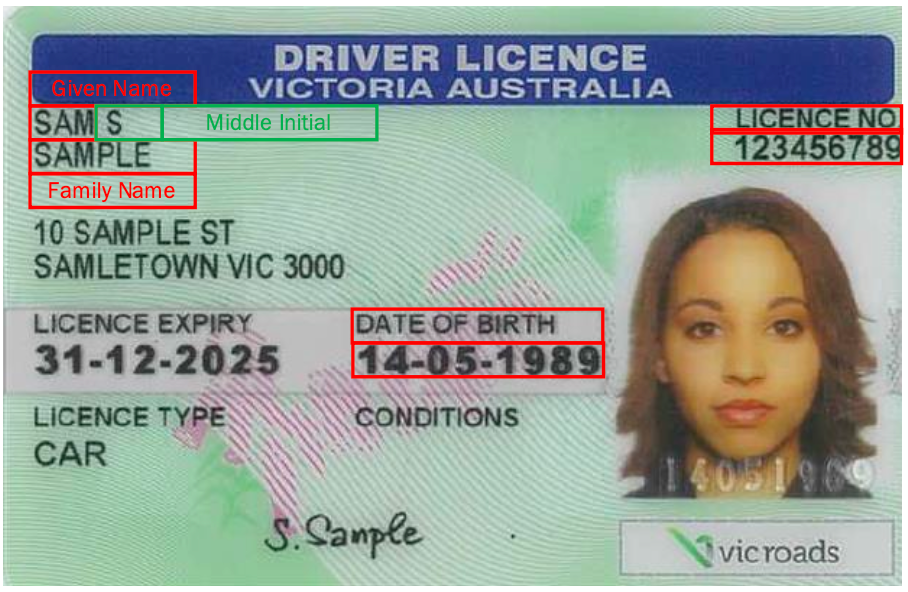
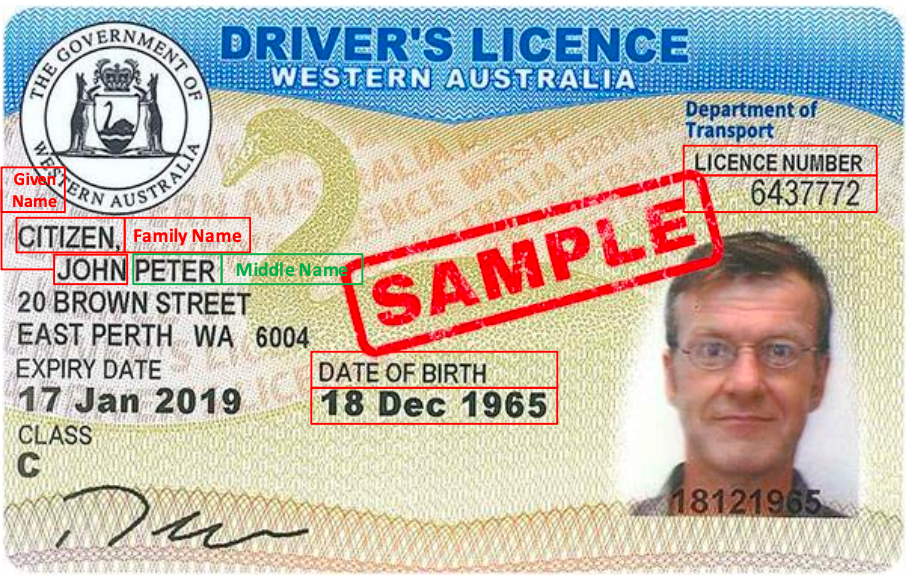
**Required Fields**
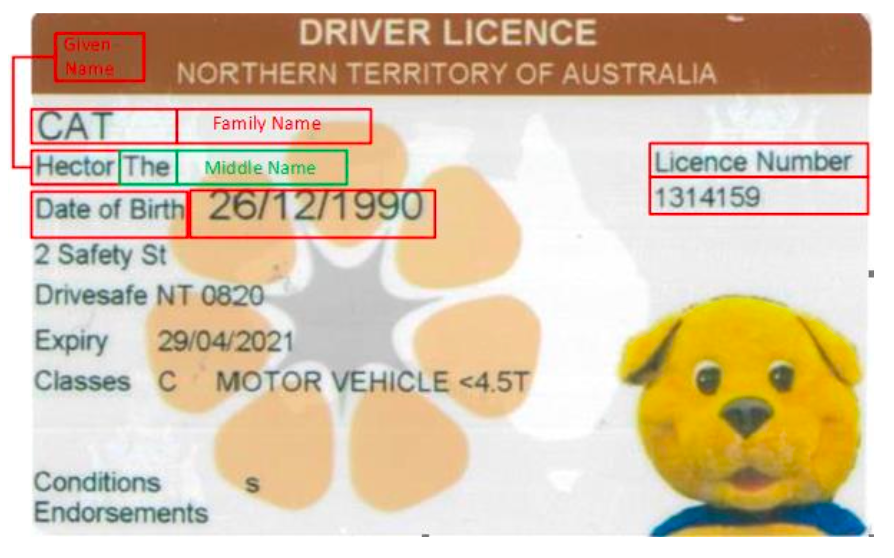
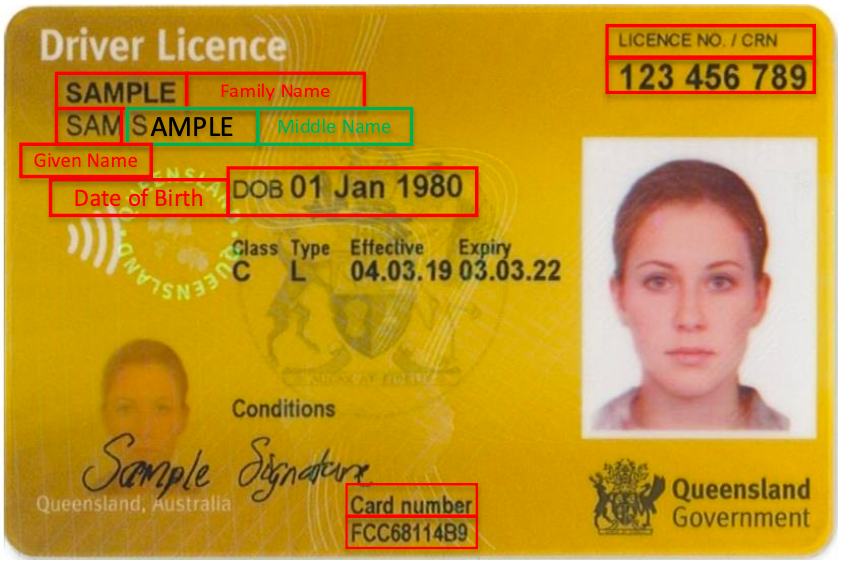
* **Name:** Given/primary and family names (exactly as shown on licence)
* **Date of Birth:** Format: `YYYY-MM-DD`
* **ID Type:** Must be `DRIVERS_LICENCE`
* **Country:** Must be `AUS`
* **State:** Use one of: `VIC`, `NSW`, `ACT`, `WA`, `SA`, `NT`, `QLD`, `TAS`
* **Licence Number:** Provided in `idNumber` field
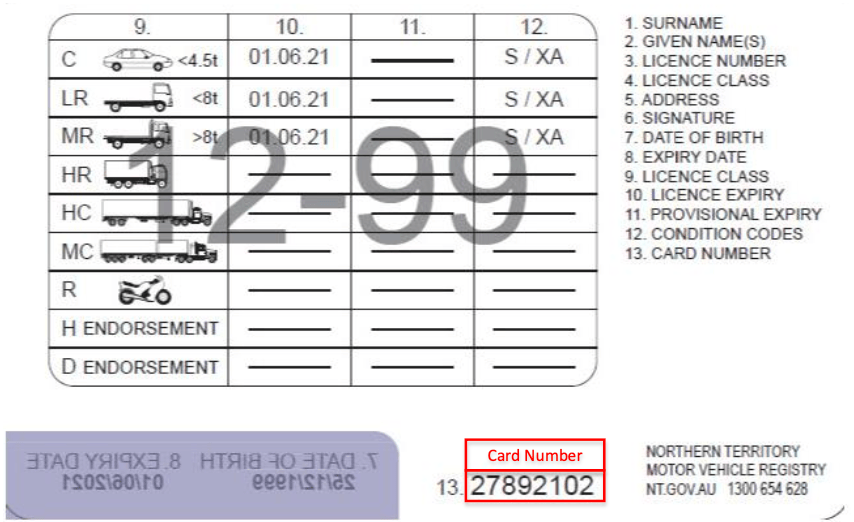
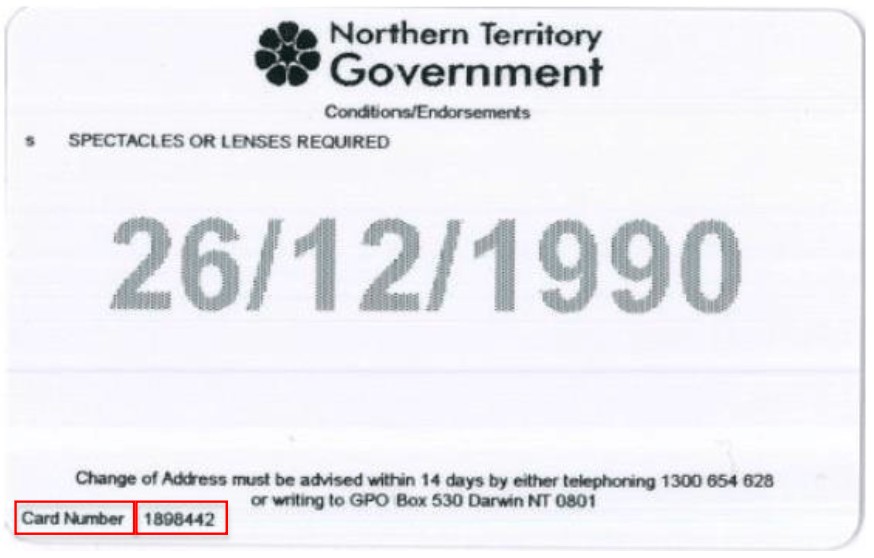
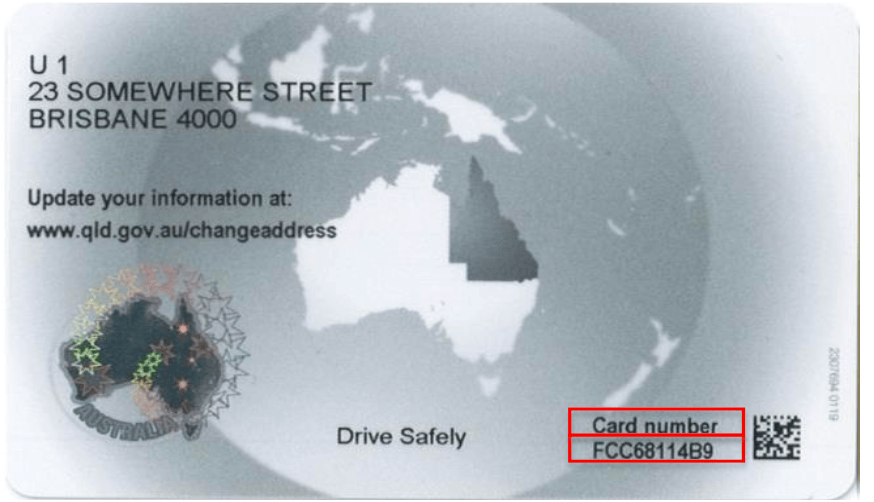
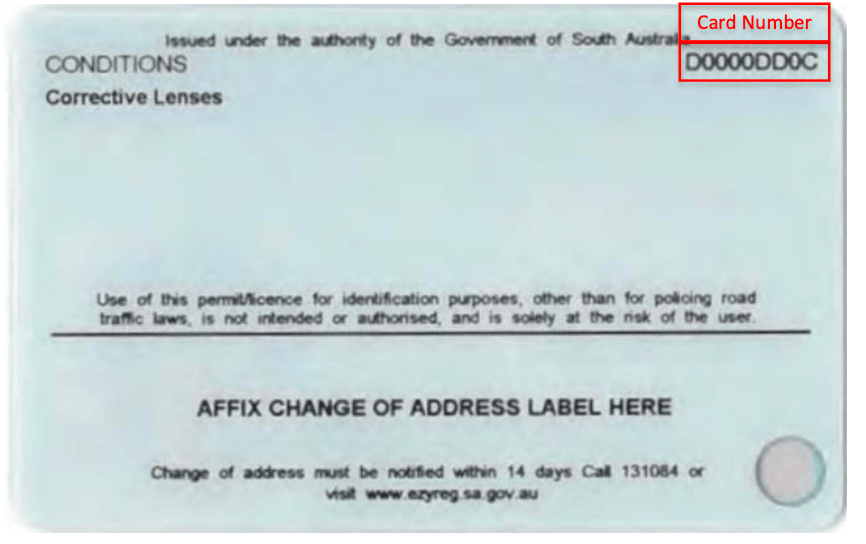
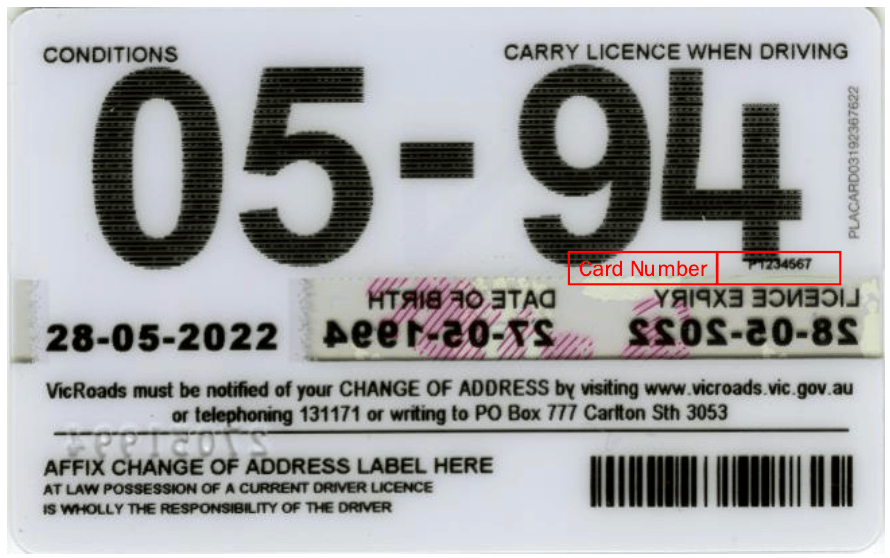
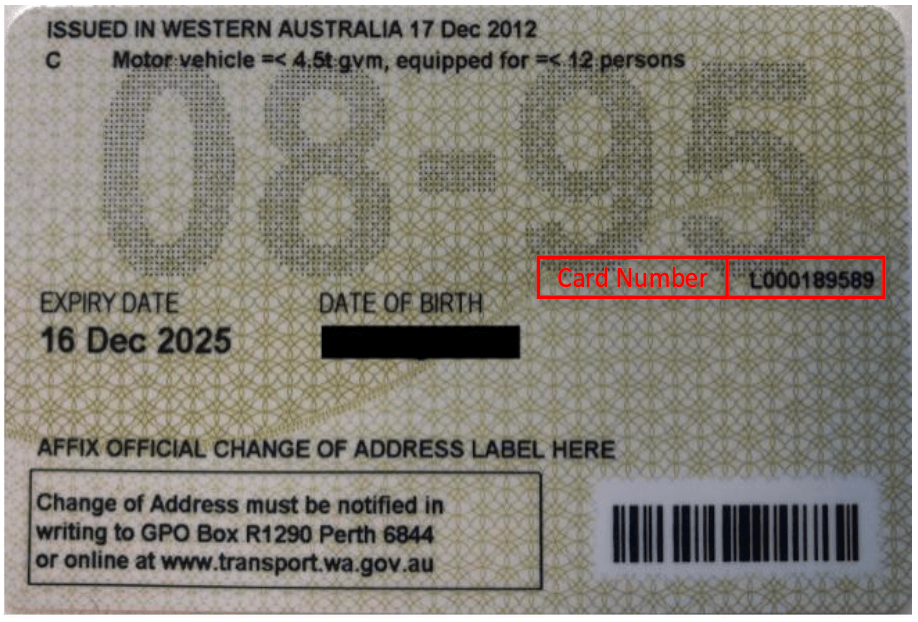
* **Card Number:** Provided in `extraData` with:
```json theme={null}
{
"kvpKey": "document_number",
"kvpValue": "your_card_number_here"
}
```
**Implementation Example**
```json Example Request theme={null}
{
"identityDocs": [
{
"idType": "DRIVERS_LICENCE",
"country": "AUS",
"region": "NSW",
"idNumber": "N49187",
"extraData": [
{
"kvpKey": "document_number",
"kvpType": "general.string",
"kvpValue": "21631234"
}
]
}
]
}
```
**Format Requirements**
| State | Format | Length | Example |
| ----- | ------------ | -------- | ----------- |
| ACT | Numeric | Up to 10 | `123456789` |
| NT | Numeric | Up to 10 | `123456789` |
| QLD | Numeric | 8-9 | `12345678` |
| NSW | Alphanumeric | 6-8 | `N49187` |
| SA | Alphanumeric | 6 | `ABC123` |
| TAS | Alphanumeric | 6-8 | `A12345` |
| VIC | Numeric | Up to 10 | `123456789` |
| WA | Numeric | 7 | `1234567` |
| State | Format | Length | Example |
| ----- | ------------ | ------ | ------------ |
| ACT | Alphanumeric | 10 | `ABC1234567` |
| NT | Numeric | 6-8 | `123456` |
| QLD | Alphanumeric | 10 | `ABC1234567` |
| NSW | Numeric | 10 | `1234567890` |
| SA | Alphanumeric | 9 | `ABC123456` |
| TAS | Alphanumeric | 9 | `ABC123456` |
| VIC | Alphanumeric | 8 | `ABC12345` |
| WA | Alphanumeric | 8-10 | `ABC123456` |
##### Victorian Licence Verification - Important Update
As of July 1st, 2023, Victorian card number verification has special handling:
* For compromised licenses (e.g., Optus breach): DVS verifies current card number
* For non-compromised licenses: Card number isn't verified (can match license number)
* Always capture card numbers as historical compromises may affect verification
* Direct DVS users will see audit log entry: "Successful Match - Card Number hasn't been checked"
**DVS Response Handling**
To receive expanded verification details: 1. Enable the "full check results"
flag 2. Access results in:
`entityResult.nameCheck.checkResult[x].checkProcessResults`
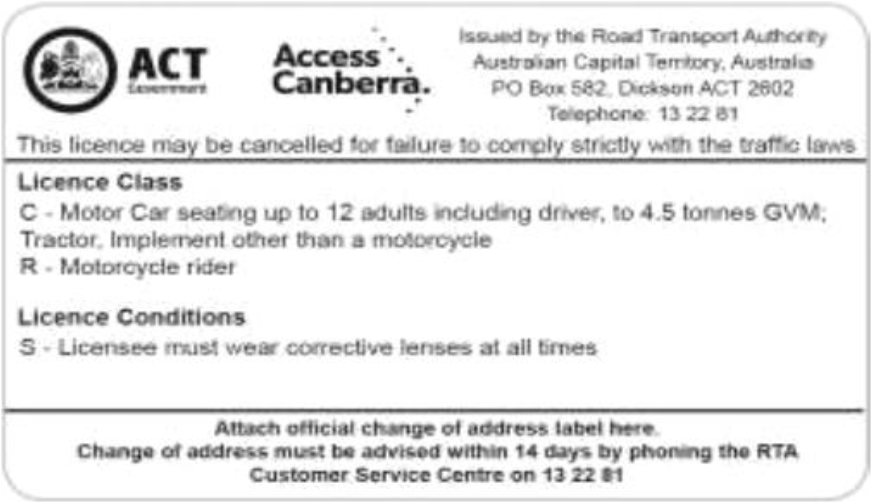
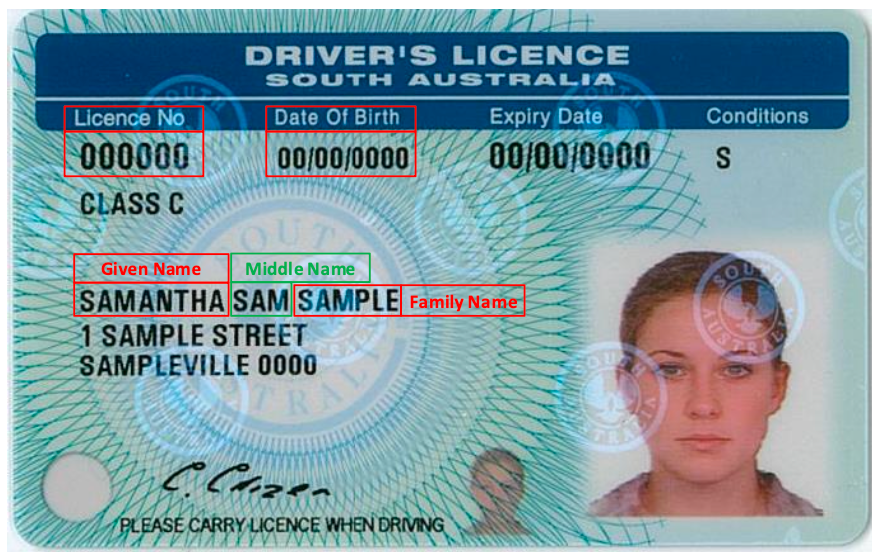
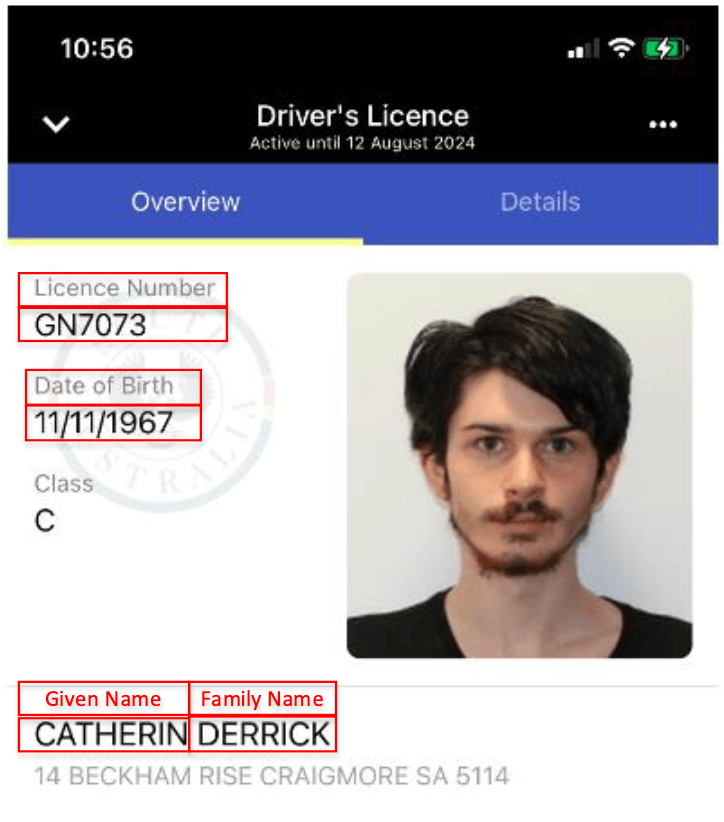
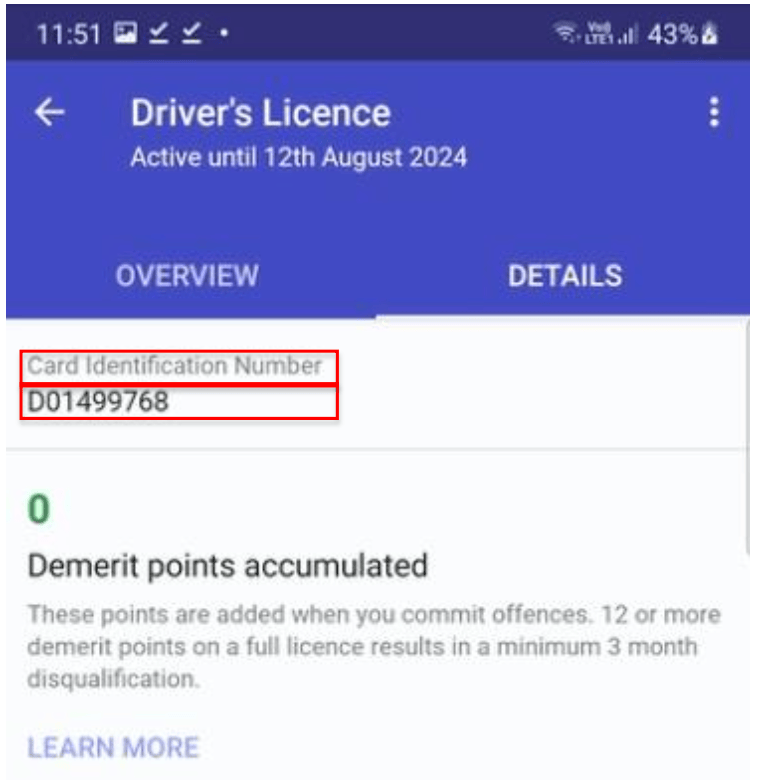
**Sample License Images**
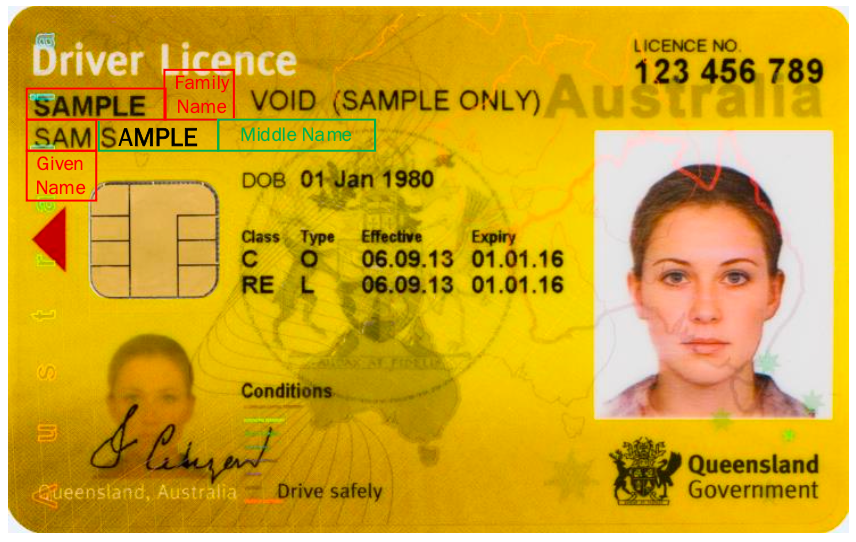
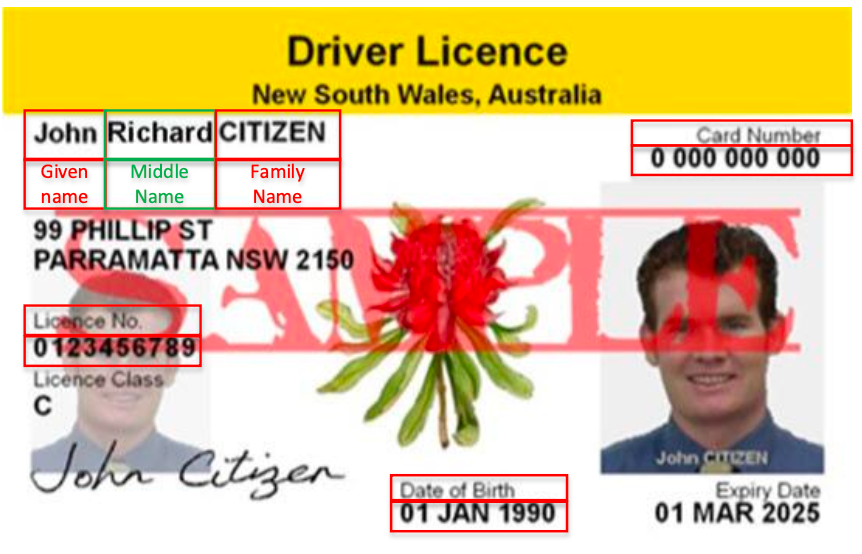
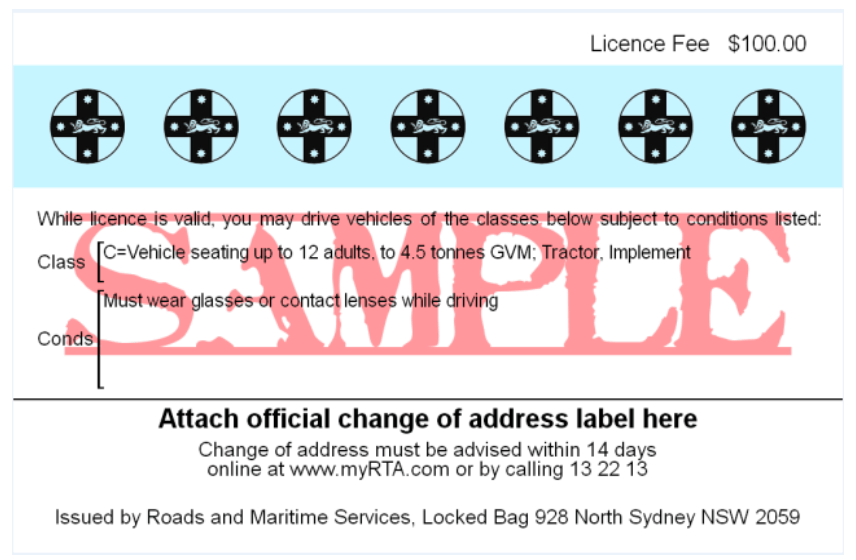
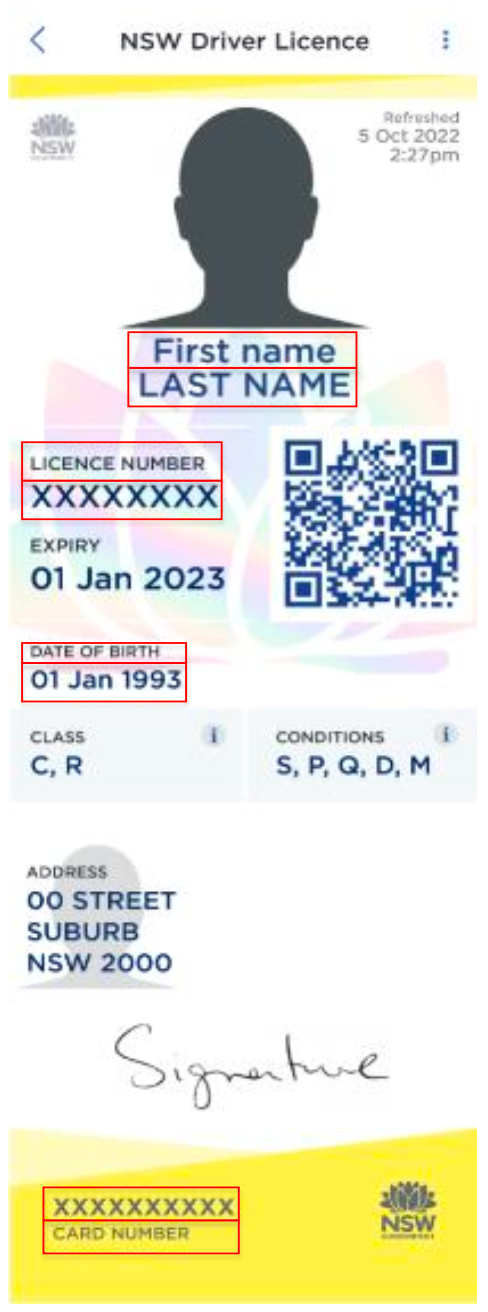
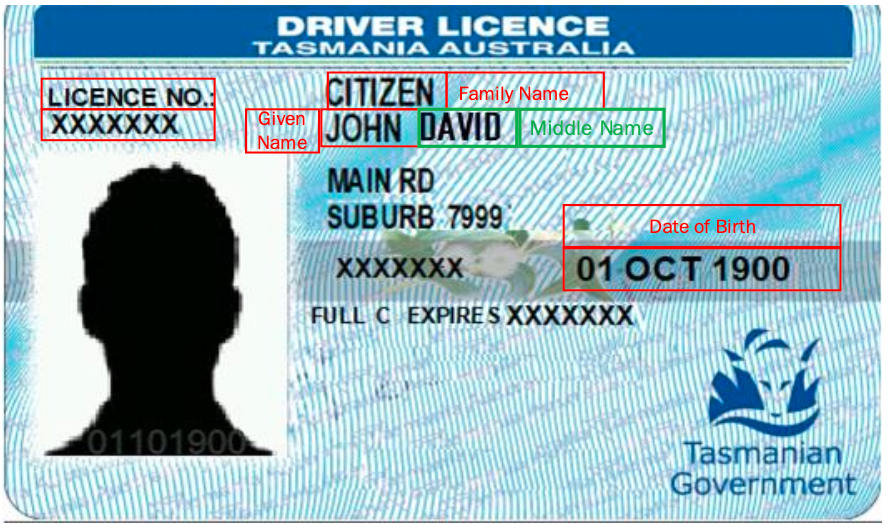
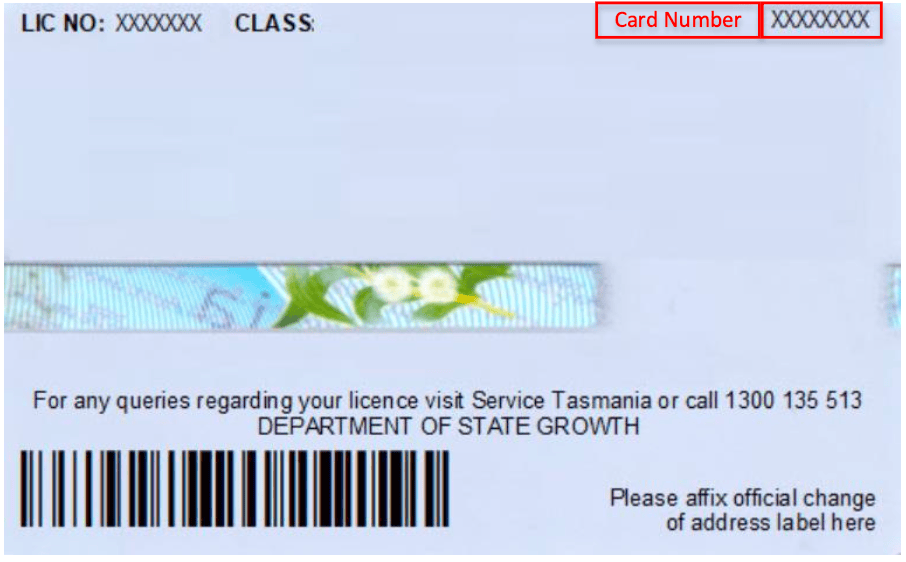
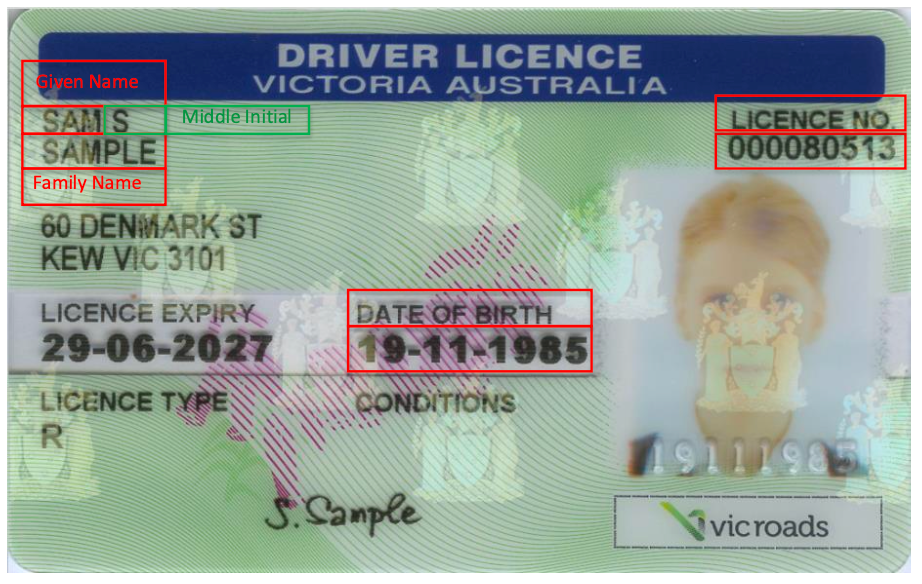
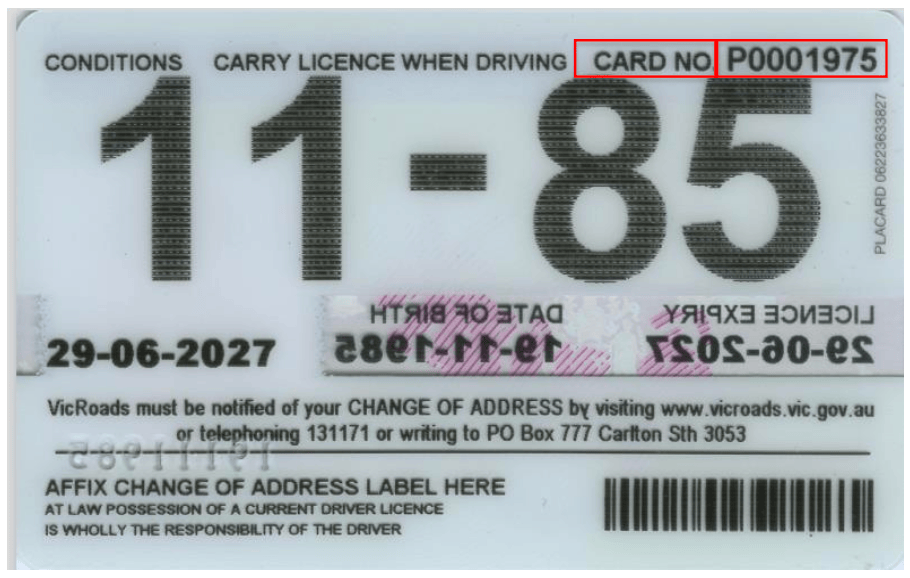
 ## Australian Passports & Visas
This guide covers verification requirements for both Australian passports and
visas. Both document types use similar verification fields but have some key
differences.
**Document Types Overview**
Australian passport verification for citizens and permanent residents.
Australian visa verification for temporary residents and visitors.
**Required Fields**
Provide the following exactly as shown on the travel document:
* Given name(s)
* Middle name(s)
* Family name(s)
Must be in ISO format: `YYYY-MM-DD`
Example: `1990-07-21` for July 21, 1990
* ID Type: Either `PASSPORT` or `VISA` (both are accepted)
* Country Code: ISO-3166-alpha3 country code of passport issuance (e.g. Aus)
* Document Number: Passport number in `idNumber` field
**Important Considerations**
Names must exactly match the travel document, including:
* Capitalization
* Special characters
* Spaces
* Diacritical marks
{" "}
* For Australian passports: Use `AUS`
* For visas: Use the ISO-3166-alpha3 code of the passport's issuing country
Always use the passport number, even when verifying a visa. The visa itself is linked to the passport number in the verification system.
When verifying visas, ensure you're using the correct passport number that the
visa is associated with. Using an incorrect or expired passport number will
result in verification failure.
For visa holders from countries with different name formats, always use the
name order and format exactly as shown
## Medicare Cards
The Australian Medicare Card is a government-issued healthcare card that comes
in three colors: Green, Blue, and Yellow. Each card type has specific
validation requirements and data formats. This guide explains how to integrate
Australian Medicare Card verification into your application.
**Required Fields**
* **Name**: Full name as displayed on the card (given name, middle initial, family name)
* **Date of Birth**: Must be in `YYYY-MM-DD` format
* **Country**: Must be `AUS`
{" "}
* **Card Number** (`idNumber`): The complete Medicare card number
* **Card Color** (`idSubType`): One of the following: - `G` - Green - `B` - Blue - `Y` - Yellow
* **Expiry Date** (`idExpiry`): Format `YYYY-MM-DD`
For Green cards, the expiry only shows YYYY-MM. You must append `-01` for
the day.
These fields should be included in the `extraData` array:
1. **Reference Number**
```json theme={null}
{
"kvpKey": "reference",
"kvpValue": "n" // Where n is 1-5
}
```
2. **Middle Name/Initial (Optional)**
```json theme={null}
{
"kvpKey": "display_middle_name",
"kvpValue": "X" // Middle initial as shown on card
}
```
**Implementation Example**
```json title="Sample Medicare Card Request" {28-42} theme={null}
{
"entity": {
"entityType": "INDIVIDUAL",
"entityProfile": "safe_harbour_id",
"gender": "M",
"name": {
"givenName": "BRUCE",
"middleName": "TWOPASS",
"familyName": "TESTTHIRTYNINE"
},
"dateOfBirth": {
"dateOfBirth": "1988-01-01"
},
"addresses": [
{
"addressType": "RESIDENTIAL1",
"streetNumber": "287",
"streetName": "Gooyong",
"streetType": "St",
"town": "WOOMERA",
"postalCode": "5720",
"state": "SA",
"country": "AUS"
}
],
"identityDocs": [
{
"idType": "NATIONAL_HEALTH_ID", // Medicare Card Identifier
"idSubType": "G", // G = Green Medicare Card
"idNumber": "5156598231", // Full card number
"idExpiry": "2030-01-01", // Expiry date with appended day
"extraData": [
{
"kvpKey": "reference",
"kvpValue": "1" // Reference number (1-5)
},
{
"kvpKey": "display_middle_name",
"kvpValue": "X" // Middle initial (optional)
}
],
"country": "AUS"
}
]
}
}
```
Use this checklist to ensure your Medicare Card implementation is correct:
* Card type is specified correctly (G/B/Y)
* Full name matches card exactly
* Date formats follow YYYY-MM-DD
* Reference number is between 1 and 5
* Country is set to "AUS"
* Middle initial is included if present on card
## Name Change Certificates
The Name Change Certificate is an official document that verifies a person's
legal name change in Australia. Each state and territory maintains its own
registry for name changes, but the verification process is standardized across
the country.
**Required Fields**
* **New Name:** Must match certificate exactly
* Given name(s)
* Middle name(s)
* Family name(s)
* **Date of Birth:** Format: `YYYY-MM-DD`
* **ID Type:** Must be `NAME_CHANGE`
* **Country:** Must be `AUS`
{" "}
* **Registration Number:** Provided in `idNumber` field
* **Registration State:** Use `region` field with one of: - `VIC`, `NSW`, `ACT`, `WA`, `SA` `NT`, `QLD`, `TAS`
* **Certificate Number:** Required in `extraData`
{" "}
Both dates must be in `YYYY-MM-DD` format:
* **Date of Print**
* **Date of Registration**
Previous legal name information:
* Original family name
* Original first given name
* Original other given name(s)
**Implementation Example**
```json Example Request theme={null}
{
"identityDocs": [
{
"idType": "NAME_CHANGE",
"country": "AUS",
"region": "NSW",
"idNumber": "NC123456789",
"extraData": [
{
"kvpKey": "certificate_number",
"kvpValue": "CERT123456"
},
{
"kvpKey": "certificate_date_of_print",
"kvpValue": "2023-06-15"
},
{
"kvpKey": "certificate_date_of_registration",
"kvpValue": "2023-06-01"
},
{
"kvpKey": "registered_name_family",
"kvpValue": "SMITH"
},
{
"kvpKey": "registered_name_first_given",
"kvpValue": "JOHN"
},
{
"kvpKey": "registered_name_other_given",
"kvpValue": "MICHAEL"
}
]
}
]
}
```
**Extra Data Fields Reference**
```json theme={null}
{
"kvpKey": "certificate_number",
"kvpValue": "your_certificate_number"
}
```
```json theme={null}
{
"kvpKey": "certificate_date_of_print",
"kvpValue": "YYYY-MM-DD"
},
{
"kvpKey": "certificate_date_of_registration",
"kvpValue": "YYYY-MM-DD"
}
```
```json theme={null}
{
"kvpKey": "registered_name_family",
"kvpValue": "ORIGINAL_SURNAME"
},
{
"kvpKey": "registered_name_first_given",
"kvpValue": "ORIGINAL_FIRST_NAME"
},
{
"kvpKey": "registered_name_other_given",
"kvpValue": "ORIGINAL_MIDDLE_NAME"
}
```
Ensure all names match exactly as shown on the certificate, including: -
Capitalization - Spacing - Special characters - Middle names/initials
When verifying a name change certificate along with other ID documents: 1. Use
the new legal name in the main entity object 2. Include the original name
details only in the name change certificate's `extraData` 3. Ensure all dates
are in ISO format (`YYYY-MM-DD`)
## Birth Certificates
Birth certificates are primary identity documents issued by Australian state
and territory Registry of Births, Deaths and Marriages. Verification
requirements may vary based on the issuing jurisdiction and year of issue.
**Required Fields**
* **Name:** Must match certificate exactly
* Given name(s)
* Middle name(s)
* Family name(s)
* **Date of Birth:** Format: `YYYY-MM-DD`
* **ID Type:** Must be `BIRTH_CERT`
* **Country:** Must be `AUS`
{" "}
* **Registration Number:** Provided in `idNumber` field
* **Registration State:** Use `region` field with one of: - `VIC`, `NSW`, `ACT`, `WA`, `SA`, `NT`, `QLD`, `TAS`
* **Registration Date:** Can be provided in either: - Full date format: `YYYY-MM-DD` - Year only format: `YYYY`
* **Registration District:** Optional field where applicable
* **Certificate Number**
* **Date of Print:** Format: `YYYY-MM-DD`
* **Registered Name Details:** May differ from current legal name
* Family name
* First given name
* Other given name(s)
**Implementation Example**
```json Example Request theme={null}
{
"identityDocs": [
{
"idType": "BIRTH_CERT",
"country": "AUS",
"region": "NSW",
"idNumber": "1234567890",
"extraData": [
{
"kvpKey": "registration_date",
"kvpValue": "1990-03-15"
},
{
"kvpKey": "registration_district",
"kvpValue": "SYDNEY"
},
{
"kvpKey": "certificate_number",
"kvpValue": "CERT123456"
},
{
"kvpKey": "certificate_date_of_print",
"kvpValue": "2023-01-10"
},
{
"kvpKey": "registered_name_family",
"kvpValue": "SMITH"
},
{
"kvpKey": "registered_name_first_given",
"kvpValue": "JOHN"
},
{
"kvpKey": "registered_name_other_given",
"kvpValue": "MICHAEL"
}
]
}
]
}
```
**Extra Data Fields Reference**
```json theme={null}
{
"kvpKey": "registration_date",
"kvpValue": "YYYY-MM-DD" // or "YYYY"
},
{
"kvpKey": "registration_district",
"kvpValue": "DISTRICT_NAME" // Optional
}
```
```json theme={null}
{
"kvpKey": "certificate_number",
"kvpValue": "CERT_NUMBER"
},
{
"kvpKey": "certificate_date_of_print",
"kvpValue": "YYYY-MM-DD"
}
```
```json theme={null}
{
"kvpKey": "registered_name_family",
"kvpValue": "SURNAME"
},
{
"kvpKey": "registered_name_first_given",
"kvpValue": "FIRST_NAME"
},
{
"kvpKey": "registered_name_other_given",
"kvpValue": "MIDDLE_NAME"
}
```
Match requirements vary by jurisdiction and certificate age. Ensure you provide:
* All available registration details
* Exact name matching as shown on certificate
* Correct date formats
##### Registration Requirements
The requirements for registration number and date matching vary based on:
* Certificate's issuing State/Territory
* Year of issue
* Registry's historical record format
Always provide as much information as available for the most accurate verification.
When handling birth certificates:
1. Collect all available fields, even optional ones
2. Pay special attention to historical date formats
3. Note any discrepancies between registered name and current legal name
4. Verify registration district spelling where applicable
## Citizenship Certificates
Australian Citizenship Certificates are official documents that prove
Australian citizenship. They contain unique identifiers and can be used to
verify both acquired and birth-right citizenship status.
**Required Fields**
* **Name:** Must match certificate exactly
* Given name(s)
* Middle name(s)
* Family name(s)
* **Date of Birth:** Format: `YYYY-MM-DD`
* **ID Type:** Must be `CITIZENSHIP`
* **Country:** Must be `AUS`
{" "}
* **Stock Number:** Provided in `idNumber` field
* **Date of Acquisition:** When citizenship was granted - Format: `YYYY-MM-DD`
Both countries must use ISO-8660-3 alpha country codes (e.g., 'AUS', 'GBR', 'USA'):
* **Primary Country:** Original citizenship
* **Secondary Country:** Additional citizenship
**Implementation Example**
```json Example Request theme={null}
{
"identityDocs": [
{
"idType": "CITIZENSHIP",
"country": "AUS",
"idNumber": "ABC123456", // Stock number
"extraData": [
{
"kvpKey": "acquisition_date",
"kvpValue": "2020-03-15"
},
{
"kvpKey": "primary_country",
"kvpValue": "GBR" // Original citizenship
},
{
"kvpKey": "secondary_country",
"kvpValue": "AUS" // New citizenship
}
]
}
]
}
```
**Extra Data Fields Reference**
```json theme={null}
{
"kvpKey": "acquisition_date",
"kvpValue": "YYYY-MM-DD"
}
```
```json theme={null}
{
"kvpKey": "primary_country",
"kvpValue": "ISO_COUNTRY_CODE"
},
{
"kvpKey": "secondary_country",
"kvpValue": "ISO_COUNTRY_CODE"
}
```
When verifying citizenship certificates: - Ensure the stock number is entered
exactly as shown - Use correct ISO country codes (3-letter format) - Match
names precisely as they appear on the certificate
Common ISO country codes for citizenship verification:
* `AUS` - Australia
* `GBR` - United Kingdom
* `NZL` - New Zealand
* `USA` - United States
* `CHN` - China
* `IND` - India
For dual citizenship cases:
* Primary country typically represents original citizenship
* Secondary country should be 'AUS' for Australian citizenship certificates
* You must provide both country codes to verify successfully
## ImmiCard
The ImmiCard is an official immigration credential issued by the Department of
Home Affairs to eligible visa holders and other non-citizens. It serves as an
official photo identification document for accessing services in Australia.
**Required Fields**
* **Name:** Must match ImmiCard exactly
* Given name(s)
* Middle name(s)
* Family name(s)
For single-name individuals, use a hyphen (-) in the `givenName` field
* **Date of Birth:** Format: `YYYY-MM-DD`
* **ID Type:** Must be `IMMIGRATION`
* **Country:** Must be `AUS`
* **ImmiCard Number:** Provided in `idNumber` field
* Format: Three alpha characters followed by six numeric characters
* Example: `PRE123456`
* Letters can be upper or lowercase
**Implementation Example**
```json Example Request theme={null}
{
"entity": {
"entityProfile": "gov_id",
"name": {
"familyName": "Jones",
"middleName": "",
"givenName": "Matthew Test"
},
"dateOfBirth": {
"dateOfBirth": "1980-01-01"
},
"identityDocs": [
{
"idType": "IMMIGRATION",
"country": "AUS",
"idNumber": "PRE123456",
"region": ""
}
]
}
}
```
```json Example with Single Name theme={null}
{
"entity": {
"name": {
"familyName": "Singh",
"middleName": "",
"givenName": "-" // Hyphen for single name
},
"identityDocs": [
{
"idType": "IMMIGRATION",
"country": "AUS",
"idNumber": "PRE123456"
}
]
}
}
```
**ImmiCard Number Format**
ImmiCard numbers must follow this pattern:
* First 3 characters: Letters (A-Z, case insensitive)
* Last 6 characters: Numbers (0-9)
* Total length: 9 characters
* Example: `PRE123456`
Common validation issues:
* Incorrect ImmiCard number format
* Missing or incorrect name format for single-name individuals
* Incorrect date format (must be YYYY-MM-DD)
##### Name Handling
When dealing with names on ImmiCards:
1. Use exact spelling and format as shown on the card
2. For single names, use hyphen (-) in given name field
3. Include middle names if present on the card 4. Maintain case sensitivity
##### Address Requirements
While the example includes address information, it's not required for ImmiCard
verification. However, if provided, ensure:
* All address components are accurate
* State codes are valid Australian states/territories
* Postal codes match the state/territory
## Marriage Certificates
Australian Marriage Certificates are official documents that verify a legal
marriage. Following the Marriage Amendment (Definition and Religious Freedoms)
Act 2017, certificates support various formats for recording participant
details.
**Required Fields**
* **Name:** Either partner's name as shown on certificate
* **Date of Birth:** Format: `YYYY-MM-DD`
* **ID Type:** Must be `MARRIAGE_CERT`
* **Country:** Must be `AUS`
{" "}
* **Registration Number:** Provided in `idNumber` field
* **Registration State:** Use `region` field with one of: `VIC`, `NSW`, `ACT`, `WA`, `SA`, `NT`, `QLD`, `TAS`
* **Registration Year:** Format: `YYYY`
* **Certificate Number**
All dates must be in `YYYY-MM-DD` format:
* **Marriage Date**
* **Date of Print**
* **Date of Registration**
**Partner Information**
```json theme={null}
// Bride Details
{
"kvpKey": "bride_name_family",
"kvpValue": "SMITH"
},
{
"kvpKey": "bride_name_first_given",
"kvpValue": "JANE"
},
{
"kvpKey": "bride_name_other_given",
"kvpValue": "MARIE"
},
// Groom Details
{
"kvpKey": "groom_name_family",
"kvpValue": "JONES"
},
{
"kvpKey": "groom_name_first_given",
"kvpValue": "JOHN"
},
{
"kvpKey": "groom_name_other_given",
"kvpValue": "MICHAEL"
}
```
```json theme={null}
// Partner 1 Details
{
"kvpKey": "partner1_name_family",
"kvpValue": "SMITH"
},
{
"kvpKey": "partner1_name_first_given",
"kvpValue": "JANE"
},
{
"kvpKey": "partner1_name_other_given",
"kvpValue": "MARIE"
},
// Partner 2 Details
{
"kvpKey": "partner2_name_family",
"kvpValue": "JONES"
},
{
"kvpKey": "partner2_name_first_given",
"kvpValue": "SARAH"
},
{
"kvpKey": "partner2_name_other_given",
"kvpValue": "ELIZABETH"
}
```
**Implementation Example**
```json Complete Example theme={null}
{
"identityDocs": [
{
"idType": "MARRIAGE_CERT",
"country": "AUS",
"region": "VIC",
"idNumber": "1234567890",
"extraData": [
{
"kvpKey": "registration_year",
"kvpValue": "2023"
},
{
"kvpKey": "marriage_date",
"kvpValue": "2023-06-15"
},
{
"kvpKey": "certificate_number",
"kvpValue": "CERT123456"
},
{
"kvpKey": "certificate_date_of_print",
"kvpValue": "2023-06-20"
},
{
"kvpKey": "certificate_date_of_registration",
"kvpValue": "2023-06-16"
},
{
"kvpKey": "partner1_name_family",
"kvpValue": "SMITH"
},
{
"kvpKey": "partner1_name_first_given",
"kvpValue": "JANE"
},
{
"kvpKey": "partner1_name_other_given",
"kvpValue": "MARIE"
},
{
"kvpKey": "partner2_name_family",
"kvpValue": "JONES"
},
{
"kvpKey": "partner2_name_first_given",
"kvpValue": "SARAH"
},
{
"kvpKey": "partner2_name_other_given",
"kvpValue": "ELIZABETH"
}
]
}
]
}
```
##### State-Specific Requirements
Victoria (VIC) has specific requirements for field mapping:
* Enter the left-hand column/first row details as Name 2
* This applies regardless of the order on the certificate
* Consult state-specific DVS specifications for other jurisdictions
##### Marriage Equality Support
Certificates support multiple format combinations:
* Traditional: Bride/Groom format
* Modern: Partner 1/Partner 2 format
* Use the appropriate format based on the certificate layout
##### Best Practices
When verifying marriage certificates:
1. Check the certificate format before
choosing field names
2. Ensure all dates are in correct ISO format
3. Verify state-specific requirements
4. Include all available optional fields
5. Match names exactly as shown on certificate
## Australian Passports & Visas
This guide covers verification requirements for both Australian passports and
visas. Both document types use similar verification fields but have some key
differences.
**Document Types Overview**
Australian passport verification for citizens and permanent residents.
Australian visa verification for temporary residents and visitors.
**Required Fields**
Provide the following exactly as shown on the travel document:
* Given name(s)
* Middle name(s)
* Family name(s)
Must be in ISO format: `YYYY-MM-DD`
Example: `1990-07-21` for July 21, 1990
* ID Type: Either `PASSPORT` or `VISA` (both are accepted)
* Country Code: ISO-3166-alpha3 country code of passport issuance (e.g. Aus)
* Document Number: Passport number in `idNumber` field
**Important Considerations**
Names must exactly match the travel document, including:
* Capitalization
* Special characters
* Spaces
* Diacritical marks
{" "}
* For Australian passports: Use `AUS`
* For visas: Use the ISO-3166-alpha3 code of the passport's issuing country
Always use the passport number, even when verifying a visa. The visa itself is linked to the passport number in the verification system.
When verifying visas, ensure you're using the correct passport number that the
visa is associated with. Using an incorrect or expired passport number will
result in verification failure.
For visa holders from countries with different name formats, always use the
name order and format exactly as shown
## Medicare Cards
The Australian Medicare Card is a government-issued healthcare card that comes
in three colors: Green, Blue, and Yellow. Each card type has specific
validation requirements and data formats. This guide explains how to integrate
Australian Medicare Card verification into your application.
**Required Fields**
* **Name**: Full name as displayed on the card (given name, middle initial, family name)
* **Date of Birth**: Must be in `YYYY-MM-DD` format
* **Country**: Must be `AUS`
{" "}
* **Card Number** (`idNumber`): The complete Medicare card number
* **Card Color** (`idSubType`): One of the following: - `G` - Green - `B` - Blue - `Y` - Yellow
* **Expiry Date** (`idExpiry`): Format `YYYY-MM-DD`
For Green cards, the expiry only shows YYYY-MM. You must append `-01` for
the day.
These fields should be included in the `extraData` array:
1. **Reference Number**
```json theme={null}
{
"kvpKey": "reference",
"kvpValue": "n" // Where n is 1-5
}
```
2. **Middle Name/Initial (Optional)**
```json theme={null}
{
"kvpKey": "display_middle_name",
"kvpValue": "X" // Middle initial as shown on card
}
```
**Implementation Example**
```json title="Sample Medicare Card Request" {28-42} theme={null}
{
"entity": {
"entityType": "INDIVIDUAL",
"entityProfile": "safe_harbour_id",
"gender": "M",
"name": {
"givenName": "BRUCE",
"middleName": "TWOPASS",
"familyName": "TESTTHIRTYNINE"
},
"dateOfBirth": {
"dateOfBirth": "1988-01-01"
},
"addresses": [
{
"addressType": "RESIDENTIAL1",
"streetNumber": "287",
"streetName": "Gooyong",
"streetType": "St",
"town": "WOOMERA",
"postalCode": "5720",
"state": "SA",
"country": "AUS"
}
],
"identityDocs": [
{
"idType": "NATIONAL_HEALTH_ID", // Medicare Card Identifier
"idSubType": "G", // G = Green Medicare Card
"idNumber": "5156598231", // Full card number
"idExpiry": "2030-01-01", // Expiry date with appended day
"extraData": [
{
"kvpKey": "reference",
"kvpValue": "1" // Reference number (1-5)
},
{
"kvpKey": "display_middle_name",
"kvpValue": "X" // Middle initial (optional)
}
],
"country": "AUS"
}
]
}
}
```
Use this checklist to ensure your Medicare Card implementation is correct:
* Card type is specified correctly (G/B/Y)
* Full name matches card exactly
* Date formats follow YYYY-MM-DD
* Reference number is between 1 and 5
* Country is set to "AUS"
* Middle initial is included if present on card
## Name Change Certificates
The Name Change Certificate is an official document that verifies a person's
legal name change in Australia. Each state and territory maintains its own
registry for name changes, but the verification process is standardized across
the country.
**Required Fields**
* **New Name:** Must match certificate exactly
* Given name(s)
* Middle name(s)
* Family name(s)
* **Date of Birth:** Format: `YYYY-MM-DD`
* **ID Type:** Must be `NAME_CHANGE`
* **Country:** Must be `AUS`
{" "}
* **Registration Number:** Provided in `idNumber` field
* **Registration State:** Use `region` field with one of: - `VIC`, `NSW`, `ACT`, `WA`, `SA` `NT`, `QLD`, `TAS`
* **Certificate Number:** Required in `extraData`
{" "}
Both dates must be in `YYYY-MM-DD` format:
* **Date of Print**
* **Date of Registration**
Previous legal name information:
* Original family name
* Original first given name
* Original other given name(s)
**Implementation Example**
```json Example Request theme={null}
{
"identityDocs": [
{
"idType": "NAME_CHANGE",
"country": "AUS",
"region": "NSW",
"idNumber": "NC123456789",
"extraData": [
{
"kvpKey": "certificate_number",
"kvpValue": "CERT123456"
},
{
"kvpKey": "certificate_date_of_print",
"kvpValue": "2023-06-15"
},
{
"kvpKey": "certificate_date_of_registration",
"kvpValue": "2023-06-01"
},
{
"kvpKey": "registered_name_family",
"kvpValue": "SMITH"
},
{
"kvpKey": "registered_name_first_given",
"kvpValue": "JOHN"
},
{
"kvpKey": "registered_name_other_given",
"kvpValue": "MICHAEL"
}
]
}
]
}
```
**Extra Data Fields Reference**
```json theme={null}
{
"kvpKey": "certificate_number",
"kvpValue": "your_certificate_number"
}
```
```json theme={null}
{
"kvpKey": "certificate_date_of_print",
"kvpValue": "YYYY-MM-DD"
},
{
"kvpKey": "certificate_date_of_registration",
"kvpValue": "YYYY-MM-DD"
}
```
```json theme={null}
{
"kvpKey": "registered_name_family",
"kvpValue": "ORIGINAL_SURNAME"
},
{
"kvpKey": "registered_name_first_given",
"kvpValue": "ORIGINAL_FIRST_NAME"
},
{
"kvpKey": "registered_name_other_given",
"kvpValue": "ORIGINAL_MIDDLE_NAME"
}
```
Ensure all names match exactly as shown on the certificate, including: -
Capitalization - Spacing - Special characters - Middle names/initials
When verifying a name change certificate along with other ID documents: 1. Use
the new legal name in the main entity object 2. Include the original name
details only in the name change certificate's `extraData` 3. Ensure all dates
are in ISO format (`YYYY-MM-DD`)
## Birth Certificates
Birth certificates are primary identity documents issued by Australian state
and territory Registry of Births, Deaths and Marriages. Verification
requirements may vary based on the issuing jurisdiction and year of issue.
**Required Fields**
* **Name:** Must match certificate exactly
* Given name(s)
* Middle name(s)
* Family name(s)
* **Date of Birth:** Format: `YYYY-MM-DD`
* **ID Type:** Must be `BIRTH_CERT`
* **Country:** Must be `AUS`
{" "}
* **Registration Number:** Provided in `idNumber` field
* **Registration State:** Use `region` field with one of: - `VIC`, `NSW`, `ACT`, `WA`, `SA`, `NT`, `QLD`, `TAS`
* **Registration Date:** Can be provided in either: - Full date format: `YYYY-MM-DD` - Year only format: `YYYY`
* **Registration District:** Optional field where applicable
* **Certificate Number**
* **Date of Print:** Format: `YYYY-MM-DD`
* **Registered Name Details:** May differ from current legal name
* Family name
* First given name
* Other given name(s)
**Implementation Example**
```json Example Request theme={null}
{
"identityDocs": [
{
"idType": "BIRTH_CERT",
"country": "AUS",
"region": "NSW",
"idNumber": "1234567890",
"extraData": [
{
"kvpKey": "registration_date",
"kvpValue": "1990-03-15"
},
{
"kvpKey": "registration_district",
"kvpValue": "SYDNEY"
},
{
"kvpKey": "certificate_number",
"kvpValue": "CERT123456"
},
{
"kvpKey": "certificate_date_of_print",
"kvpValue": "2023-01-10"
},
{
"kvpKey": "registered_name_family",
"kvpValue": "SMITH"
},
{
"kvpKey": "registered_name_first_given",
"kvpValue": "JOHN"
},
{
"kvpKey": "registered_name_other_given",
"kvpValue": "MICHAEL"
}
]
}
]
}
```
**Extra Data Fields Reference**
```json theme={null}
{
"kvpKey": "registration_date",
"kvpValue": "YYYY-MM-DD" // or "YYYY"
},
{
"kvpKey": "registration_district",
"kvpValue": "DISTRICT_NAME" // Optional
}
```
```json theme={null}
{
"kvpKey": "certificate_number",
"kvpValue": "CERT_NUMBER"
},
{
"kvpKey": "certificate_date_of_print",
"kvpValue": "YYYY-MM-DD"
}
```
```json theme={null}
{
"kvpKey": "registered_name_family",
"kvpValue": "SURNAME"
},
{
"kvpKey": "registered_name_first_given",
"kvpValue": "FIRST_NAME"
},
{
"kvpKey": "registered_name_other_given",
"kvpValue": "MIDDLE_NAME"
}
```
Match requirements vary by jurisdiction and certificate age. Ensure you provide:
* All available registration details
* Exact name matching as shown on certificate
* Correct date formats
##### Registration Requirements
The requirements for registration number and date matching vary based on:
* Certificate's issuing State/Territory
* Year of issue
* Registry's historical record format
Always provide as much information as available for the most accurate verification.
When handling birth certificates:
1. Collect all available fields, even optional ones
2. Pay special attention to historical date formats
3. Note any discrepancies between registered name and current legal name
4. Verify registration district spelling where applicable
## Citizenship Certificates
Australian Citizenship Certificates are official documents that prove
Australian citizenship. They contain unique identifiers and can be used to
verify both acquired and birth-right citizenship status.
**Required Fields**
* **Name:** Must match certificate exactly
* Given name(s)
* Middle name(s)
* Family name(s)
* **Date of Birth:** Format: `YYYY-MM-DD`
* **ID Type:** Must be `CITIZENSHIP`
* **Country:** Must be `AUS`
{" "}
* **Stock Number:** Provided in `idNumber` field
* **Date of Acquisition:** When citizenship was granted - Format: `YYYY-MM-DD`
Both countries must use ISO-8660-3 alpha country codes (e.g., 'AUS', 'GBR', 'USA'):
* **Primary Country:** Original citizenship
* **Secondary Country:** Additional citizenship
**Implementation Example**
```json Example Request theme={null}
{
"identityDocs": [
{
"idType": "CITIZENSHIP",
"country": "AUS",
"idNumber": "ABC123456", // Stock number
"extraData": [
{
"kvpKey": "acquisition_date",
"kvpValue": "2020-03-15"
},
{
"kvpKey": "primary_country",
"kvpValue": "GBR" // Original citizenship
},
{
"kvpKey": "secondary_country",
"kvpValue": "AUS" // New citizenship
}
]
}
]
}
```
**Extra Data Fields Reference**
```json theme={null}
{
"kvpKey": "acquisition_date",
"kvpValue": "YYYY-MM-DD"
}
```
```json theme={null}
{
"kvpKey": "primary_country",
"kvpValue": "ISO_COUNTRY_CODE"
},
{
"kvpKey": "secondary_country",
"kvpValue": "ISO_COUNTRY_CODE"
}
```
When verifying citizenship certificates: - Ensure the stock number is entered
exactly as shown - Use correct ISO country codes (3-letter format) - Match
names precisely as they appear on the certificate
Common ISO country codes for citizenship verification:
* `AUS` - Australia
* `GBR` - United Kingdom
* `NZL` - New Zealand
* `USA` - United States
* `CHN` - China
* `IND` - India
For dual citizenship cases:
* Primary country typically represents original citizenship
* Secondary country should be 'AUS' for Australian citizenship certificates
* You must provide both country codes to verify successfully
## ImmiCard
The ImmiCard is an official immigration credential issued by the Department of
Home Affairs to eligible visa holders and other non-citizens. It serves as an
official photo identification document for accessing services in Australia.
**Required Fields**
* **Name:** Must match ImmiCard exactly
* Given name(s)
* Middle name(s)
* Family name(s)
For single-name individuals, use a hyphen (-) in the `givenName` field
* **Date of Birth:** Format: `YYYY-MM-DD`
* **ID Type:** Must be `IMMIGRATION`
* **Country:** Must be `AUS`
* **ImmiCard Number:** Provided in `idNumber` field
* Format: Three alpha characters followed by six numeric characters
* Example: `PRE123456`
* Letters can be upper or lowercase
**Implementation Example**
```json Example Request theme={null}
{
"entity": {
"entityProfile": "gov_id",
"name": {
"familyName": "Jones",
"middleName": "",
"givenName": "Matthew Test"
},
"dateOfBirth": {
"dateOfBirth": "1980-01-01"
},
"identityDocs": [
{
"idType": "IMMIGRATION",
"country": "AUS",
"idNumber": "PRE123456",
"region": ""
}
]
}
}
```
```json Example with Single Name theme={null}
{
"entity": {
"name": {
"familyName": "Singh",
"middleName": "",
"givenName": "-" // Hyphen for single name
},
"identityDocs": [
{
"idType": "IMMIGRATION",
"country": "AUS",
"idNumber": "PRE123456"
}
]
}
}
```
**ImmiCard Number Format**
ImmiCard numbers must follow this pattern:
* First 3 characters: Letters (A-Z, case insensitive)
* Last 6 characters: Numbers (0-9)
* Total length: 9 characters
* Example: `PRE123456`
Common validation issues:
* Incorrect ImmiCard number format
* Missing or incorrect name format for single-name individuals
* Incorrect date format (must be YYYY-MM-DD)
##### Name Handling
When dealing with names on ImmiCards:
1. Use exact spelling and format as shown on the card
2. For single names, use hyphen (-) in given name field
3. Include middle names if present on the card 4. Maintain case sensitivity
##### Address Requirements
While the example includes address information, it's not required for ImmiCard
verification. However, if provided, ensure:
* All address components are accurate
* State codes are valid Australian states/territories
* Postal codes match the state/territory
## Marriage Certificates
Australian Marriage Certificates are official documents that verify a legal
marriage. Following the Marriage Amendment (Definition and Religious Freedoms)
Act 2017, certificates support various formats for recording participant
details.
**Required Fields**
* **Name:** Either partner's name as shown on certificate
* **Date of Birth:** Format: `YYYY-MM-DD`
* **ID Type:** Must be `MARRIAGE_CERT`
* **Country:** Must be `AUS`
{" "}
* **Registration Number:** Provided in `idNumber` field
* **Registration State:** Use `region` field with one of: `VIC`, `NSW`, `ACT`, `WA`, `SA`, `NT`, `QLD`, `TAS`
* **Registration Year:** Format: `YYYY`
* **Certificate Number**
All dates must be in `YYYY-MM-DD` format:
* **Marriage Date**
* **Date of Print**
* **Date of Registration**
**Partner Information**
```json theme={null}
// Bride Details
{
"kvpKey": "bride_name_family",
"kvpValue": "SMITH"
},
{
"kvpKey": "bride_name_first_given",
"kvpValue": "JANE"
},
{
"kvpKey": "bride_name_other_given",
"kvpValue": "MARIE"
},
// Groom Details
{
"kvpKey": "groom_name_family",
"kvpValue": "JONES"
},
{
"kvpKey": "groom_name_first_given",
"kvpValue": "JOHN"
},
{
"kvpKey": "groom_name_other_given",
"kvpValue": "MICHAEL"
}
```
```json theme={null}
// Partner 1 Details
{
"kvpKey": "partner1_name_family",
"kvpValue": "SMITH"
},
{
"kvpKey": "partner1_name_first_given",
"kvpValue": "JANE"
},
{
"kvpKey": "partner1_name_other_given",
"kvpValue": "MARIE"
},
// Partner 2 Details
{
"kvpKey": "partner2_name_family",
"kvpValue": "JONES"
},
{
"kvpKey": "partner2_name_first_given",
"kvpValue": "SARAH"
},
{
"kvpKey": "partner2_name_other_given",
"kvpValue": "ELIZABETH"
}
```
**Implementation Example**
```json Complete Example theme={null}
{
"identityDocs": [
{
"idType": "MARRIAGE_CERT",
"country": "AUS",
"region": "VIC",
"idNumber": "1234567890",
"extraData": [
{
"kvpKey": "registration_year",
"kvpValue": "2023"
},
{
"kvpKey": "marriage_date",
"kvpValue": "2023-06-15"
},
{
"kvpKey": "certificate_number",
"kvpValue": "CERT123456"
},
{
"kvpKey": "certificate_date_of_print",
"kvpValue": "2023-06-20"
},
{
"kvpKey": "certificate_date_of_registration",
"kvpValue": "2023-06-16"
},
{
"kvpKey": "partner1_name_family",
"kvpValue": "SMITH"
},
{
"kvpKey": "partner1_name_first_given",
"kvpValue": "JANE"
},
{
"kvpKey": "partner1_name_other_given",
"kvpValue": "MARIE"
},
{
"kvpKey": "partner2_name_family",
"kvpValue": "JONES"
},
{
"kvpKey": "partner2_name_first_given",
"kvpValue": "SARAH"
},
{
"kvpKey": "partner2_name_other_given",
"kvpValue": "ELIZABETH"
}
]
}
]
}
```
##### State-Specific Requirements
Victoria (VIC) has specific requirements for field mapping:
* Enter the left-hand column/first row details as Name 2
* This applies regardless of the order on the certificate
* Consult state-specific DVS specifications for other jurisdictions
##### Marriage Equality Support
Certificates support multiple format combinations:
* Traditional: Bride/Groom format
* Modern: Partner 1/Partner 2 format
* Use the appropriate format based on the certificate layout
##### Best Practices
When verifying marriage certificates:
1. Check the certificate format before
choosing field names
2. Ensure all dates are in correct ISO format
3. Verify state-specific requirements
4. Include all available optional fields
5. Match names exactly as shown on certificate