> ## Documentation Index
> Fetch the complete documentation index at: https://docs.frankieone.com/llms.txt
> Use this file to discover all available pages before exploring further.
# Asynchronous Calls (Background Processes)
> FrankieOne API supports both synchronous and asynchronous operations, giving you flexibility in how you handle requests. Here's everything you need to know about using asynchronous processes.
## Quick Start
To make an asynchronous call, simply add this header to your request:
```http theme={null}
X-Frankie-Background: 1
```
By default, all operations are synchronous unless specified otherwise in the
API documentation.
Not all endpoints support asynchronous operations (e.g., GET requests). Check
the specific endpoint documentation for availability.
## How Asynchronous Calls Work
The API performs basic validation of your request data.
If validation passes, you'll receive an `HTTP 202 ACCEPT` response containing:
* RequestID
* Entity/DocumentID
* CheckID (for check requests)
* Portal link (when applicable)
The service processes your request asynchronously and generates a result notification.
Once processing completes, you'll receive a webhook notification containing:
* Original RequestID
* Request status summary
Use the `/retrieve` API endpoint to fetch the complete results.
## Response Structure
When retrieving results, you'll receive two main components:
The HTTP response that would have been returned in a synchronous call.
Contains either: - Success: The result object matching the original function
call - Error: A standard FrankieOne Error Object for non-200 responses
## Visual Flow
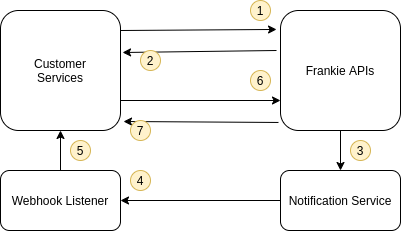 Need help configuring webhooks? Contact our developer support team for
assistance with FrankieOne configuration.
## Example Implementation
```javascript title="Async Request" theme={null}
const headers = {
'X-Frankie-Background': '1',
'Content-Type': 'application/json'
};
// Make async request
const response = await fetch('https://api.frankie.one/endpoint', {
method: 'POST',
headers,
body: JSON.stringify(payload)
});
// Handle 202 Accepted response
if (response.status === 202) {
const { requestId } = await response.json();
// Store requestId for later use when webhook arrives
}
```
```javascript title="Webhook Handler" theme={null}
app.post('/webhook', async (req, res) => {
const { requestId, status } = req.body;
// Fetch complete results
const results = await fetch(
`https://api.frankie.one/retrieve/${requestId}`
);
// Process results
const { httpResponse, payload } = await results.json();
// Handle response based on your requirements
});
```
Need help configuring webhooks? Contact our developer support team for
assistance with FrankieOne configuration.
## Example Implementation
```javascript title="Async Request" theme={null}
const headers = {
'X-Frankie-Background': '1',
'Content-Type': 'application/json'
};
// Make async request
const response = await fetch('https://api.frankie.one/endpoint', {
method: 'POST',
headers,
body: JSON.stringify(payload)
});
// Handle 202 Accepted response
if (response.status === 202) {
const { requestId } = await response.json();
// Store requestId for later use when webhook arrives
}
```
```javascript title="Webhook Handler" theme={null}
app.post('/webhook', async (req, res) => {
const { requestId, status } = req.body;
// Fetch complete results
const results = await fetch(
`https://api.frankie.one/retrieve/${requestId}`
);
// Process results
const { httpResponse, payload } = await results.json();
// Handle response based on your requirements
});
```