> ## Documentation Index
> Fetch the complete documentation index at: https://docs.frankieone.com/llms.txt
> Use this file to discover all available pages before exploring further.
# OCR Extraction Document API
> Extract text and data from ID documents using Optical Character Recognition (OCR). This API supports Australian Driver's Licenses and Passports (any country).
When onboarding users, businesses need to verify identity documents (ID) and extract information accurately. This API provides OCR (Optical Character Recognition) capabilities to extract information from identity documents, specifically Australian Driver's Licenses and Passports from any country.
## Document Requirements
Different identity documents have different image requirements:
### Australian Driver's License
* Requires both front and back images
* Must submit front image first, then back image
* Both images are mandatory for complete processing
### Passport (Any Country)
* Requires only the main identity page
* Single image submission is sufficient
* Status will be COMPLETE\_OCR after successful processing
## Implementation Guide
First, create an entity to store the OCR results
```
POST https://api.kycaml.uat.frankiefinancial.io/compliance/v1.2/entity
Body Content:
{
"entityProfile": "gov_id",
"entityType": "INDIVIDUAL",
"name": {
"givenName": "testingAccount"
},
"extraData": [
{
"kvpKey": "customer_reference",
"kvpType": "id.external",
"kvpValue": "customerOnboardingPerson"
},
{
"kvpKey": "consent.general",
"kvpValue": "true"
},
{
"kvpKey": "consent.docs",
"kvpValue": "true"
},
{
"kvpKey": "consent.creditheader",
"kvpValue": "true"
}
]
}
RESPONSE
{
"entity": {
"entityId": "1b1c123b-a058-4b78-ae00-d124fabe2057",
// ... other entity details
}
}
```
```
Submit the first (or only) image of the document.
POST https://api.kycaml.uat.frankiefinancial.io/idv/v2/idvalidate/ocr
{
"entity": {
"entityId": "1b1c123b-a058-4b78-ae00-d124fabe2057" //Entity ID from step 1
},
"fileData": {
"scanFilename": "DL_front.jpeg",
"scanMIME": "image/jpeg",
"scanSide": "F",
"scanType": "PHOTO",
"scanData": ""
}
}
```
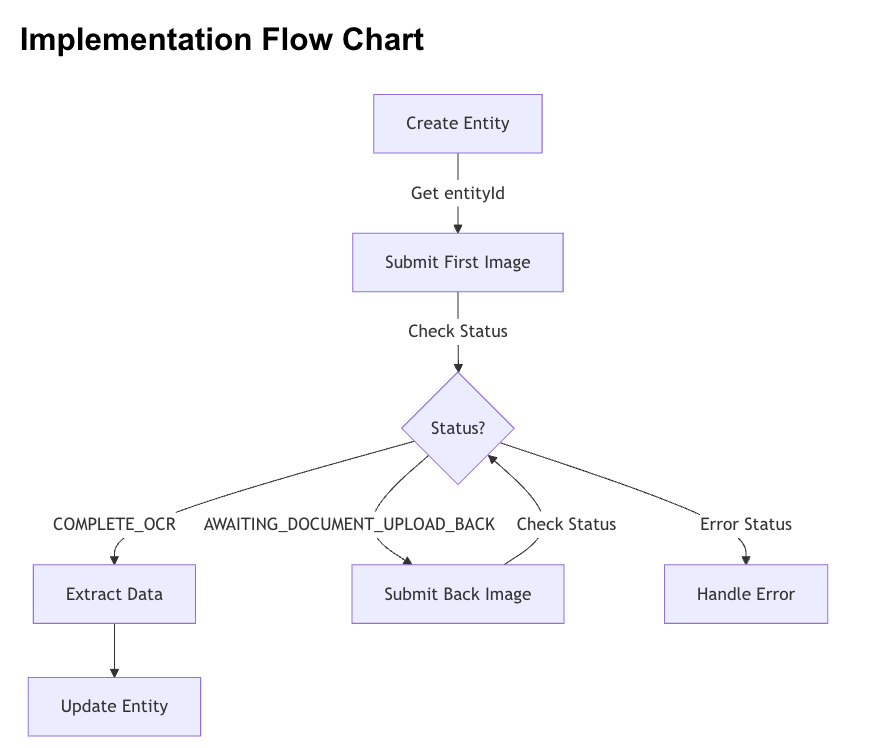
After submitting the first image, check the response status of the data
returned in step 2 to determine next steps:
```
{
"entity": {
"entityId": "1b1c123b-a058-4b78-ae00-d124fabe2057",
"identityDocs": [
{
"documentId": "136a9526-3b6c-5155-b0b4-2cd40dc475ce",
"extraData": [
{
"kvpKey": "ocr_process_status",
"kvpType": "general.string",
"kvpValue": "AWAITING_DOCUMENT_UPLOAD_BACK"
}
]
}
]
},
"status": "AWAITING_DOCUMENT_UPLOAD_BACK" // <-- This is what you're looking for
}
```
#### Status Handling
1. If status is `COMPLETE_OCR`:
I. Processing is complete
II. Proceed to Step 5 (Extract Data)
2. If status is `AWAITING_DOCUMENT_UPLOAD_BACK`:
I. Document requires back image (Australian Driver's License)
II. Store the documentId from the response Proceed to Step 4 (Submit
Back Image)
3. If status indicates an error:
I. `DOCUMENT_INVALID_INCORRECT_FILE_FORMAT`: Check file format
II. `DOCUMENT_INVALID_EXCEEDED_SIZE_LIMIT`: ReKuyaduce image size
III. `AWAITING_DOCUMENT_UPLOAD_INVALID_TYPE`: Verify document type
IV. `AWAITING_DOCUMENT_UPLOAD_FAILED_OCR`: Improve image quality
Only required for Australian Driver's License when status is `AWAITING_DOCUMENT_UPLOAD_BACK`.
```
POST https://api.kycaml.uat.frankiefinancial.io/idv/v2/idvalidate/ocr
{
"documentId": "136a9526-3b6c-5155-b0b4-2cd40dc475ce",
"entity": {
"entityId": "1b1c123b-a058-4b78-ae00-d124fabe2057"
},
"fileData": {
"scanFilename": "DL_back.jpeg",
"scanMIME": "image/jpeg",
"scanSide": "B",
"scanType": "PHOTO",
"scanData": ""
}
}
```
Once status is COMPLETE\_OCR, extract the relevant data from the
response: (parts of this response has been truncated for brevity)
```
{
"entity": {
....
"identityDocs": [
{
"extraData": [
{
"kvpKey": "ocr_scanned_first_name",
"kvpValue": "BRUCE"
},
{
"kvpKey": "ocr_scanned_middle_name",
"kvpValue": "F"
},
{
"kvpKey": "ocr_scanned_last_name",
"kvpValue": "TESTNINE"
},
{
"kvpKey": "ocr_scanned_date_of_birth",
"kvpValue": "1958-01-01"
},
{
"kvpKey": "ocr_scanned_address_long",
"kvpValue": "81 ARGYLE ROAD MARY VIC 3465"
}
]
}
]
}
}
```
Using the above action will return the OCR extracted values as part of the
response but will **NOT** update the values on the document.
* Call the `updateAndVerifyEntity` endpoint to provide the extracted data and trigger checks, specifically:
```
POST https://api.kycaml.uat.frankiefinancial.io/compliance/v1.2/entity/{entityId}/verify/profile
{
"entity": {
"entityId": "entityId",
"dateOfBirth": {
"dateOfBirth": "1990-01-01" // OPTIONAL: OCR extracted DOB
},
"name": {
"familyName": "Smith", // OPTIONAL: OCR extracted familyName
"middleName":"F",
"givenName": "Johnothan" // OPTIONAL: OCR extracted givenName
},
"identityDocs": [
{
"documentId": "documentId", // ID of document you're updating
"extraData": [
{
"kvpKey": "document_number",
"kvpValue": "cardNumber" // OCR extracted cardNumber
}
],
"country": "AUS",
"idType": "DRIVERS_LICENCE",
"idNumber": "idNumber", // OCR extracted idNumber
"region": "state" // OCR extracted state
}
]
}
}
```
 ## Important Notes
1. Document Type Detection
* The API automatically detects the document type.
* Response status will indicate if more images are needed.
* Always check the status before proceeding.
2. Data quality
* Check `ocr_scanned_mismatch` for discrepancies.
* Monitor confidence scores (for example, `first_name_ocr_data_confidence`).
* Higher confidence scores indicate better data quality.
3. Adress Handling
* `ocr_scanned_address_long` is only reliable for Australian documents.
* For non-Australian documents, collect address manually.
4. Error Handling
* Implement retry logic for provider offline errors.
* Validate image quality before submission.
* Store both `entityId` and `documentId` for error recovery.
## Postman Collection
[Download Postman Collection ](https://drive.google.com/file/d/12IM-WS2-5QFJXIPKQMRBmCMMHRgA34b_/view?usp=sharing)
## Important Notes
1. Document Type Detection
* The API automatically detects the document type.
* Response status will indicate if more images are needed.
* Always check the status before proceeding.
2. Data quality
* Check `ocr_scanned_mismatch` for discrepancies.
* Monitor confidence scores (for example, `first_name_ocr_data_confidence`).
* Higher confidence scores indicate better data quality.
3. Adress Handling
* `ocr_scanned_address_long` is only reliable for Australian documents.
* For non-Australian documents, collect address manually.
4. Error Handling
* Implement retry logic for provider offline errors.
* Validate image quality before submission.
* Store both `entityId` and `documentId` for error recovery.
## Postman Collection
[Download Postman Collection ](https://drive.google.com/file/d/12IM-WS2-5QFJXIPKQMRBmCMMHRgA34b_/view?usp=sharing)