> ## Documentation Index
> Fetch the complete documentation index at: https://docs.frankieone.com/llms.txt
> Use this file to discover all available pages before exploring further.
# Verifying customers
> Learn how to verify customers as part of onboarding and ongoing due diligence.
In FrankieOne your customers are represented by the Entity object. You can perform KYC, AML and fraud checks on a potential customer undergoing onboarding using the [Create and Verify Entity API](/docs/v1/api/kyc-api-endpoints/reference/entity/create-check-entity).
A potential customer must pass each of the checks specified, either explicitly or as part of the Entity Profile, as a minimum before their profile can reach a Passed status and they can open an account.
##### Names with apostrophes
When entering names with apostrophe, make sure to use the correct punctuation mark. Never use a single quotation mark for an apostrophe. This would result in checks not being run because of entry formatting being incorrect.
## Create and verify a new entity
To create a new entity and immediately perform verification checks:
```json curl expandable theme={null}
curl https://api.kycaml.uat.frankiefinancial.io/compliance/v1.2/entity/new/verify/profile/simple \
-H 'X-Frankie-CustomerId: {customerId}' \
-H 'api_key: ••••••' \
-X POST \
-d '{
"entity": {
"entityProfile": "safe_harbour",
"entityType": "INDIVIDUAL",
"name": {
"familyName": "TESTFORTY",
"middleName":"Z",
"givenName": "STACY"
},
"dateOfBirth": {
"dateOfBirth": "1989-01-01"
},
"addresses": [
{
"addressType": "RESIDENTIAL1",
"country": "AUS",
"postalCode": "7140",
"state": "TAS",
"unitNumber": "",
"streetNumber": "9",
"streetName": "THE AVENUE",
"town": "ELLENDALE"
}
],
"gender":"F",
"extraData": [
{
"kvpKey": "consent.general",
"kvpValue": "true",
"kvpType": "general.bool"
},
{
"kvpKey": "consent.docs",
"kvpValue": "true",
"kvpType": "general.bool"
},
{
"kvpKey": "consent.creditheader",
"kvpValue": "true",
"kvpType": "general.bool"
},
{
"kvpKey": "customer_reference",
"kvpValue": "cust_001",
"kvpType": "id.external"
}
],
"identityDocs": [
{
"country": "NZL",
"idType": "PASSPORT",
"idNumber": "J64407008"
}
]
}
}'
```
## Re-verify an existing entity
You can re-verify an existing entity using the same API. Pass the ID of the entity in the path instead of `new`:
Shell
| \$ | curl -X POST [https://api.kycaml.uat.frankiefinancial.io/compliance/v1.2/entity/\{entityId}/verify/profile/simple](https://api.kycaml.uat.frankiefinancial.io/compliance/v1.2/entity/\{entityId}/verify/profile/simple) |
| -- | ----------------------------------------------------------------------------------------------------------------------------------------------------------------------------------------------------------------------- |
Re-verifying an entity will re-use any previous check results if they’re still valid, rather than performing the checks again.
## See verification results
### Through the API
Verification results are returned in the response of the [Create and Verify Entity API](/docs/v1/api/kyc-api-endpoints/reference/entity/create-check-entity). You must specify a `resultLevel` parameter indicating the level of detail you with to receive.
To request simple verification results:
```shell Shell theme={null}
$| curl -X POST https://api.kycaml.uat.frankiefinancial.io/compliance/v1.2/entity/new/verify/profile/simple
```
To request full verification results:
```shell Shell theme={null}
$| curl -X POST https://api.kycaml.uat.frankiefinancial.io/compliance/v1.2/entity/new/verify/profile/full
```
### Through the Portal
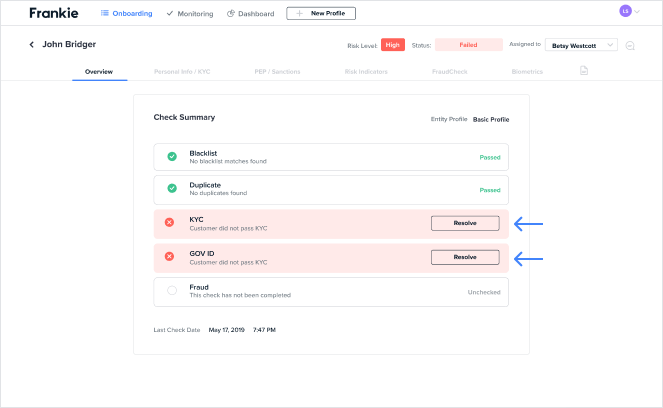
The result of the checks run against a potential customer is displayed under the Overview tab of a customer’s profile.