> ## Documentation Index
> Fetch the complete documentation index at: https://docs.frankieone.com/llms.txt
> Use this file to discover all available pages before exploring further.

# Hosted Common Use Cases

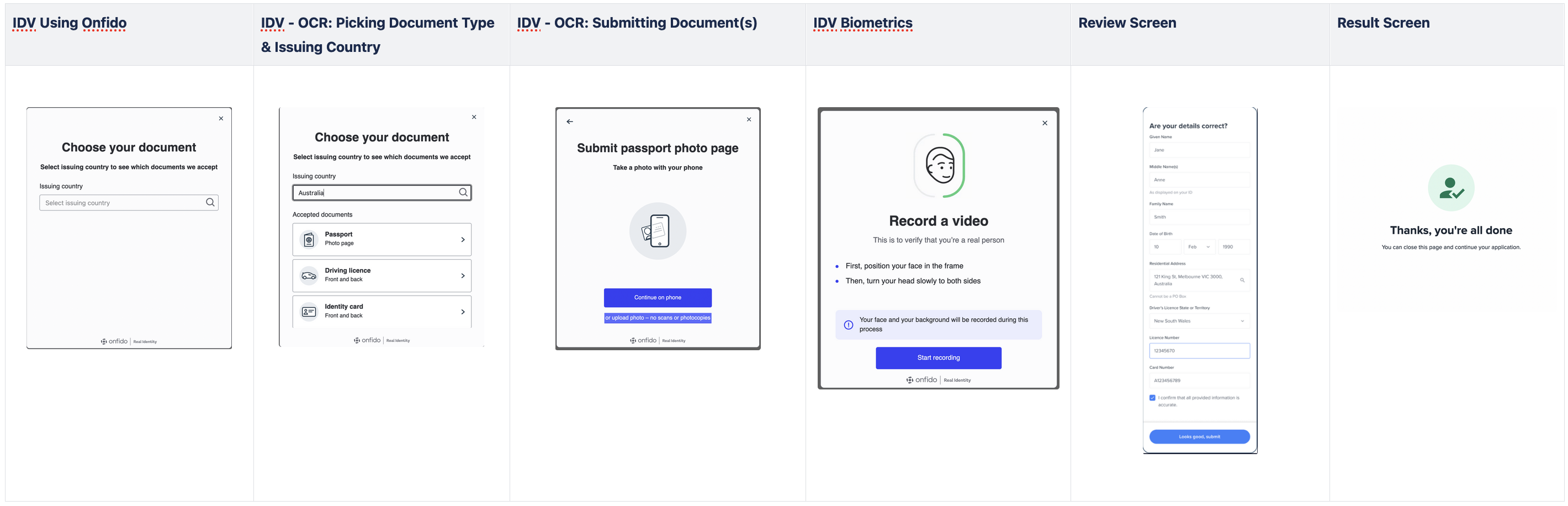
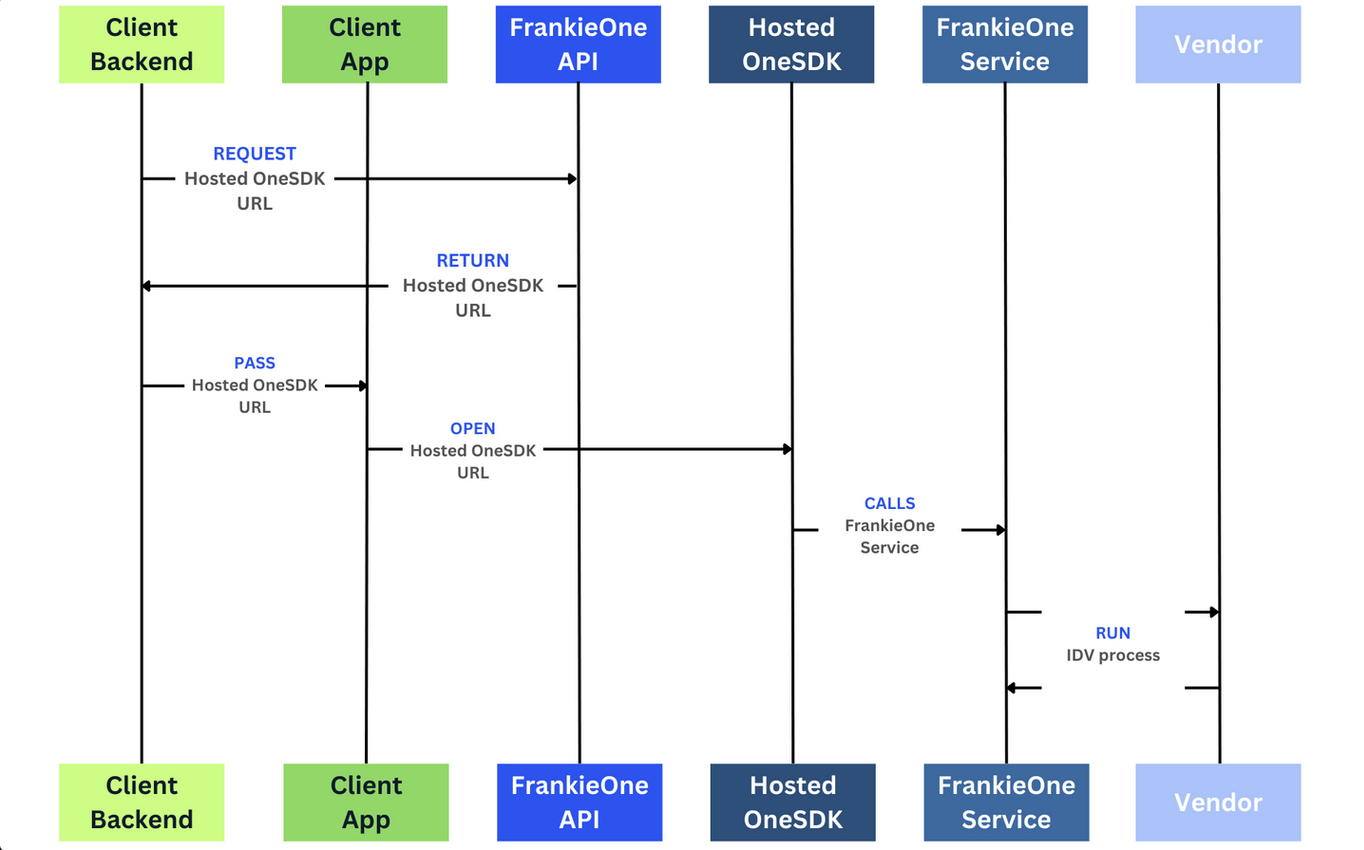
Hosted OneSDK Hosted OneSDK offers a low-code solution, allowing customers to easily integrate with FrankieOne services with little to no code. Hosted OneSDK automatically updates, ensuring a consistent, secure, and compliant integration. This reduces engineering and security efforts, helping you go live faster.

<img src="https://mintcdn.com/frankieone-f5583b1b/MpEYW70dy4W-choU/images/docs/hosted-diagram.png?fit=max&auto=format&n=MpEYW70dy4W-choU&q=85&s=0072059c1d430ee3e923e38338c03f0a" width="1364" height="850" data-path="images/docs/hosted-diagram.png" />

Below are sample out-of-the-box flows that we offer for Hosted OneSDK.
<Callout icon="thumbtack" color="#1A6CFF" iconType="regular">
  We also support customisations of themeing, branding and flows for Hosted OneSDK. Contact [FrankieOne Support <Icon icon="arrow-up-right-from-square" size={12} />](mailto:support@frankieone.com) to get started.
</Callout>

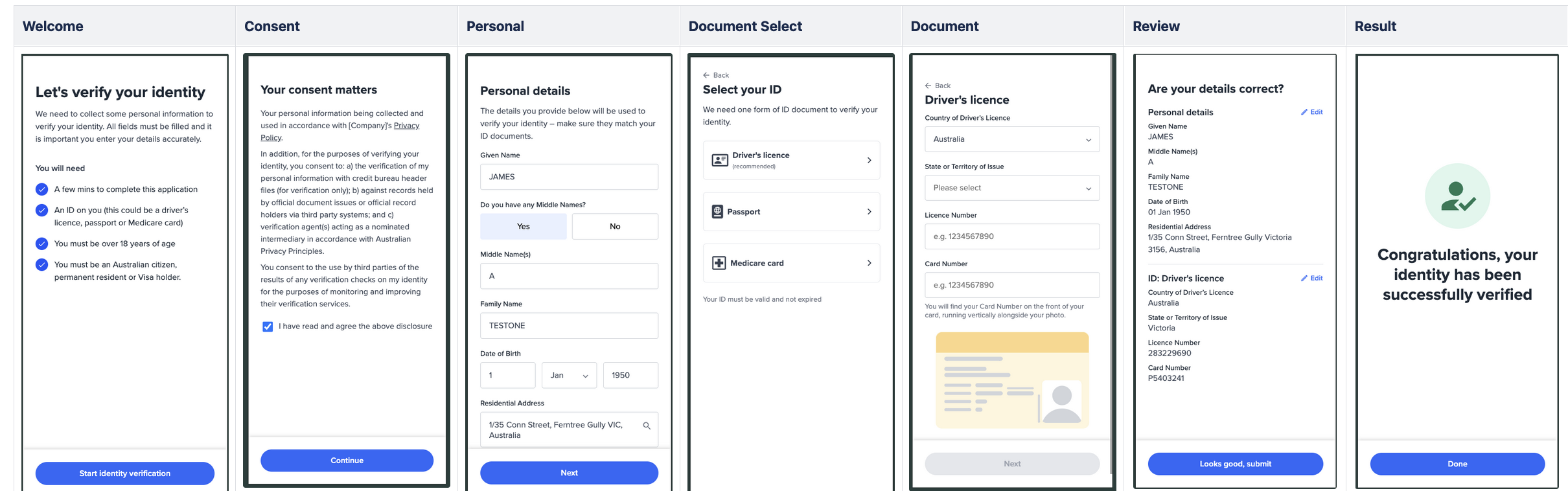
## eKYC Forms Flow

The eKYC Forms Flow on the Hosted OneSDK allow customers to embed or send their end-users a link with a fixed set of forms that allow PII data to be captured and used for KYC. Customers will gain access to the following screens in sequence with no ability to make any modifications.

<Tabs>
  <Tab title="eKYC Forms Flow User Journey">
    <img src="https://mintcdn.com/frankieone-f5583b1b/MpEYW70dy4W-choU/images/docs/hosted-ekyc-flow.png?fit=max&auto=format&n=MpEYW70dy4W-choU&q=85&s=f6173fcab65522ff1e017ad6b84e108c" width="2420" height="758" data-path="images/docs/hosted-ekyc-flow.png" />
  </Tab>

  <Tab title="Generating Hosted OneSDK Link with eKYC Forms Flow">
    Creating a POST Request with following headers and request Body

    ```shell theme={null}
    		curl --location 'https://api.kycaml.frankiefinancial.io/idv/v2/idvalidate/onboarding-url' \
    		--header 'X-Frankie-Customerid: CUSTOMER_ID' \
    		--header 'api_key: API_KEY' \
    		--header 'Content-Type: application/json' \
    		--data '{
    				"customerRef": "YOUR_CUSTOMER_ID_OR_RANDOM_STRING",
    				"consent": true,
    				"flowId": "manual_kyc"
    		}'
    ```

    will return object:

    ```json theme={null}
    {
    	"status": "success",
    	"url": "https://verify.frankie.one?t=qWfYeYy40taNdMC2nTgpRh",
    	"entity": {
    		"entityId": "50768f69-4e9b-1f5d-651f-7796fef775e8",
    		"entityProfile": "default",
    		"entityType": "INDIVIDUAL",
    		"extraData": [
    			{
    				"kvpKey": "consent.general",
    				"kvpType": "general.string",
    				"kvpValue": "true"
    			},
    			{
    				"kvpKey": "consent.docs",
    				"kvpType": "general.string",
    				"kvpValue": "true"
    			},
    			{
    				"kvpKey": "consent.creditheader",
    				"kvpType": "general.string",
    				"kvpValue": "true"
    			},
    			{
    				"kvpKey": "consent.superannuation",
    				"kvpType": "general.string",
    				"kvpValue": "true"
    			},
    			{
    				"kvpKey": "customer_reference",
    				"kvpType": "id.external",
    				"kvpValue": "YOUR_CUSTOMER_ID_OR_RANDOM_STRING"
    			}
    		],
    		"name": {
    			"familyName": ""
    		}
    	},
    	"urlExpiry": "2024-12-07T02:42:21.655079919Z"
    }
    ```

    where `url` will contain the link to our Hosted OneSDK Solution. To read more, go <a href="/api-reference/provide-onboarding-url-for-hosted-onesdk">here.</a>
  </Tab>
</Tabs>

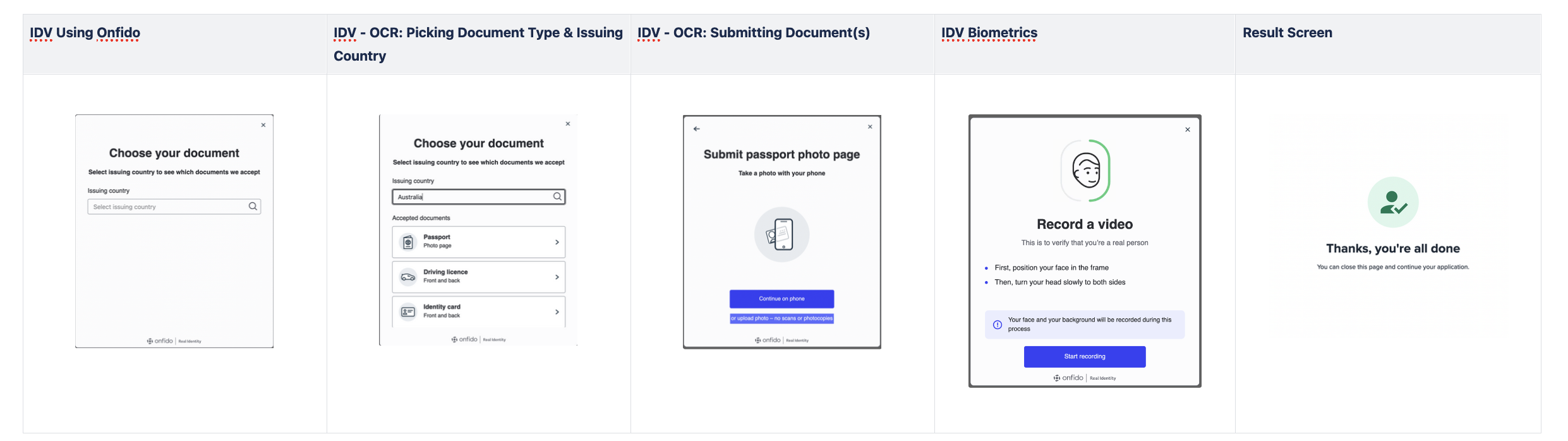
## IDV Flow

The IDV flow is a combination of the vendors SDK all-in-one where the customer goes through the process of (1) capturing their document and (2) running the selfie and liveness checks.

<Tabs>
  <Tab title="IDV Only User Journey">
    <img src="https://mintcdn.com/frankieone-f5583b1b/MpEYW70dy4W-choU/images/docs/hosted-idv-onfido.png?fit=max&auto=format&n=MpEYW70dy4W-choU&q=85&s=2d52bb823215b56d7b1091a4198e337f" width="2482" height="698" data-path="images/docs/hosted-idv-onfido.png" />
  </Tab>

  <Tab title="Generating Hosted OneSDK Link with IDV Only Flow">
    Creating a POST Request with following headers and request Body

    ```shell theme={null}
    		curl --location 'https://api.kycaml.frankiefinancial.io/idv/v2/idvalidate/onboarding-url' \
    		--header 'X-Frankie-Customerid: CUSTOMER_ID' \
    		--header 'api_key: API_KEY' \
    		--header 'Content-Type: application/json' \
    		--data '{
    				"customerRef": "YOUR_CUSTOMER_ID_OR_RANDOM_STRING",
    				"consent": true,
    				"flowId": "idv"
    		}'
    ```

    will return object:

    ```json theme={null}
    {
    	"status": "success",
    	"url": "https://verify.frankie.one?t=qWfYeYy40taNdMC2nTgpRh",
    	"entity": {
    		"entityId": "50768f69-4e9b-1f5d-651f-7796fef775e8",
    		"entityProfile": "default",
    		"entityType": "INDIVIDUAL",
    		"extraData": [
    			{
    				"kvpKey": "consent.general",
    				"kvpType": "general.string",
    				"kvpValue": "true"
    			},
    			{
    				"kvpKey": "consent.docs",
    				"kvpType": "general.string",
    				"kvpValue": "true"
    			},
    			{
    				"kvpKey": "consent.creditheader",
    				"kvpType": "general.string",
    				"kvpValue": "true"
    			},
    			{
    				"kvpKey": "consent.superannuation",
    				"kvpType": "general.string",
    				"kvpValue": "true"
    			},
    			{
    				"kvpKey": "customer_reference",
    				"kvpType": "id.external",
    				"kvpValue": "YOUR_CUSTOMER_ID_OR_RANDOM_STRING"
    			}
    		],
    		"name": {
    			"familyName": ""
    		}
    	},
    	"urlExpiry": "2024-12-07T02:42:21.655079919Z"
    }
    ```

    where `url` will contain the link to our Hosted OneSDK Solution. To read more, go <a href="/api-reference/provide-onboarding-url-for-hosted-onesdk">here.</a>
  </Tab>
</Tabs>

## IDV + Review Screen Flow

<Tabs>
  <Tab title="IDV + Review Scren User Journey">
    <img src="https://mintcdn.com/frankieone-f5583b1b/MpEYW70dy4W-choU/images/docs/hosted-idv-review.png?fit=max&auto=format&n=MpEYW70dy4W-choU&q=85&s=4b7de499b3583a1024d4756c7c54cd94" width="2840" height="916" data-path="images/docs/hosted-idv-review.png" />
  </Tab>

  <Tab title="Generating Hosted OneSDK Link with IDV Only Flow">
    Creating a POST Request with following headers and request Body

    ```shell theme={null}
    		curl --location 'https://api.kycaml.frankiefinancial.io/idv/v2/idvalidate/onboarding-url' \
    		--header 'X-Frankie-Customerid: CUSTOMER_ID' \
    		--header 'api_key: API_KEY' \
    		--header 'Content-Type: application/json' \
    		--data '{
    				"customerRef": "YOUR_CUSTOMER_ID_OR_RANDOM_STRING",
    				"consent": true,
    				"flowId": "idv_review"
    		}'
    ```

    will return object:

    ```json theme={null}
    	{
    	"status": "success",
    	"url": "https://verify.frankie.one?t=qWfYeYy40taNdMC2nTgpRh",
    	"entity": {
    	"entityId": "50768f69-4e9b-1f5d-651f-7796fef775e8",
    	"entityProfile": "default",
    	"entityType": "INDIVIDUAL",
    	"extraData": [
    	{
    	"kvpKey": "consent.general",
    	"kvpType": "general.string",
    	"kvpValue": "true"
    	},
    	{
    	"kvpKey": "consent.docs",
    	"kvpType": "general.string",
    	"kvpValue": "true"
    	},
    	{
    	"kvpKey": "consent.creditheader",
    	"kvpType": "general.string",
    	"kvpValue": "true"
    	},
    	{
    	"kvpKey": "consent.superannuation",
    	"kvpType": "general.string",
    	"kvpValue": "true"
    	},
    	{
    	"kvpKey": "customer_reference",
    	"kvpType": "id.external",
    	"kvpValue": "YOUR_CUSTOMER_ID_OR_RANDOM_STRING"
    	}
    	],
    	"name": {
    	"familyName": ""
    	}
    	},
    	"urlExpiry": "2024-12-07T02:42:21.655079919Z"
    	}
    ```

    where`url` will contain the link to our Hosted OneSDK Solution. To read more, go <a href="/api-reference/provide-onboarding-url-for-hosted-onesdk">here.</a>
  </Tab>
</Tabs>

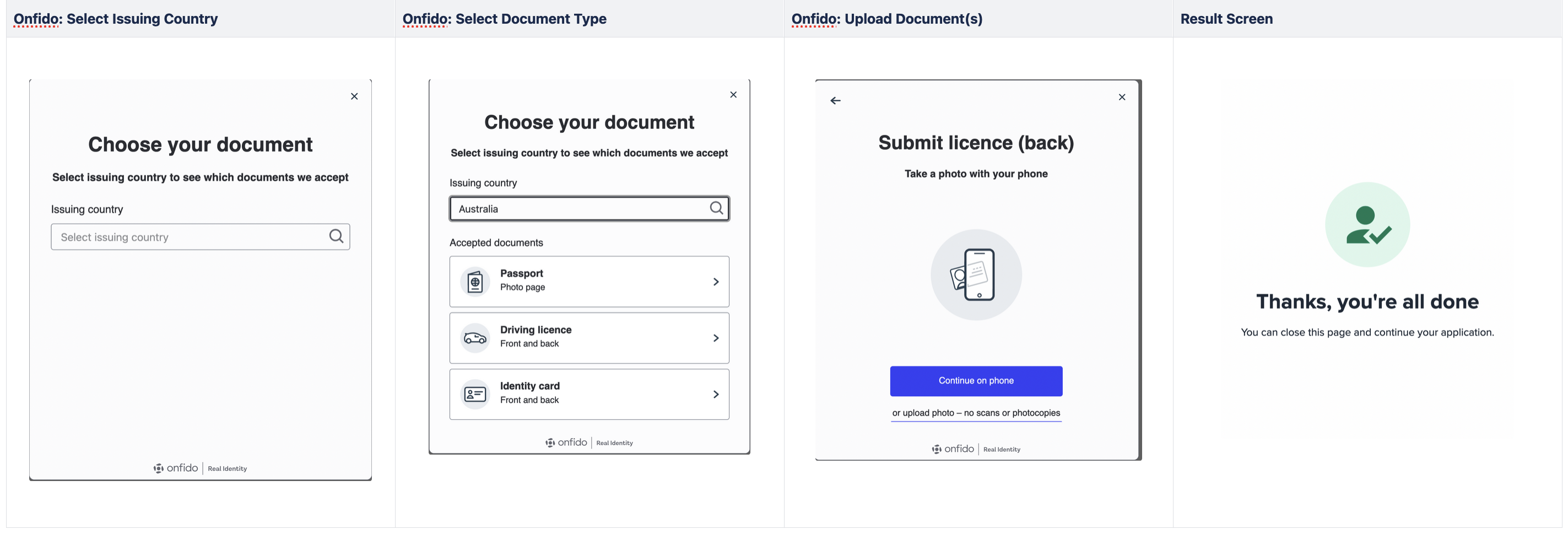
## OCR Only Flow

OCR Only Flow on the Hosted OneSDK allow customers to embed or send their end-users a link with an OCR journey provided by Onfido / Incode, getting their data to be captured and used for KYC.

<Tabs>
  <Tab title="IDV Only User Journey">
    <img src="https://mintcdn.com/frankieone-f5583b1b/MpEYW70dy4W-choU/images/docs/hosted-ocr-only.png?fit=max&auto=format&n=MpEYW70dy4W-choU&q=85&s=34fc77517961e0931844802a2fe948b6" width="2846" height="980" data-path="images/docs/hosted-ocr-only.png" />
  </Tab>

  <Tab title="Generating Hosted OneSDK Link with IDV Only Flow">
    Creating a POST Request with following headers and request Body

    ```shell theme={null}
    		curl --location 'https://api.kycaml.frankiefinancial.io/idv/v2/idvalidate/onboarding-url' \
    		--header 'X-Frankie-Customerid: CUSTOMER_ID' \
    		--header 'api_key: API_KEY' \
    		--header 'Content-Type: application/json' \
    		--data '{
    				"customerRef": "YOUR_CUSTOMER_ID_OR_RANDOM_STRING",
    				"consent": true,
    				"flowId": "ocr_only"
    		}'
    ```

    will return object:

    ```json theme={null}
    	{
    	"status": "success",
    	"url": "https://verify.frankie.one?t=qWfYeYy40taNdMC2nTgpRh",
    	"entity": {
    	"entityId": "50768f69-4e9b-1f5d-651f-7796fef775e8",
    	"entityProfile": "default",
    	"entityType": "INDIVIDUAL",
    	"extraData": [
    	{
    	"kvpKey": "consent.general",
    	"kvpType": "general.string",
    	"kvpValue": "true"
    	},
    	{
    	"kvpKey": "consent.docs",
    	"kvpType": "general.string",
    	"kvpValue": "true"
    	},
    	{
    	"kvpKey": "consent.creditheader",
    	"kvpType": "general.string",
    	"kvpValue": "true"
    	},
    	{
    	"kvpKey": "consent.superannuation",
    	"kvpType": "general.string",
    	"kvpValue": "true"
    	},
    	{
    	"kvpKey": "customer_reference",
    	"kvpType": "id.external",
    	"kvpValue": "YOUR_CUSTOMER_ID_OR_RANDOM_STRING"
    	}
    	],
    	"name": {
    	"familyName": ""
    	}
    	},
    	"urlExpiry": "2024-12-07T02:42:21.655079919Z"
    	}
    ```

    where`url` will contain the link to our Hosted OneSDK Solution. To read more, go <a href="/api-reference/provide-onboarding-url-for-hosted-onesdk">here.</a>
  </Tab>
</Tabs>

## Listening to Window Events with Hosted OneSDK

Hosted OneSDK will emit window events during specific stage of your onboarding experience. You can leverage this mechanism to handle error and success handling

<Tabs>
  <Tab title="Table of Events">
    <table>
      <thead>
        <tr>
          <td>flowId</td>
          <td>On which stage?</td>
          <td>Event Emitted</td>
          <td>Payload</td>
        </tr>
      </thead>

      <tbody>
        <tr>
          <td>ocr\_only</td>

          <td>
            failed uploading OCR
          </td>

          <td>`ocr_only:failed`</td>
          <td>-</td>
        </tr>

        <tr>
          <td>ocr\_only</td>

          <td>
            success uploading OCR
          </td>

          <td>`ocr_only:success`</td>
          <td>-</td>
        </tr>

        <tr>
          <td>manual\_kyc</td>

          <td>
            manual kyc is mounted
          </td>

          <td>`manual_kyc:mounted`</td>
          <td>-</td>
        </tr>

        <tr>
          <td>manual\_kyc</td>

          <td>
            success with manual kyc
          </td>

          <td>`manual_kyc:success`</td>
          <td>-</td>
        </tr>

        <tr>
          <td>manual\_kyc</td>

          <td>
            partial success with manual kyc
          </td>

          <td>`manual_kyc:partial`</td>
          <td>-</td>
        </tr>

        <tr>
          <td>manual\_kyc</td>

          <td>
            failed manual kyc
          </td>

          <td>`manual_kyc:failed`</td>
          <td>-</td>
        </tr>

        <tr>
          <td>idv</td>

          <td>
            idv is getting mounted
          </td>

          <td>`idv:mount`</td>
          <td>-</td>
        </tr>

        <tr>
          <td>idv</td>

          <td>
            idv process success
          </td>

          <td>`idv:success`</td>
          <td>-</td>
        </tr>

        <tr>
          <td>idv</td>

          <td>
            idv process failed
          </td>

          <td>`idv:failed`</td>
          <td>-</td>
        </tr>

        <tr>
          <td>idv</td>

          <td>
            idv getting rendered
          </td>

          <td>`idv:render`</td>
          <td>-</td>
        </tr>

        <tr>
          <td>idv\_review</td>

          <td>
            idv\_review is getting mounted
          </td>

          <td>`idv_review:mount`</td>
          <td>-</td>
        </tr>

        <tr>
          <td>idv\_review</td>

          <td>
            idv\_review getting rendered
          </td>

          <td>`idv_review:render`</td>
          <td>-</td>
        </tr>

        <tr>
          <td>idv\_review</td>

          <td>
            idv was failed on idv\_review flow
          </td>

          <td>`idv_review:idv_failed`</td>
          <td>(error message depends on error type)</td>
        </tr>

        <tr>
          <td>idv\_review</td>

          <td>
            after submitting review screen
          </td>

          <td>`idv_review:submit`</td>

          <td>
            *
          </td>
        </tr>

        <tr>
          <td>idv\_review</td>

          <td>
            idv\_review process is success
          </td>

          <td>`idv_review:success`</td>

          <td>
            result from calling `individual.submit()`

            sample:

            ```json theme={null}
                {
                  "payload": {
                    "checkDate": "0001-01-01T00:00:00.000Z",
                    "checkTypes": [
                      "id",
                      "namev",
                      "two_plus",
                      "pep",
                      "idvalidate"
                    ],
                    "personalChecks": {
                      "name": null,
                      "dateOfBirth": null,
                      "phoneNumber": null,
                      "email": null,
                      "chineseName": null,
                      "addresses": {
                        "4021e881-e51a-48ab-b8db-82cdc882d1a2": null
                      }
                    },
                    "status": {
                      "type": "unchecked",
                      "label": "Unchecked",
                      "key": "UNCHECKED"
                    },
                    "risk": {
                      "level": null,
                      "class": "HIGH"
                    },
                    "alertList": [],
                    "blocklistPotentialMatches": [],
                    "duplicatePotentialMatches": [],
                    "duplicateBlocklistMatches": [],
                    "checkCounts": {
                      "name": null,
                      "address": {
                        "4021e881-e51a-48ab-b8db-82cdc882d1a2": []
                      },
                      "document": {},
                      "dob": null
                    },
                    "kycMethod": "electronic",
                    "issues": {
                      "creditHeader": false,
                    },
                    "checkResults": [],
                    "rulesetsMatches": []
                  }
                }
            ```
          </td>
        </tr>

        <tr>
          <td>idv\_review</td>

          <td>
            during idv\_review, there are some issues occurred
          </td>

          <td>`idv_review:error`</td>

          <td>
            ```json theme={null}
            {
                error: {} // object of dumped errors
            }
            ```
          </td>
        </tr>
      </tbody>
    </table>
  </Tab>

  <Tab title="Implementation method">
    You can listen to Hosted OneSDK window events if you embed Hosted OneSDK inside an iframe

    ```html theme={null}
    <html lang="en">
        <head>
        	<meta name="viewport" content="width=device-width, initial-scale=1.0" charset="UTF-8"/>
        	<meta http-equiv="Content-Type" content="text/html; charset=UTF-8">
        </head>

    	<script>
            // here, you add an event listener to listen to Hosted OneSDK window events
    		window.addEventListener('message', (e) => {
    			if (e.data['X-Frankie-Source'] === 'hosted-onesdk') {
    				console.log('---HOSTED OneSDK events', e.data)
    			}
    		});
    	</script>

    	<body>
    		<iframe
    		style="position: absolute; top: 0; left: 0; left: 0;right: 0;bottom: 0;border: 0;margin: 0; padding: 0;width: 100%; height: 100%; fontSize: 100%;font: inherit; vertical-align: baseline;"
    		src="https://verify.frankie.one?t=wy2BSoBrMYba7dB4cHS5dLjK" allow="camera;fullscreen;accelerometer;gyroscope;magnetometer;geolocation;microphone;" />
    	</body>
    </html>
    ```
  </Tab>
</Tabs>