> ## Documentation Index
> Fetch the complete documentation index at: https://docs.frankieone.com/llms.txt
> Use this file to discover all available pages before exploring further.
# OneSDK eKYC Form
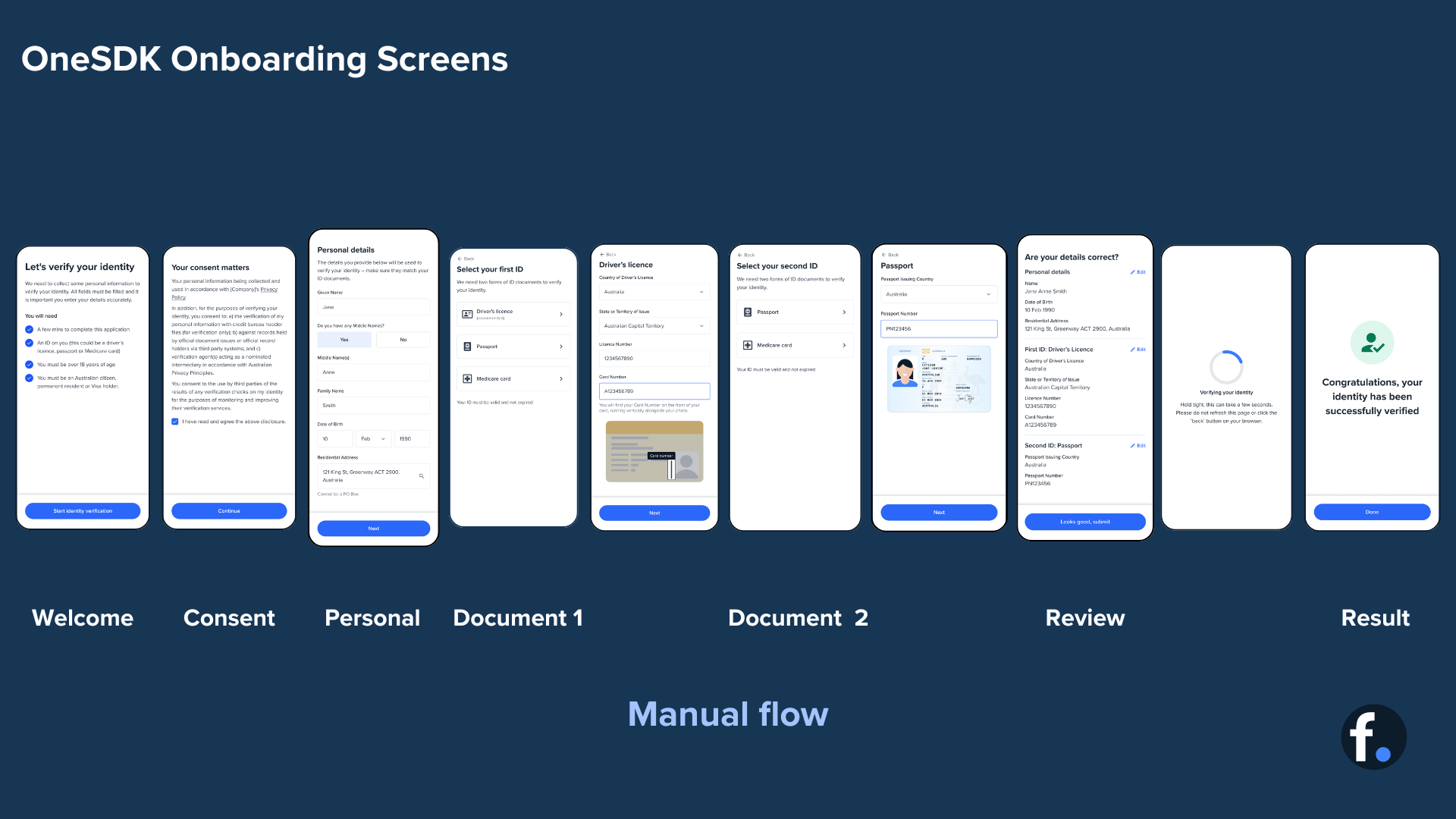
> The eKYC Form provides a complete manual onboarding flow for collecting and verifying user information. This guide explains each module in the flow and how to implement them.
## Flow Overview
##### Manual vs OCR
The manual flow allows users to input their details directly, providing an
alternative to OCR-based document scanning. This is particularly useful when
OCR scanning isn't available or when users prefer manual input.
 ## Error Handling
```typescript theme={null}
ekyc.on('error', (error) => {
switch (error.code) {
case 'INVALID_DOCUMENT':
// Handle invalid document error
break;
case 'NETWORK_ERROR':
// Handle network connectivity issues
break;
case 'VALIDATION_ERROR':
// Handle data validation errors
break;
}
});
```
```typescript theme={null}
ekyc.on('verification_failed', async () => {
// Implement retry logic
await ekyc.retry({
preserveData: true,
maxAttempts: 3
});
});
```
##### Best Practices
* Clear instructions at each step
* Proper error handling
* Progress indication
* Mobile-responsive design
* Real-time input validation
* Format verification
* Document authenticity checks
* Data consistency validation
##### Implementation Tips
* Test the flow thoroughly with different document types
* Implement proper error handling for network issues
* Consider accessibility requirements
* Provide clear feedback for validation errors
Now you have a complete understanding of the eKYC Form flow and its
implementation. Remember to test thoroughly and provide clear user guidance
throughout the verification process.
## Error Handling
```typescript theme={null}
ekyc.on('error', (error) => {
switch (error.code) {
case 'INVALID_DOCUMENT':
// Handle invalid document error
break;
case 'NETWORK_ERROR':
// Handle network connectivity issues
break;
case 'VALIDATION_ERROR':
// Handle data validation errors
break;
}
});
```
```typescript theme={null}
ekyc.on('verification_failed', async () => {
// Implement retry logic
await ekyc.retry({
preserveData: true,
maxAttempts: 3
});
});
```
##### Best Practices
* Clear instructions at each step
* Proper error handling
* Progress indication
* Mobile-responsive design
* Real-time input validation
* Format verification
* Document authenticity checks
* Data consistency validation
##### Implementation Tips
* Test the flow thoroughly with different document types
* Implement proper error handling for network issues
* Consider accessibility requirements
* Provide clear feedback for validation errors
Now you have a complete understanding of the eKYC Form flow and its
implementation. Remember to test thoroughly and provide clear user guidance
throughout the verification process.