> ## Documentation Index
> Fetch the complete documentation index at: https://docs.frankieone.com/llms.txt
> Use this file to discover all available pages before exploring further.
# Retry
> The Retry flow enables users to review and correct their submitted information when verification is partially successful. This feature improves verification success rates by allowing users to fix errors or provide additional information.
## Flow Overview
User submits their information through the standard flow (Personal → Document → Review)
If verification is partially successful, show the Partial Result screen
User can review and update their information through the Retry flow
System may request extra data based on specific failure scenarios
## Implementation
```typescript title="Basic Retry Flow Setup" theme={null}
const retry = oneSdk.component("form", {
name: "RETRY",
type: "manual",
});
// Create failure result component with custom messaging
const result_fail = oneSdk.component("form", {
name: "RESULT",
type: "manual",
state: 'FAIL',
title: { label: 'Max attempt reached' },
descriptions: [
{ label: 'You have reached all the attempts. Our officer will review your details and get in touch.' },
{ label: 'Please close the browser' }
],
cta: { label: 'Close' }
});
// Track retry attempts
let count = 0;
// Handle partial form results
review.on("form:result:partial", async () => {
if (count < 2) {
// Allow retry if under max attempts
retry.mount("#form-container");
count += 1;
} else {
// Show final error when max attempts reached
result_fail.mount("#form-container");
}
});
```
```typescript title="Event Handlers" theme={null}
retry.on("form:retry:loaded", () => {
// Event triggered when Retry screen loads
// Add custom business logic for retry handling here
});
```
## Smart Retry Behavior
Triggered when KYC check results in a partial match and the user hasn't modified their personal details.
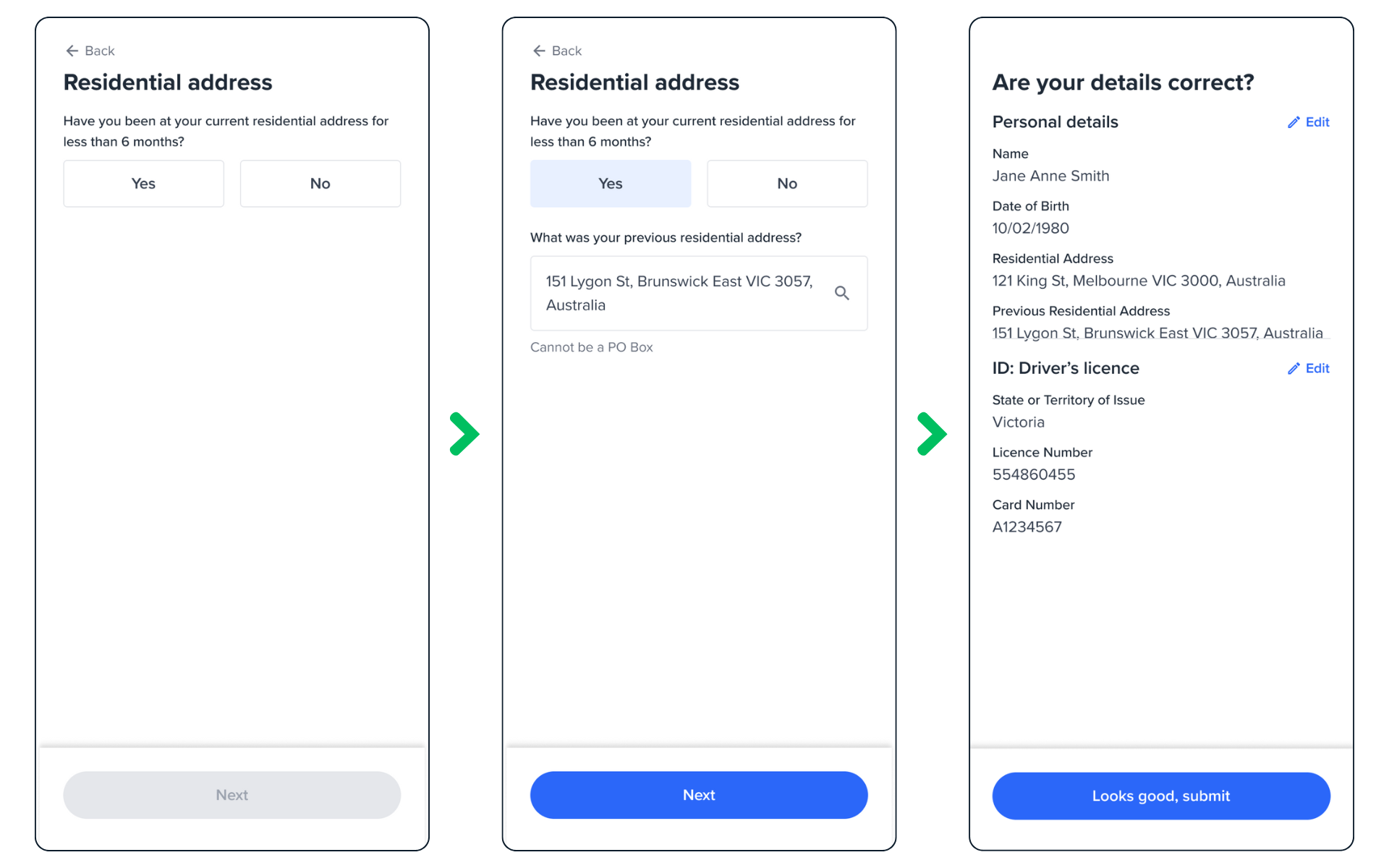 This flow:
1. Detects partial KYC match
2. Checks if personal details remained unchanged
3. Prompts for previous address
4. Uses additional data to improve verification chances
To customize the text for previous address request, override `addresssI.fullAddress` field
```javascript theme={null}
const retry = oneSdk.component('form', {
name: 'RETRY',
type: 'manual',
personal: {
countries: {
default: {
default: {
fields: [{
title: {
label: 'Prev Address Title',
},
name: 'address1.fullAddress',
label: 'Prev address label',
dataType: 'previous_addr',
fieldType: 'address',
toggleConfig: {
label:
'Previous address question?',
rules: {
required: {
value: true,
message:
'Previous address required error',
},
},
},
placeholder: 'Prev address placeholder',
}],
},
},
},
},
});
```
Triggered when KYC passes but ID verification fails, and the user hasn't modified their ID details.
This flow:
1. Detects partial KYC match
2. Checks if personal details remained unchanged
3. Prompts for previous address
4. Uses additional data to improve verification chances
To customize the text for previous address request, override `addresssI.fullAddress` field
```javascript theme={null}
const retry = oneSdk.component('form', {
name: 'RETRY',
type: 'manual',
personal: {
countries: {
default: {
default: {
fields: [{
title: {
label: 'Prev Address Title',
},
name: 'address1.fullAddress',
label: 'Prev address label',
dataType: 'previous_addr',
fieldType: 'address',
toggleConfig: {
label:
'Previous address question?',
rules: {
required: {
value: true,
message:
'Previous address required error',
},
},
},
placeholder: 'Prev address placeholder',
}],
},
},
},
},
});
```
Triggered when KYC passes but ID verification fails, and the user hasn't modified their ID details.
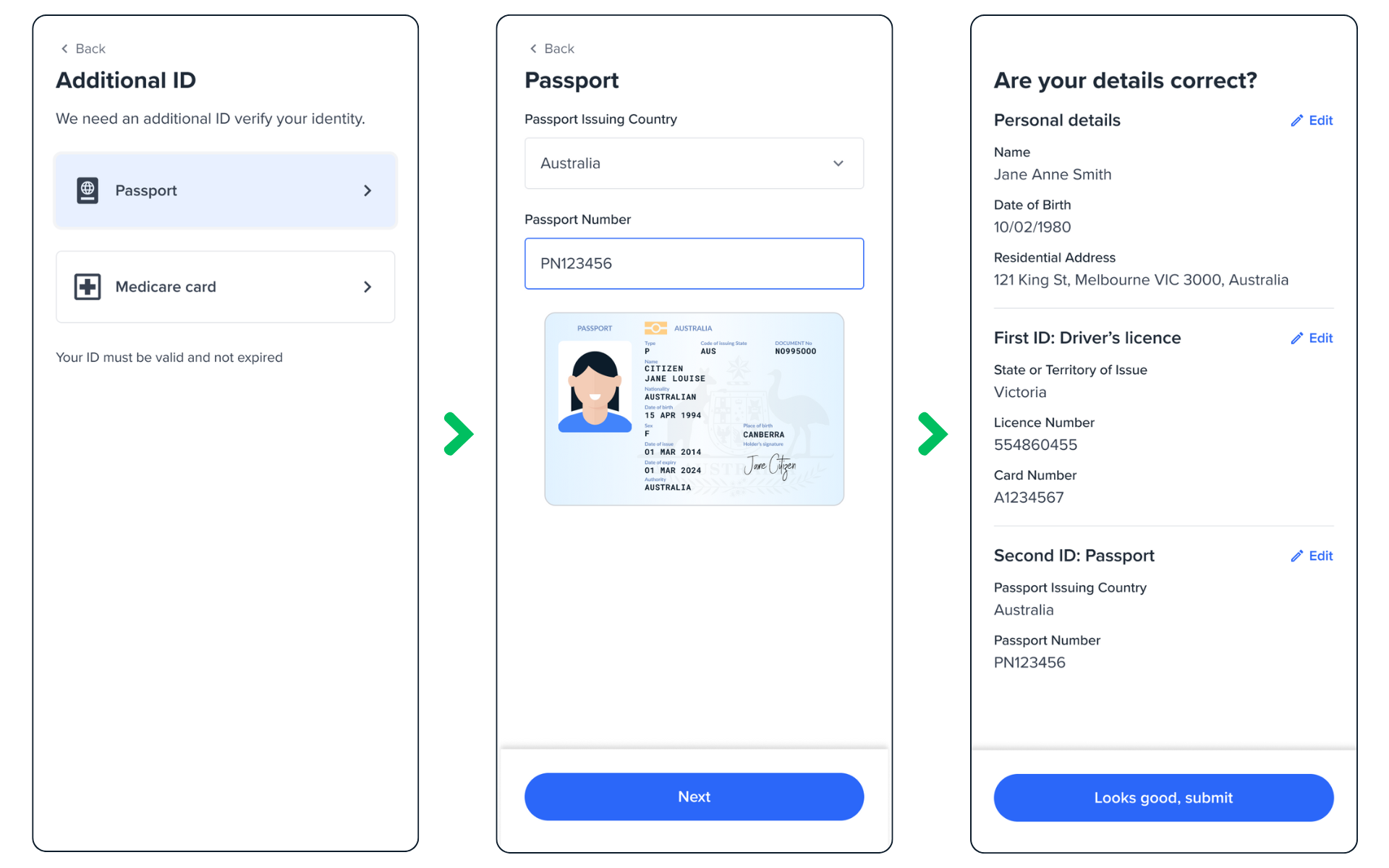 This flow:
1. Detects successful KYC but failed ID verification
2. Checks if ID details remained unchanged
3. Prompts for alternative ID document
4. Resubmits for verification
To customize the text for additional ID request, use `additionInfo` property
```javascript theme={null}
const retry = oneSdk.component('form', {
name: 'RETRY',
type: 'manual',
additionInfo: {
label: 'Additional document label',
descriptions: [{ label: 'Additional document description' }],
},
});
```
## Best Practices
Implement a maximum retry count to prevent endless attempts:
```typescript theme={null}
if (retryCount < 2) {
partial.mount(appContainer);
} else {
failed.mount(appContainer);
}
```
* Clear error messaging
* Intuitive navigation
* Progress indication
* Helpful prompts for additional information
Remember to handle edge cases such as: - Network failures during verification
* Timeout scenarios - Maximum retry limit reached - Invalid or corrupt
document uploads
## Common Integration Points
```typescript theme={null}
review.on("form:review:partial", async () => {
// Handle partial success scenario
});
```
```typescript theme={null}
partial.on("form:result:partial", async () => {
// Initiate retry flow
});
```
```typescript theme={null}
review.on("form:review:success", async () => {
// Handle successful verification
});
```
## Adding logo to retry screens
```javascript theme={null}
const retry = oneSdk.component('form', {
name: 'RETRY',
type: 'manual',
logo: {
src: './assets/logo.png'
},
style: {
'ff-logo': {
'width': '50px'
}
}
});
```
This flow:
1. Detects successful KYC but failed ID verification
2. Checks if ID details remained unchanged
3. Prompts for alternative ID document
4. Resubmits for verification
To customize the text for additional ID request, use `additionInfo` property
```javascript theme={null}
const retry = oneSdk.component('form', {
name: 'RETRY',
type: 'manual',
additionInfo: {
label: 'Additional document label',
descriptions: [{ label: 'Additional document description' }],
},
});
```
## Best Practices
Implement a maximum retry count to prevent endless attempts:
```typescript theme={null}
if (retryCount < 2) {
partial.mount(appContainer);
} else {
failed.mount(appContainer);
}
```
* Clear error messaging
* Intuitive navigation
* Progress indication
* Helpful prompts for additional information
Remember to handle edge cases such as: - Network failures during verification
* Timeout scenarios - Maximum retry limit reached - Invalid or corrupt
document uploads
## Common Integration Points
```typescript theme={null}
review.on("form:review:partial", async () => {
// Handle partial success scenario
});
```
```typescript theme={null}
partial.on("form:result:partial", async () => {
// Initiate retry flow
});
```
```typescript theme={null}
review.on("form:review:success", async () => {
// Handle successful verification
});
```
## Adding logo to retry screens
```javascript theme={null}
const retry = oneSdk.component('form', {
name: 'RETRY',
type: 'manual',
logo: {
src: './assets/logo.png'
},
style: {
'ff-logo': {
'width': '50px'
}
}
});
```