> ## Documentation Index
> Fetch the complete documentation index at: https://docs.frankieone.com/llms.txt
> Use this file to discover all available pages before exploring further.
# Welcome
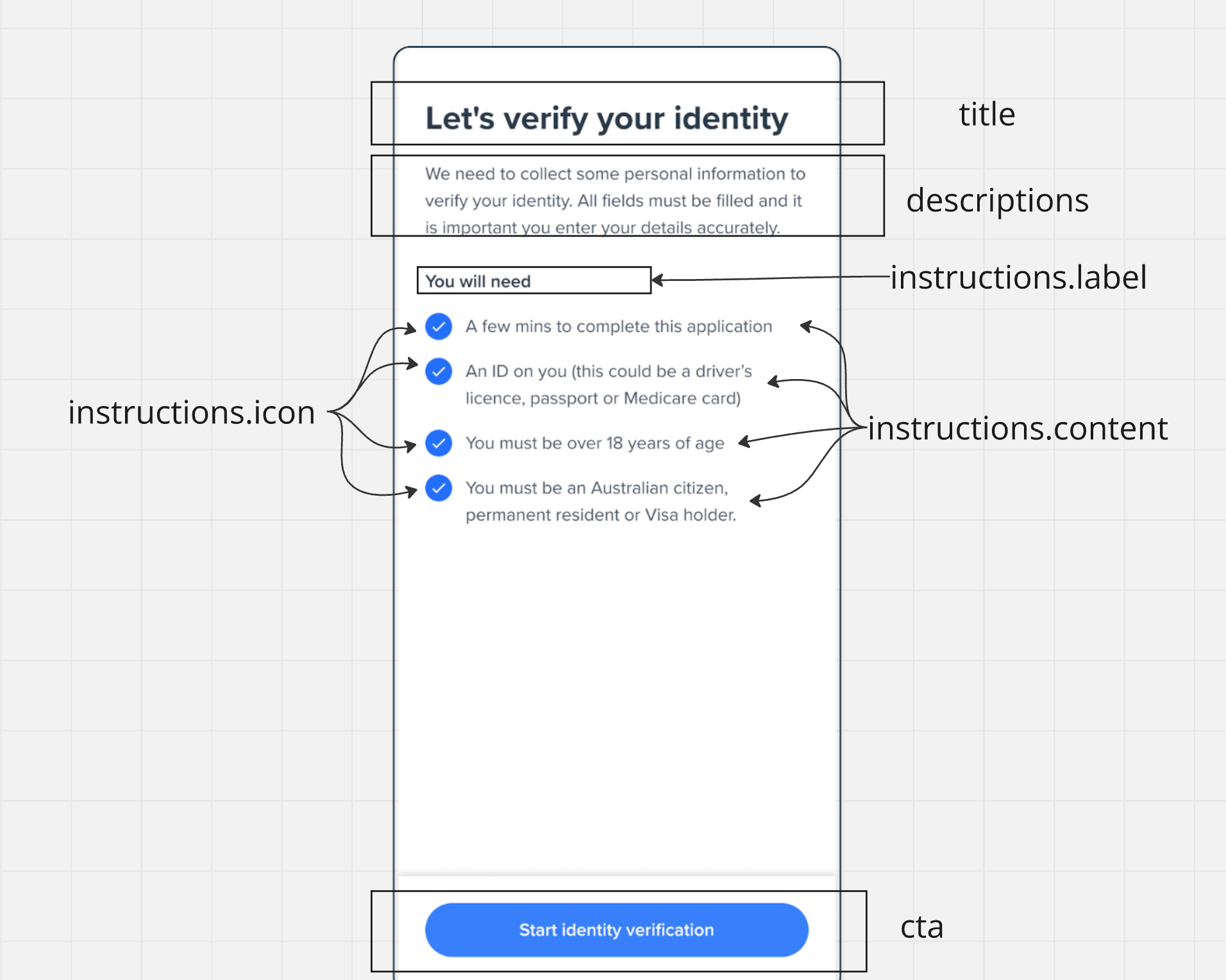
> The Welcome screen serves as the entry point of your onboarding flow, providing users with essential information and instructions before they begin the verification process.
## Quick Implementation
```html title="index.html" theme={null}
```
```javascript title="welcome.js" theme={null}
const welcome = oneSdk.component("form", {
name: "WELCOME",
type: "manual",
});
welcome.mount("#form");
```
## Event Handling
| Event Name | Triggered When |
| --------------------- | ------------------------------- |
| `form:welcome:loaded` | Screen is successfully mounted |
| `form:welcome:ready` | User clicks the continue button |
| `form:welcome:failed` | Screen encounters an error |
```javascript theme={null}
// Listen for successful screen mount
welcome.on('form:welcome:loaded', () => {
console.log('Welcome screen ready');
});
// Handle user clicking continue
welcome.on('form:welcome:ready', () => {
// Load the next screen (e.g., consent form)
consent.mount("#form");
});
// Handle errors
welcome.on('form:welcome:failed', (error) => {
console.error('Welcome screen error:', error);
});
```
## Screen Customization
```javascript theme={null}
const welcome = oneSdk.component('form', {
name: "WELCOME", // Set the screen name identifier
type: "manual", // Set form type to manual input
title: { // Configure the title section
label: "Let's Get Started!",
style: { 'ff-title': { color: '#2563eb' } } // Style title color
},
cta: { // Configure the call-to-action button
label: "Continue",
style: { 'ff-button': { backgroundColor: '#2563eb' } } // button bg color
}
});
```
```javascript theme={null}
// Initialize welcome screen component with form type
const welcome = oneSdk.component('form', {
// Set screen name and type
name: "WELCOME",
type: "manual",
title: { // Configure title section
label: "Let's verify your identity",
style: { 'ff-title': {
'font-family': 'Helvetica',
'font-size': '24px'
}}
},
descriptions: [ // Add descriptive text below title
{
label: 'Please have your documents ready',
style: { 'ff-description': { color: '#4b5563' } }
}
],
instructions: { // Configure document requirements list
content: [
{
label: "A valid passport OR",
icon: './assets/bullet-point.svg' // Bullet point icon for list items
},
{
label: "An Australian driver's license",
icon: './assets/bullet-point.svg'
}
],
logo: { // Add logo to top of the page
src: './assets/logo.png'
},
// Style instructions container
style: {
'ff-instructions': {
'font-family': 'Helvetica',
'margin-top': '20px'
},
'ff-logo': {
'width': '50px',
}
}
},
// Configure the call-to-action button
cta: {
label: 'Begin Verification',
style: {
'ff-button': {
backgroundColor: '#2563eb',
padding: '12px 24px'
}
}
}
});
```
## Customization Options
```javascript theme={null}
title: {
label: "Custom Title", // The heading text
style: { // Optional styling
'ff-title': {
'font-family': 'Arial',
'font-size': '24px',
color: '#000000'
}
}
}
```
```javascript theme={null}
descriptions: [
{
label: 'First description line',
style: { 'ff-description': {} }
},
{
label: 'Second description line',
style: { 'ff-description': {} }
}
]
```
```javascript theme={null}
instructions: {
content: [
{
label: "Instruction item 1",
icon: './assets/icon1.svg'
},
{
label: "Instruction item 2",
icon: './assets/icon2.svg'
}
],
style: {
'ff-instructions': {
'margin-top': '16px'
}
}
}
```
```javascript theme={null}
cta: {
label: 'Continue',
style: {
'ff-button': {
backgroundColor: '#2563eb',
color: '#ffffff',
borderRadius: '4px',
padding: '12px 24px'
}
}
}
```
```javascript theme={null}
logo: {
src: './assets/logo.png'
},
style: {
'ff-logo': {
'width': '50px'
}
}
```
##### Styling Best Practices
* Use consistent colors and fonts across your implementation
* Ensure sufficient contrast for accessibility
* Maintain padding and spacing for readability
* Test your customizations across different screen sizes
All styling should be applied through the appropriate style objects
(`ff-title`, `ff-description`, `ff-instructions`, `ff-button`). Direct CSS
manipulation isn't recommended.
## UI Structure