> ## Documentation Index
> Fetch the complete documentation index at: https://docs.frankieone.com/llms.txt
> Use this file to discover all available pages before exploring further.
# Hosted OneSDK IDV Flow
> Implement complete identity verification in minutes with our no-code solution. Simply generate an onboarding URL and let OneSDK handle the rest.
## Features
Instant document verification and liveness detection
Built-in protection against deepfakes and screen captures
Advanced facial recognition and matching
Intuitive flow for both desktop and mobile users
## Industry Solutions
Reduce user drop-off with streamlined verification
Meet KYC/AML regulatory requirements
{" "}
Verify seller identities to build platform trust
Protect buyers and sellers from fraudulent activities
Prevent identity theft and account fraud
Automated checks for money laundering prevention
## Architecture
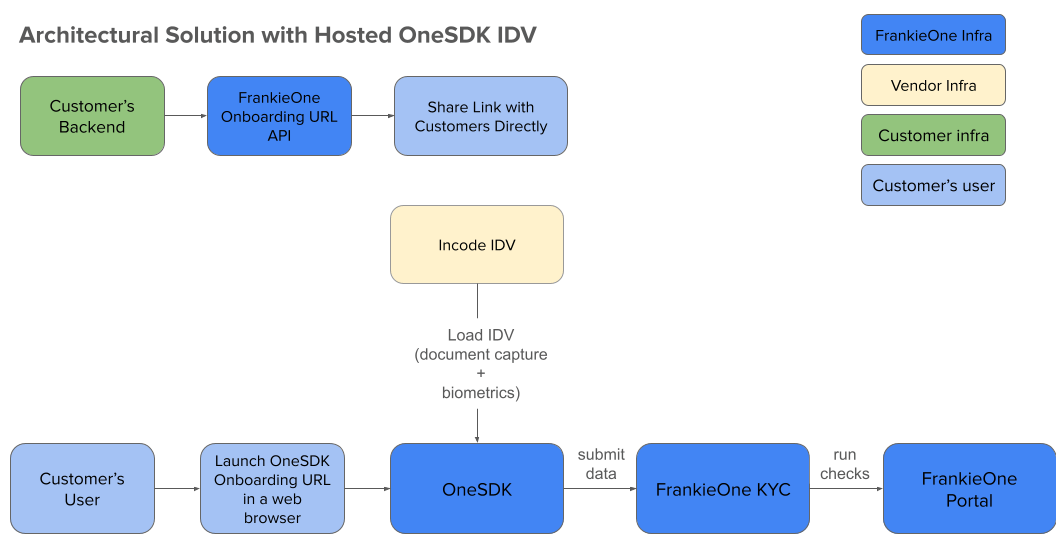 1. Backend requests onboarding URL
2. User receives verification link
3. OneSDK handles document/biometric capture
4. Incode processes IDV data
5. FrankieOne KYC analyzes results
6. Status updates in Portal
## User Experience Flows
1. Backend requests onboarding URL
2. User receives verification link
3. OneSDK handles document/biometric capture
4. Incode processes IDV data
5. FrankieOne KYC analyzes results
6. Status updates in Portal
## User Experience Flows
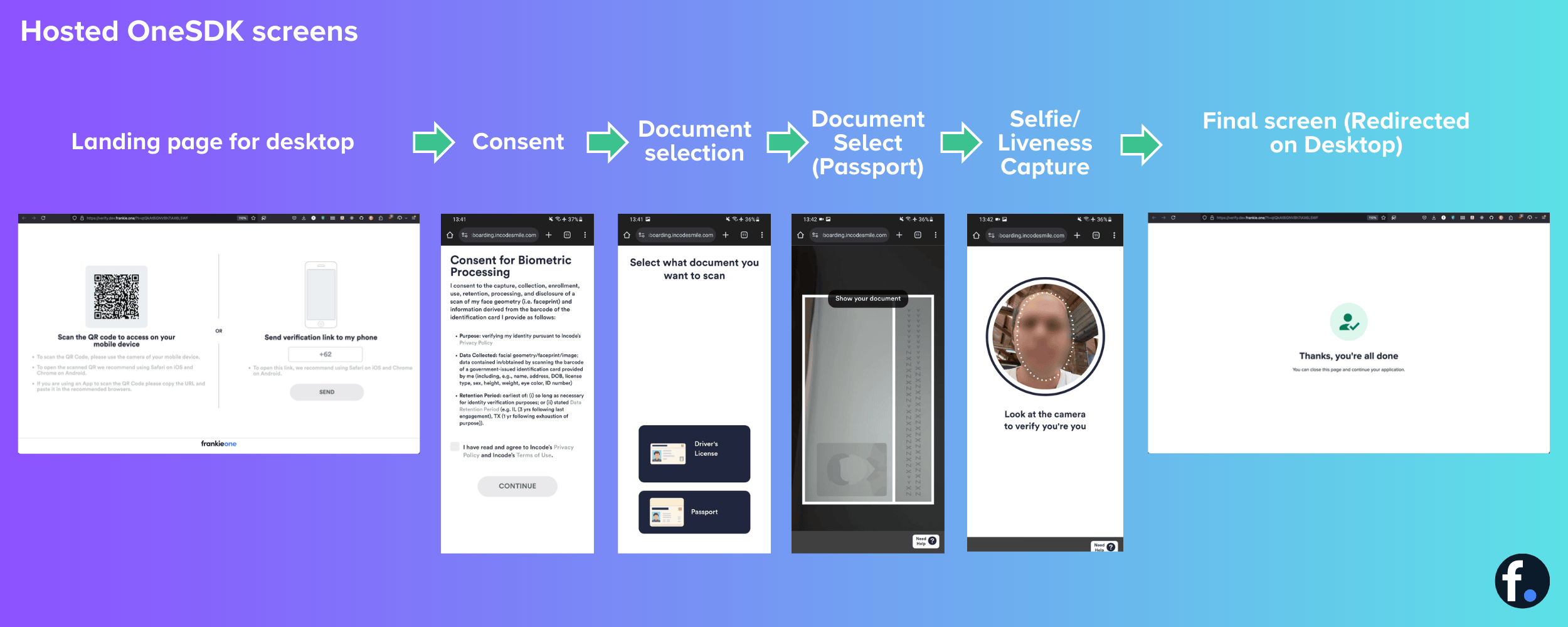 Desktop users will need a mobile device to complete the document and selfie capture steps.
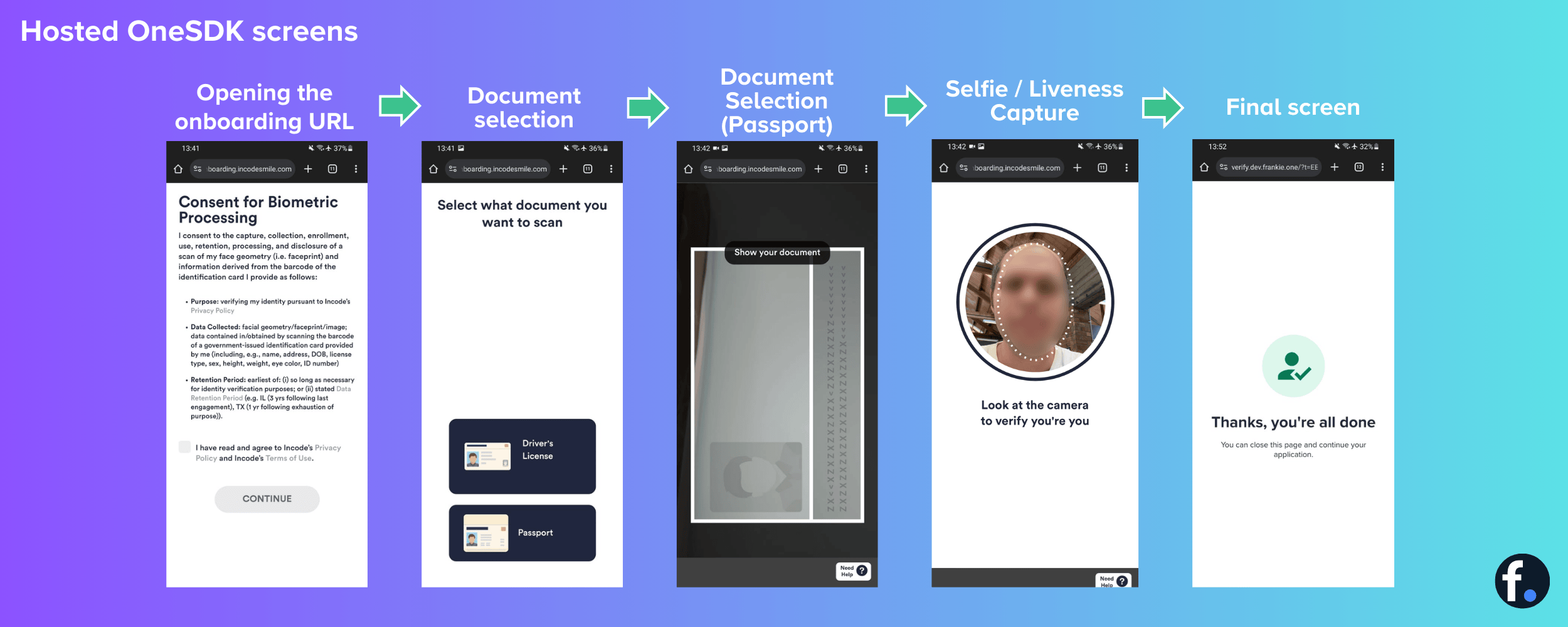 Send verification links via SMS for the best mobile experience.
## Customization
For further details about customizing Hosted OneSDK, please contact FrankieOne.
* 📚 [API Documentation](/docs/v1/onesdk/oneSDK/quickstart-guide/use-case-1-hosted-onesdk)
* 📧 [Developer Support ](mailto:support@frankieone.com)
* 🎥 [Demo Video ](https://www.loom.com/share/48238036514340ff9981f324faa4ad3e)
##### Quick Start Guide
Request your API key and Customer ID via the [FrankieOne Support Portal ](https://frankieone.atlassian.net/servicedesk/customer/portals).
Use our [test data](docs/v1/api/guide-to-the-api/getting-started/test-data) to verify your implementation.
Track verification statuses and analytics in the Portal.
Switch to production credentials and start verifying users.
```bash title="1. Generate Onboarding URL" theme={null}
curl --request POST \
--url https://api.kycaml.uat.frankiefinancial.io/idv/v2/idvalidate/onboarding-url \
--header 'api_key: API-KEY' \
--header 'X-Frankie-CustomerID: CUSTOMER-ID' \
--header 'accept: application/json' \
--header 'content-type: application/json' \
--data-raw '{
"customerRef": "YOUR_UNIQUE_STRING",
"consent": true,
"flowId": "idv"
}'
```
Secure your webhook endpoint and validate webhook signatures to prevent unauthorized access.
Send verification links via SMS for the best mobile experience.
## Customization
For further details about customizing Hosted OneSDK, please contact FrankieOne.
* 📚 [API Documentation](/docs/v1/onesdk/oneSDK/quickstart-guide/use-case-1-hosted-onesdk)
* 📧 [Developer Support ](mailto:support@frankieone.com)
* 🎥 [Demo Video ](https://www.loom.com/share/48238036514340ff9981f324faa4ad3e)
##### Quick Start Guide
Request your API key and Customer ID via the [FrankieOne Support Portal ](https://frankieone.atlassian.net/servicedesk/customer/portals).
Use our [test data](docs/v1/api/guide-to-the-api/getting-started/test-data) to verify your implementation.
Track verification statuses and analytics in the Portal.
Switch to production credentials and start verifying users.
```bash title="1. Generate Onboarding URL" theme={null}
curl --request POST \
--url https://api.kycaml.uat.frankiefinancial.io/idv/v2/idvalidate/onboarding-url \
--header 'api_key: API-KEY' \
--header 'X-Frankie-CustomerID: CUSTOMER-ID' \
--header 'accept: application/json' \
--header 'content-type: application/json' \
--data-raw '{
"customerRef": "YOUR_UNIQUE_STRING",
"consent": true,
"flowId": "idv"
}'
```
Secure your webhook endpoint and validate webhook signatures to prevent unauthorized access.