> ## Documentation Index
> Fetch the complete documentation index at: https://docs.frankieone.com/llms.txt
> Use this file to discover all available pages before exploring further.
# Embedded OneSDK IDV + eKYC Flow
> The Embedded OneSDK provides a flexible, developer-controlled approach to identity verification (IDV) and eKYC flows. Unlike the Hosted version, you have complete control over the integration and user experience.
Instead of building your own flow, it's *highly recommended* to fork an existing flow from the public sample codes [found here ](https://github.com/FrankieOne/frontend-onesdk-public-sample-codes/).
## Solution Overview
* Financial services requiring KYC - Telecom providers - Online marketplaces
* Identity verification services
* Modular architecture - Built-in compliance - Real-time verification -
Developer-first design
## Architecture
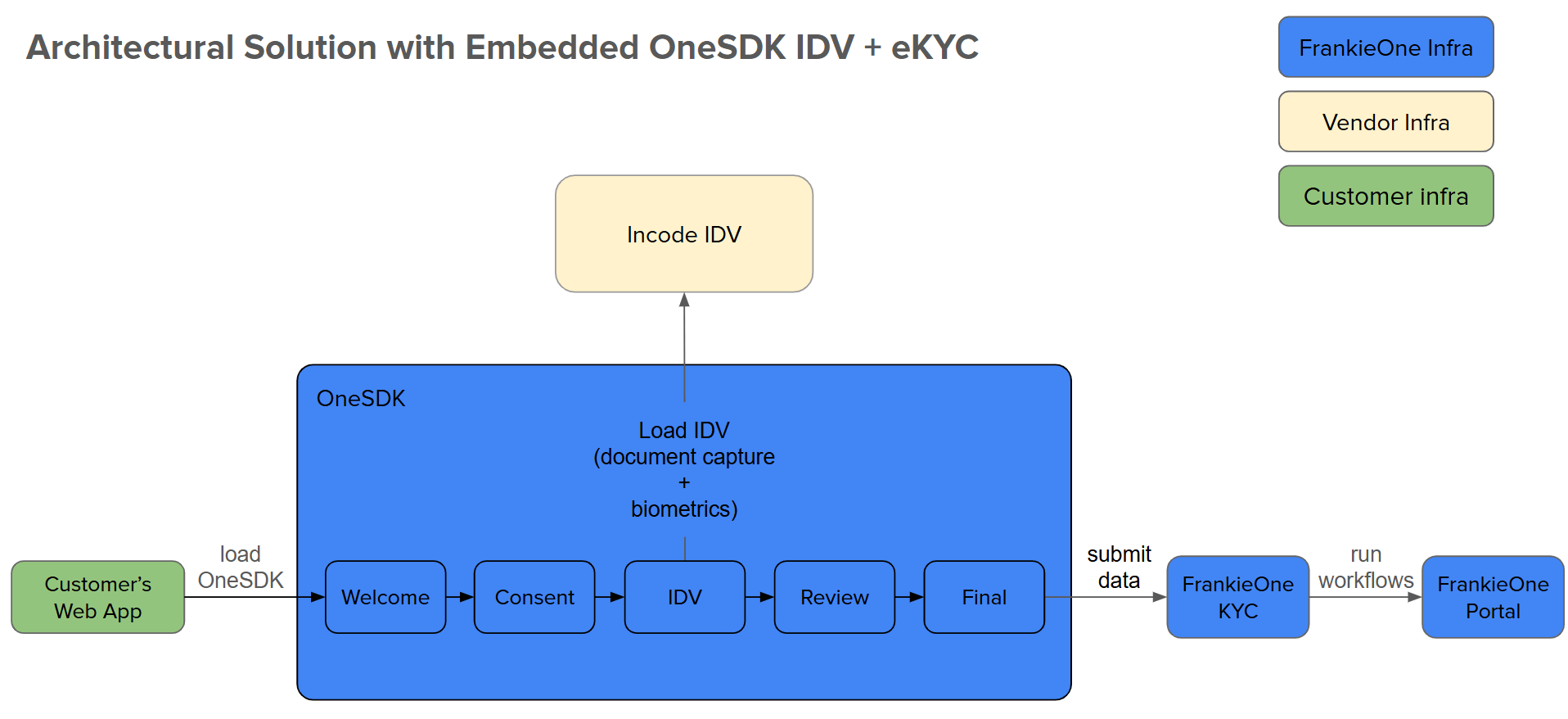 1. Customer Web App: Your application hosting OneSDK
2. OneSDK: Manages
verification UI/UX
3. Incode IDV: Handles document/biometric capture
4. FrankieOne KYC: Processes verification checks
5. Portal: Displays verification results
## Implementation Steps
```bash 1. Create a React App theme={null}
npm create vite@latest onesdk-embedded-idv-ekyc -- --template react
```
```bash 2. Install Dependencies theme={null}
cd onesdk-embedded-idv-ekyc
npm i @frankieone/one-sdk
```
Create a `.env` file with your credentials:
```env theme={null}
# Authentication
VITE_CUSTOMER_ID=your_customer_id
VITE_API_KEY=your_api_key
# Environment URLs
VITE_FRANKIE_BASE_URL=https://backend.kycaml.uat.frankiefinancial.io # UAT
# VITE_FRANKIE_BASE_URL=https://backend.kycaml.frankiefinancial.io # PROD
VITE_GOOGLE_PLACES_API_KEY=your_google_api_key # Optional: Address Autocomplete
```
Never commit sensitive credentials to version control. Use environment variables in production.
```jsx theme={null}
'use client'; // Indicates this is a client-side component
import OneSdk from '@frankieone/one-sdk';
import { useEffect, useRef, useState } from 'react';
// Assign environment variables to constants for customer ID, API key, and base URL
const CUSTOMER_ID = import.meta.env.VITE_CUSTOMER_ID;
const API_KEY = import.meta.env.VITE_API_KEY;
const FRANKIE_BASE_URL = import.meta.env.VITE_FRANKIE_BASE_URL;
/**
* OneSDKHandler component initializes and manages the FrankieOne SDK instance.
* @param {Object} config - Configuration object to override default SDK setup.
* @returns {Object} - Returns the SDK instance, error, and loading state.
*/
const OneSDKHandler = ({ config }) => {
// State hooks for managing SDK instance, error, and loading status
console.log('???');
const [oneSDKInstance, setOneSDKInstance] = useState(null);
const [error, setError] = useState(null);
const [loading, setLoading] = useState(false);
// useRef to track SDK initialization and prevent reinitialization
const initializedRef = useRef(false);
/**
* Generates a base64-encoded token for authorization.
* @returns {string} - Base64-encoded authorization string.
*/
const parseAuthToken = () => btoa(`${CUSTOMER_ID}:${API_KEY}`);
/**
* Fetches a session token from the backend by authenticating
* with the FrankieOne API.
* @returns {Object|null} - Returns the session token or null on error.
*/
const generateToken = async () => {
try {
const tokenResponse = await fetch(
`${FRANKIE_BASE_URL}/auth/v2/machine-session`,
{
method: 'POST',
headers: {
authorization: `machine ${parseAuthToken()}`,
'Content-Type': 'application/json',
},
body: JSON.stringify({
permissions: {
preset: 'one-sdk',
reference: `demo-${new Date().toISOString()}`, // Optional: Custom reference
},
}),
}
);
return await tokenResponse.json(); // Return the parsed response as JSON
} catch (error) {
setError(error.message); // Capture error message in state
return null; // Return null in case of error
}
};
/**
* Initializes the OneSDK instance using the provided token and configuration.
*/
const generateOneSDKInstance = async () => {
setLoading(true); // Set loading to true while SDK is initializing
// Fetch token from the backend
const tokenSession = await generateToken();
if (!tokenSession) return; // Exit if no valid token is fetched
// Default SDK configuration, can be overridden by the `config` prop
const defaultConfig = {
mode: 'development', // Set mode to development (adjust as needed)
recipe: {
form: {
provider: {
name: 'react',
googleApiKey: import.meta.env.VITE_GOOGLE_PLACES_API_KEY,
},
},
},
};
const SDKConfig = config || defaultConfig; // Use the passed config or the default one
try {
// Initialize the OneSDK with the fetched token and configuration
const oneSDKInit = await OneSdk({
session: tokenSession,
...SDKConfig,
});
setOneSDKInstance(oneSDKInit); // Set SDK instance in state
} catch (error) {
setError(error.message); // Capture initialization errors
} finally {
setLoading(false); // Reset loading state after initialization
}
};
/**
* useEffect hook to initialize the SDK once on component mount.
* Prevents reinitialization on re-render using `initializedRef`.
*/
useEffect(() => {
if (!initializedRef.current) {
generateOneSDKInstance(); // Initialize the SDK instance
initializedRef.current = true; // Set to true to prevent re-initialization
}
}, [config]); // Re-run if the config prop changes
// Return SDK instance, error message (if any), and loading state
return {
oneSDKInstance,
error,
loading,
};
};
export default OneSDKHandler;
```
```jsx theme={null}
// Import React useEffect hook and custom SDK handler
import { useEffect } from "react";
import OneSDKHandler from "./OneSDKHandler";
const OneSDKFlow = () => {
// Define SDK configuration object with development mode and provider settings
// - OCR settings disable review screen and use Incode provider
// - Biometrics configured to use Incode provider
// - Form component uses React with Google Places API integration
const config = {
mode: "development",
recipe: {
ocr: {
provideReviewScreen: false,
provider: { name: "incode" },
},
biometrics: {
provider: { name: "incode" },
},
form: {
provider: {
name: 'react',
googleApiKey: import.meta.env.VITE_GOOGLE_PLACES_API_KEY,
},
},
},
};
// Initialize OneSDK using custom hook that manages instance, error handling, and loading state
const { oneSDKInstance, error, loading } = OneSDKHandler({ config });
// Function to initialize OneSDK components and set up event flow
const initOneSDK = () => {
// Enable logging for all SDK events for debugging purposes
oneSDKInstance.on('*', console.log);
// Initialize the Identity Verification (IDV) flow
const idv = oneSDKInstance.flow('idv');
// Create form components for different stages of the verification process
// Welcome screen component
const welcome = oneSDKInstance.component("form", {
name: "WELCOME",
type: "ocr",
});
// Consent form component for user agreement
const consent = oneSDKInstance.component("form", {
name: "CONSENT",
type: "ocr",
});
// Review component for verification results
const review = oneSDKInstance.component("form", {
name: "REVIEW",
type: "ocr",
verify: true,
});
// Final result component showing completion status
const form_result = oneSDKInstance.component("form", {
name: "RESULT",
type: "manual",
state: 'SUCCESS',
title: { label: 'Complete' },
descriptions: [{ label: 'Process is now complete.' }],
cta: { label: 'Done' },
});
// Start the flow by mounting the welcome component
welcome.mount('#onesdk-container');
// Set up event chain for component transitions
// When welcome is ready, mount consent form
welcome.on("form:welcome:ready", () => {
consent.mount("#onesdk-container");
});
// When consent is given, start IDV flow
consent.on("form:consent:ready", async () => {
idv.mount("#onesdk-container");
});
// After IDV completes successfully, show review screen
idv.on('results', ({ checkStatus }) => {
if (checkStatus) {
review.mount("#onesdk-container");
}
});
// After review, show completion screen
review.on('form:review:ready', async () => {
form_result.mount("#onesdk-container");
});
};
// Initialize SDK when instance becomes available
useEffect(() => {
if (oneSDKInstance) {
initOneSdk();
}
}, [oneSDKInstance]);
// Render loading state or SDK container
return loading ? (
1. Customer Web App: Your application hosting OneSDK
2. OneSDK: Manages
verification UI/UX
3. Incode IDV: Handles document/biometric capture
4. FrankieOne KYC: Processes verification checks
5. Portal: Displays verification results
## Implementation Steps
```bash 1. Create a React App theme={null}
npm create vite@latest onesdk-embedded-idv-ekyc -- --template react
```
```bash 2. Install Dependencies theme={null}
cd onesdk-embedded-idv-ekyc
npm i @frankieone/one-sdk
```
Create a `.env` file with your credentials:
```env theme={null}
# Authentication
VITE_CUSTOMER_ID=your_customer_id
VITE_API_KEY=your_api_key
# Environment URLs
VITE_FRANKIE_BASE_URL=https://backend.kycaml.uat.frankiefinancial.io # UAT
# VITE_FRANKIE_BASE_URL=https://backend.kycaml.frankiefinancial.io # PROD
VITE_GOOGLE_PLACES_API_KEY=your_google_api_key # Optional: Address Autocomplete
```
Never commit sensitive credentials to version control. Use environment variables in production.
```jsx theme={null}
'use client'; // Indicates this is a client-side component
import OneSdk from '@frankieone/one-sdk';
import { useEffect, useRef, useState } from 'react';
// Assign environment variables to constants for customer ID, API key, and base URL
const CUSTOMER_ID = import.meta.env.VITE_CUSTOMER_ID;
const API_KEY = import.meta.env.VITE_API_KEY;
const FRANKIE_BASE_URL = import.meta.env.VITE_FRANKIE_BASE_URL;
/**
* OneSDKHandler component initializes and manages the FrankieOne SDK instance.
* @param {Object} config - Configuration object to override default SDK setup.
* @returns {Object} - Returns the SDK instance, error, and loading state.
*/
const OneSDKHandler = ({ config }) => {
// State hooks for managing SDK instance, error, and loading status
console.log('???');
const [oneSDKInstance, setOneSDKInstance] = useState(null);
const [error, setError] = useState(null);
const [loading, setLoading] = useState(false);
// useRef to track SDK initialization and prevent reinitialization
const initializedRef = useRef(false);
/**
* Generates a base64-encoded token for authorization.
* @returns {string} - Base64-encoded authorization string.
*/
const parseAuthToken = () => btoa(`${CUSTOMER_ID}:${API_KEY}`);
/**
* Fetches a session token from the backend by authenticating
* with the FrankieOne API.
* @returns {Object|null} - Returns the session token or null on error.
*/
const generateToken = async () => {
try {
const tokenResponse = await fetch(
`${FRANKIE_BASE_URL}/auth/v2/machine-session`,
{
method: 'POST',
headers: {
authorization: `machine ${parseAuthToken()}`,
'Content-Type': 'application/json',
},
body: JSON.stringify({
permissions: {
preset: 'one-sdk',
reference: `demo-${new Date().toISOString()}`, // Optional: Custom reference
},
}),
}
);
return await tokenResponse.json(); // Return the parsed response as JSON
} catch (error) {
setError(error.message); // Capture error message in state
return null; // Return null in case of error
}
};
/**
* Initializes the OneSDK instance using the provided token and configuration.
*/
const generateOneSDKInstance = async () => {
setLoading(true); // Set loading to true while SDK is initializing
// Fetch token from the backend
const tokenSession = await generateToken();
if (!tokenSession) return; // Exit if no valid token is fetched
// Default SDK configuration, can be overridden by the `config` prop
const defaultConfig = {
mode: 'development', // Set mode to development (adjust as needed)
recipe: {
form: {
provider: {
name: 'react',
googleApiKey: import.meta.env.VITE_GOOGLE_PLACES_API_KEY,
},
},
},
};
const SDKConfig = config || defaultConfig; // Use the passed config or the default one
try {
// Initialize the OneSDK with the fetched token and configuration
const oneSDKInit = await OneSdk({
session: tokenSession,
...SDKConfig,
});
setOneSDKInstance(oneSDKInit); // Set SDK instance in state
} catch (error) {
setError(error.message); // Capture initialization errors
} finally {
setLoading(false); // Reset loading state after initialization
}
};
/**
* useEffect hook to initialize the SDK once on component mount.
* Prevents reinitialization on re-render using `initializedRef`.
*/
useEffect(() => {
if (!initializedRef.current) {
generateOneSDKInstance(); // Initialize the SDK instance
initializedRef.current = true; // Set to true to prevent re-initialization
}
}, [config]); // Re-run if the config prop changes
// Return SDK instance, error message (if any), and loading state
return {
oneSDKInstance,
error,
loading,
};
};
export default OneSDKHandler;
```
```jsx theme={null}
// Import React useEffect hook and custom SDK handler
import { useEffect } from "react";
import OneSDKHandler from "./OneSDKHandler";
const OneSDKFlow = () => {
// Define SDK configuration object with development mode and provider settings
// - OCR settings disable review screen and use Incode provider
// - Biometrics configured to use Incode provider
// - Form component uses React with Google Places API integration
const config = {
mode: "development",
recipe: {
ocr: {
provideReviewScreen: false,
provider: { name: "incode" },
},
biometrics: {
provider: { name: "incode" },
},
form: {
provider: {
name: 'react',
googleApiKey: import.meta.env.VITE_GOOGLE_PLACES_API_KEY,
},
},
},
};
// Initialize OneSDK using custom hook that manages instance, error handling, and loading state
const { oneSDKInstance, error, loading } = OneSDKHandler({ config });
// Function to initialize OneSDK components and set up event flow
const initOneSDK = () => {
// Enable logging for all SDK events for debugging purposes
oneSDKInstance.on('*', console.log);
// Initialize the Identity Verification (IDV) flow
const idv = oneSDKInstance.flow('idv');
// Create form components for different stages of the verification process
// Welcome screen component
const welcome = oneSDKInstance.component("form", {
name: "WELCOME",
type: "ocr",
});
// Consent form component for user agreement
const consent = oneSDKInstance.component("form", {
name: "CONSENT",
type: "ocr",
});
// Review component for verification results
const review = oneSDKInstance.component("form", {
name: "REVIEW",
type: "ocr",
verify: true,
});
// Final result component showing completion status
const form_result = oneSDKInstance.component("form", {
name: "RESULT",
type: "manual",
state: 'SUCCESS',
title: { label: 'Complete' },
descriptions: [{ label: 'Process is now complete.' }],
cta: { label: 'Done' },
});
// Start the flow by mounting the welcome component
welcome.mount('#onesdk-container');
// Set up event chain for component transitions
// When welcome is ready, mount consent form
welcome.on("form:welcome:ready", () => {
consent.mount("#onesdk-container");
});
// When consent is given, start IDV flow
consent.on("form:consent:ready", async () => {
idv.mount("#onesdk-container");
});
// After IDV completes successfully, show review screen
idv.on('results', ({ checkStatus }) => {
if (checkStatus) {
review.mount("#onesdk-container");
}
});
// After review, show completion screen
review.on('form:review:ready', async () => {
form_result.mount("#onesdk-container");
});
};
// Initialize SDK when instance becomes available
useEffect(() => {
if (oneSDKInstance) {
initOneSdk();
}
}, [oneSDKInstance]);
// Render loading state or SDK container
return loading ? (
Loading...
) : (
);
};
export default OneSDKFlow;
```
```jsx title="App.jsx" theme={null}
import './App.css'
import OneSDKFlow from './OneSDKFlow'
function App() {
return (
)
}
export default App
```
```css title="App.css" theme={null}
.onesdk-container {
display: flex;
justify-content: center;
padding: 1em;
background-color: white;
}
```
```bash Start Development Server theme={null}
npm install
npm run dev
```
## Additional Resources
Browse reference implementations in our sample code repository.
Try out OneSDK in our interactive demo environment.
Get test credentials and sample data for development and testing.
## Troubleshooting
Token Generation Failed
* Check credentials in .env file
* Verify network connectivity
* Ensure correct API endpoint
Component Mount Issues
* Verify DOM element IDs match
* Check component event handlers
* Console log for initialization errors
* Handle token generation on backend
* Implement proper error handling
* Monitor SDK events
* Test with sample data first