> ## Documentation Index
> Fetch the complete documentation index at: https://docs.frankieone.com/llms.txt
> Use this file to discover all available pages before exploring further.
# Exporting all Customer Records
> After requesting an ‘All Customer Records Report’ from the portal, you will be emailed a password-protected zip file.
The file is secured with AES-256 Encryption, which isn’t supported by the default unzip software.
Use the following guide for your Operating System to unzip and access your report.
### For Mac OS
[The Unarchiver](https://apps.apple.com/us/app/the-unarchiver/id425424353?mt=12)
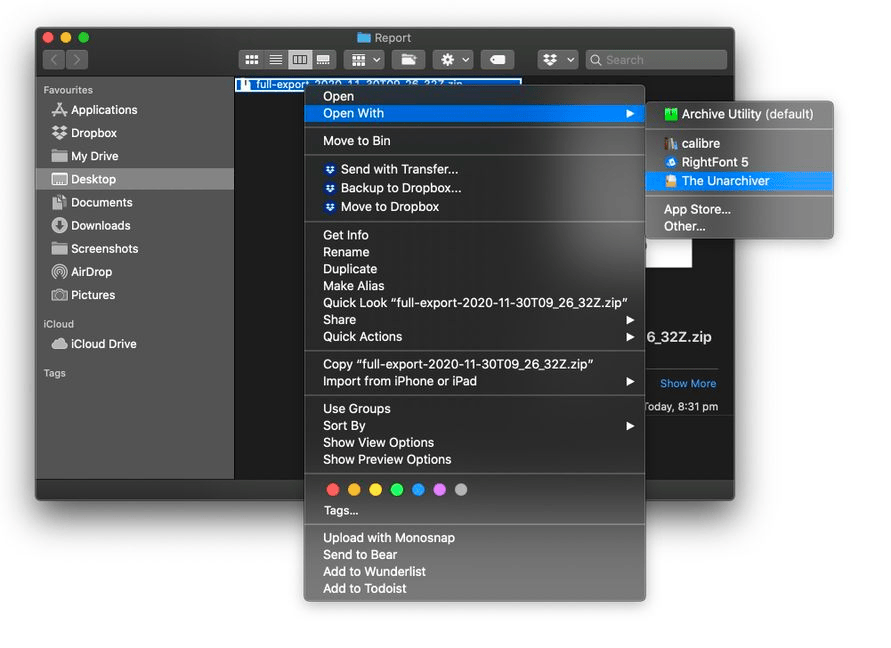
1. Install your selected program from above
2. Right-click the zip file and choose **Open With**
3. Select **The Unarchiver** from the list.
4. Enter the password that you nominated when requesting the report.
 ### For Windows
[WinZip](https://www.winzip.com/win/en/downwz.html)
[WinRAR](https://www.win-rar.com/start.html?\&L=0)
[7Zip](https://www.7-zip.org/download.html)
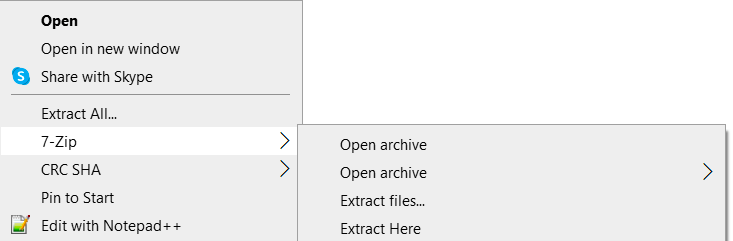
1. Install your selected program as listed above.
2. Right-click your zip file and navigate to your selected program.
3. Select **Extract Files**.
4. Enter the password that you nominated when requesting the report.
### For Windows
[WinZip](https://www.winzip.com/win/en/downwz.html)
[WinRAR](https://www.win-rar.com/start.html?\&L=0)
[7Zip](https://www.7-zip.org/download.html)
1. Install your selected program as listed above.
2. Right-click your zip file and navigate to your selected program.
3. Select **Extract Files**.
4. Enter the password that you nominated when requesting the report.