> ## Documentation Index
> Fetch the complete documentation index at: https://docs.frankieone.com/llms.txt
> Use this file to discover all available pages before exploring further.
# Manually Overriding Biometrics/OCR Results
> Each Biometrics/OCR result can be manually overridden to one of the two manual review statuses.
Each Biometrics/OCR result can be manually overridden to one of the two manual review statuses.
## Manual Pass
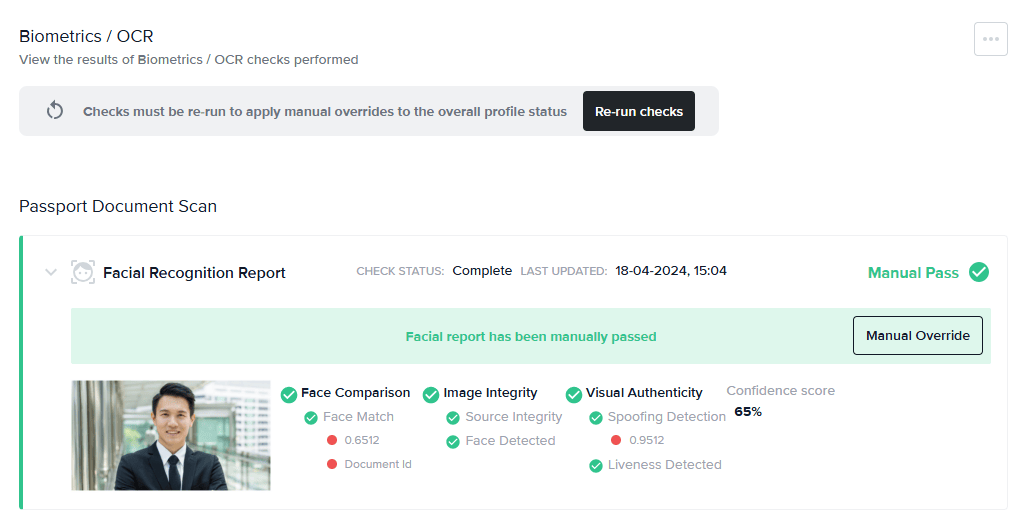
If you have manually reviewed a profile and are satisfied with the details of the check, you may override the result with a **Manual Pass** status. If all of the other Biometrics/OCR reports and other checks as part of the associated recipe have also passed, this will move the entire profile into a **Manually Passed** state and allow the applicant to onboard.
## Manual Fail
If a report shows a clear status and you aren’t happy with the result, changing a result to **Manual Fail** will result in the entire profile being **Manually Failed** , and the applicant won’t be able to onboard.
### To manually override the result of a Biometrics/OCR report:
1. Click **Manual Override**.
2. Select **Manual Pass** or **Manual Fail**.
3. Enter a comment.
4. Re-run checks.
 Once you have made any manual adjustments to the results on the biometrics tab, you must click **Re-run** **Checks** to apply the manual overrides to the overall profile status.