> ## Documentation Index
> Fetch the complete documentation index at: https://docs.frankieone.com/llms.txt
> Use this file to discover all available pages before exploring further.
# Viewing your risk configuration
The Risk Policy page lets you see your KYC and/or KYB risk model in one place: factors, scoring logic, levels and thresholds. See the exact configuration driving your verification decisions without digging through JSON files or waiting on support.
## Accessing your risk configuration
You can view your account’s risk configuration by clicking **Risk Policy** on the sidebar. The page visible to all portal users.
## How to view your risk configuration
All the factors, scores, and values in the page are pulled directly from your account’s live risk configuration.
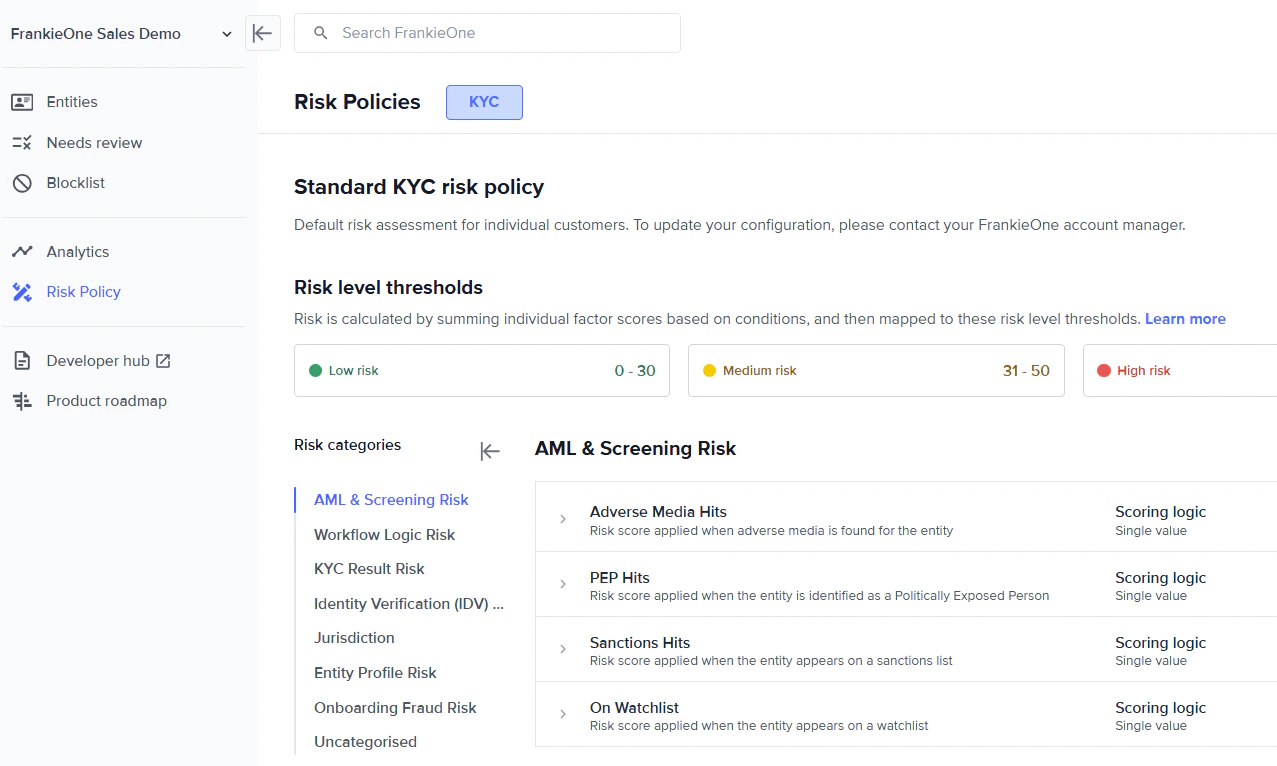 1. **Risk model (either KYC or KYB)**
2. **Risk level thresholds**
3. **Risk categories**
4. **Risk factor name**
5. **Scoring logic**
6. **Risk factor levels**
7. **Level ranges** (applicable only to specific risk factors)
8. **Risk factor score**
For more information about different risk factors, see [Link to V2 Risk Factors documentation](https://docs.frankieone.com/docs/risk-factors#risk-factors)
**Note:** Updating your risk scoring logic is available for V2 only. Please reach out to your account manager to migrate your FrankieOne account from V1 to V2.
1. **Risk model (either KYC or KYB)**
2. **Risk level thresholds**
3. **Risk categories**
4. **Risk factor name**
5. **Scoring logic**
6. **Risk factor levels**
7. **Level ranges** (applicable only to specific risk factors)
8. **Risk factor score**
For more information about different risk factors, see [Link to V2 Risk Factors documentation](https://docs.frankieone.com/docs/risk-factors#risk-factors)
**Note:** Updating your risk scoring logic is available for V2 only. Please reach out to your account manager to migrate your FrankieOne account from V1 to V2.