> ## Documentation Index
> Fetch the complete documentation index at: https://docs.frankieone.com/llms.txt
> Use this file to discover all available pages before exploring further.
# Configuring SSO with the FrankieOne portal
> Single sign-on is an authentication scheme that allows a user to log in with a single ID and password to any of several related, yet independent, software systems. True single sign-on allows the user to log in once and access services without re-entering authentication factors. Currently FrankieOne Portal only supports the SAML standard of integration.
##### SAML Definition
SAML (Security Assertion Mark-up Language) is an umbrella standard that covers federation, identity management and single sign-on (SSO).
## Getting Started with SAML
The portal admin pages for configuring SSO are currently under development and for that reason email communication is required to finish the setup. This guide will use OKTA, a popular IdP service, as part of the guide for each step, but any other service compliant with the SAML standard will integrate successfully.
**Concepts**
* SP - Service Provider; in our context, this is always Frankie One’s portal
* IdP - Identity Provider; Okta, Azure AD, Google, OneLogin and any other identity service
* Metadata - XML files containing details on how to integrate to both SP and IdP
The configuration needs to be done both on the SP side and on the IdP side. We will take care of configuring the SP and will generate the SP XML metadata, which is sent over to you by email or any other preferred means of communication.
Although the Portal has moved to `https://portal.frankie.one`, the SSO endpoints (ACS and logout URLs) in the SP metadata intentionally remain on the legacy `*.frankiefinancial.io` domain. Use the URLs exactly as provided in the metadata, and do not update an existing IdP configuration unless FrankieOne asks you to.
##### IDP Initiated Authentication Only
The FrankieOne Portal only supports IDP initiated SSO authentication at the moment. Please have that in mind while following this Guide and setting up your SAML based SSO setup.
With the SP XML metadata file in hands, you’ll need to configure the IdP service. Depending on your IdP, there are two ways to do that, by file upload (1) and by manually entering details (2). Okta uses the latter.
1. Upload the SP metadata file, from where all required information will be automatically extracted
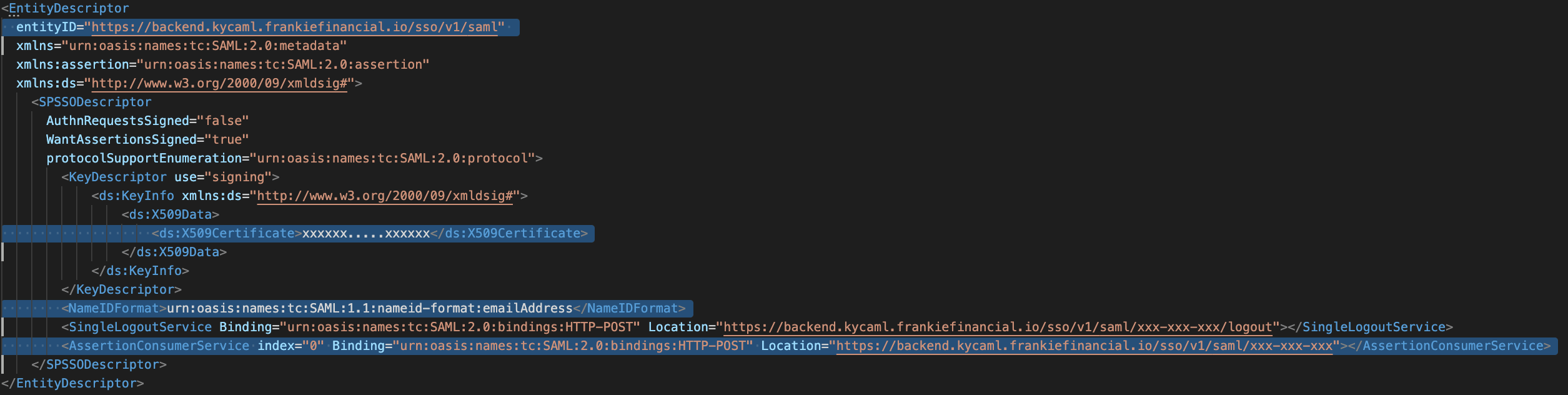
2. Manually insert the following details, which can be found in the SP XML metadata file (see image below)
* **Assertion Consumer Service (ACS)** , sometimes also called Login URL
* **SingleLogoutService** sometimes also called Logout URL
* Entity ID/Audience URL
* Name ID format, always use “Email Address” for Frankie One
* x.509 Certificate.
 For both methods above, you will also be required to add extra attributes when configuring your IdP. The following extra attributes are stricly required on your IdP configuration:
1. **email** : User’s unique email (must not be repeated for different users of the portal in the same environment uat, demo, production…)
2. **fullName** : User’s complete name as to be displayed in portal
3. **roles** : List of role names, exactly as displayed on Portal’s User configuration page (case sensitive). Depending on your IdP, it might be a list of string values or a single comma separated string value (no spaces). Okta accept both formats. These roles are case sensitive, so make sure they’re spelt perfectly. As of 27 Oct 2021 system Roles defined are:\
a. App-FrankieFinancial-Role-UpdateRecords\
b. App-FrankieFinancial-Role-Admin\
c. App-FrankieFinancial-Role-ITOps\
d. App-FrankieFinancial-Role-ViewAsChild\
e. App-FrankieFinancial-Role-CustomerService\
f. App-FrankieFinancial-Role-ReadOnly\
g. App-FrankieFinancial-Role-Compliance
Missing the required attributes unique email, fullName and a list of existing roles will result in a failed integration, so make sure they’re valid and correct
After configuring your IdP, you’ll be provided by IdP with the IdP XML Metadata. **Please download it and email it to [help@frankieone.com](mailto:help@frankieone.com)**.
Please ensure you mention what Domain the SAML is being configured for and which environment you’d like this provisioned in.
## Frequently Asked Questions / Errors Shown for SSO
This error means the email is already in use elsewhere (could be in use on a child account or in a different entity entirely).
The user is being sent without roles correctly passed through (there may be a typo or roles are missing entirely). This could be a mistake, or intentional for unauthorized users (in which case a user is still created in Frankie).
Unintended SSO users are being shown the link to Frankie. Attempting the creation will still make the account, just without roles (see #2).
If you have updated your metadata, you need to provide the same to Frankie so that they can update it at their end, which should resolve the issue.
Deletion of users must be done in the portal for now.
You can have multiple SSO products/providers pointed to the same account (e.g., Parent).
You can also have separate SSO for parent/child accounts.
The SSO product must initiate the authentication. (e.g., someone can’t go to Frankie, try to sign in and be redirected to an external SSO service).
Setup is currently a manual process. For example, raise a ticket in Jira.
You can set up a new role in FrankieOne portal and give permissions as per the requirement. Once done, give the user the same role in your IdP (make sure it’s spelled correctly). When the user logs in, they will have the permissions as per the new assigned role.
No, the email address must be unique for each account.
You can update the email address in the IdP for that user. No changes are required on Frankie side.
For both methods above, you will also be required to add extra attributes when configuring your IdP. The following extra attributes are stricly required on your IdP configuration:
1. **email** : User’s unique email (must not be repeated for different users of the portal in the same environment uat, demo, production…)
2. **fullName** : User’s complete name as to be displayed in portal
3. **roles** : List of role names, exactly as displayed on Portal’s User configuration page (case sensitive). Depending on your IdP, it might be a list of string values or a single comma separated string value (no spaces). Okta accept both formats. These roles are case sensitive, so make sure they’re spelt perfectly. As of 27 Oct 2021 system Roles defined are:\
a. App-FrankieFinancial-Role-UpdateRecords\
b. App-FrankieFinancial-Role-Admin\
c. App-FrankieFinancial-Role-ITOps\
d. App-FrankieFinancial-Role-ViewAsChild\
e. App-FrankieFinancial-Role-CustomerService\
f. App-FrankieFinancial-Role-ReadOnly\
g. App-FrankieFinancial-Role-Compliance
Missing the required attributes unique email, fullName and a list of existing roles will result in a failed integration, so make sure they’re valid and correct
After configuring your IdP, you’ll be provided by IdP with the IdP XML Metadata. **Please download it and email it to [help@frankieone.com](mailto:help@frankieone.com)**.
Please ensure you mention what Domain the SAML is being configured for and which environment you’d like this provisioned in.
## Frequently Asked Questions / Errors Shown for SSO
This error means the email is already in use elsewhere (could be in use on a child account or in a different entity entirely).
The user is being sent without roles correctly passed through (there may be a typo or roles are missing entirely). This could be a mistake, or intentional for unauthorized users (in which case a user is still created in Frankie).
Unintended SSO users are being shown the link to Frankie. Attempting the creation will still make the account, just without roles (see #2).
If you have updated your metadata, you need to provide the same to Frankie so that they can update it at their end, which should resolve the issue.
Deletion of users must be done in the portal for now.
You can have multiple SSO products/providers pointed to the same account (e.g., Parent).
You can also have separate SSO for parent/child accounts.
The SSO product must initiate the authentication. (e.g., someone can’t go to Frankie, try to sign in and be redirected to an external SSO service).
Setup is currently a manual process. For example, raise a ticket in Jira.
You can set up a new role in FrankieOne portal and give permissions as per the requirement. Once done, give the user the same role in your IdP (make sure it’s spelled correctly). When the user logs in, they will have the permissions as per the new assigned role.
No, the email address must be unique for each account.
You can update the email address in the IdP for that user. No changes are required on Frankie side.