> ## Documentation Index
> Fetch the complete documentation index at: https://docs.frankieone.com/llms.txt
> Use this file to discover all available pages before exploring further.
# Workflow events tab
### Video Guide
## What are Workflows for individuals?
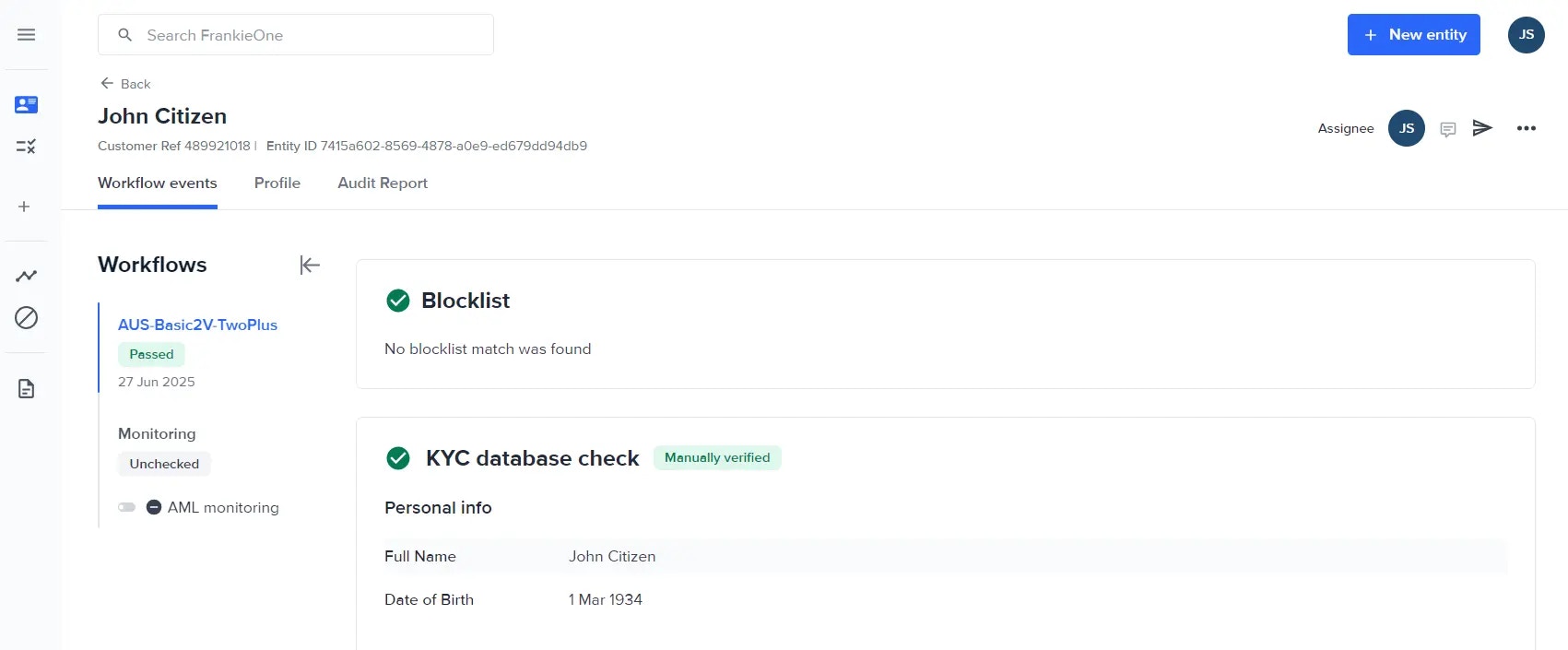 A workflow is a predefined sequence of checks—KYC, OCR, Biometrics, AML, Fraud—that FrankieOne runs on an entity. The **Workflow events** tab lists each execution (event) and its results.
### Monitoring workflows vs. Standard
| Type | Purpose | Runs automatically? |
| :------------- | :--------------------------------------------------------------------------------------- | :----------------------------------------------------- |
| **Standard** | Onboard or re-verify a customer with the chosen checks. | Triggered manually (Save & Verify, Send link, or API). |
| **Monitoring** | Re-screen an existing profile at regular intervals (for example, daily sanctions watch). | Yes—scheduled or rule-based. |
### Multiple workflows on an entity
You can run different workflows on the same entity. Each run appears as a separate **event** in the list (Attempt #1, Attempt #2). Use this to:
* Retry a failed onboarding workflow after data fixes.
* Add an extra “Enhanced Due Diligence” workflow on high-risk profiles.
## What is an Event, attempt or execution, event ID
An event (also called an attempt or execution) is a single run of a workflow on an entity. When you press Save & verify, resend a Smart UI link, or schedule a monitoring cycle, the Portal creates a fresh event and tags it with an Event ID—a unique reference you can use in audit logs, API calls, or support tickets.
### Key points
* Each event shows its own status (Pass, Fail, Needs attention, and so on).
* The Workflow events tab lists events in reverse order: Attempt #1, Attempt #2, Attempt #3 … so you can track every execution.
* You can copy the Event ID from the Audit Report or the URL path when drilling into check details.
## Risk score
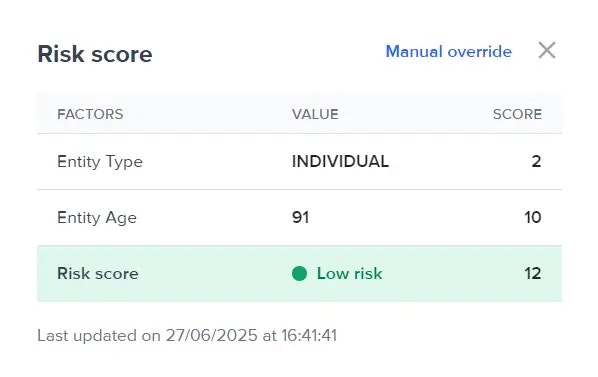
Click **Risk score** to view the numeric score and the factors that changed it. Scores update every time a workflow finishes.
A workflow is a predefined sequence of checks—KYC, OCR, Biometrics, AML, Fraud—that FrankieOne runs on an entity. The **Workflow events** tab lists each execution (event) and its results.
### Monitoring workflows vs. Standard
| Type | Purpose | Runs automatically? |
| :------------- | :--------------------------------------------------------------------------------------- | :----------------------------------------------------- |
| **Standard** | Onboard or re-verify a customer with the chosen checks. | Triggered manually (Save & Verify, Send link, or API). |
| **Monitoring** | Re-screen an existing profile at regular intervals (for example, daily sanctions watch). | Yes—scheduled or rule-based. |
### Multiple workflows on an entity
You can run different workflows on the same entity. Each run appears as a separate **event** in the list (Attempt #1, Attempt #2). Use this to:
* Retry a failed onboarding workflow after data fixes.
* Add an extra “Enhanced Due Diligence” workflow on high-risk profiles.
## What is an Event, attempt or execution, event ID
An event (also called an attempt or execution) is a single run of a workflow on an entity. When you press Save & verify, resend a Smart UI link, or schedule a monitoring cycle, the Portal creates a fresh event and tags it with an Event ID—a unique reference you can use in audit logs, API calls, or support tickets.
### Key points
* Each event shows its own status (Pass, Fail, Needs attention, and so on).
* The Workflow events tab lists events in reverse order: Attempt #1, Attempt #2, Attempt #3 … so you can track every execution.
* You can copy the Event ID from the Audit Report or the URL path when drilling into check details.
## Risk score
Click **Risk score** to view the numeric score and the factors that changed it. Scores update every time a workflow finishes.
 ### Workflow status
The coloured badge beside each event shows the outcome.
#### Pass
All checks passed. No action needed.
#### Fail
Blocking issue found. Review Check summary to see why.
#### Manual pass / manual fail
A user overrode the automatic result (comment is logged).
#### Need attention
At least one check needs manual review.
#### Unchecked
Event started but checks have not finished yet.
## Check summary
The lower pane lists every check in the order executed, showing:
* Data source used (for example, **DVS**, **Adverse Media**).
* Match count or pass/fail result.
* Comments icon for manual overrides or notes.
### Workflow status
The coloured badge beside each event shows the outcome.
#### Pass
All checks passed. No action needed.
#### Fail
Blocking issue found. Review Check summary to see why.
#### Manual pass / manual fail
A user overrode the automatic result (comment is logged).
#### Need attention
At least one check needs manual review.
#### Unchecked
Event started but checks have not finished yet.
## Check summary
The lower pane lists every check in the order executed, showing:
* Data source used (for example, **DVS**, **Adverse Media**).
* Match count or pass/fail result.
* Comments icon for manual overrides or notes.