> ## Documentation Index
> Fetch the complete documentation index at: https://docs.frankieone.com/llms.txt
> Use this file to discover all available pages before exploring further.
# FrankieOne Integration Architecture Guide
> Understand system connections, data flows, and integration patterns when integrating with FrankieOne.
## Purpose
This guide explains how your systems connect with FrankieOne from an architectural perspective, including:
* System-to-system communication patterns
* Data flow and sequencing
* Infrastructure considerations
* Security and compliance requirements
* Common integration architectures for different use cases
## Audience
* **Solution Architects** — design the integration architecture
* **Technical Leads** — understand system boundaries and responsibilities
* **Project Managers** — understand technical dependencies and timelines
* **Security Teams** — understand data flows and security requirements
***
## Contents
* [Core Architecture Concepts](#core-architecture-concepts)
* [Integration Pattern 1: Hybrid (API + Portal)](#integration-pattern-1-hybrid-api--portal)
* [Integration Pattern 2: Fully Automated (API-Only)](#integration-pattern-2-fully-automated-api-only)
* [Integration Pattern 3: Platform/Marketplace Model](#integration-pattern-3-platformmarketplace-model)
* [Technical Considerations](#technical-considerations)
* [Security & Compliance](#security--compliance)
* [When to Consult FrankieOne](#when-to-consult-frankieone)
* [Summary: Choosing Your Integration Approach](#summary-choosing-your-integration-approach)
***
## Core Architecture Concepts
### System Boundaries
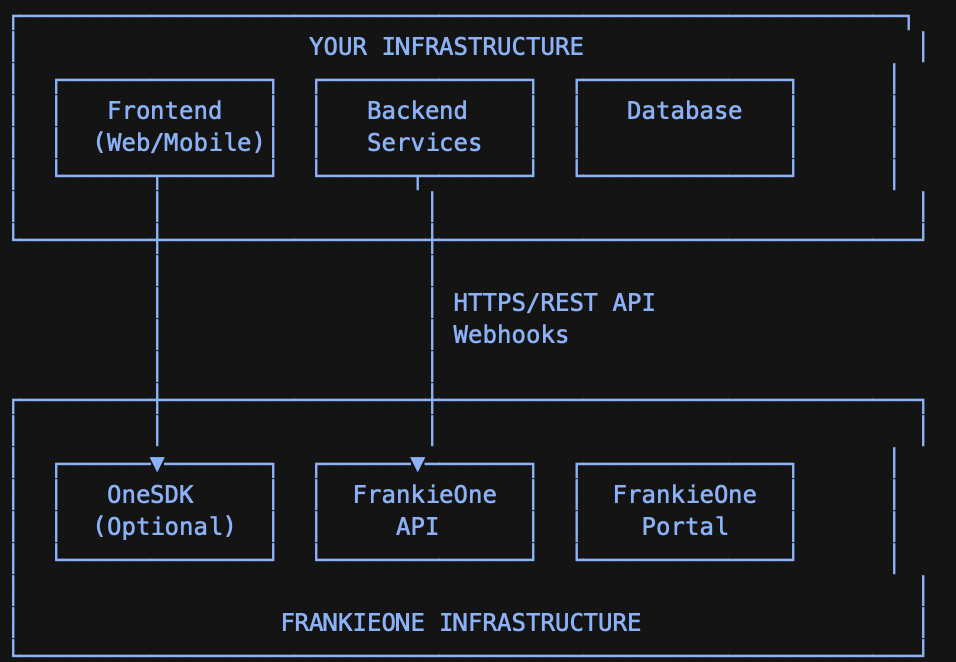 Alternate view
```mermaid theme={null}
flowchart LR
subgraph Your["Your infrastructure"]
App["App (Web / Mobile)"]
Backend["Backend"]
Data["DB / CRM"]
App --> Backend --> Data
end
subgraph Frankie["FrankieOne"]
API["API"]
Portal["Portal"]
Webhooks["Webhooks"]
end
Users["Compliance / Ops"]
Backend -- "API calls" --> API
Webhooks -- "Events" --> Backend
API --> Webhooks
Users <-- "Review / reporting" --> Portal
```
***
### Key Components
#### FrankieOne API
* **Protocol:** HTTPS REST
* **Authentication:** API Key + Customer ID headers
* **Base URLs:**
* V2 UAT: `https://api.uat.frankie.one/v2/`
* V2 Production: `https://api.frankie.one/v2/`
* V1 Production: `https://api.kycaml.frankiefinancial.io/compliance/v1.2/`
**Primary functions**
* Create individuals and organisations
* Execute verification workflows
* Retrieve results
* Update entity data
***
#### Webhooks
* **Direction:** FrankieOne → Your system
* **Protocol:** HTTPS POST
* **Format:** JSON
* **Purpose:** Asynchronous event notifications
* **Retry policy:** Exponential backoff (up to 50 retries over 24 hours)
***
#### FrankieOne Portal
* **Access:** Web UI (HTTPS)
* **Authentication:** Username/password + MFA
* **Purpose:** Case management, manual review, reporting
* **Users:** Compliance and operations teams
***
#### OneSDK (Optional)
* **Type:** Client-side JavaScript SDK
* **Deployment:** Embedded in web or mobile apps
* **Purpose:** Document capture, biometrics, form collection
* **Communication:** Direct to FrankieOne API using session tokens
***
## Data Flow Fundamentals
At a high level, the standard FrankieOne verification flow looks like this:
* **Create an entity and execute a workflow** via API
* Receive an **immediate response** (synchronous result + IDs you'll need later)
* FrankieOne sends **webhooks** if the workflow status changes (or completes asynchronously)
* Your webhook handler should **acknowledge quickly** and then fetch full results
* Your system applies **decision logic** (PASS / FAIL / REVIEW) and proceeds with onboarding
### End-to-end flow diagram
```mermaid theme={null}
sequenceDiagram
participant Client as Your System
participant API as FrankieOne API
participant Webhook as FrankieOne Webhooks
Client->>API: Create entity + execute workflow
Note right of Client: POST /v2/individuals/new/.../execute
API-->>Client: Immediate response
Note left of API: requestId, entityId,
Alternate view
```mermaid theme={null}
flowchart LR
subgraph Your["Your infrastructure"]
App["App (Web / Mobile)"]
Backend["Backend"]
Data["DB / CRM"]
App --> Backend --> Data
end
subgraph Frankie["FrankieOne"]
API["API"]
Portal["Portal"]
Webhooks["Webhooks"]
end
Users["Compliance / Ops"]
Backend -- "API calls" --> API
Webhooks -- "Events" --> Backend
API --> Webhooks
Users <-- "Review / reporting" --> Portal
```
***
### Key Components
#### FrankieOne API
* **Protocol:** HTTPS REST
* **Authentication:** API Key + Customer ID headers
* **Base URLs:**
* V2 UAT: `https://api.uat.frankie.one/v2/`
* V2 Production: `https://api.frankie.one/v2/`
* V1 Production: `https://api.kycaml.frankiefinancial.io/compliance/v1.2/`
**Primary functions**
* Create individuals and organisations
* Execute verification workflows
* Retrieve results
* Update entity data
***
#### Webhooks
* **Direction:** FrankieOne → Your system
* **Protocol:** HTTPS POST
* **Format:** JSON
* **Purpose:** Asynchronous event notifications
* **Retry policy:** Exponential backoff (up to 50 retries over 24 hours)
***
#### FrankieOne Portal
* **Access:** Web UI (HTTPS)
* **Authentication:** Username/password + MFA
* **Purpose:** Case management, manual review, reporting
* **Users:** Compliance and operations teams
***
#### OneSDK (Optional)
* **Type:** Client-side JavaScript SDK
* **Deployment:** Embedded in web or mobile apps
* **Purpose:** Document capture, biometrics, form collection
* **Communication:** Direct to FrankieOne API using session tokens
***
## Data Flow Fundamentals
At a high level, the standard FrankieOne verification flow looks like this:
* **Create an entity and execute a workflow** via API
* Receive an **immediate response** (synchronous result + IDs you'll need later)
* FrankieOne sends **webhooks** if the workflow status changes (or completes asynchronously)
* Your webhook handler should **acknowledge quickly** and then fetch full results
* Your system applies **decision logic** (PASS / FAIL / REVIEW) and proceeds with onboarding
### End-to-end flow diagram
```mermaid theme={null}
sequenceDiagram
participant Client as Your System
participant API as FrankieOne API
participant Webhook as FrankieOne Webhooks
Client->>API: Create entity + execute workflow
Note right of Client: POST /v2/individuals/new/.../execute
API-->>Client: Immediate response
Note left of API: requestId, entityId,
initial workflowResult
API-->>Webhook: Workflow completes or status changes
Webhook-->>Client: Webhook notification
Note right of Webhook: WorkflowComplete / StatusChanged
Client->>API: Fetch full results
Note right of Client: GET workflow execution details
API-->>Client: Final workflow result
Note left of API: status, riskAssessment,
issues, steps
Client->>Client: Apply decision logic
(PASS / FAIL / REVIEW)
```
### Practical notes
* Always store identifiers from step 2 (e.g. `requestId`, `entityId`, and any workflow/execution IDs returned), so you can fetch results later.
* Treat webhooks as a signal, not the full truth. A best practice is:
* Respond `200` quickly, then
* Fetch the latest results via API, then
* Update your database and trigger downstream actions.
* Make webhook handling idempotent (duplicate deliveries can occur).
### Example webhook handling approach (recommended)
```javascript theme={null}
// Pseudocode: acknowledge fast, then process async
app.post("/frankieone-webhook", async (req, res) => {
res.status(200).send("OK"); // respond quickly
// enqueue for background processing
await queue.publish({
type: req.body.function,
requestId: req.body.requestId,
entityId: req.body.entityId,
payload: req.body
});
});
```
***
## Integration Pattern 1: Hybrid (API + Portal)
### Overview
Use this pattern when you want **automated verification** with **manual review handled in the FrankieOne Portal**.
**Common scenarios**
* Fintech onboarding with edge-case review
* E-commerce seller verification
* Lending platforms with risk-based decisioning
***
### Architecture
```text theme={null}
Your App → Your Backend → FrankieOne API
↘
FrankieOne Portal (Manual Review)
↗
Webhooks
```
***
### Key Decisions
#### Where does entity data live?
**Recommended: Dual storage**
* Your system remains the source of truth
* FrankieOne stores verification context
* Link records using a stable reference
```json theme={null}
{
"customerId": "CUST-12345",
"frankieEntityId": "entity-abc-123",
"verificationStatus": "PENDING"
}
```
***
#### Synchronous vs Asynchronous Workflows
**Synchronous**
* Immediate response (2–10 seconds)
* Best for real-time onboarding
**Asynchronous**
* Immediate acknowledgement
* Final result via webhook
* Best for high volume or long-running checks
***
#### Webhook Architecture (Recommended)
```text theme={null}
Load Balancer
↓
Webhook Endpoint (respond 200 immediately)
↓
Message Queue
↓
Worker Process (fetch results, update DB)
```
**Requirements**
* HTTPS only
* Idempotent processing
* Fast response under 5s
***
## Integration Pattern 2: Fully Automated (API-Only)
### Overview
Use this pattern when you want **complete control** and already have (or plan to build) your own case management system.
**Common scenarios**
* High-volume lending platforms
* Crypto exchanges
* Enterprises with Salesforce or ServiceNow
***
### Characteristics
* No operational dependency on the FrankieOne Portal
* All decisioning handled in your systems
* FrankieOne used purely as a verification engine
***
### Responsibilities
**You build**
* Case management system
* Review UI
* Escalation workflows
* Decision logic
**FrankieOne provides**
* Verification execution
* Data sources
* Audit trail
***
## Integration Pattern 3: Platform / Marketplace Model
### Overview
Use this pattern when **your customers need to verify their own end-users**, and you provide compliance as a service.
**Common scenarios**
* Marketplaces
* SaaS platforms
* White-label onboarding products
***
### Parent / Child Account Model
```text theme={null}
Your Platform (Parent)
├── Customer A (Child)
│ └── End Users
├── Customer B (Child)
└── Customer C (Child)
```
**Key concept:** Each customer maps to a FrankieOne **child account**.
***
### API Example (Child Routing)
```javascript theme={null}
await frankieOneAPI.createEntity({
headers: {
api_key: PLATFORM_API_KEY,
"X-Frankie-CustomerID": PLATFORM_CUSTOMER_ID,
"X-Frankie-CustomerChildID": CUSTOMER_CHILD_ID
},
body: {
individual: { ... },
extraData: [
{ "kvpKey": "platform_customer_id", "kvpValue": "CUSTOMER-A" }
]
}
});
```
***
## Technical Considerations
### Authentication & Secrets
* Never expose API keys client-side
* Store keys in a secrets manager
* Rotate keys regularly
***
### Networking
* Outbound HTTPS (443) to FrankieOne APIs
* Inbound HTTPS (443) for webhooks
* IP allowlisting available on request
***
### Error Handling
| Status | Meaning | Action |
| :------ | :----------- | :----------------- |
| 400 | Bad request | Fix request |
| 401/403 | Auth error | Check credentials |
| 429 | Rate limited | Retry with backoff |
| 5xx | Server error | Retry with backoff |
***
## Security & Compliance
### Data Protection
* All data encrypted in transit (TLS 1.2+)
* Encrypted at rest (AES-256)
* SOC 2 Type II & ISO 27001 compliant
***
### Logging Guidance
**Log**
* Request IDs
* Entity IDs
* Status transitions
**Do not log**
* API keys
* Full PII
* Documents or biometrics
***
## When to Consult FrankieOne
Contact FrankieOne if you have:
* High-volume requirements (>10k/day)
* Multi-region or data residency needs
* Complex platform or marketplace architecture
* Custom workflow or data source requirements
* Production performance issues
***
## Summary: Choosing Your Integration Approach
| Your Situation | Recommended Pattern |
| :----------------------- | :---------------------------- |
| Fastest time to market | Hybrid or OneSDK for frontend |
| Full automation | API-only |
| White-label / SaaS | Platform model |
| Limited dev resources | Hybrid |
| Existing case management | API-only |
***
## Next Steps
* Identify your integration pattern
* Review architecture with FrankieOne
* Implement in UAT
* Test webhooks and failure scenarios
* Go live and monitor