> ## Documentation Index
> Fetch the complete documentation index at: https://docs.frankieone.com/llms.txt
> Use this file to discover all available pages before exploring further.
# Interpret activity results
> This guide explains how to read the workflowResult response, understand step outcomes, and identify alerts generated by an activity evaluation.
## Review alerts
Once an activity has been deemed to be alerting, relevant workflows will be triggered and the alerts will be consumed and presented in the workflowResult object. This object is the key to understanding the outcome, the reason for any alerts, and the granular details of the checks performed. Operators will typically review these alerts via the Portal, where issues are flagged for manual review.
### via API
Get the result of the evaluation by calling the [Get Workflow Execution Results](/api-reference/individual-workflows/get-the-result-of-a-specific-execution-by-its-executionid) endpoint. The `workflowResult` object in the response will contain the comprehensive details needed to interpret the outcome.
```bash theme={null}
curl https://api.uat.frankie.one/v2/individuals/{{your_entity_id}}/serviceprofiles/serviceName/workflows/workflowName/executions/workflowExecutionId \
-H "api_key: X" \
-H "X-Frankie-CustomerID: {{your_customer_id}}"
```
### via Portal
To learn how Fraud and Compliance Officers can review alerts generated via Portal here, review [Entity View](/v2/docs/tm/features-activity-results).
### Interpreting the results
The `workflowResult` object provides a structured, top-down view of the evaluation. Here's how to interpret the key sections, focusing on Transaction and Activity Monitoring:
**Overall outcome (`workflowResult` top-level fields)**
| API | Portal |
| ------------------------------------------------------------------------------------------------------------------------------------------------------------------------------------------------------------------------------------------------------------------------------------------------------------------------------------------------------------------ | --------------------------------------------------------------------------------------------------------------------------------------------------------------------------------------------------------------------------------------------------------------------------------------------------------------------------------------------------------------------------------------------------------------------------------------------------------------------------------------------------------------------------------------------------------------------------------------------------------------------------------------------------------------------------------------------------------------------------------------------------------------------------------------------------------------------------------------------------------------------------------------------------------------------------------------------------------------------------------------------------------------------------------------------------------------------------------------------------------------------------------------------------------------------------------------------------------------------------------------------------------------------------------------------------------------------------------------------------------------------------------------------------------------------------------------------------------------------------------------------------------------------------------------------------------------------------------------------------------------------------------------------------------------------------------------------------------------------------------------------------------------------------------------------------------------------------------------------------------------------------------------------------------------------------------------------------------------------------------------------------------------------------------------------------------------------------------------------------------------------------------------------------------------------------------------------------------------------------------------------------------------------------------------------------------------------------------------------------------------------------------------------------------------------------------------------------------------------------------------------------------------------------------------------------------------------------------------------------------------------------------------------------------------------------------------------------------------------------------------------------------------------------------------------------------------------------------------------------------------------------------------------------------------------------------------------------------------------------------------------------------------------------------------------------------------------------------------------------------------------------------------------------------------------------------------------------------------------------------------------------------------------------------------------------------------------------------------------------------------------------------------------------------------------------------------------------------------------------------------------------------------------------------------------------------------------------------------------------------------------------- |
| `workflowExecutionState`: This confirms the workflow’s technical status.
It must be `COMPLETED` for the status to be considered final and for you to reliably review the activity's details.
Other states like `IN_PROGRESS`, `ERROR`, `TIMEOUT`, `CANCELED`, or `TERMINATED` indicate the workflow did not finish successfully. | Not displayed in Portal |
| `status` : This represents a conclusive recommendation (configured status in your selected workflow) for the activity after evaluation and accounts for any manual overrides.
For monitoring workflows, common/preferred statuses include
- `CLEAR` (no negative information found)
- `REVIEW` (requires manual review due to identified issues) | 
No issues (CLEAR)

Needs attention (REVIEW) |
| `result`: This field holds the original, automated outcome of the workflow *before* any manual changes.
It is useful for auditing and understanding the system's initial verdict versus any human intervention. | Not displayed in Portal |
### Issues
This array will contain a list of problems that may require manual review. If the status is REVIEW, this array will provide the specific reasons why the activity needs further investigation.
For Transaction and Activity Monitoring, this might include flags of different types for unusual transaction patterns, device anomalies, or AML concerns with issueCategory: ACTIVITY. The Portal will display these as “Activity” as seen in the image below.
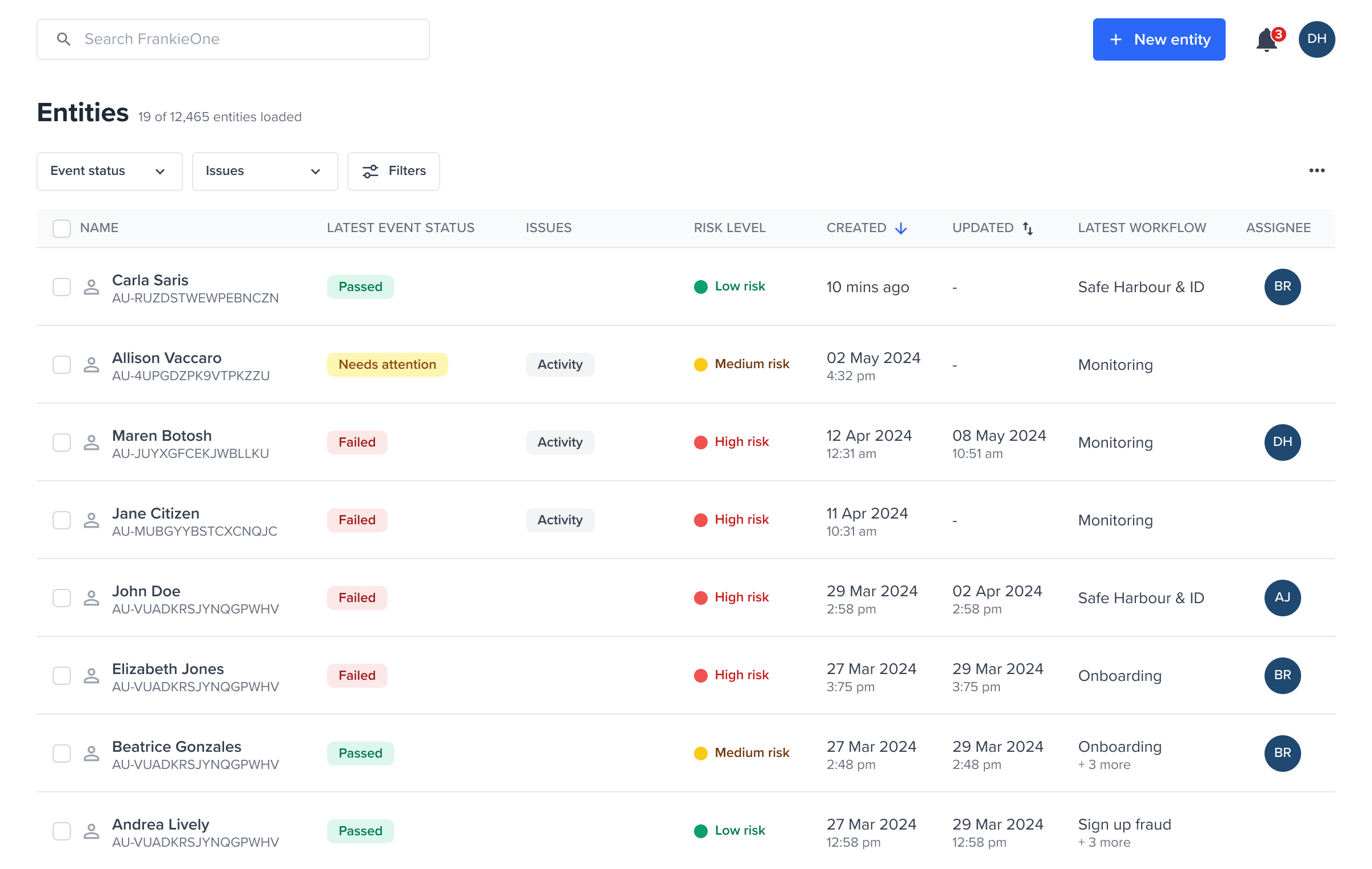 Entities flagged with issue Activity
| Issue Type | Description |
| --------------- | ----------------------------------------------------------------------------------------------------------------------------------------------------------------------------------------------------------------------------------------------------- |
| ACTIVITY\_AML | An issue identified during an Anti-Money Laundering (AML) check within the activity monitoring workflow. This could be due to potentially high-risk financial behavior patterns detected during transaction or activity monitoring. |
| ACTIVITY\_FRAUD | An issue identified as potential fraud during the transaction and activity monitoring workflow. This can stem from indicators of fraudulent intent related to financial activities. |
| ACTIVITY\_EVENT | An issue identified as potential fraud during the activity monitoring workflow. This can stem from indicators that are non-transactional or behavioral by nature such as device anomalies, or unusual login patterns or interactions with the device. |
Each issue corresponds to an alert (a [process result](/v2/docs/tm/concepts-and-definitions)) raised against the activity. Once you have reviewed these, set a manual outcome or apply tags — see [Classifying activities and alerts](/v2/docs/tm/classifying-activities-and-alerts).
### Workflow step results
The `workflowStepResults` array is a log of each step in the workflow, explaining how the overall `status` was reached. Each object in this array corresponds to a step configured in your monitoring workflow (for example, AML check, device check, transaction velocity check).
**API** **`stepName`**: The name of the specific step that was executed
* `ACTIVITY_AML` - a step dedicated to performing AML checks on the activity.
* `ACTIVITY_FRAUD` - a step dedicated to performing fraud checks on the activity.
**Portal**
Entities flagged with issue Activity
| Issue Type | Description |
| --------------- | ----------------------------------------------------------------------------------------------------------------------------------------------------------------------------------------------------------------------------------------------------- |
| ACTIVITY\_AML | An issue identified during an Anti-Money Laundering (AML) check within the activity monitoring workflow. This could be due to potentially high-risk financial behavior patterns detected during transaction or activity monitoring. |
| ACTIVITY\_FRAUD | An issue identified as potential fraud during the transaction and activity monitoring workflow. This can stem from indicators of fraudulent intent related to financial activities. |
| ACTIVITY\_EVENT | An issue identified as potential fraud during the activity monitoring workflow. This can stem from indicators that are non-transactional or behavioral by nature such as device anomalies, or unusual login patterns or interactions with the device. |
Each issue corresponds to an alert (a [process result](/v2/docs/tm/concepts-and-definitions)) raised against the activity. Once you have reviewed these, set a manual outcome or apply tags — see [Classifying activities and alerts](/v2/docs/tm/classifying-activities-and-alerts).
### Workflow step results
The `workflowStepResults` array is a log of each step in the workflow, explaining how the overall `status` was reached. Each object in this array corresponds to a step configured in your monitoring workflow (for example, AML check, device check, transaction velocity check).
**API** **`stepName`**: The name of the specific step that was executed
* `ACTIVITY_AML` - a step dedicated to performing AML checks on the activity.
* `ACTIVITY_FRAUD` - a step dedicated to performing fraud checks on the activity.
**Portal**  stepName: `ACTIVITY_AML` is available
 stepName: `ACTIVITY_FRAUD` is available
**API** `result`: The outcome of this specific step. For monitoring, this can be:
* `CLEAR` (step passed): The step completed successfully without identifying any issues.
* `HIT` (step identified an issue): The step identified a potential issue or match according to its configured rules.
* `ERROR` (technical issue with the step): The step encountered an unrecoverable technical error during its execution. **Portal**
stepName: `ACTIVITY_FRAUD` is available
**API** `result`: The outcome of this specific step. For monitoring, this can be:
* `CLEAR` (step passed): The step completed successfully without identifying any issues.
* `HIT` (step identified an issue): The step identified a potential issue or match according to its configured rules.
* `ERROR` (technical issue with the step): The step encountered an unrecoverable technical error during its execution. **Portal** 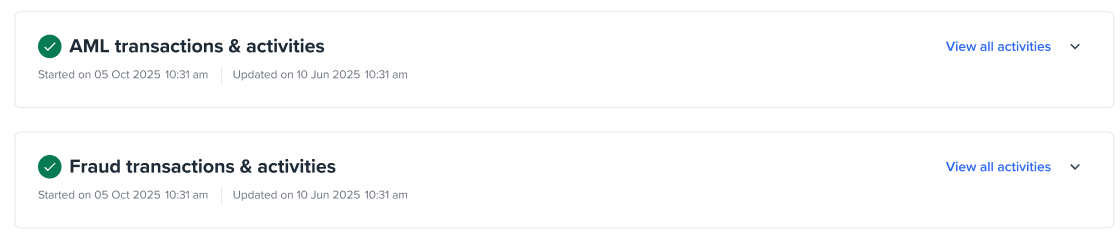 `HIT`, Expanded view
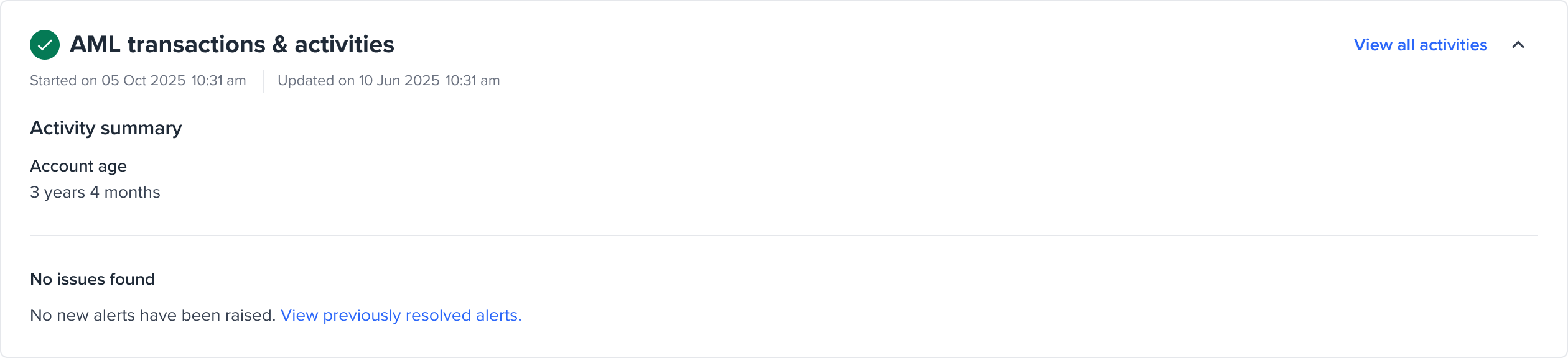 `CLEAR`, Expanded view
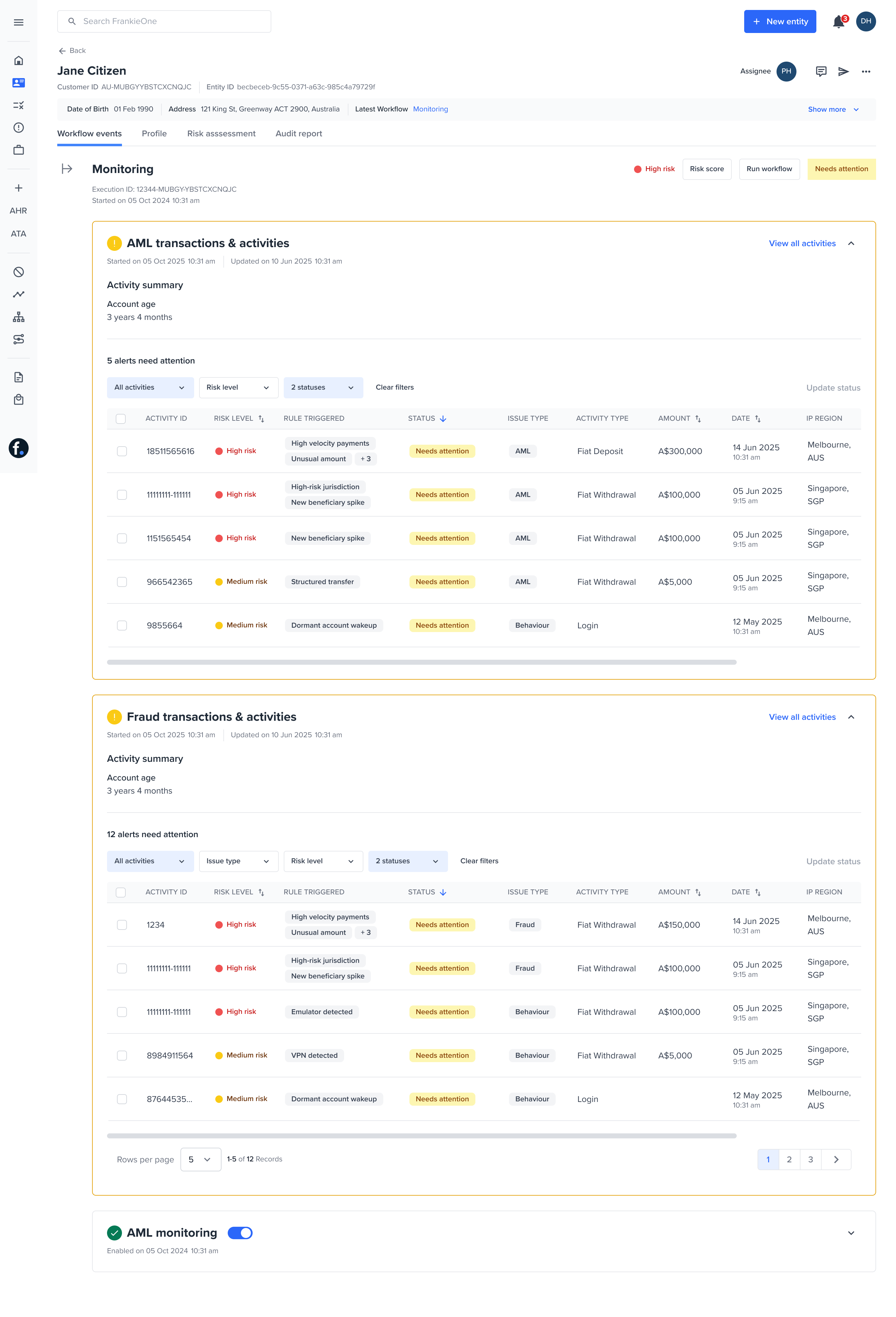 `HIT` Expanded view
**API** **`summary`**: A concise, human-readable summary of the step’s outcome.
```json theme={null}
{
"amlActivityCount": 3,
"amlActivityTruePositiveCount": 0,
"eventActivityCount": 0,
"eventActivityTruePositiveCount": 0,
"fraudActivityCount": 0,
"fraudActivityTruePositiveCount": 0,
"stepName": "ACTIVITY_MONITOR"
}
```
**Portal**
Not displayed in Portal
**API** **`risk`**: The risk assessment specific to this step, including the score it contributed to the overall `workflowRiskScore` and `workflowRiskLevel`.
### Portal
`HIT` Expanded view
**API** **`summary`**: A concise, human-readable summary of the step’s outcome.
```json theme={null}
{
"amlActivityCount": 3,
"amlActivityTruePositiveCount": 0,
"eventActivityCount": 0,
"eventActivityTruePositiveCount": 0,
"fraudActivityCount": 0,
"fraudActivityTruePositiveCount": 0,
"stepName": "ACTIVITY_MONITOR"
}
```
**Portal**
Not displayed in Portal
**API** **`risk`**: The risk assessment specific to this step, including the score it contributed to the overall `workflowRiskScore` and `workflowRiskLevel`.
### Portal
 ### Activity alerts
On evaluations each activity will have activity results, but only activity results that meet the risk threshold to trigger an alert are represented as a [Process Result (PRO)](/v2/docs/tm/concepts-and-definitions). These are the alerts that require action.
For granular detail, look inside a `workflowStepResult` at its `processResults` array. A [**Process Result** (PRO)](/v2/docs/tm/concepts-and-definitions) is the raw evidence from a single check against a single data source (for example, a specific device fingerprint provider, an AML watchlist provider).
* **`processResultId`**: A unique identifier for this specific piece of evidence.
* `systemStatus`: The lifecycle status of this PRO (for example, VALID, STALE, MARKED\_INVALID). A STALE status means the underlying entity data has changed since this check was performed and it might need re-evaluation. Only the alerts with a systemStatus: VALID will be displayed in Portal.
* **`class`**: The high-level category of the check performed, for Transaction and Activity Monitoring, it’s `ACTIVITY`.
* **`objectType`**: The specific data element that was checked (for example, INDIVIDUAL, TRANSACTION, DEVICE).
* **`result`**: The outcome of this specific PRO (for example, MATCH for a hit, CLEAR for no hit, CREATED for data fetched).
* **`manualStatus`**: If an operator has manually reviewed this specific PRO, their conclusion (for example, `TRUE_POSITIVE`, `FALSE_POSITIVE`, `IN_REVIEW`) is recorded here. This is directly linked to the statuses described in [Resolve alerts and re-evaluate](/v2/docs/tm/implementation-resolve-reevaluate).
* **`providerResult`**: An object containing details from the downstream data provider, including the source of the data.
* **`supplementaryData`**: A rich, context-specific object containing detailed metrics or extracted data, like AML hits details or specific device intelligence data. This is where most of the alerts or rows in the table gets its details as seen in the Portal.
## Next step
You have interpreted the workflow result and identified the alerts raised by the activity. Next, record an outcome for each alert.
* [Classifying activities and alerts](/v2/docs/tm/classifying-activities-and-alerts) — set an alert's manual status (for example, `FALSE_POSITIVE`) or apply tags to an activity, via API.
* [Resolve alerts and re-evaluate](/v2/docs/tm/implementation-resolve-reevaluate) — after resolving every alert, re-run the workflow so the entity's status is updated.
### Activity alerts
On evaluations each activity will have activity results, but only activity results that meet the risk threshold to trigger an alert are represented as a [Process Result (PRO)](/v2/docs/tm/concepts-and-definitions). These are the alerts that require action.
For granular detail, look inside a `workflowStepResult` at its `processResults` array. A [**Process Result** (PRO)](/v2/docs/tm/concepts-and-definitions) is the raw evidence from a single check against a single data source (for example, a specific device fingerprint provider, an AML watchlist provider).
* **`processResultId`**: A unique identifier for this specific piece of evidence.
* `systemStatus`: The lifecycle status of this PRO (for example, VALID, STALE, MARKED\_INVALID). A STALE status means the underlying entity data has changed since this check was performed and it might need re-evaluation. Only the alerts with a systemStatus: VALID will be displayed in Portal.
* **`class`**: The high-level category of the check performed, for Transaction and Activity Monitoring, it’s `ACTIVITY`.
* **`objectType`**: The specific data element that was checked (for example, INDIVIDUAL, TRANSACTION, DEVICE).
* **`result`**: The outcome of this specific PRO (for example, MATCH for a hit, CLEAR for no hit, CREATED for data fetched).
* **`manualStatus`**: If an operator has manually reviewed this specific PRO, their conclusion (for example, `TRUE_POSITIVE`, `FALSE_POSITIVE`, `IN_REVIEW`) is recorded here. This is directly linked to the statuses described in [Resolve alerts and re-evaluate](/v2/docs/tm/implementation-resolve-reevaluate).
* **`providerResult`**: An object containing details from the downstream data provider, including the source of the data.
* **`supplementaryData`**: A rich, context-specific object containing detailed metrics or extracted data, like AML hits details or specific device intelligence data. This is where most of the alerts or rows in the table gets its details as seen in the Portal.
## Next step
You have interpreted the workflow result and identified the alerts raised by the activity. Next, record an outcome for each alert.
* [Classifying activities and alerts](/v2/docs/tm/classifying-activities-and-alerts) — set an alert's manual status (for example, `FALSE_POSITIVE`) or apply tags to an activity, via API.
* [Resolve alerts and re-evaluate](/v2/docs/tm/implementation-resolve-reevaluate) — after resolving every alert, re-run the workflow so the entity's status is updated.