

Critical Implementation Notes
Before implementing Smart UI, ensure you handle the completion events properly to avoid users getting stuck on the “sit tight” page.
Handling Completion Events
The Smart UI emits specific events when the flow completes:FF_CHECK_RESULTFF_EXTERNAL_IDV_CHECK_COMPLETED
Event Handler Example
If you don’t handle these events, users will see either:
- A “sit tight” page (for passed checks)
- An “Oh No” page (for failed checks)
Common Issues and Solutions
Character Encoding Issues
Character Encoding Issues
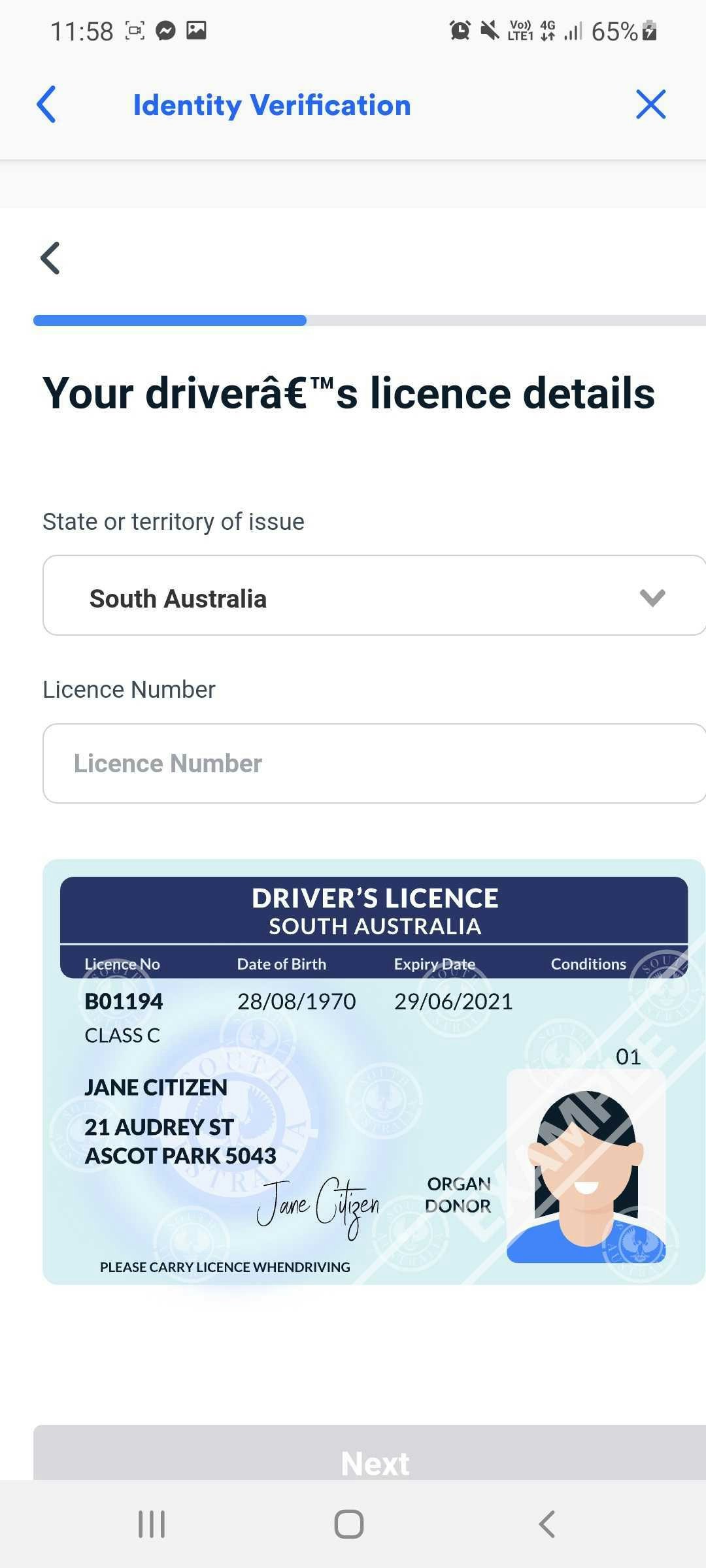
Example of incorrect character rendering
Required Meta Tag
Browser Compatibility
Browser Compatibility
Smart UI is compatible with all ES5-compliant browsers.
Browser Compatibility List
View full browser compatibility table
Google API Key Security
Google API Key Security
1
Secure your API key
Restrict your Google API key to Frankie’s IP addresses2
Find Frankie’s IPs
Access the Outbound IP Address List3
Configure Restrictions
Follow Google’s API key security guideDevice Support and Limitations
Current minimum viewport width: 320-330 pixels
Future updates will improve responsiveness for smaller devices.
Address Collection Logic
Users are only prompted for past addresses when their initial address doesn’t return results.