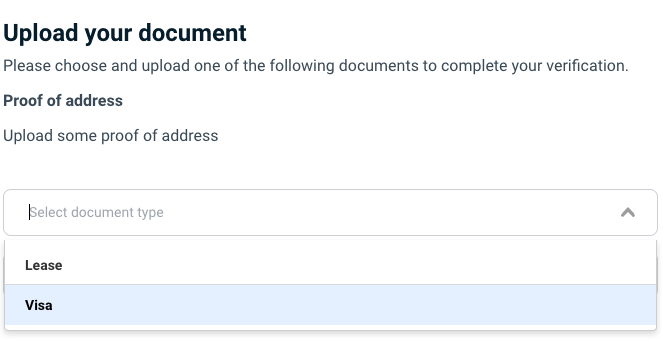
- Custom identity documents.
- Custom supporting documents, such as lease agreements or utility bills.
Verifying custom identity documents
Smart UI supports the following types of identity documents:- Passport
- Drivers License
- National ID
- National Health ID
JSON
Verifying supporting documents
Occasionally you may want to verify additional non-identity documents as part of your user onboarding journey. Such documents may include birth certificates, bills or bank statements. You can request the user upload these kinds of documents as attachments during the Smart UI onboarding process, and manually verify them in the FrankieOne portal.
How it works
- When initialising Smart UI, you include the
documentUploadsobject in theconfigurationobject. - Smart UI inserts a step in the flow to request the configured documents as file attachments from the user.
- Smart UI uploads the file attachments to the FrankieOne platform when the user submits their information.
- FrankieOne marks the individual as Needs Attention.
- You view the supporting document file attachments in the Portal and manually verify them before determining whether the individual should be onboarded.
Configuration
You can configure- The number of supporting documents requested.
- The allowable types of those supporting documents.
- The text displayed by Smart UI when requesting supporting documents.
The documentUploads object
The documentUploads object contains the following properties:
The documentUploads.uploads object
Each documentUploads.uploads object has the following properties:
Note: type “ATTESTATION” can’t be used as a supporting document.
Customising text displayed in Smart UI for supporting documents
The text displayed by Smart UI can be customised by including thephrases.document_uploads object in the configuration object.
- title - title of page e.g. Document Uploads
- guide_text - description at top of page, can be a string or HTML e.g.
- select_placeholder - text inside the upload component e.g. “Upload file“
- upload_cta - text inside the ‘Next’ button at the bottom of the page e.g. “Next”
- upload_success - text that shows in green when the upload is successful e.g. “Upload Success“
- generic_error - text that displays generic file upload failure message
- unsupported_file_type - text that displays as an error if user tries to upload an unsupported file type
- summary_title - text displayed as a header for the document upload on the summary screen
Example configuration
The following Smart UI configuration will request one documents from the user, which can be of type Lease or VISA.JavaScript