

Document Requirements
Different identity documents have different image requirements:Australian Driver’s License
- Requires both front and back images
- Must submit front image first, then back image
- Both images are mandatory for complete processing
Passport (Any Country)
- Requires only the main identity page
- Single image submission is sufficient
- Status will be COMPLETE_OCR after successful processing
Implementation Guide
1
Step 1: Create Entity
First, create an entity to store the OCR results
2
Step 2: Submit First Image
3
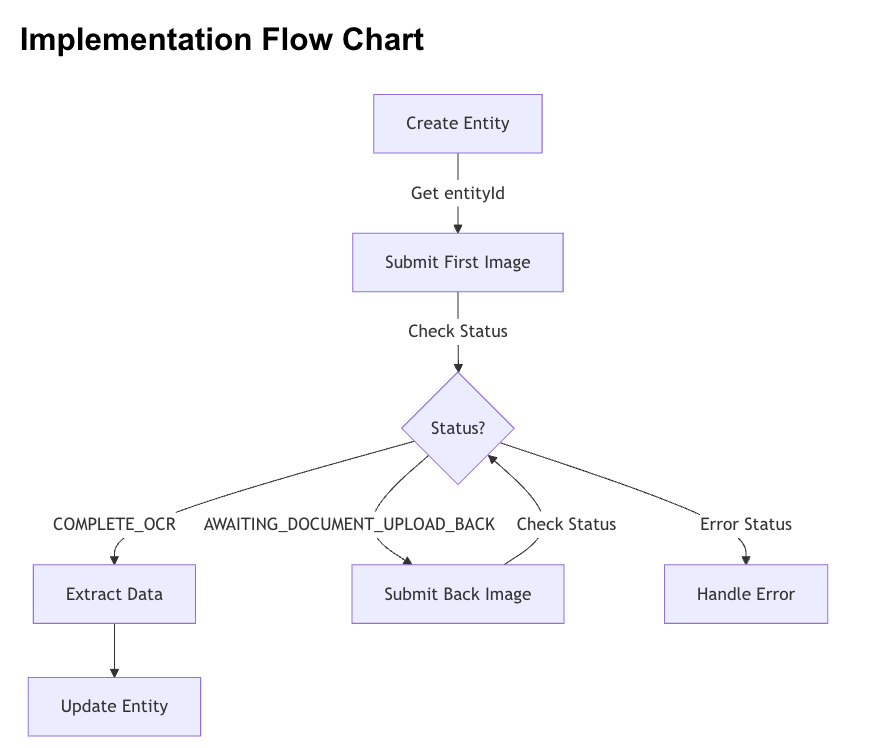
Step 3: Check Response Status
After submitting the first image, check the response status of the data
returned in step 2 to determine next steps:
Status Handling
-
If status is
COMPLETE_OCR: I. Processing is complete II. Proceed to Step 5 (Extract Data) -
If status is
AWAITING_DOCUMENT_UPLOAD_BACK: I. Document requires back image (Australian Driver’s License) II. Store the documentId from the response Proceed to Step 4 (Submit Back Image) -
If status indicates an error:
I.
DOCUMENT_INVALID_INCORRECT_FILE_FORMAT: Check file format II.DOCUMENT_INVALID_EXCEEDED_SIZE_LIMIT: ReKuyaduce image size III.AWAITING_DOCUMENT_UPLOAD_INVALID_TYPE: Verify document type IV.AWAITING_DOCUMENT_UPLOAD_FAILED_OCR: Improve image quality
4
Step 4: Submit Back Image (If Required)
Only required for Australian Driver’s License when status is
AWAITING_DOCUMENT_UPLOAD_BACK.5
Step 5: Extract OCR Data
Once status is COMPLETE_OCR, extract the relevant data from the
response: (parts of this response has been truncated for brevity)
6
Step 6: Update Entity
Using the above action will return the OCR extracted values as part of the
response but will NOT update the values on the document.
- Call the
updateAndVerifyEntityendpoint to provide the extracted data and trigger checks, specifically:
Important Notes
-
Document Type Detection
- The API automatically detects the document type.
- Response status will indicate if more images are needed.
- Always check the status before proceeding.
-
Data quality
- Check
ocr_scanned_mismatchfor discrepancies. - Monitor confidence scores (for example,
first_name_ocr_data_confidence). - Higher confidence scores indicate better data quality.
- Check
-
Adress Handling
ocr_scanned_address_longis only reliable for Australian documents.- For non-Australian documents, collect address manually.
-
Error Handling
- Implement retry logic for provider offline errors.
- Validate image quality before submission.
- Store both
entityIdanddocumentIdfor error recovery.