

Driver’s Licences
This guide explains how to verify Australian driver’s licences across different states and territories. Required FieldsBasic Information
Basic Information
- Name: Given/primary and family names (exactly as shown on licence)
- Date of Birth: Format:
YYYY-MM-DD - ID Type: Must be
DRIVERS_LICENCE - Country: Must be
AUS
State-Specific Fields
State-Specific Fields
- State: Use one of:
VIC,NSW,ACT,WA,SA,NT,QLD,TAS - Licence Number: Provided in
idNumberfield - Card Number: Provided in
extraDatawith:
- Licence Number Formats
- Card Number Formats
Victorian Licence Verification - Important Update
As of July 1st, 2023, Victorian card number verification has special handling:- For compromised licenses (e.g., Optus breach): DVS verifies current card number
- For non-compromised licenses: Card number isn’t verified (can match license number)
- Always capture card numbers as historical compromises may affect verification
- Direct DVS users will see audit log entry: “Successful Match - Card Number hasn’t been checked”
entityResult.nameCheck.checkResult[x].checkProcessResultsAustralian Capital Territory (ACT)
Australian Capital Territory (ACT)
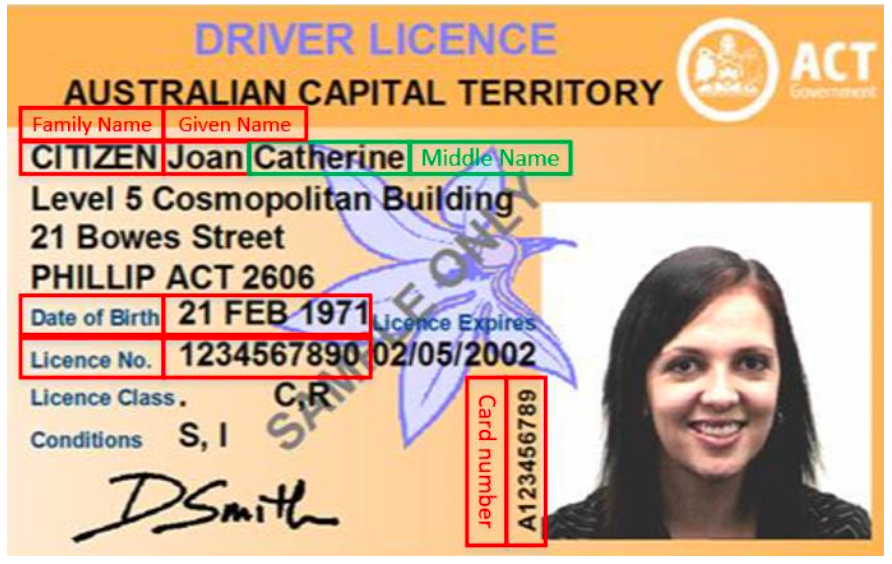
Australian Capital Territory Driver Licence sample - front
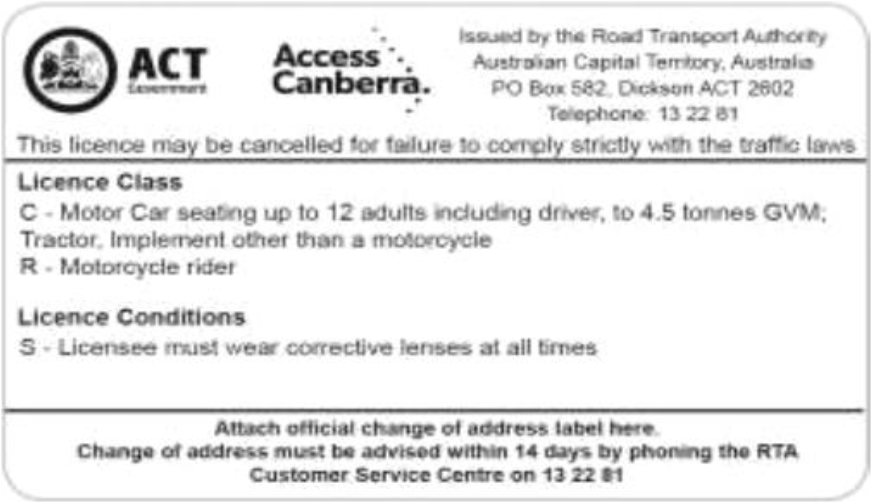
Australian Capital Territory Driver Licence sample - back
Northern Territory (NT)
Northern Territory (NT)
- Post Nov 2020
- Pre Nov 2020
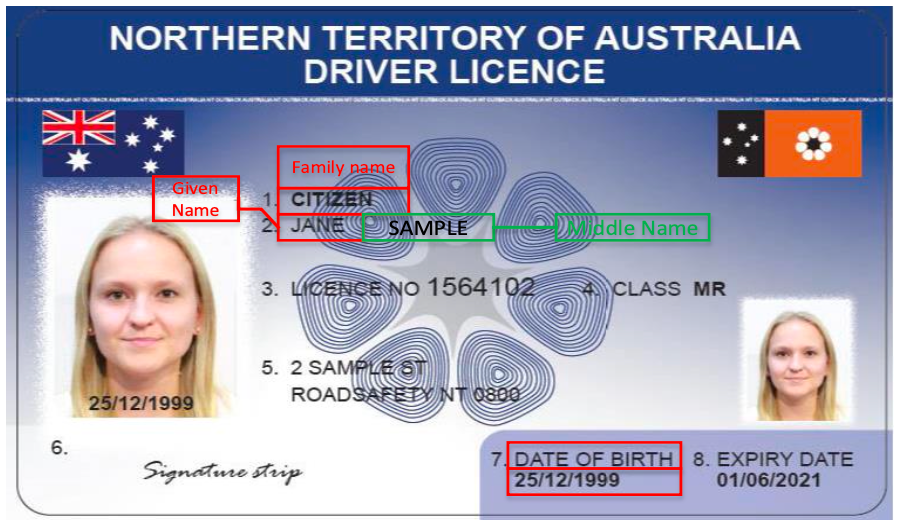
Northern Territory Driver Licence - post 1 November 2020 sample - front
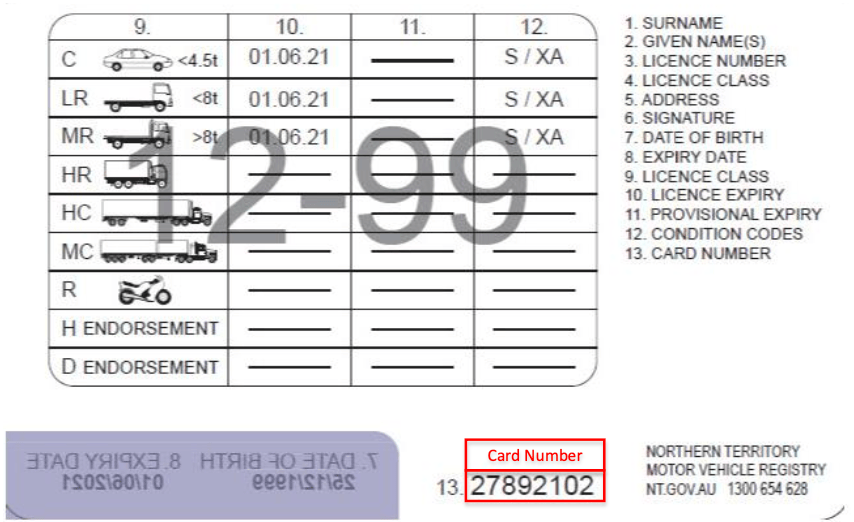
Northern Territory Driver Licence - post 1 November 2020 sample - back
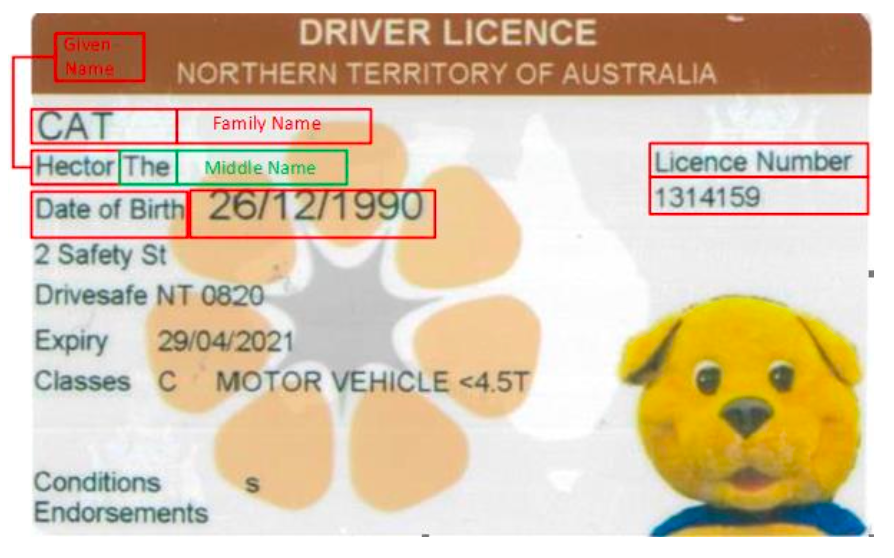
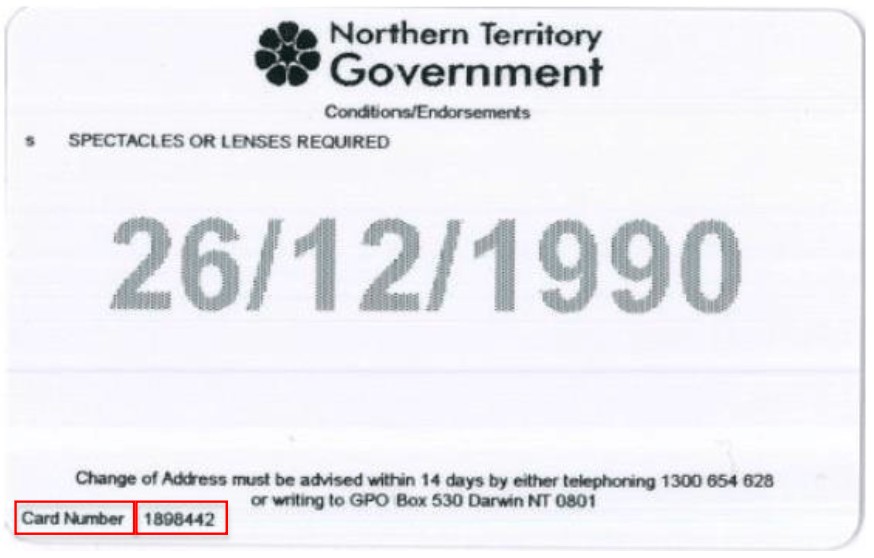
Queensland (QLD)
Queensland (QLD)
- Post June 2019
- Pre June 2019
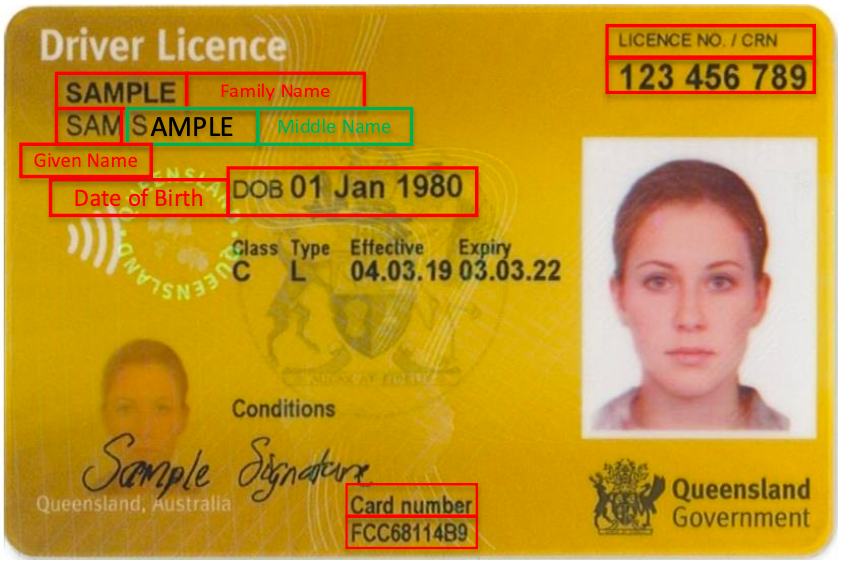
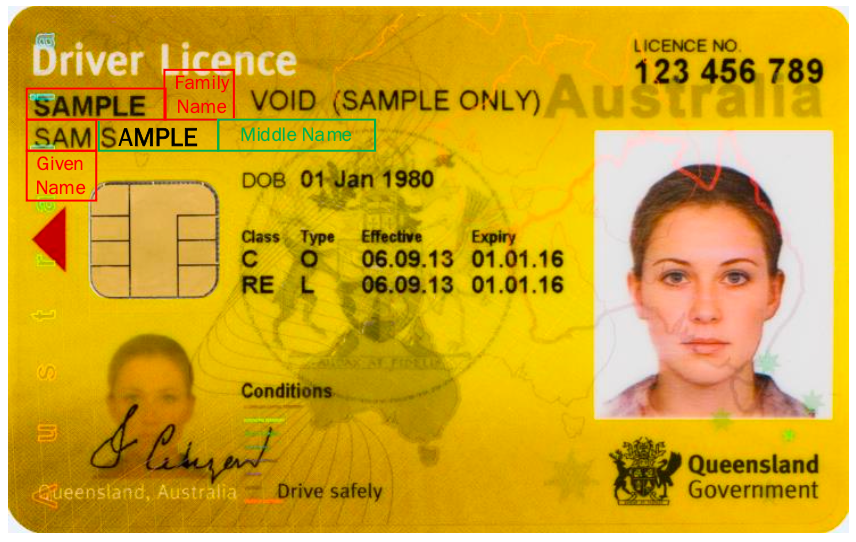
Queensland Driver Licence – post 12 June 2019 sample - front
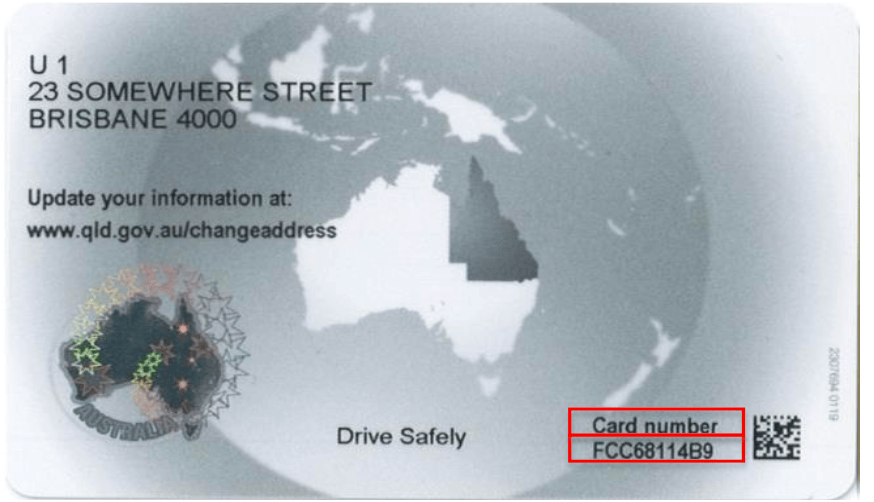
Queensland Driver Licence sample - back
New South Wales (NSW)
New South Wales (NSW)
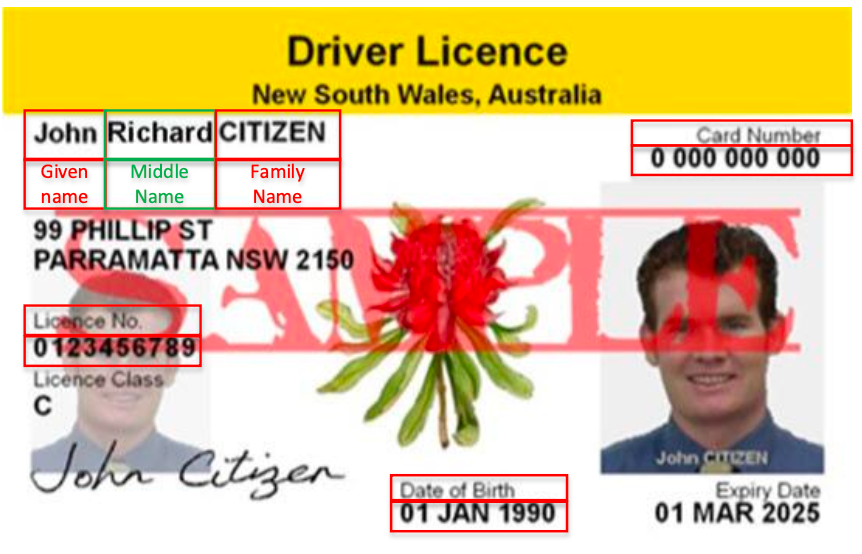
New South Wales Driver Licence sample - front
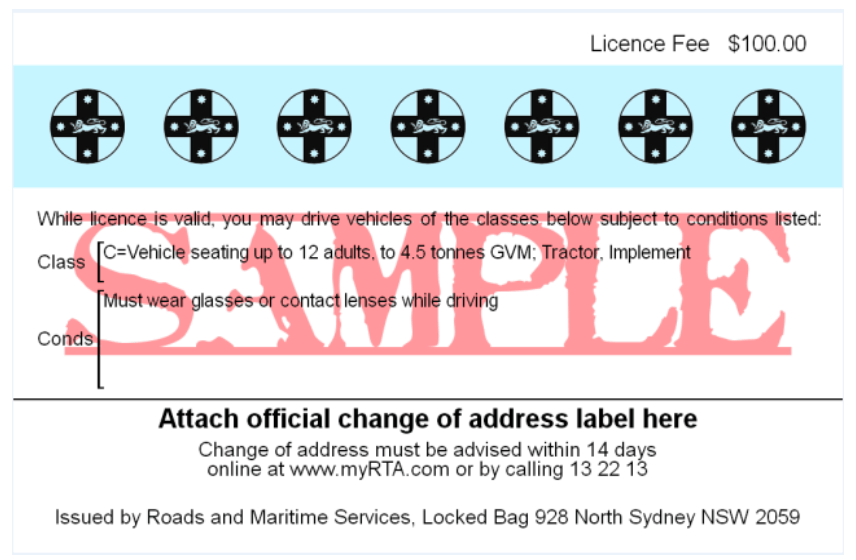
New South Wales Driver Licence sample - back
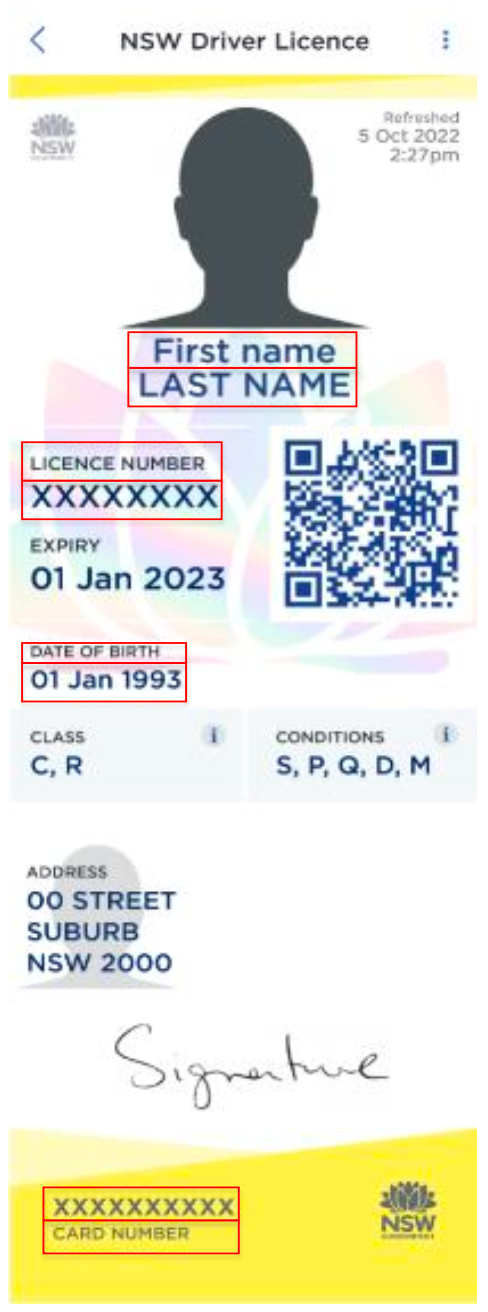
New South Wales Digital Driver Licence sample
South Australia (SA)
South Australia (SA)
- Physical License
- Digital License
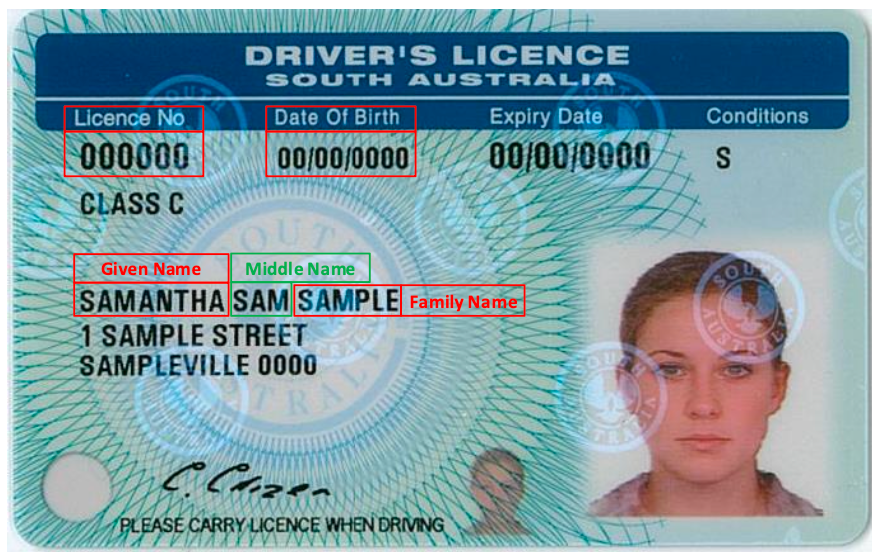
South Australia Driver Licence sample - front
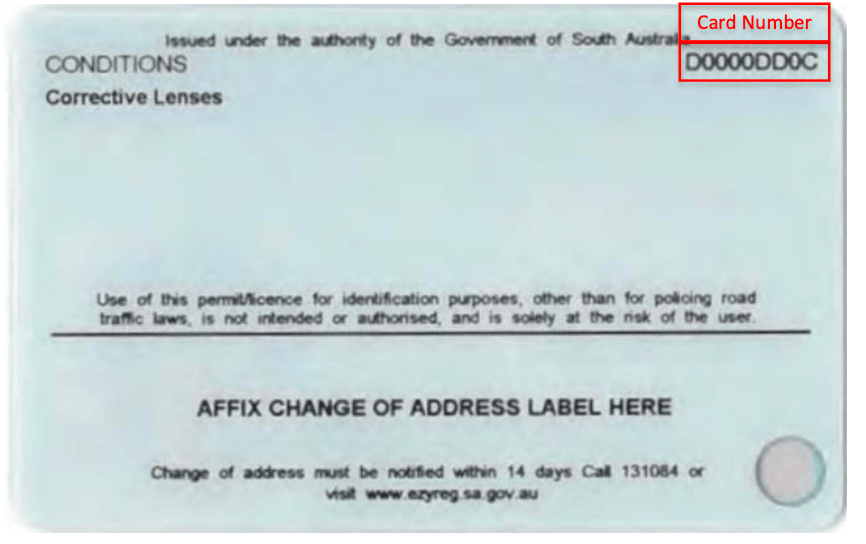
South Australia Driver Licence sample - back
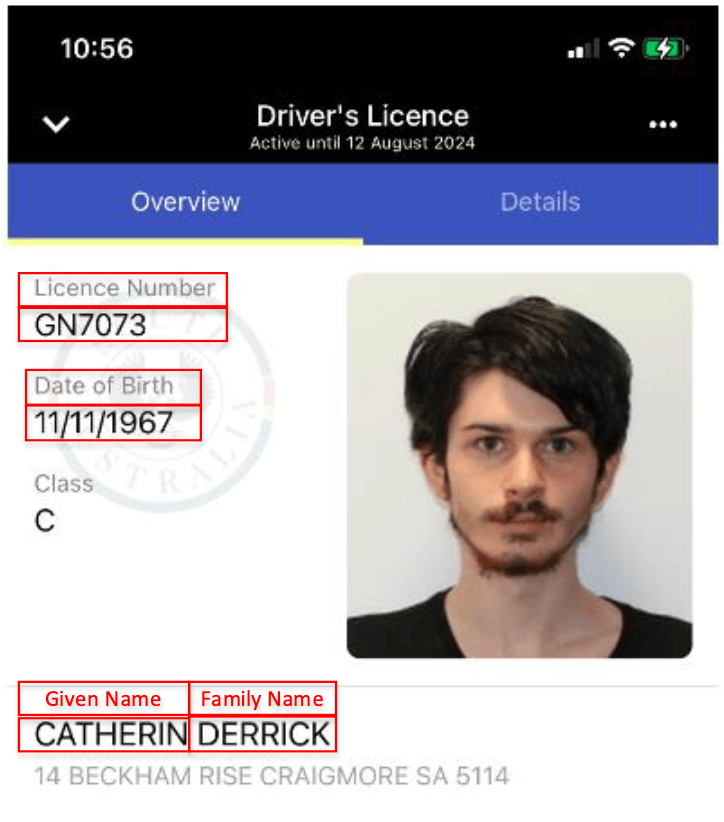
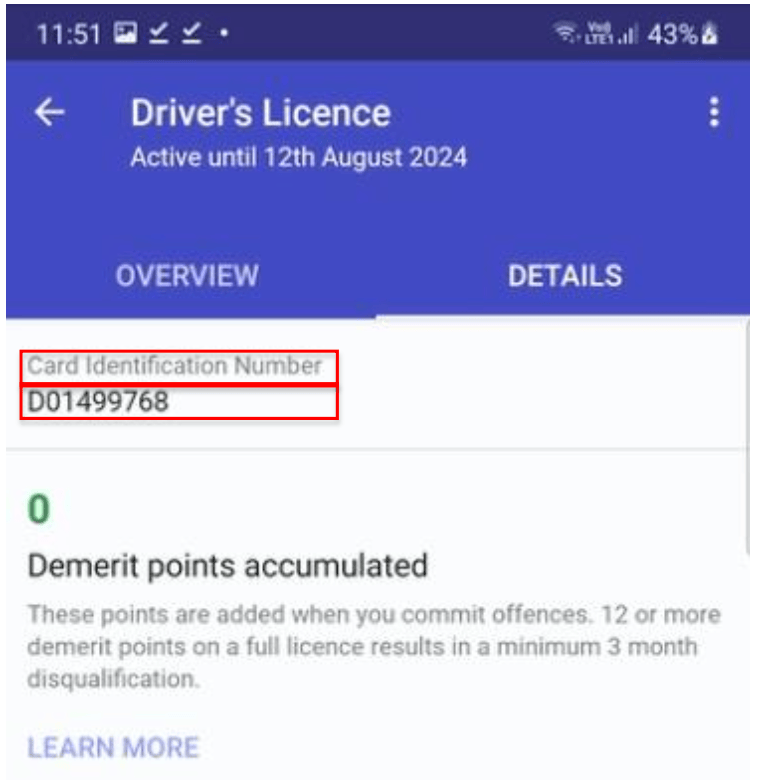
Tasmania (TAS)
Tasmania (TAS)
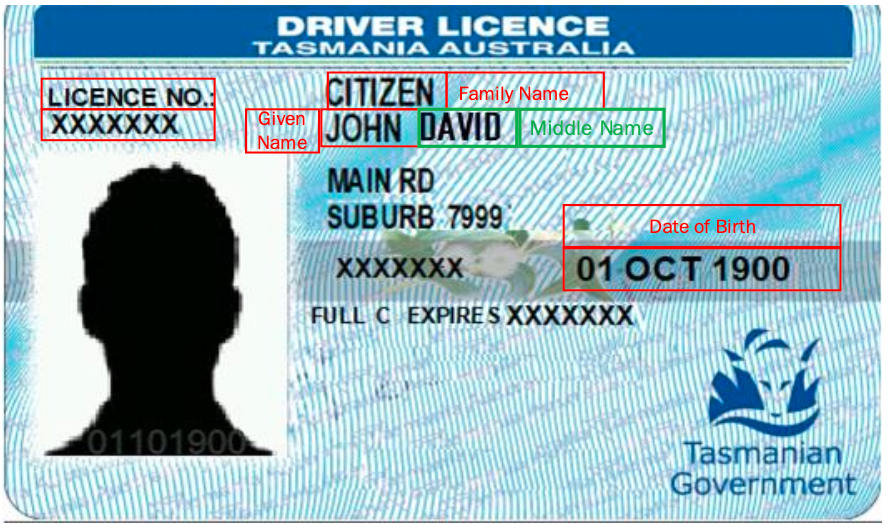
Tasmania Driver Licence sample - front
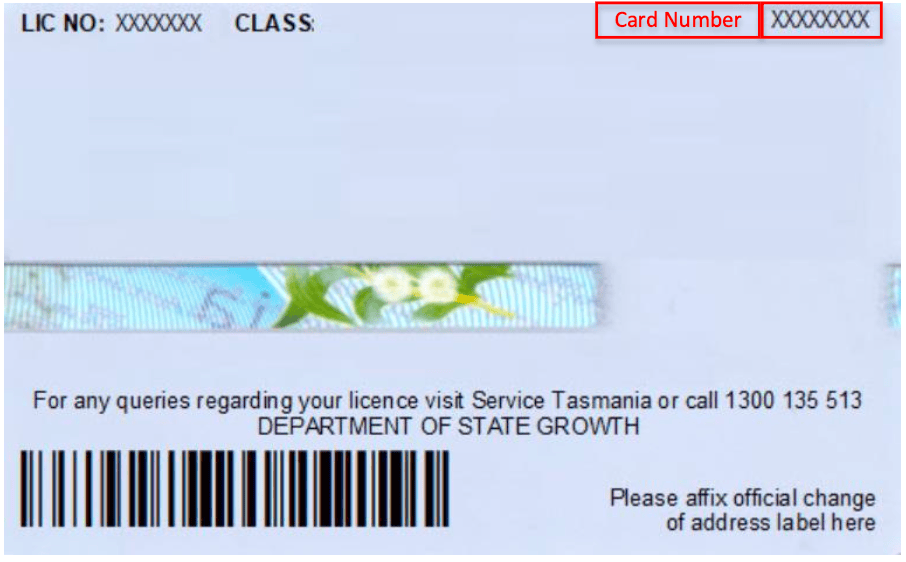
Tasmania Driver Licence sample - back
Victoria (VIC)
Victoria (VIC)
- Post Nov 2022
- Pre Nov 2022
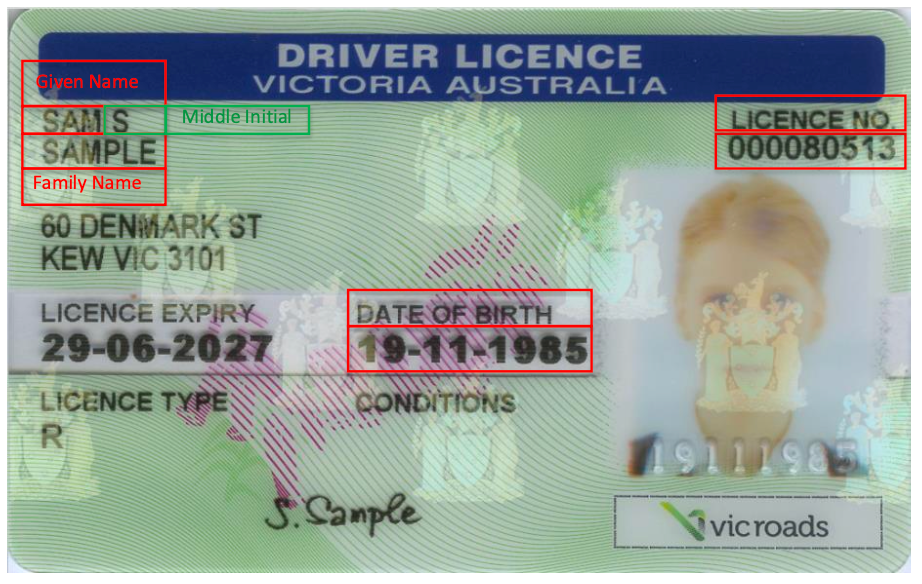
Victoria Driver Licence – post 7 November 2022 sample - front
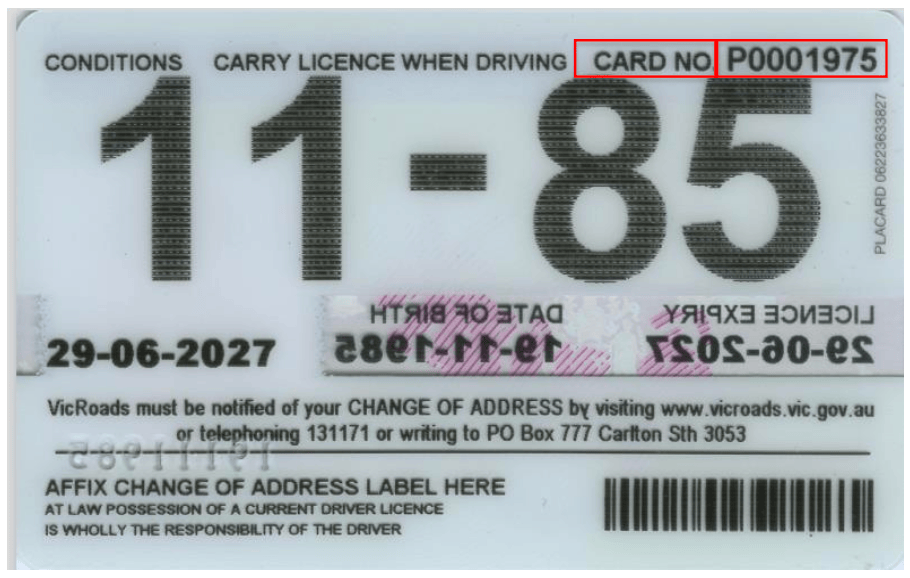
Victoria Driver Licence - post 7 November 2022 sample - back
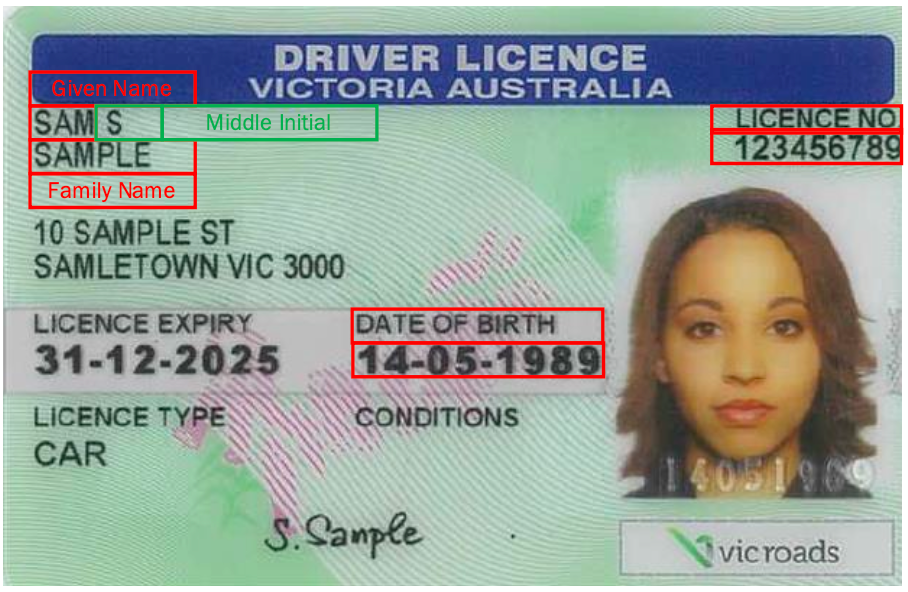
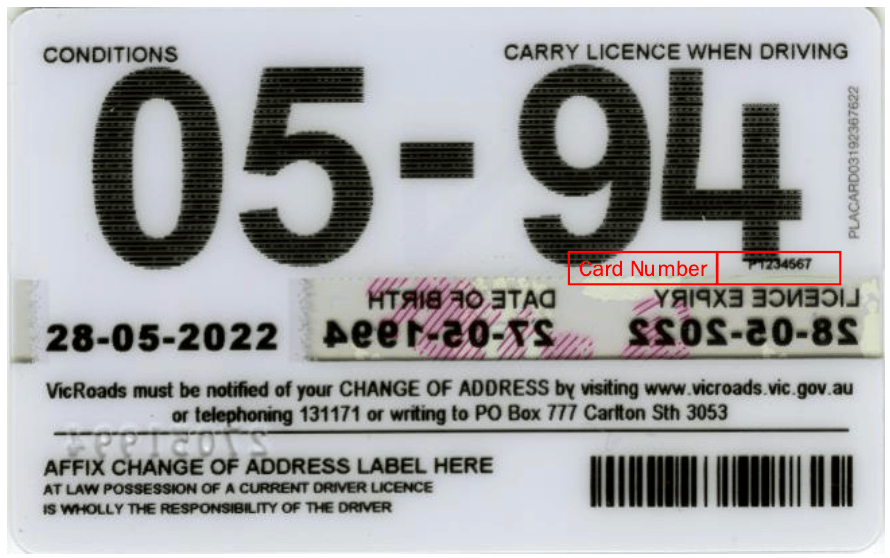
Western Australia (WA)
Western Australia (WA)
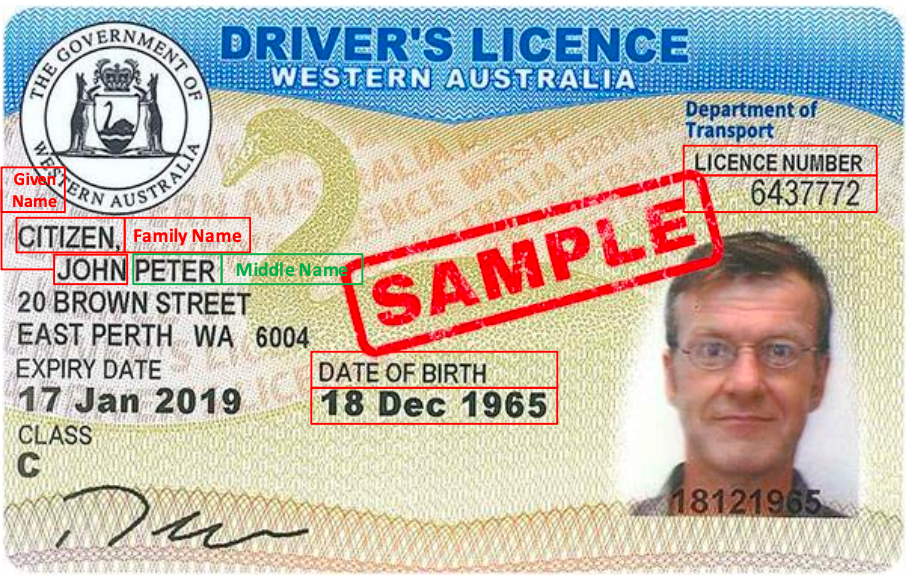
Western Australia Driver Licence sample - front
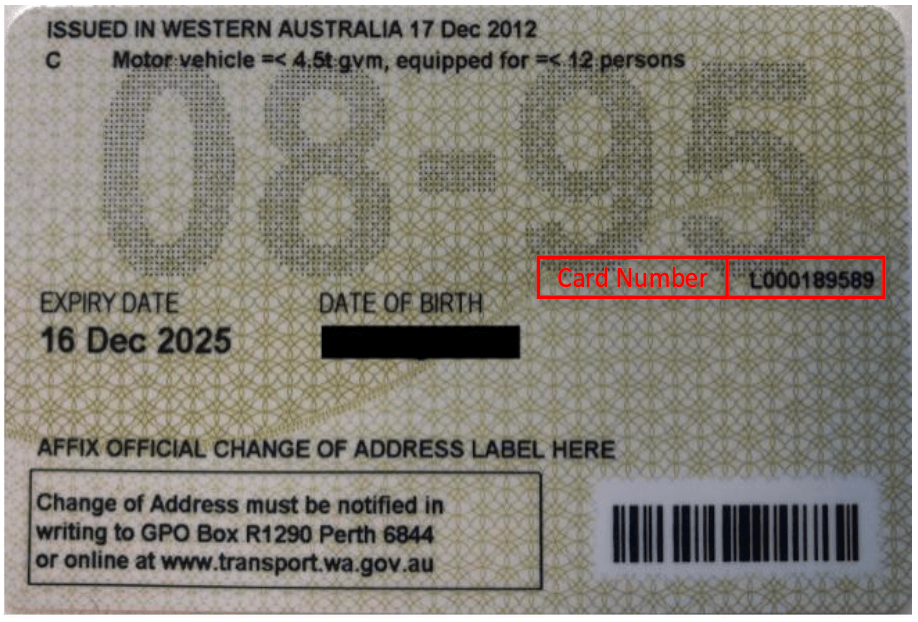
Western Australia Driver Licence sample - back
Australian Passports & Visas
Passport Verification
Visa Verification
Personal Information
Personal Information
- Given name(s)
- Middle name(s)
- Family name(s)
Date of Birth
Date of Birth
YYYY-MM-DD1990-07-21 for July 21, 1990Document Details
Document Details
- ID Type: Either
PASSPORTorVISA(both are accepted) - Country Code: ISO-3166-alpha3 country code of passport issuance (e.g. Aus)
- Document Number: Passport number in
idNumberfield
Name Matching
Name Matching
- Capitalization
- Special characters
- Spaces
- Diacritical marks
Country Codes
Country Codes
- For Australian passports: Use
AUS - For visas: Use the ISO-3166-alpha3 code of the passport’s issuing country
Document Numbers
Document Numbers
Medicare Cards
Basic Information
Basic Information
- Name: Full name as displayed on the card (given name, middle initial, family name)
- Date of Birth: Must be in
YYYY-MM-DDformat - Country: Must be
AUS
Card-Specific Details
Card-Specific Details
- Card Number (
idNumber): The complete Medicare card number - Card Color (
idSubType): One of the following: -G- Green -B- Blue -Y- Yellow - Expiry Date (
idExpiry): FormatYYYY-MM-DD
-01 for
the day.Additional Data Fields
Additional Data Fields
extraData array:- Reference Number
- Middle Name/Initial (Optional)
- Card type is specified correctly (G/B/Y)
- Full name matches card exactly
- Date formats follow YYYY-MM-DD
- Reference number is between 1 and 5
- Country is set to “AUS”
- Middle initial is included if present on card
Name Change Certificates
Basic Information
Basic Information
- New Name: Must match certificate exactly
- Given name(s)
- Middle name(s)
- Family name(s)
- Date of Birth: Format:
YYYY-MM-DD - ID Type: Must be
NAME_CHANGE - Country: Must be
AUS
Certificate Details
Certificate Details
- Registration Number: Provided in
idNumberfield - Registration State: Use
regionfield with one of: -VIC,NSW,ACT,WA,SANT,QLD,TAS - Certificate Number: Required in
extraData
Date Information
Date Information
YYYY-MM-DD format:- Date of Print
- Date of Registration
Original Name Details
Original Name Details
- Original family name
- Original first given name
- Original other given name(s)
- Certificate Details
- Date Fields
- Original Name
extraData 3. Ensure all dates
are in ISO format (YYYY-MM-DD)Birth Certificates
Basic Information
Basic Information
- Name: Must match certificate exactly
- Given name(s)
- Middle name(s)
- Family name(s)
- Date of Birth: Format:
YYYY-MM-DD - ID Type: Must be
BIRTH_CERT - Country: Must be
AUS
Registration Details
Registration Details
- Registration Number: Provided in
idNumberfield - Registration State: Use
regionfield with one of: -VIC,NSW,ACT,WA,SA,NT,QLD,TAS - Registration Date: Can be provided in either: - Full date format:
YYYY-MM-DD- Year only format:YYYY - Registration District: Optional field where applicable
Certificate Information
Certificate Information
- Certificate Number
- Date of Print: Format:
YYYY-MM-DD - Registered Name Details: May differ from current legal name
- Family name
- First given name
- Other given name(s)
- Registration Details
- Certificate Details
- Registered Name
- All available registration details
- Exact name matching as shown on certificate
- Correct date formats
Registration Requirements
The requirements for registration number and date matching vary based on:- Certificate’s issuing State/Territory
- Year of issue
- Registry’s historical record format
- Collect all available fields, even optional ones
- Pay special attention to historical date formats
- Note any discrepancies between registered name and current legal name
- Verify registration district spelling where applicable
Citizenship Certificates
Basic Information
Basic Information
- Name: Must match certificate exactly
- Given name(s)
- Middle name(s)
- Family name(s)
- Date of Birth: Format:
YYYY-MM-DD - ID Type: Must be
CITIZENSHIP - Country: Must be
AUS
Certificate Details
Certificate Details
- Stock Number: Provided in
idNumberfield - Date of Acquisition: When citizenship was granted - Format:
YYYY-MM-DD
Country Information
Country Information
- Primary Country: Original citizenship
- Secondary Country: Additional citizenship
- Acquisition Date
- Country Codes
AUS- AustraliaGBR- United KingdomNZL- New ZealandUSA- United StatesCHN- ChinaIND- India
- Primary country typically represents original citizenship
- Secondary country should be ‘AUS’ for Australian citizenship certificates
- You must provide both country codes to verify successfully
ImmiCard
Basic Information
Basic Information
- Name: Must match ImmiCard exactly
- Given name(s)
- Middle name(s)
- Family name(s)
For single-name individuals, use a hyphen (-) in thegivenNamefield - Date of Birth: Format:
YYYY-MM-DD - ID Type: Must be
IMMIGRATION - Country: Must be
AUS
ImmiCard Details
ImmiCard Details
- ImmiCard Number: Provided in
idNumberfield- Format: Three alpha characters followed by six numeric characters
- Example:
PRE123456 - Letters can be upper or lowercase
Format Requirements
- First 3 characters: Letters (A-Z, case insensitive)
- Last 6 characters: Numbers (0-9)
- Total length: 9 characters
- Example:
PRE123456
- Incorrect ImmiCard number format
- Missing or incorrect name format for single-name individuals
- Incorrect date format (must be YYYY-MM-DD)
Name Handling
When dealing with names on ImmiCards:- Use exact spelling and format as shown on the card
- For single names, use hyphen (-) in given name field
- Include middle names if present on the card 4. Maintain case sensitivity
Address Requirements
While the example includes address information, it’s not required for ImmiCard verification. However, if provided, ensure:- All address components are accurate
- State codes are valid Australian states/territories
- Postal codes match the state/territory
Marriage Certificates
Basic Information
Basic Information
- Name: Either partner’s name as shown on certificate
- Date of Birth: Format:
YYYY-MM-DD - ID Type: Must be
MARRIAGE_CERT - Country: Must be
AUS
Certificate Details
Certificate Details
- Registration Number: Provided in
idNumberfield - Registration State: Use
regionfield with one of:VIC,NSW,ACT,WA,SA,NT,QLD,TAS - Registration Year: Format:
YYYY - Certificate Number
Date Information
Date Information
YYYY-MM-DD format:- Marriage Date
- Date of Print
- Date of Registration
- Traditional Format
- Marriage Equality Format
State-Specific Requirements
Victoria (VIC) has specific requirements for field mapping:- Enter the left-hand column/first row details as Name 2
- This applies regardless of the order on the certificate
- Consult state-specific DVS specifications for other jurisdictions
Marriage Equality Support
Certificates support multiple format combinations:- Traditional: Bride/Groom format
- Modern: Partner 1/Partner 2 format
- Use the appropriate format based on the certificate layout
Best Practices
When verifying marriage certificates:- Check the certificate format before choosing field names
- Ensure all dates are in correct ISO format
- Verify state-specific requirements
- Include all available optional fields
- Match names exactly as shown on certificate