

Quick Start
To make an asynchronous call, simply add this header to your request:By default, all operations are synchronous unless specified otherwise in the
API documentation.
Not all endpoints support asynchronous operations (e.g., GET requests). Check
the specific endpoint documentation for availability.
How Asynchronous Calls Work
1
Initial Request Validation
The API performs basic validation of your request data.
2
Acceptance Response
If validation passes, you’ll receive an
HTTP 202 ACCEPT response containing:- RequestID
- Entity/DocumentID
- CheckID (for check requests)
- Portal link (when applicable)
3
Background Processing
The service processes your request asynchronously and generates a result notification.
4
Webhook Notification
Once processing completes, you’ll receive a webhook notification containing:
- Original RequestID
- Request status summary
5
Result Retrieval
Use the
/retrieve API endpoint to fetch the complete results.Response Structure
When retrieving results, you’ll receive two main components:Original HTTP Response
Original HTTP Response
The HTTP response that would have been returned in a synchronous call.
Response Payload
Response Payload
Contains either: - Success: The result object matching the original function
call - Error: A standard FrankieOne Error Object for non-200 responses
Visual Flow
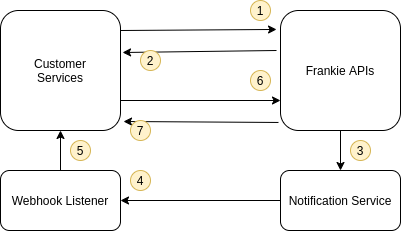
Asynchronous Process Flow
Need help configuring webhooks? Contact our developer support team for
assistance with FrankieOne configuration.