Instead of building your own flow, it’s highly recommended to fork an existing flow from the public sample codes found here .

Solution Overview

Best For

  • Financial services requiring KYC - Telecom providers - Online marketplaces
  • Identity verification services

Key Features

  • Modular architecture - Built-in compliance - Real-time verification - Developer-first design

Architecture
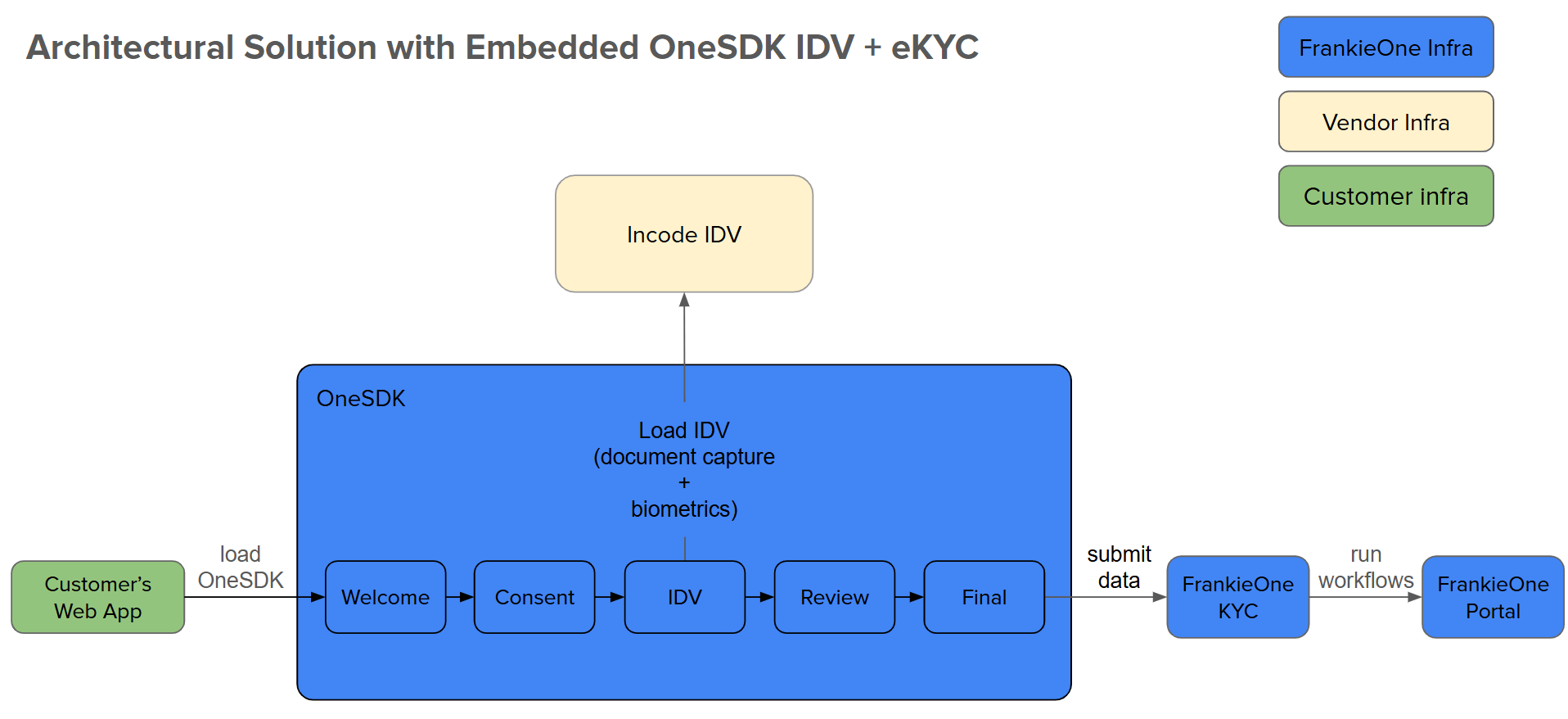
Solution Architecture
  1. Customer Web App: Your application hosting OneSDK
  2. OneSDK: Manages verification UI/UX
  3. Incode IDV: Handles document/biometric capture
  4. FrankieOne KYC: Processes verification checks
  5. Portal: Displays verification results

Implementation Steps

1

Project Setup

npm create vite@latest onesdk-embedded-idv-ekyc -- --template react
2

Configure Environment

Create a .env file with your credentials:
# Authentication
VITE_CUSTOMER_ID=your_customer_id
VITE_API_KEY=your_api_key

# Environment URLs
VITE_FRANKIE_BASE_URL=https://backend.kycaml.uat.frankiefinancial.io # UAT
# VITE_FRANKIE_BASE_URL=https://backend.kycaml.frankiefinancial.io # PROD

VITE_GOOGLE_PLACES_API_KEY=your_google_api_key # Optional: Address Autocomplete

Never commit sensitive credentials to version control. Use environment variables in production.
3

SDK Handler Implementation

'use client'; // Indicates this is a client-side component
import OneSdk from '@frankieone/one-sdk';
import { useEffect, useRef, useState } from 'react';

// Assign environment variables to constants for customer ID, API key, and base URL
const CUSTOMER_ID = import.meta.env.VITE_CUSTOMER_ID;
const API_KEY = import.meta.env.VITE_API_KEY;
const FRANKIE_BASE_URL = import.meta.env.VITE_FRANKIE_BASE_URL;

/**
* OneSDKHandler component initializes and manages the FrankieOne SDK instance.
* @param {Object} config - Configuration object to override default SDK setup.
* @returns {Object} - Returns the SDK instance, error, and loading state.
*/
const OneSDKHandler = ({ config }) => {
// State hooks for managing SDK instance, error, and loading status
console.log('???');
const [oneSDKInstance, setOneSDKInstance] = useState(null);
const [error, setError] = useState(null);
const [loading, setLoading] = useState(false);

// useRef to track SDK initialization and prevent reinitialization
const initializedRef = useRef(false);

/**
* Generates a base64-encoded token for authorization.
* @returns {string} - Base64-encoded authorization string.
*/
const parseAuthToken = () => btoa(`${CUSTOMER_ID}:${API_KEY}`);

/**
* Fetches a session token from the backend by authenticating
* with the FrankieOne API.
* @returns {Object|null} - Returns the session token or null on error.
*/
const generateToken = async () => {
try {
const tokenResponse = await fetch(
  `${FRANKIE_BASE_URL}/auth/v2/machine-session`,
  {
    method: 'POST',
    headers: {
      authorization: `machine ${parseAuthToken()}`,
      'Content-Type': 'application/json',
    },
    body: JSON.stringify({
      permissions: {
        preset: 'one-sdk',
        reference: `demo-${new Date().toISOString()}`, // Optional: Custom reference
      },
    }),
  }
);
return await tokenResponse.json(); // Return the parsed response as JSON
} catch (error) {
setError(error.message); // Capture error message in state
return null; // Return null in case of error
}
};

/**
* Initializes the OneSDK instance using the provided token and configuration.
*/
const generateOneSDKInstance = async () => {
setLoading(true); // Set loading to true while SDK is initializing

// Fetch token from the backend
const tokenSession = await generateToken();
if (!tokenSession) return; // Exit if no valid token is fetched

// Default SDK configuration, can be overridden by the `config` prop
const defaultConfig = {
mode: 'development', // Set mode to development (adjust as needed)
recipe: {
  form: {
    provider: {
      name: 'react',
      googleApiKey: import.meta.env.VITE_GOOGLE_PLACES_API_KEY,
    },
  },
},
};

const SDKConfig = config || defaultConfig; // Use the passed config or the default one

try {
// Initialize the OneSDK with the fetched token and configuration
const oneSDKInit = await OneSdk({
  session: tokenSession,
  ...SDKConfig,
});
setOneSDKInstance(oneSDKInit); // Set SDK instance in state
} catch (error) {
setError(error.message); // Capture initialization errors
} finally {
setLoading(false); // Reset loading state after initialization
}
};

/**
* useEffect hook to initialize the SDK once on component mount.
* Prevents reinitialization on re-render using `initializedRef`.
*/
useEffect(() => {
if (!initializedRef.current) {
generateOneSDKInstance(); // Initialize the SDK instance
initializedRef.current = true; // Set to true to prevent re-initialization
}
}, [config]); // Re-run if the config prop changes

// Return SDK instance, error message (if any), and loading state
return {
oneSDKInstance,
error,
loading,
};
};

export default OneSDKHandler;
4

Launch the Application

npm install
npm run dev

Additional Resources

Troubleshooting

Token Generation Failed
  • Check credentials in .env file
  • Verify network connectivity
  • Ensure correct API endpoint
Component Mount Issues
  • Verify DOM element IDs match
  • Check component event handlers
  • Console log for initialization errors
  • Handle token generation on backend
  • Implement proper error handling
  • Monitor SDK events
  • Test with sample data first