

This guide provides a conceptual overview of OneSDK integration with basic code examples. The code snippets shown are illustrative and need to be adapted into your specific framework and application architecture.
For complete, working examples:
- See our Framework Integration Guides for Angular, React, Vue.js, Next.js and other frameworks
- Visit our GitHub repository for extensive sample code and reference implementations
- Check out our Hosted Implementation Examples for end-to-end solutions hosted by FrankieOne
Core Modules Overview
Individual Module
Complete KYC workflow for individual verification, including document handling, address verification, and profile management.
Biometrics Module
Advanced biometric verification capabilities including facial recognition,
liveness detection, and matching.
OCR Module
Intelligent document scanning and data extraction for IDs, passports, and
other verification documents.
IDV Module
Comprehensive identity document verification with support for multiple
document types across jurisdictions.
eKYC Form Module
Customizable electronic Know Your Customer forms with built-in validation and
compliance checks.
Fraud Detection Module
Real-time fraud prevention and detection across multiple risk vectors.
OneSDK Modules Data Capture Flow
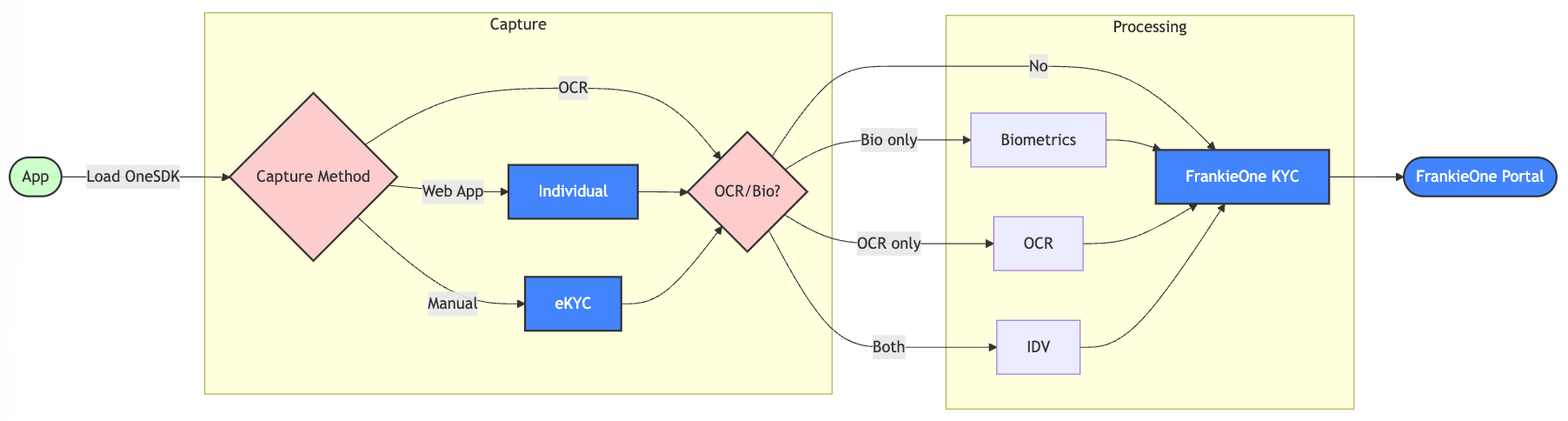
Data capture flow diagram showing module selection options
Quick Integration Guide
1
Install OneSDK
2
Initialize the SDK
Note: The sample code below is just an example. Never generate tokens on the frontend — doing so can expose your credentials.
Always generate tokens securely on your backend and pass them to your app as needed.
3
Configure Modules
4
Start Verification
Implementation Best Practices
Error Handling
Error Handling
Module Coordination
Module Coordination
Performance Optimization
Performance Optimization
Initialize modules only when needed and release resources after use. This is especially important for camera-based operations in the Biometrics and OCR modules.
Common Integration Scenarios
- Basic KYC
- Enhanced Verification
Each module can be used independently or as part of a comprehensive
verification flow. Check individual module documentation for detailed
implementation guidelines.
Content Security Policy (CSP) Settings
You may need to adjust your Content Security Policy (CSP) settings to allow vendors’ scripts and resources to load correctly. Below are the additional CSP rules required based on the vendor you are integrating with:- Onfido
- Incode
- Truuth
Permissions-Policy (Camera Access)
If your application sends aPermissions-Policy HTTP header, it controls whether the browser lets OneSDK and the vendor SDK use the camera. This is separate from CSP: a page can pass every CSP rule and still never show the camera permission prompt.
Every vendor needs at least self, because OneSDK and several vendor SDKs run directly in your page. Vendors that render their capture screens inside an iframe also need that iframe’s origin, because OneSDK can only pass camera access to an iframe your policy allows.
Permissions-Policy for Onfido
camera=(...) allowlist.
OneSDK also passes
microphone, fullscreen, accelerometer, gyroscope, magnetometer, and geolocation to vendor iframes. If your policy restricts any of these, apply the same allowlist to them.Related Resources
API Reference
Detailed API documentation for all OneSDK modules and methods.
Migration Guide
Guide for upgrading from previous versions of OneSDK.
Examples Repository
Sample implementations and integration patterns.
Support Portal
Technical support and implementation assistance.