Extract trust structures from trust deeds and produce audit-ready, structured output for complex KYB onboarding using the FrankieOne Trust Analyzer, through the Portal or the API.
Access
The Trust Analyzer runs as the GLB-Trust-Analysis workflow on the V2 platform. Contact your FrankieOne representative to have it enabled for your environment.
Trusts are one of the harder entity types to onboard. The information you need lives in a trust deed, a long, free-form legal document that varies in layout from one trust to the next, and reading it by hand is slow and easy to get wrong. The Trust Analyzer does that reading for you.It ingests a trust deed PDF, classifies the trust type, extracts the named parties (trustees, settlors, beneficiaries, appointors, protectors, SMSF members), and normalises their roles into a consistent structure. Every extracted value carries a reference back to the page of the deed it came from, so your compliance team can trace and verify each field.The result is structured, audit-ready data you can review, correct, and feed into your KYB and KYC workflows. It lets you onboard trusts, and businesses that hold assets through trusts, at scale without adding the manual review effort that deeds normally demand.Trust Analyzer currently supports Australian trust deeds only; international coverage is not yet supported.
You can run a trust analysis either through the Portal or directly through the API. Both follow the same underlying analyse, review, confirm pattern, with a human confirmation step so a person signs off on the extracted structure before it is used for compliance.
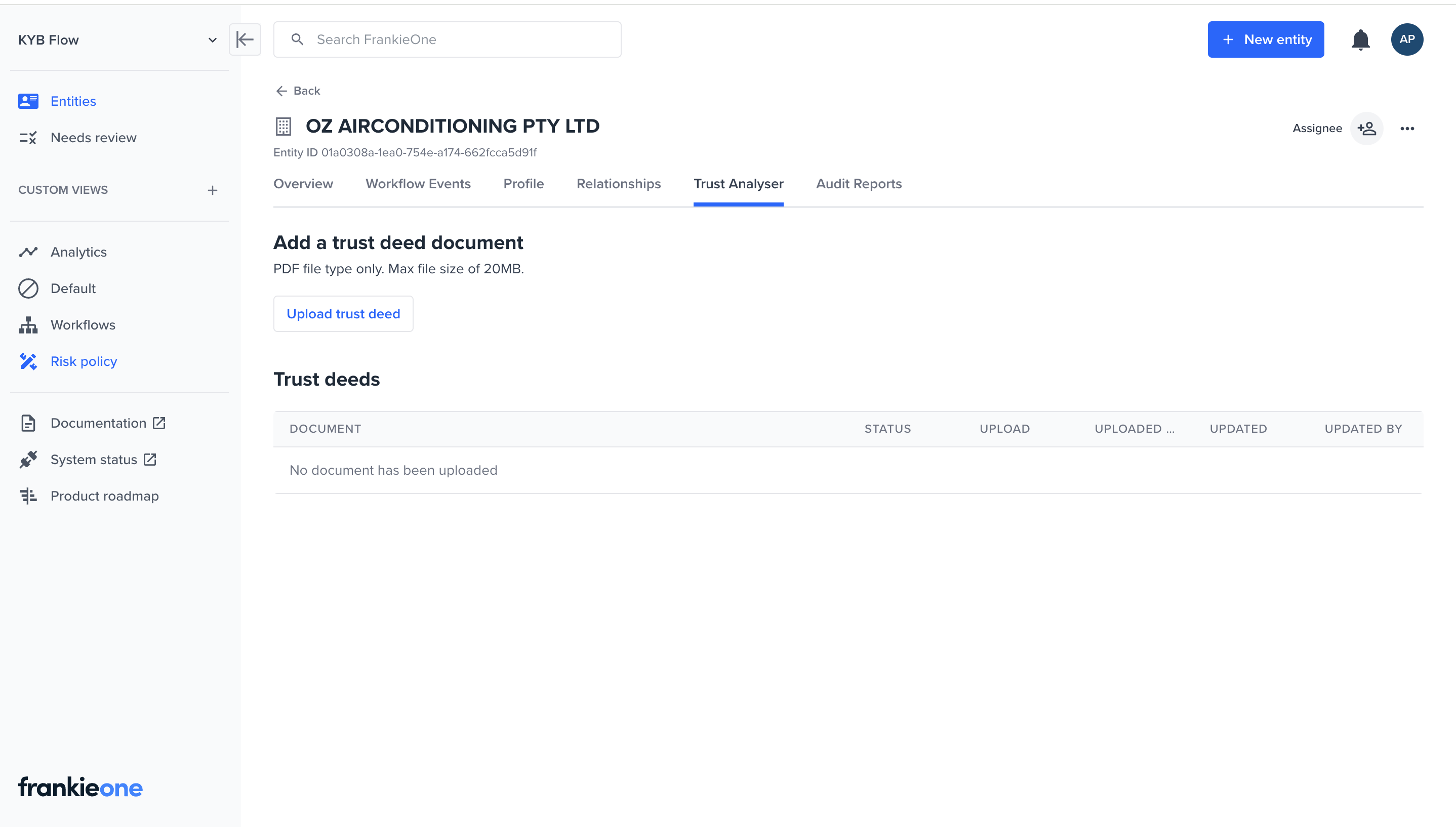
From the organization’s Overview page, select the Trust Analyser tab.
Trust Analyser tab, no document uploaded yet
2
Upload the trust deed
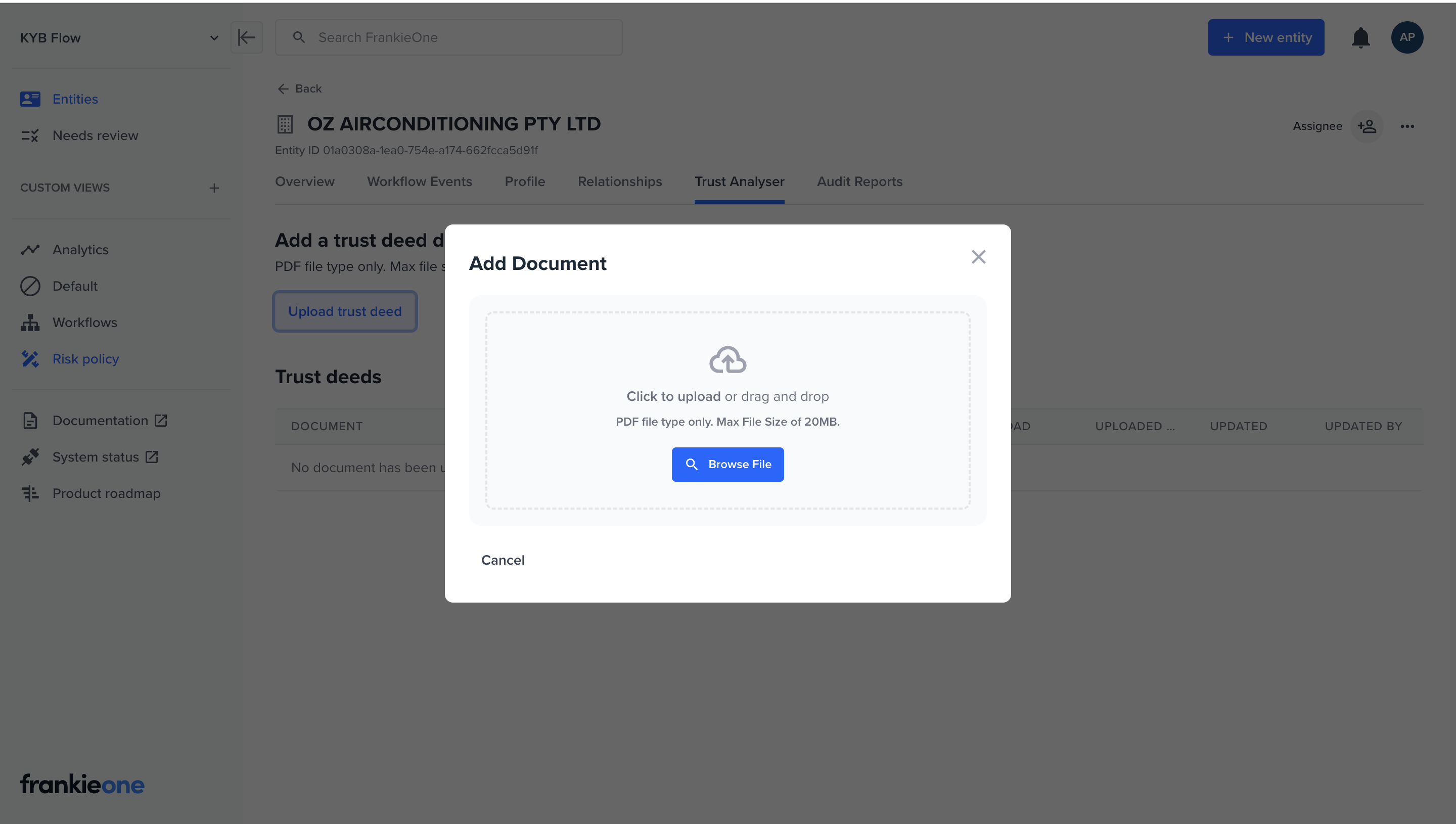
Select Upload trust deed and add the PDF (up to 20MB).
Add Document dialog with drag-and-drop and Browse File
3
Track progress
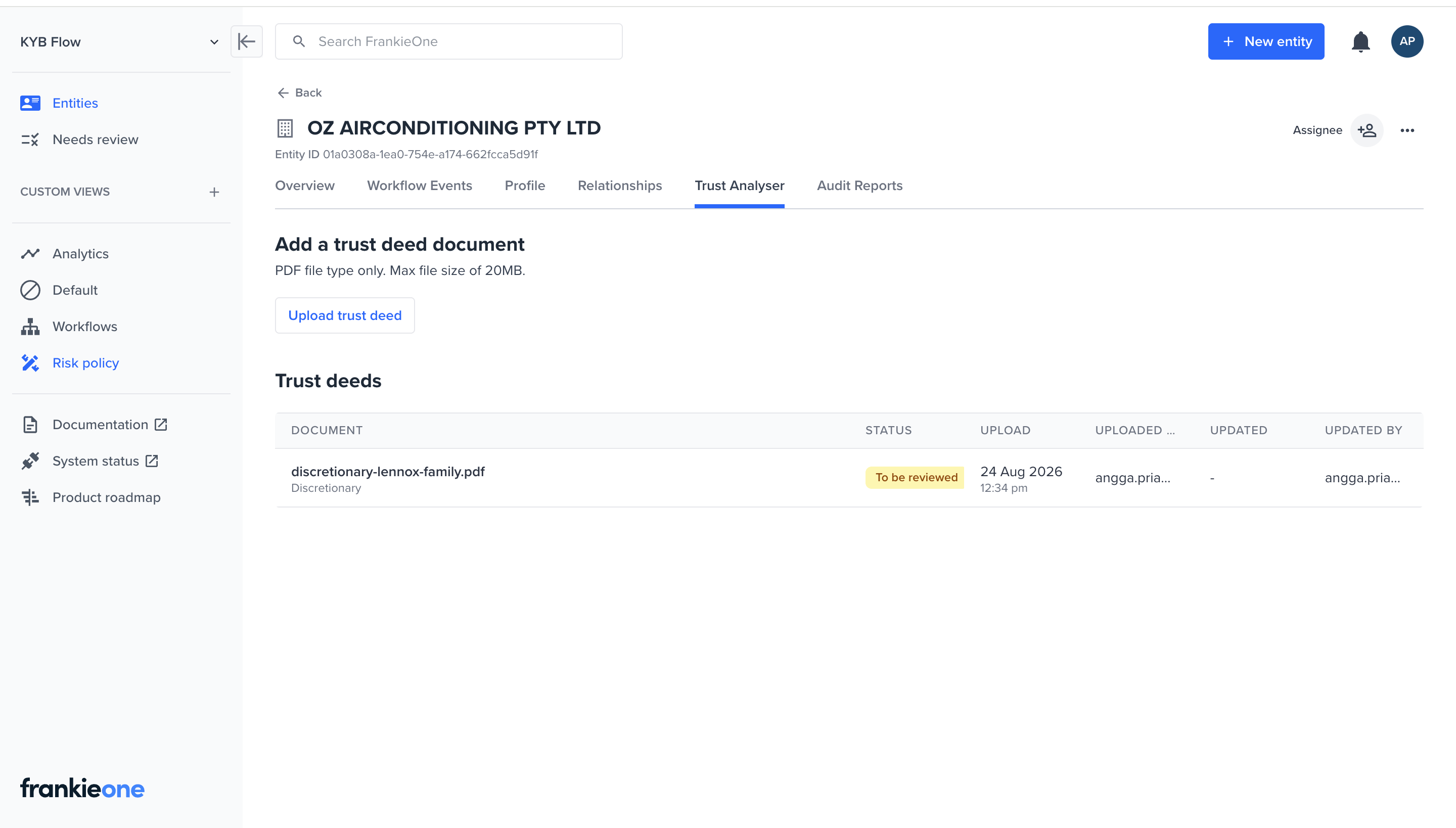
The uploaded deed appears in the Trust deeds table with its status — starting at analysis, then To be reviewed once ready.
Trust deeds table showing a deed with status To be reviewed
4
Review and confirm, with corrections if needed
Once analysis completes, the extracted structure opens in a split view: the deed on the left, extracted fields on the right. Each field carries a small reference marker (e.g. 1a, 2a) linking it back to its source page, so you can verify quickly without re-reading the whole document. Correct anything that needs it inline, select I have reviewed and accept the data in this trust deed, then select Save.
5
Associate the parties
Confirmed parties appear on the same screen, marked as an Associated party, and are linked to the organization’s ownership and control structure.
Upload the trust deed PDF as a TRUST_DEED document against the organization entity and keep the returned documentId. This is the document the workflow will analyse.
2
Execute the Trust Analysis workflow
Execute GLB-Trust-Analysis for the organization, passing the documentId via executionVariables. The trust type is detected from the document, so you do not supply it.
3
Track progress
The workflow runs asynchronously. Track the execution result until it reaches REVIEW, which signals that analysis has completed and the extracted data is ready to look at.
4
Retrieve and review the analysis
Fetch the analyses for the document. Each analysis includes the detected trust type and the extracted parties, with references that point back to the page in the deed each value came from.
5
Confirm, with corrections if needed
Review the extracted data, correct any field that needs it, then confirm. Confirmation records your accepted version while keeping the original analysis as an audit trail.
6
Associate the parties
Link the extracted parties to the focus organization so they form part of its ownership and control structure.
Ready to integrate? The Trust Analyzer Implementation Guide walks the full Portal and API flow step by step, with request and response examples for each stage.
Every analysis returns the details common to any trust (name, establishment, certification, and execution dates, trustees, and settlors). On top of that, the shape of typeInformation depends on the detected type:
Discretionary (discretionary): specified beneficiaries, general beneficiaries, appointors, and protectors.
Unit (unit): unit holders with their holdings (as a percentage or a unit count) and the total units on issue.
SMSF (selfManagedSuperFund): the fund’s members.
Unknown (unknown): the reasons the trust could not be classified. A trust type must be identified before you can confirm.
General beneficiaries are a class of persons defined in the deed who may receive funds; specified beneficiaries are named individuals.
The trust deed must be a PDF, up to 100 pages and 20MB. Use a text-based (machine-readable) PDF: extraction reads the document text directly, so scanned or image-only deeds may not extract reliably.
How long does analysis take?
Analysis is asynchronous and usually takes a couple of minutes; complex multi-schedule deeds can take a little longer.
Do I need to specify the trust type?
No. The trust type is detected automatically from the deed. It’s returned in type.detected via the API and shown directly in the Portal’s review screen.
What happens if the trust type cannot be detected?
It’s returned as UNKNOWN (API) or shown as unclassified (Portal), with the reasons why. Trust type is inferred by the analyzer and isn’t something you can manually set or override, in the Portal or via the API — a trust type must be successfully identified before the analysis can be confirmed.
Can I correct the extracted data?
Yes. In the Portal, correct fields inline on the review screen before selecting Save. Via the API, send the corrected documentInformation to the analysis confirm endpoint. The original analysis is always retained as an audit trail.
What happens if I re-run analysis on a deed that hasn't changed?
Re-running analysis on an unchanged trust deed reuses the existing valid analysis rather than running a new one, and you’re not charged again. If the deed’s attachment is later updated or deleted, prior analyses for that document are marked stale.