

- Search and filter entities
- Get workflow event details - check results, risk level
- Get entity profile information - personal information, identity documents
- Assign portal users to an entity - including bulk assignment
- Create and manage custom views
- See comments
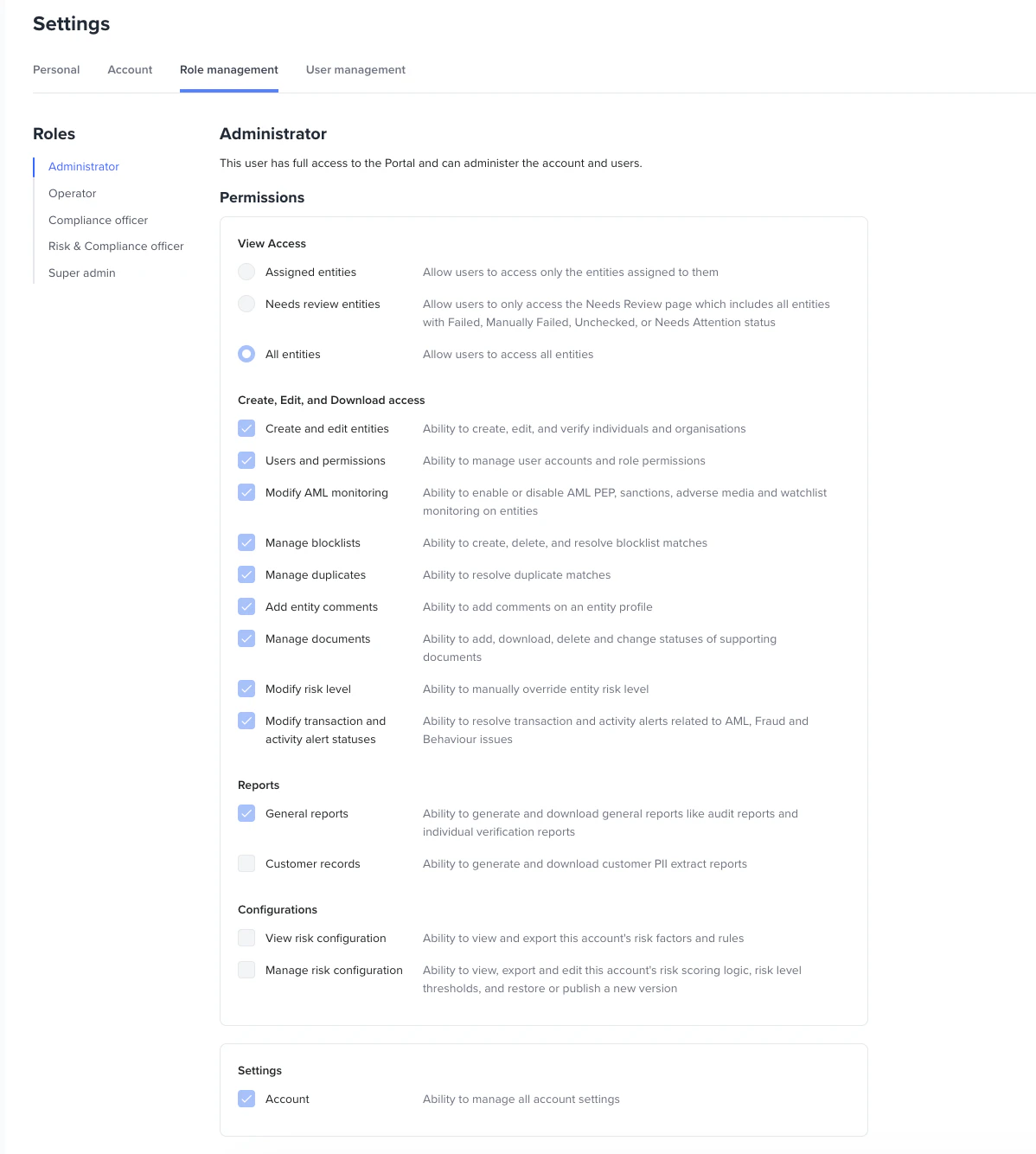
Permissions
View Access
Assigned entities
Allow users to access only the entities assigned to them.Needs review entities
Allow users to only access the Needs Review page, which includes all entities with Failed, Manually Failed, Unchecked, or Needs Attention status.All entities
Allow users to access all entities.Create, Edit, and Download Access
Create and edit entities
Ability to create, edit, and verify individuals and organisations.- Manage entities
- Create and verify a new entity
- Archive/Unarchive an entity
- Assign the user to an entity
- Update and/or verify an existing entity
- Manual KYC for an existing entity
- Electronic KYC for an existing entity
- Review entities
- Allow override of workflow event status
- Retrigger checks by clicking the Verify entity button
- Update AML alert status
- Override Document check results
- Override Biometrics check results
- Re-send links for re-verification
- Download the entities table as a CSV file
- Leave comments on manual review actions
- Resolve Visa check issues
Modify AML monitoring
Ability to enable or disable AML PEP, sanctions, adverse media and watchlist monitoring on entities.Manage blocklists
Ability to manage blocklist entries and blocklist assignments.- Create/Update/Remove blocklist entries
- Add an existing entity to a blocklist
- Remove an existing entity from a blocklist
Manage duplicates
Ability to resolve duplicate issues on entity records.Add entity comments
Ability to add comments on an entity profile.Manage documents
Ability to add, download, delete, and change the status of supporting documents.Modify risk level
Ability to manually override an entity’s risk level.Modify transaction and activity alert statuses
Ability to resolve transaction and activity alerts related to AML, Fraud, and Behaviour issues.Reports
General reports
Ability to generate and download general reports such as audit reports and individual verification reports.Organisation reports
Ability to generate and download organisation reports.Customer records
Ability to generate and download customer PII extract reports.Configurations
View risk configuration
Ability to view and export this account’s risk factors and rules.Manage risk configuration
Ability to view, export, and edit this account’s risk scoring logic and risk level thresholds, and to restore or publish a new version.Settings
Users and permissions
Ability to manage user accounts and role permissions.- See all available roles
- See all users
- Create new user
- Edit existing user
- Delete a user
- Lock a user
Account
Ability to manage all account settings.- View and update customer account data