The Result screen is a versatile component that displays outcome messages at any point in your onboarding flow. It handles both success and failure scenarios, and can be embedded anywhere in your application.

Available Result Types

Success

Displays when a process completes successfully

Fail

Shows when an operation encounters an error

Partial Match

Indicates when some criteria are met but others aren’t

Pending

Represents operations that are still in progress
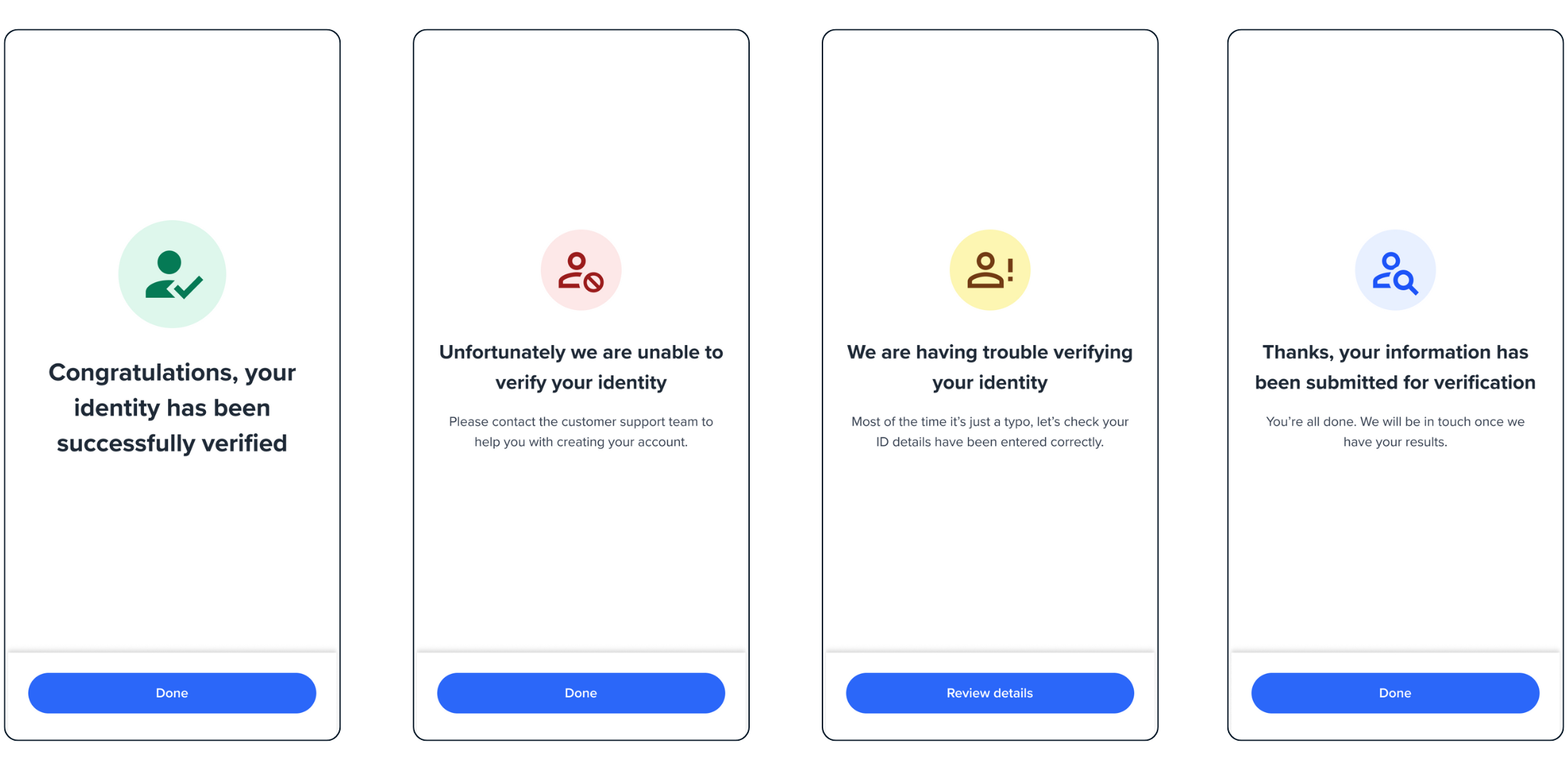
Result screen types

Quick Start

1

Add HTML Container

<div id="form"></div>
2

Initialize Result Component

const result = oneSdk.component("form", {
  name: "RESULT",
  type: "manual",
  state: "SUCCESS",
  title: { label: "Complete" },
  descriptions: [{ label: "Process is now complete. You can close the page" }],
  cta: { label: "Done" },
});
3

Mount Component

result.mount("#form");

Configuration Options

interface ResultConfig {
  name: "RESULT";            // Screen identifier
  type: "manual";            // Flow type
  state: ResultState;        // Screen state
  title: TitleConfig;        // Title configuration
  descriptions: Description[]; // Description array
  cta: CTAConfig;           // Call-to-action button
}
type ResultState = | "SUCCESS" /* Success completion */
| "FAIL" /* Operation failed */
| "PARTIAL" /* Partial match */
| "PENDING"; /* In progress */

Title

interface TitleConfig {
  label: string;
  style?: "ff-title";
}

Descriptions

interface Description {
  label: string;
  style?: "ff-description";
}

CTA Button

interface CTAConfig {
  label: string;
  style?: "ff-button";
}

Event Handling

Listen for Result Events
// Component loaded
oneSdk.on('form:result:loaded', () => {
  console.log('Result screen loaded');
});

// Success button clicked
oneSdk.on('form:result:success', () => {
  console.log('Success action triggered');
});

// Failure button clicked
oneSdk.on('form:result:failed', () => {
  console.log('Failure action triggered');
});
Event NameDescription
form:result:loadedEmitted when screen loads
form:result:successTriggered on success screen button click
form:result:failedTriggered on fail screen button click
form:result:partialTriggered on partial match button click
form:result:pendingTriggered on pending screen button click

Styling Guide

Title

.ff-title {
  /* custom css */
}

Subtitle

.ff-subtitle {
  /* custom css */
}

Description

.ff-description {
  /* custom css */
}

Logo

.ff-logo {
  /* custom css */
}
Styling Best Practices
  • Use CSS classes for consistent styling across all result screens
  • Override specific styles using the configuration object when needed
  • Keep styling consistent with your application’s theme