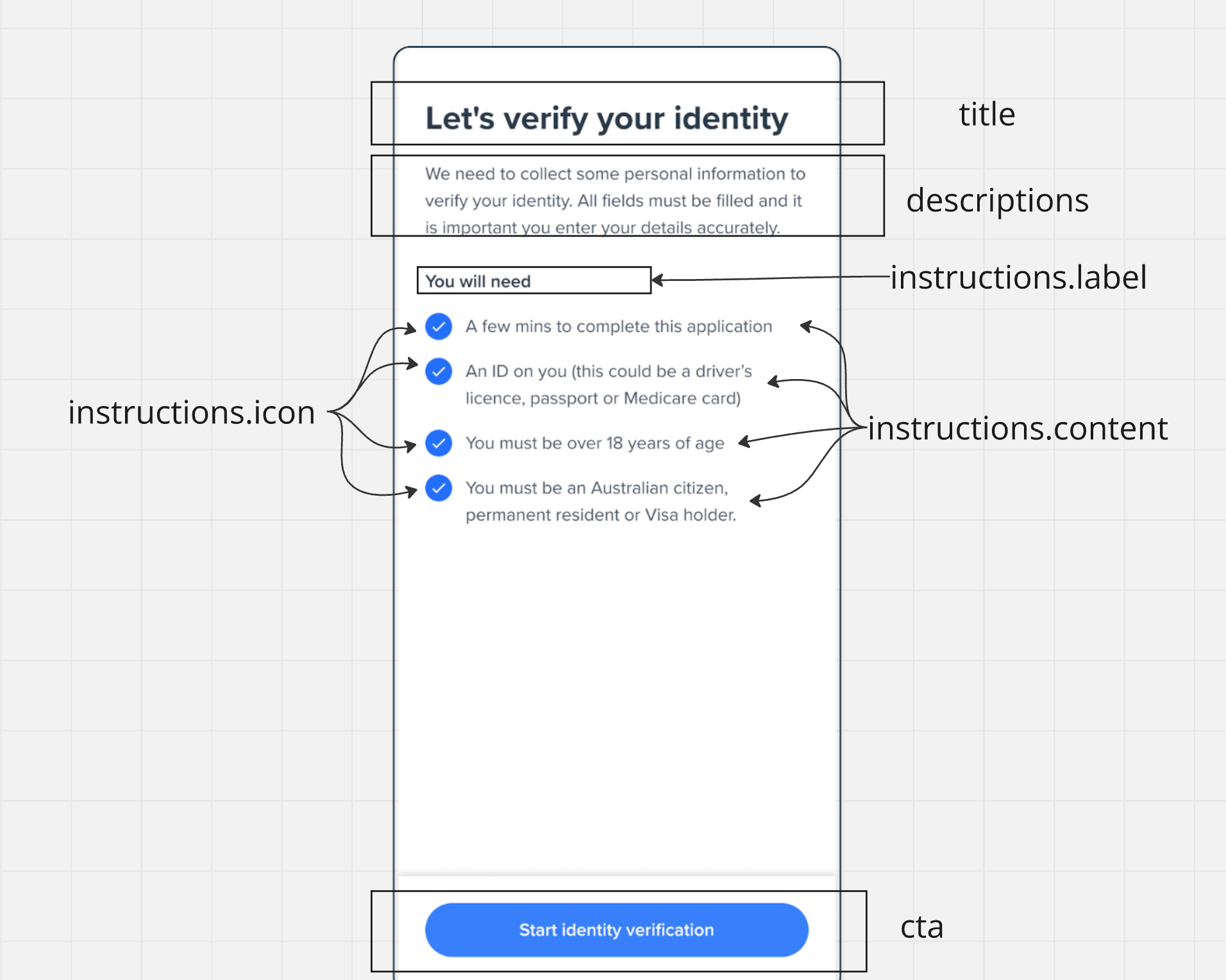
Quick Implementation

<body>
  <div id="form"></div>
</body>

Event Handling

Event NameTriggered When
form:welcome:loadedScreen is successfully mounted
form:welcome:readyUser clicks the continue button
form:welcome:failedScreen encounters an error
// Listen for successful screen mount
welcome.on('form:welcome:loaded', () => {
  console.log('Welcome screen ready');
});

// Handle user clicking continue
welcome.on('form:welcome:ready', () => {
  // Load the next screen (e.g., consent form)
  consent.mount("#form");
});

// Handle errors
welcome.on('form:welcome:failed', (error) => {
  console.error('Welcome screen error:', error);
});

Screen Customization

const welcome = oneSdk.component('form', {
  name: "WELCOME", // Set the screen name identifier
  type: "manual",  // Set form type to manual input
  title: { // Configure the title section
    label: "Let's Get Started!",
    style: { 'ff-title': { color: '#2563eb' } } // Style title color
  },
  cta: { // Configure the call-to-action button
    label: "Continue",
    style: { 'ff-button': { backgroundColor: '#2563eb' } } // button bg color
  }
});

Customization Options

title: {
  label: "Custom Title",    // The heading text
  style: {                  // Optional styling
    'ff-title': {
      'font-family': 'Arial',
      'font-size': '24px',
      color: '#000000'
    }
  }
}
descriptions: [
  {
    label: 'First description line',
    style: { 'ff-description': {} }
  },
  {
    label: 'Second description line',
    style: { 'ff-description': {} }
  }
]
instructions: {
  content: [
    {
      label: "Instruction item 1",
      icon: './assets/icon1.svg'
    },
    {
      label: "Instruction item 2",
      icon: './assets/icon2.svg'
    }
  ],
  style: {
    'ff-instructions': {
      'margin-top': '16px'
    }
  }
}
cta: {
  label: 'Continue',
  style: {
    'ff-button': {
      backgroundColor: '#2563eb',
      color: '#ffffff',
      borderRadius: '4px',
      padding: '12px 24px'
    }
  }
}
Styling Best Practices
  • Use consistent colors and fonts across your implementation
  • Ensure sufficient contrast for accessibility
  • Maintain padding and spacing for readability
  • Test your customizations across different screen sizes
All styling should be applied through the appropriate style objects (ff-title, ff-description, ff-instructions, ff-button). Direct CSS manipulation isn’t recommended.

UI Structure

Welcome Screen Layout