

SAML Definition
SAML (Security Assertion Mark-up Language) is an umbrella standard that covers federation, identity management and single sign-on (SSO).Getting Started with SAML
The portal admin pages for configuring SSO are currently under development and for that reason email communication is required to finish the setup. This guide will use OKTA, a popular IdP service, as part of the guide for each step, but any other service compliant with the SAML standard will integrate successfully. Concepts- SP - Service Provider; in our context, this is always Frankie One’s portal
- IdP - Identity Provider; Okta, Azure AD, Google, OneLogin and any other identity service
- Metadata - XML files containing details on how to integrate to both SP and IdP
Although the Portal has moved to
https://portal.frankie.one, the SSO endpoints (ACS and logout URLs) in the SP metadata intentionally remain on the legacy *.frankiefinancial.io domain. Use the URLs exactly as provided in the metadata, and do not update an existing IdP configuration unless FrankieOne asks you to.IDP Initiated Authentication Only
The FrankieOne Portal only supports IDP initiated SSO authentication at the moment. Please have that in mind while following this Guide and setting up your SAML based SSO setup.- Upload the SP metadata file, from where all required information will be automatically extracted
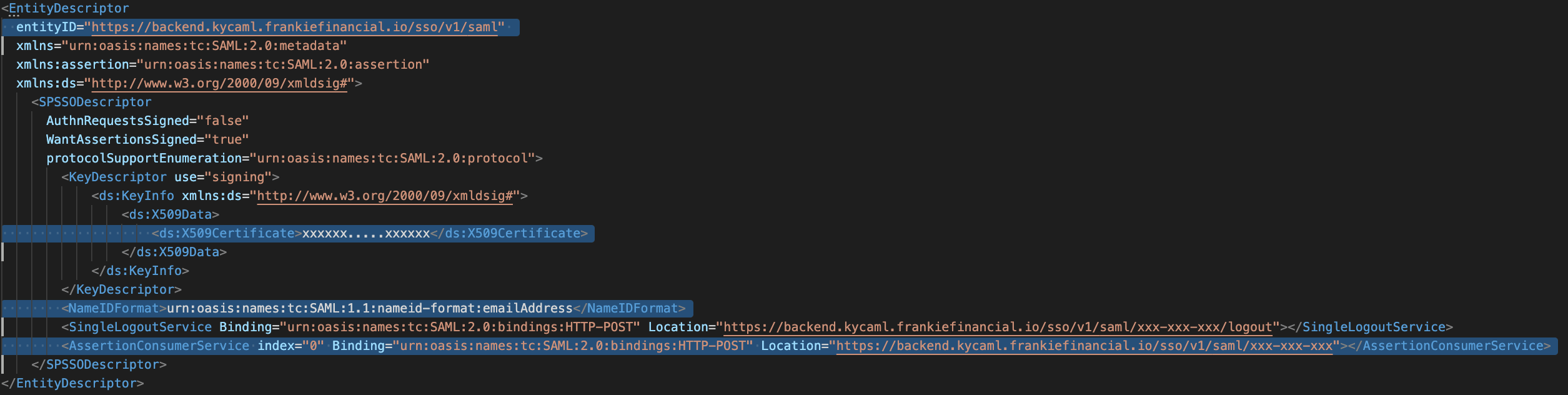
- Manually insert the following details, which can be found in the SP XML metadata file (see image below)
- Assertion Consumer Service (ACS) , sometimes also called Login URL
- SingleLogoutService sometimes also called Logout URL
- Entity ID/Audience URL
- Name ID format, always use “Email Address” for Frankie One
- x.509 Certificate.
- email : User’s unique email (must not be repeated for different users of the portal in the same environment uat, demo, production…)
- fullName : User’s complete name as to be displayed in portal
- roles : List of role names, exactly as displayed on Portal’s User configuration page (case sensitive). Depending on your IdP, it might be a list of string values or a single comma separated string value (no spaces). Okta accept both formats. These roles are case sensitive, so make sure they’re spelt perfectly. As of 27 Oct 2021 system Roles defined are:
a. App-FrankieFinancial-Role-UpdateRecords
b. App-FrankieFinancial-Role-Admin
c. App-FrankieFinancial-Role-ITOps
d. App-FrankieFinancial-Role-ViewAsChild
e. App-FrankieFinancial-Role-CustomerService
f. App-FrankieFinancial-Role-ReadOnly
g. App-FrankieFinancial-Role-Compliance
After configuring your IdP, you’ll be provided by IdP with the IdP XML Metadata. Please download it and email it to help@frankieone.com.Please ensure you mention what Domain the SAML is being configured for and which environment you’d like this provisioned in.
Frequently Asked Questions / Errors Shown for SSO
1. Error shown is “duplicate key error constraint”
1. Error shown is “duplicate key error constraint”
This error means the email is already in use elsewhere (could be in use on a child account or in a different entity entirely).
2. Error shown is “you dont have permission”
2. Error shown is “you dont have permission”
The user is being sent without roles correctly passed through (there may be a typo or roles are missing entirely). This could be a mistake, or intentional for unauthorized users (in which case a user is still created in Frankie).
3. Error shown is “Excessive users in the portal”
3. Error shown is “Excessive users in the portal”
Unintended SSO users are being shown the link to Frankie. Attempting the creation will still make the account, just without roles (see #2).
4. Error shown is “certificate error”
4. Error shown is “certificate error”
If you have updated your metadata, you need to provide the same to Frankie so that they can update it at their end, which should resolve the issue.
5. How do I delete a user?
5. How do I delete a user?
Deletion of users must be done in the portal for now.
6. Can I have multiple SSO providers?
6. Can I have multiple SSO providers?
You can have multiple SSO products/providers pointed to the same account (e.g., Parent).
7. Can I have separate SSO?
7. Can I have separate SSO?
You can also have separate SSO for parent/child accounts.
8. How can I initialise an authentication?
8. How can I initialise an authentication?
The SSO product must initiate the authentication. (e.g., someone can’t go to Frankie, try to sign in and be redirected to an external SSO service).
9. How do I setup an SSO?
9. How do I setup an SSO?
Setup is currently a manual process. For example, raise a ticket in Jira.
10. How to setup roles with SSO?
10. How to setup roles with SSO?
You can set up a new role in FrankieOne portal and give permissions as per the requirement. Once done, give the user the same role in your IdP (make sure it’s spelled correctly). When the user logs in, they will have the permissions as per the new assigned role.
11. Can one email address be used for multiple/different accounts to login using SSO?
11. Can one email address be used for multiple/different accounts to login using SSO?
No, the email address must be unique for each account.
12. What do I do if a user's email address changes?
12. What do I do if a user's email address changes?
You can update the email address in the IdP for that user. No changes are required on Frankie side.