- API Biometrics: In your onboarding flow you can trigger Biometrics
- Smart UI Biometrics: Using our Smart UI you can enable Biometrics checks
- Portal Biometrics: In our Portal you can manually trigger Biometrics
API Biometrics
Refer to IDV Service FlowsSmart UI Biometrics
Refer to Biometrics / ID Validation Using OnfidoPortal Biometrics
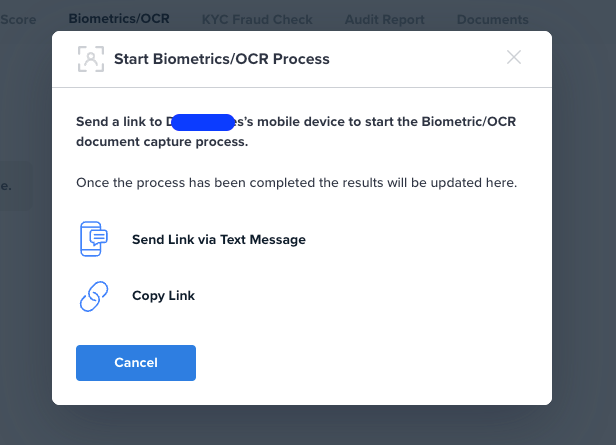
In the Biometrics/OCR tab in the top right click on the three dots to bring up the menu with “Start Biometrics”.
- Send Link via Text Message: to send an SMS to a mobile phone
- Copy Link: to get a URL that can be sent via email
Biometrics Notes
Send Link is valid for a configurable time, generally, this is set to 24 hrs.There is a limited amount of text possible in the text message, up to 24 characters.
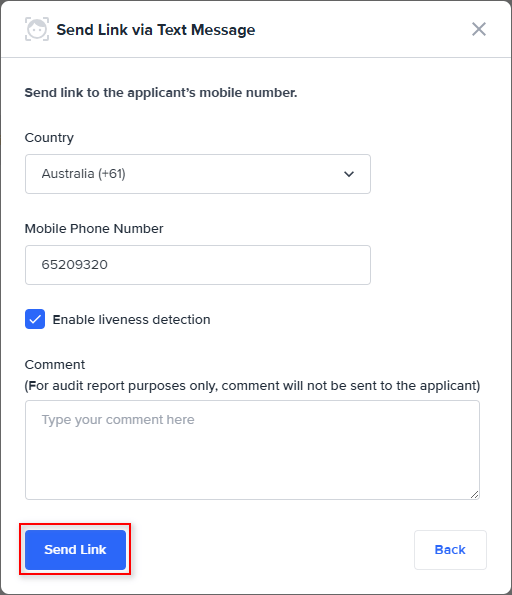
Send link via Text Message:
- Select the Country Code.
- Input the mobile phone number.
- If you would like “liveness” (video of an individual versus a photo) check the liveness checkbox, otherwise selfie photo will be used instead.
- Write a comment for audit purposes, note this comment isn’t sent to the customer.
- Click on Send Link.
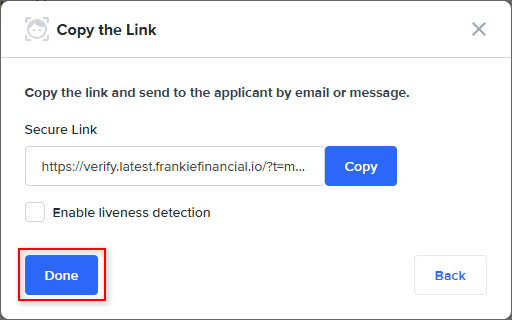
Copy link
- Secure link is generated, copy this link to use in an email or message.
- If you would like “liveness” (video of an individual versus a photo) check the liveness checkbox, otherwise selfie photo will be used instead.
- Once finished select Done.